How to use a game controller as a mouse on a Mac
 InputConfig is completely free on the Mac App Store. You don't have to make an account, there are no subscriptions, and nothing is locked. Optimized for Apple silicon.
Yes, and it takes about a minute. macOS pairs PS5, Xbox, Switch and most other controllers by itself, but it has no setting that makes a stick move the pointer. A free app does: InputConfig turns the left stick into the pointer, the right stick into scrolling and a button into a click, in every app, on any Mac or MacBook running macOS 14 or later. Pair the controller, pick the built-in Mouse + Scroll preset and press Activate. You do not need a driver or an account, and Steam does not need to be open.
On this page
- Steps
- What the Mouse + Scroll preset does
- Pick another ready layout
- Make it precise
- Click, drag and right-click
- Scroll
- Use the PlayStation touchpad
- Tilt to point with the gyro
- Which controllers work as a mouse
- If the pointer does not move
- While you edit, and at the lock screen
- If you tried the Steam method from a video
- Controlly, JoyMapper and the other apps you may have read about
- Gopher360 and other Windows tools
- Who this is for
- The short version
- Questions
Steps
- Pair the controller with the Mac.
- Install InputConfig and grant it Accessibility when it asks.
- Pick the Mouse + Scroll preset and press Activate.
- Drag Pointer speed on the preset's page until the pointer feels right.
What the Mouse + Scroll preset does
The built-in Mouse + Scroll preset is a plain mouse and nothing else. Buttons bind by position, so on a Switch Pro Controller the bottom face button (B on a Switch) is the left click.
| Control | Xbox / PlayStation | What it does |
|---|---|---|
| Left stick | Left stick | Moves the pointer. A small push is slow, a full push is fast. |
| Right stick | Right stick | Scrolls up, down, left and right. |
| D-pad | D-pad | Nudges the pointer slowly, for small targets. |
| Bottom face button | A / Cross | Left click |
| Right face button | B / Circle | Right click |
| Left face button | X / Square | Middle click |
Pick another ready layout
- Desktop Navigation. Clicks with the triggers: the right trigger left-clicks and the left trigger right-clicks. The D-pad sends the arrow keys, the bumpers switch apps, the two menu buttons are Spotlight and Return, and the face buttons click, undo, cut and paste, with Select All on the right stick press.
- Easy Browse. For using the whole Mac from a controller: a pointer that starts slow, a click, back a page, close a pop-up, grab and drop on the left stick press, double click on the right, Dictation and Read Selection on the bumpers, and Spotlight and Mission Control on the menu buttons. The face buttons say their names aloud while you learn them.
- Easy Edit. Built in too, for a controller in one hand and a mouse in the other: the D-pad is Undo, Copy, Cut and Paste, and the buttons delete, save, type a space and press Return.
For typing, the controller drives the Mac's own Accessibility Keyboard and dictation: typing with a controller on a Mac.
Make it precise
Four things turn a controller into a good mouse rather than a passable one.
- Pointer speed. On the preset's page, it makes every pointer movement in the preset faster or slower in one move, from 0.10 to 5 times the rows' own speed.
- A deadzone. It stops the pointer drifting when you let go. Every stick row shows its deadzone, and Adjust live sets it while you watch the stick.
- A curve. One that starts slow makes fine moves easy: Linear, Smooth or Aggressive, in the stick row's Options.
- Ramp-up. Also in the row's Options: the pointer starts at a fifth of its speed and builds up the longer you hold, and it stops the moment you let go.
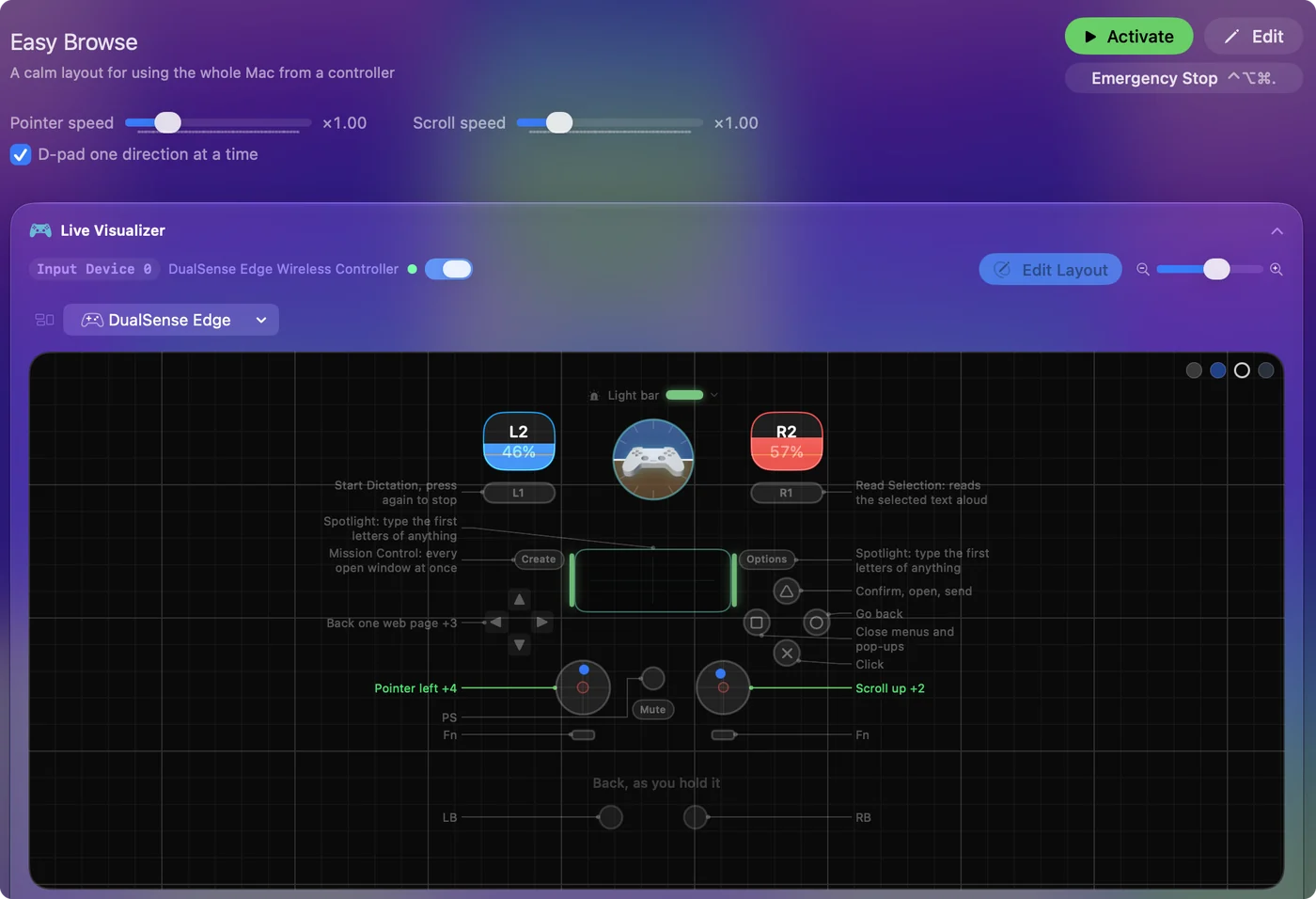
For the last few pixels, Mouse + Scroll puts a slow pointer on the D-pad. Set Pointer speed first, because most people never need to touch the rest. Making a controller mouse faster or slower goes through every one of these.
Click, drag and right-click
Hold the left-click button and move the stick, and InputConfig sends a real drag, so windows move, text gets selected and files drop where you let go. If holding a button while steering a stick is hard, open the click row's Options and set it to Toggle: one press holds the mouse button down, the next press lets it go. Easy Browse does this on the left stick press. It is the easiest way to drag with one hand.
Right click is B or Circle in Mouse + Scroll and the left trigger in Desktop Navigation. With only a few buttons, one control can do both: under Extra actions, add a hold action, so a short press is a left click and a longer press is a right click.
Scroll
The right stick scrolls vertically and sideways, faster the further you push it. Scroll speed, beside Pointer speed on the preset's page, makes it slower for reading or faster for long pages. For one fixed step per press instead of a smooth scroll, put the Mouse Wheel Step output on a D-pad direction or a switch. Scrolling with a controller covers direction, speed and the touchpad.
Use the PlayStation touchpad
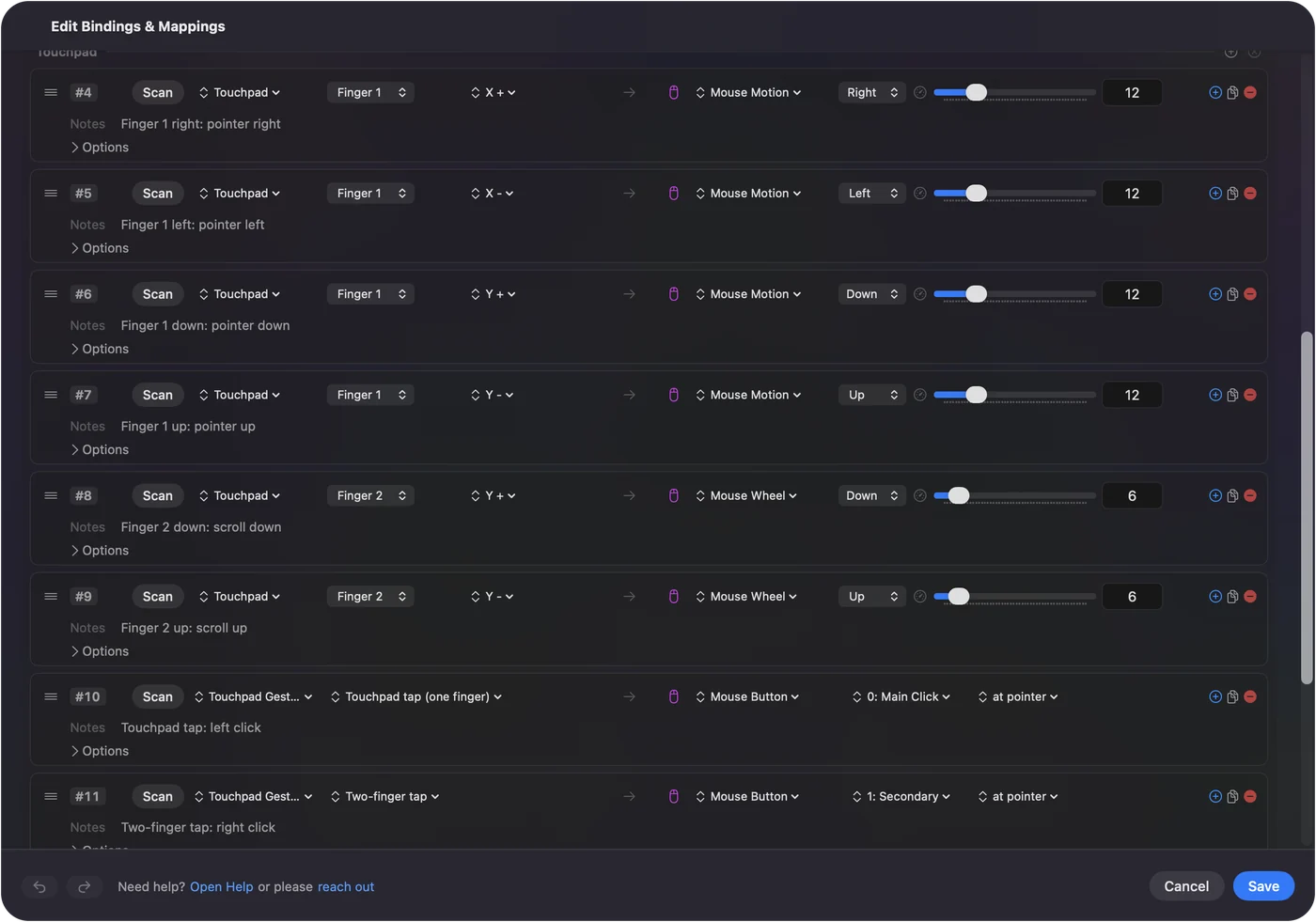
On a DualSense or DualShock 4, the touchpad is a real trackpad on a Mac through InputConfig: one finger moves, a tap clicks, a two-finger tap right-clicks, and a second finger scrolls. It is more natural than a stick for a lot of people. The PS5 touchpad as a trackpad has the setup, and tap to click the fixes.
Tilt to point with the gyro
A DualSense, DualSense Edge or DualShock 4 can move the pointer by tilting, like a laser pointer. The built-in Motion Cursor preset does it, with left and right click on the bottom and right face buttons and scrolling on the right stick. It suits someone who can hold a controller but finds a stick hard to work. When your wrist runs out of travel, a button set to the App Action Pause Motion While Held freezes the pointer while you bring the controller back to a comfortable angle. A cable always carries motion. Some Bluetooth pairings drop it. InputConfig reads motion from those three PlayStation controllers, the Switch Pro Controller, a Joy-Con when macOS reports its motion, and, experimentally, both Steam Controllers. Xbox controllers have no gyroscope. The gyro page has the rest.
Which controllers work as a mouse
- PS5 DualSense, DualSense Edge, PS4 DualShock 4. Sticks, the touchpad as a trackpad, and tilt. Use a PS5 controller as a mouse on Mac.
- Xbox Wireless, Series X|S and Elite Series 2. Sticks, triggers and buttons. Use an Xbox controller as a mouse on Mac.
- Switch Pro Controller. Over Bluetooth, since on a Mac its cable only charges it. The Switch Pro Controller on a Mac.
- One Joy-Con held sideways. A whole pointer in one hand. One-handed Mac setups.
- 8BitDo. D mode, the one 8BitDo lists for Apple devices, works best, and InputConfig also reads some pads in X mode over a USB cable. 8BitDo modes on a Mac.
- Steam Controllers. On both the original and the 2026 model, the trackpads work as trackpads, with slide, tap, double tap and press, and each has a built-in preset that puts the pointer on the right trackpad. Support for the 2026 model is experimental. Steam Controller on a Mac and the new Steam Controller.
- A joystick. A USB joystick, an arcade stick, the Access Controller's stick or a joystick on the Xbox Adaptive Controller maps the same way: each direction to Mouse Motion, a button to a click. The joystick mouse guide.
- Adaptive controllers. The Xbox Adaptive Controller and the PlayStation Access Controller have their own guides.
If the pointer does not move
Climb this ladder, smallest step first:
- Check the preset is running. The menu bar icon has Start and Stop.
- Grant Accessibility. macOS only lets an app move the pointer after you switch it on in System Settings, Privacy & Security, Accessibility. The menu bar icon turns orange while a running preset is waiting for it, and rows start working the moment it is granted.
- Remove and add it again. If InputConfig is already on that list and nothing happens, remove it with the minus button and add it again.
- Check the Mac sees the controller. Open Game Controllers in the System Settings sidebar and press a button.
While you edit, and at the lock screen
- In the editor. A preset that is on keeps working while the editor is open, so the controller still moves the pointer and clicks, and Save and Cancel are in reach without a mouse.
- Asleep or locked. InputConfig sends no keys. At the lock screen only the pointer, clicks and scrolling work.
- If a preset takes over. The emergency stop lets go of every key and click at once: Control Option Command period, or hold Back and Start together on the controller for three seconds.
If you tried the Steam method from a video
Search YouTube for this and most of what comes back is either a Windows guide or a Mac video more than seven years old. The most-watched current ones use Steam's own desktop controller layout. That can work on a Mac too, but only while Steam is running, and only for controllers Steam Input has taken over.
InputConfig is the other way round: it runs from the menu bar with Steam closed, and the pointer works in every app. If you use both, turn Steam Input off for the controller or quit Steam while a desktop preset is active, so two apps are not moving the same pointer. The Steam and games page explains how the two share a controller.
Controlly, JoyMapper and the other apps you may have read about
Most news articles about using a controller as a Mac mouse date from 2021 and cover Controlly, and the App Store answers are JoyMapper, JoyKeyMapper and Gamepad Mapper. All of them move the pointer with a stick. The differences are price and range:
- Controlly. A 7-day trial, then $3.99.
- JoyMapper. A 5-day trial, then $7.99, and it can also point with motion or the DualSense touchpad.
- JoyKeyMapper. Free, and made for Nintendo controllers.
- Gamepad Mapper. A free download with in-app purchases.
- InputConfig. Free with nothing locked, with the DualSense touchpad and gyro as pointers, a slow pointer on the D-pad for small targets, and layouts that switch by app.
I make InputConfig, so weigh that. The full comparison has versions and macOS requirements for each, checked on 22 September 2026.
Gopher360 and other Windows tools
Searches for this often turn up Gopher360, which turns an Xbox or DualShock controller into a mouse and keyboard. Its GitHub page (read October 27, 2026) describes a Windows program that you run as Gopher.exe, with no Mac version. The same goes for most of the tools the articles about controllers as a mouse recommend, because they are written for Windows. I have not checked each one, so look at a tool's own page for a Mac download before you spend time on it. On a Mac the route is the built-in Mouse + Scroll preset. It does the same job: a stick moves the pointer, the other stick scrolls, and a button clicks.
Who this is for
People who cannot use a mouse, first. I built the app because my hands do not work well, and a stick under a thumb is what I use. The Mac without a keyboard guide is the full setup, and the tremor guide has the settings for a shaky hand. A stick can ignore a shake and a click can go on any button, though it is not easier for every hand. It is also just pleasant from a sofa, with a media preset for the TV.
The short version
- Pick Mouse + Scroll and press Activate. Left stick points, right stick scrolls, A clicks.
- Set Pointer speed. One slider on the preset's page changes the whole preset.
- Try Easy Browse next. It covers the whole Mac, with a slow start and spoken button names.
If the pointer does not move, the Accessibility permission is almost always why.
Questions
Can a PS5 controller be used as a mouse on a Mac?
Yes, with InputConfig: the stick, the touchpad or tilt moves the pointer, and a face button, a trigger or a tap on the touchpad clicks.
How do I turn my controller into a mouse?
Pair the controller in System Settings, Bluetooth, then open InputConfig, pick the built-in Mouse + Scroll preset and press Activate. The left stick moves the pointer, the right stick scrolls and a button clicks.
How do I control my Mac without a mouse?
macOS has Full Keyboard Access, Mouse Keys and Voice Control built in. A game controller can also be the mouse: InputConfig turns its sticks into the pointer and scrolling and its buttons into clicks.
Is there a free app to use a controller as a mouse on Mac?
InputConfig is free and open source, with Mouse + Scroll, Desktop Navigation and Easy Browse built in.
Does Gopher360 work on a Mac?
No. Its GitHub page describes a Windows program, run as Gopher.exe, and offers no Mac version. On a Mac, InputConfig's built-in Mouse + Scroll preset does the same job with a stick, free.
How do I stop a controller moving the mouse when I do not want it to?
If InputConfig is running a preset, stop it from the menu bar icon or use the emergency stop: Control Option Command and the period key, or hold Back and Start together on the controller for three seconds. It lets go of every key and click at once. An original Steam Controller moves the pointer on its own through its built-in lizard mode, and Steam can move it with its desktop layout while Steam is open.
Can I use it as a mouse and still play games with the same controller?
Yes. Stop the mouse preset before a game that supports controllers, or give the game its own preset and turn on Switch presets when the front app changes in Settings, Advanced, so the layout changes when the game comes to the front. InputConfig does not take the controller away from games, so a game with controller support still sees it.
Does it work with two displays?
Yes. The pointer crosses from one screen to the next the way a mouse does. To keep it away from the screen edges, turn on Confine cursor away from screen edges in the preset's Automation & Gaming Utilities section.
Can I run a Mac mini under the TV with a controller as the mouse?
Yes, and it is one of the best uses. Pair the controller, activate Mouse + Scroll or Easy Browse, and browse and play video from the sofa. Bluetooth is weak through a TV cabinet, so if the pointer stutters, use a cable or move the Mac into the open. The couch browsing guide has a layout for it.
Related
This page in other languages: Deutsch, Français, Português, 日本語, 简体中文, 한국어, Русский, ไทย, Tiếng Việt
Updated