The Xbox Adaptive Controller on a Mac
 InputConfig is completely free on the Mac App Store. You don't have to make an account, there are no subscriptions, and nothing is locked. Optimized for Apple silicon.
The Xbox Adaptive Controller works on a Mac. Apple lists it among the Xbox controllers a Mac supports, and it pairs over Bluetooth like any Xbox Wireless Controller. What the Mac does not have is Microsoft's Xbox Accessories app, where its buttons are remapped on Windows and Xbox, and macOS itself does not turn a controller into a mouse or keyboard. That is what InputConfig does. I built it because my hands do not work well, and it is free.
The Adaptive Controller is a hub: two large buttons on top, a D-pad, and nineteen 3.5 mm ports on the back, one for every button and stick direction on a standard Xbox controller, plus two USB ports for joysticks. Every switch plugged into it is a button as far as InputConfig is concerned, so it is a way to build a controller out of whatever switches a person can use. Setting it up as a mouse and keyboard takes about fifteen minutes.
On this page: 13 sections
Steps
- Pair the Adaptive Controller over Bluetooth by holding its pairing button until the Xbox button blinks, then connect in System Settings, Bluetooth. A USB-C cable also works on macOS 15 and later.
- Plug switches into the ports for the actions you want. The port labels (A, B, X, Y, LB, RB, and so on) are the button each switch becomes.
- Download the Adaptive Desktop preset from this page and drop the file on InputConfig's Dock icon, or add it with Import Preset File (the … button next to any preset in the sidebar).
- Activate it. The two large buttons are click and Return by default. Every port is mapped to something sensible.
- Press Scan on any row and press a switch to move that job to it.
- Put Emergency Stop on a switch that is easy to reach.
How to read this guide
Start where you are:
- If you are setting it up today, read what each port sends, then work down step by step.
- If you have no joystick, go to moving the pointer with switches.
- If a port sends the wrong thing, read the ladder of fixes.
Know what each port sends
Each port on the back is named after an Xbox control, and a switch in that port sends that control. InputConfig sees the whole thing as one Xbox controller, so any preset built for an Xbox pad works, and Scan captures a switch the moment it is pressed.
- The two big top buttons. They are A and B.
- The left and right USB ports. Each takes a joystick, which becomes the left or right stick.
- The LT and RT ports. They send the digital trigger presses. There is no analog trigger unless a trigger accessory is used.
The controller sends one Xbox report, and nothing in it says which jack fired. The large A button and a switch in the A port both send A, so InputConfig cannot give them different jobs. The Live Visualizer in InputConfig draws the Adaptive Controller itself, with its domes, D-pad and the row of jacks, and lights each control as its input fires.
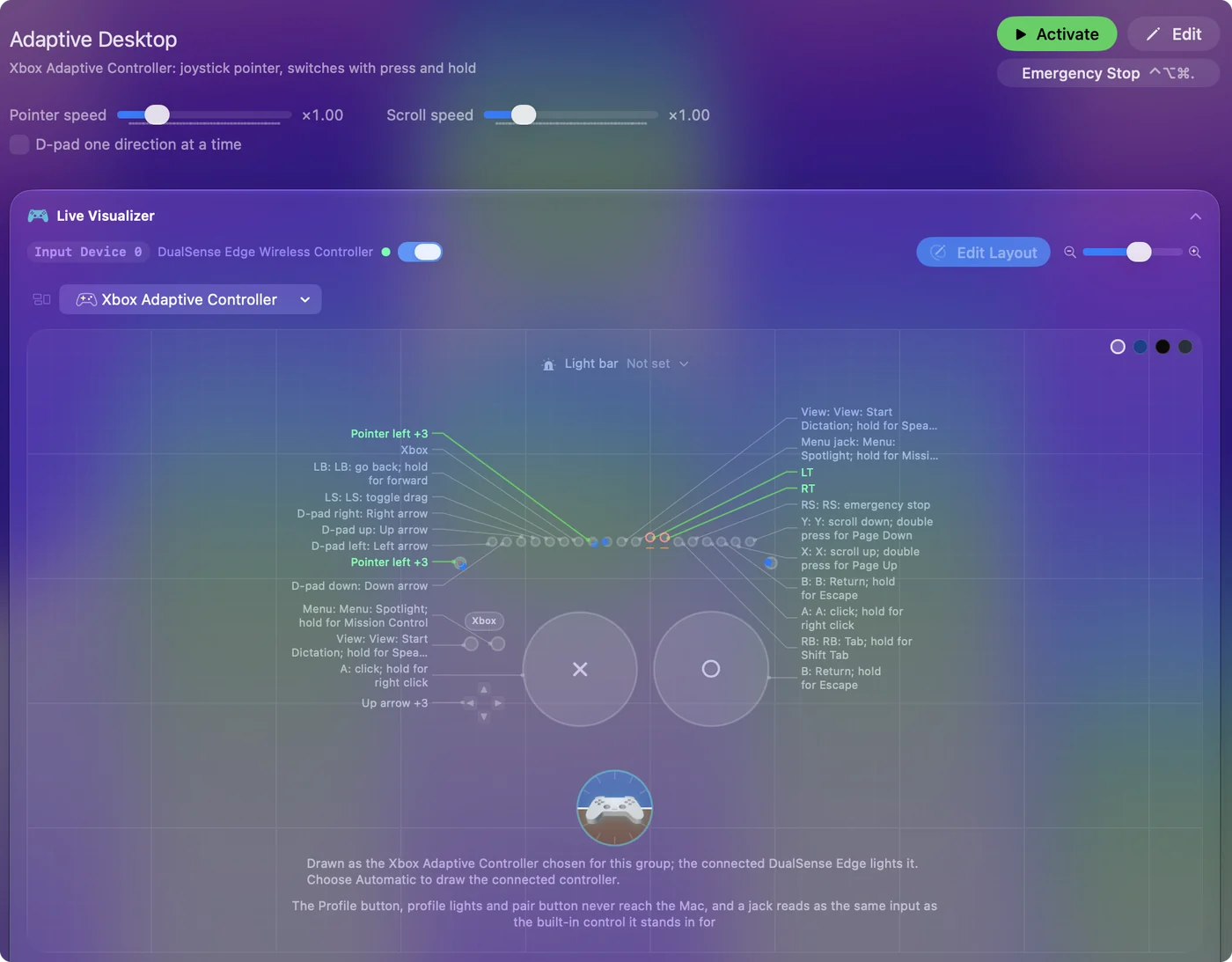
Plan the layout by function, and put switches in ports whose built-in control the person does not also use.
Step by step: switches to a working mouse
This part takes the controller from the box to a pointer, clicks and a stop the person can reach.
Step 1: Pair it
- You: Hold the pairing button until the Xbox button blinks, then click Connect in System Settings, Bluetooth. On macOS 15 and later a USB-C cable works too.
- macOS: Lists it as an Xbox controller, with no driver.
- Check: It appears in System Settings, Game Controllers, and at the top of InputConfig's sidebar.
Step 2: Add the Adaptive Desktop preset
- You: Download it from this page, drop the file on InputConfig's Dock icon, and press Activate.
- InputConfig: A joystick in the left USB port is the pointer, the large A button clicks, and a hold on it right-clicks.
- Check: Push the joystick and click something. If the pointer drifts or rushes, raise the deadzone on the four stick rows and lower Speed. The tremor and limited range guide has numbers to start from.
Step 3: Move jobs onto the switches they can reach
- You: Press Scan on a row and press the switch you want for that job.
- InputConfig: Rebinds the row to whatever control that switch's port sends.
- Check: Press the switch with the Live Visualizer open and watch the row's control light.
Step 4: Put the stop where it is easy
- You: Decide which switch the person can always reach, and Scan the Emergency Stop row onto it.
- InputConfig: The Adaptive Desktop layout puts Emergency Stop on RS. The default controller stop, a three-second hold of View and Menu together, works as well.
- Check: Press it while the preset runs. The preset stops and every held key and click is released.
One joystick and one button make a complete mouse.
Use the desktop layout
The Adaptive Desktop preset assumes a joystick in the left USB port and a handful of switches. It uses holds and double presses, so few switches go a long way.
| Port | Press | Hold | Double press |
|---|---|---|---|
| Left USB joystick | Pointer | ||
| A (large button) | Click | Right click | |
| B (large button) | Return | Escape | |
| X | Scroll up | Page Up | |
| Y | Scroll down | Page Down | |
| LB | Go back | Go forward | |
| RB | Tab | Shift Tab | |
| View | Start Dictation | Speak Selection | |
| Menu | Spotlight | Mission Control | |
| D-pad | Arrow keys | ||
| LS (stick click) | Toggle drag | ||
| RS | Emergency Stop |
Anything not plugged in simply never fires. If the person uses a right-hand joystick instead, convert the rows by scanning them onto the right stick. An empty port costs nothing, so the layout can grow one switch at a time.
Move the pointer with switches only
The pointer can be driven from switches when there is no joystick.
- Four direction switches. Bind them to Mouse Motion up, down, left and right with a low speed and Variable Sensitivity off. Switches in the D-pad ports are the natural place.
- A fifth switch. Bind it to click.
- A fast mode. A hold on each direction switch at a higher speed.
It is slower than a stick but completely usable. The few-buttons guide has a four switch layout that does exactly this and can be scanned onto the Adaptive Controller's ports, and scanning-style layouts for one or two switches. No joystick is no barrier: four switches move the pointer at a steady pace.
Play games with it
Any Smart Preset Maker layout for an Xbox controller works unchanged. The switches simply are those buttons. For driving, one-stick driving takes the USB joystick as the whole vehicle. The Adaptive Controller has no gyroscope and no haptics, so those rows are unavailable, but spoken feedback through the Mac works on every row.
If a port sends the wrong thing, or nothing
Climb this ladder, smallest step first:
- Reseat the plug. A half-inserted 3.5 mm plug is the usual reason a switch sends nothing.
- Wake the controller. It sleeps after a period of no input. Any switch wakes it, and a USB-C cable keeps it awake and charged.
- Reset the profile. The Adaptive Controller stores profiles of its own, made in Microsoft's Xbox Accessories app on Windows or an Xbox, and its Profile button switches between them. If a port sends something other than its label, press the Profile button until the default comes back.
- Remap in InputConfig instead. Neither the Profile button nor the profile lights reach the Mac, so Scan is the simpler way to put a job on a switch.
Export Backup after setting it up. The file restores the whole layout on any Mac.
Kits, joysticks, and what I have not tested
Logitech's Adaptive Gaming Kit is a set of buttons and triggers with 3.5 mm plugs. They go into the Adaptive Controller's ports, so on a Mac they arrive as whatever port they are in, the same as any switch. An accessory plugged in while the controller is connected is picked up within a second or so.
Microsoft also sells the Xbox Adaptive Joystick as a controller of its own. I have not tested it on a Mac. The quick check for it, or for any device:
- Look in System Settings, Game Controllers. If it appears there, InputConfig reads it with no setup, and the Live Visualizer lights up as you press it.
- Press Scan and try. If it does not appear there, InputConfig may still read it as a plain USB device.
For the other adaptive hardware people ask about, the QuadStick, switch interfaces and the Hori Flex, see adaptive controllers on a Mac.
The short version
- Pair it like any Xbox controller. No driver, and no Xbox Accessories app is needed on the Mac.
- Add the Adaptive Desktop preset. A joystick and the large A button are a mouse in minutes.
- Scan each job onto the switch the person can reach. Every port is the Xbox control it is named after.
Put the stop on the easiest switch before you hand it over.
Sources
Every fact about the hardware on this page comes from its maker's own page, read on the date shown. What InputConfig does with it comes from the app itself.
- Apple. Connect an Xbox wireless game controller to your Apple device lists the Xbox Adaptive Controller among the Xbox controllers a Mac supports and gives the pairing steps. Read October 7, 2026.
- Apple, Buddy Controller. Connect a wireless game controller to your Apple device describes Buddy Controller, which combines inputs from several controllers into one. Read October 7, 2026.
- Microsoft, the controller. Xbox Adaptive Controller gives the nineteen 3.5 mm ports and two USB ports, the Xbox Accessories app, and the Profile button that switches between three stored profiles. Read October 7, 2026.
- Microsoft, Controller Assist. How to use Xbox Controller Assist says the feature was formerly known as Copilot and covers it on a console and on a PC. Read October 7, 2026.
- InputConfig. The app's README says a wired Xbox controller needs macOS 15 or later, with Bluetooth for macOS 14. Read October 7, 2026.
Download
- Adaptive Desktop presetThe table above, built for an Xbox-family controller so every port of the Adaptive Controller lands on the right row. 10 KB
To add a downloaded preset: drop the file on InputConfig's Dock icon, or click the … button next to any preset in the sidebar, choose Import Preset File, and pick the file. It lands in the sidebar, ready to activate or edit. Any launch target inside a preset file is cleared on import; add one yourself in the editor if you want it.
Questions
Can I use both an Xbox controller and the Adaptive Controller together?
Each gets its own slot. A common setup is a standard controller in one hand and switches for the actions the other hand cannot reach.
Does Xbox Controller Assist, once called Copilot, work on a Mac?
Not under that name. Controller Assist, which Microsoft used to call Copilot, links two controllers on an Xbox console or a Windows PC. The Mac has its own version for games that read controllers: Buddy Controller, in System Settings, Game Controllers, combines the inputs of several controllers into one. For keys and the mouse, InputConfig binds two controllers in one preset.
Do the two USB joystick ports support any joystick?
They take the joysticks made for the Adaptive Controller and most USB HID joysticks. On the Mac side they appear as the left and right stick.
Does the Xbox Adaptive Controller work on a Mac?
Apple lists it as a supported Xbox controller and it pairs over Bluetooth. Games with controller support see it. For everything else, InputConfig maps it to a mouse and keys.
Why will my Mac not recognize my Xbox Adaptive Controller?
Hold its pairing button until the Xbox button blinks fast, then click Connect in System Settings, Bluetooth. If it still does not appear, try a USB-C cable on macOS 15 or later, and wake it with any switch, since it sleeps after a while with no input.
Is there an Xbox Accessories app for Mac?
No. Microsoft's remapping app is for Windows and Xbox. On a Mac, remap in InputConfig: press Scan on a row and press the switch you want for that job.
Can the Xbox Adaptive Controller be a mouse on a Mac?
A joystick in a USB port moves the pointer and a switch or the large A button clicks. With no joystick, four switches can move the pointer.
Can a school use the Xbox Adaptive Controller with its Macs?
macOS sees it as an Xbox controller over Bluetooth, or over USB on macOS 15 and later, with no driver. On its own it only works in games that support controllers. InputConfig turns its big buttons and the switches in its ports into clicks, keys, dictation and app shortcuts for everyday class work. InputConfig is free on the Mac App Store and needs macOS 14 or later.
Related
This page in other languages: العربية, Čeština, Dansk, Deutsch, Español, Suomi, Français, עברית, Magyar, Bahasa Indonesia, Italiano, 日本語, 한국어, Norsk, Nederlands, Polski, Português, Русский, Slovenčina, Svenska, ไทย, Türkçe, Українська, Tiếng Việt, 繁體中文, 简体中文
Completely free. You don't have to make an account, there are no subscriptions, and nothing is locked. Optimized for Apple silicon. Open source on GitHub.
Updated