Computer access on a Mac: assessing and setting up a client
 InputConfig is completely free on the Mac App Store. You don't have to make an account, there are no subscriptions, and nothing is locked. Optimized for Apple silicon.
An OT or AT specialist can assess and set up Mac computer access in one session with InputConfig: watch what the client can do in the Live Visualizer, choose the inputs, build the setup in layers, and hand it over with notes and a backup file. The app is free, so a client can try a controller they already own before anyone buys hardware.
I built InputConfig because my own hands do not work well with a mouse. This guide is for the occupational therapists and assistive technology specialists who set it up for other people, and it is a working method rather than a feature list. Plan on ten minutes of assessment and a first session that stops at pointer and click.
On this page: 10 sections
Steps
- Check the macOS built-ins first: Switch Control, Voice Control, the head pointer, the Accessibility Keyboard and Dictation.
- Connect what the client can hold and watch every control in the Live Visualizer: what registers, where sticks rest, how far they travel, how much they shake.
- Choose the inputs from what you saw.
- Build in layers: pointer and click first, then keys, text, apps, feedback and a stop.
- Lengthen hold and double-tap windows for a client who moves slowly.
- Write each row's note in the client's words, export the preset and a full backup, and record a review date.
Check the macOS built-ins first
Assess the built-ins first. InputConfig does not replace them, and several work well alongside it.
| Built into macOS | What it does | Where InputConfig adds to it |
|---|---|---|
| Switch Control | Scans the screen. A switch picks what is highlighted | InputConfig does not scan. It gives each switch fixed jobs instead: a press, a hold, and a double press, each spoken aloud if wanted. |
| Voice Control | Runs the Mac by voice | A button for the commands that are tiring to say over and over: click, scroll, Return, Escape. |
| Head pointer and Dwell | Move the pointer with the head. Click by resting on a spot | No head tracking in InputConfig. A switch or big button can do the clicking. |
| Accessibility Keyboard | An on-screen keyboard | InputConfig has no on-screen keyboard. A controller can point and click on this one. |
| Mouse Keys, Sticky Keys, Slow Keys | Pointer from the keyboard; modifiers one at a time; delayed key acceptance | For a client who can hold a controller, a stick with a deadzone is usually a faster pointer than Mouse Keys. |
| Dictation | Speech to text | Start Dictation on any button or switch. |
All of these live in System Settings, Accessibility, except Dictation, which is in System Settings, Keyboard. For a client who needs dictation that works offline, I make YapToText, a free dictation app that runs on the Mac itself.
Assess with the Live Visualizer
- You: Connect whatever the client can hold and open any preset's page. Ask the client to rest, then to move each control they can reach.
- InputConfig: The Live Visualizer shows every control live.
- Check: Watch three things: which controls register at all, where each stick rests and how far it comfortably travels, and how much shake there is at rest.
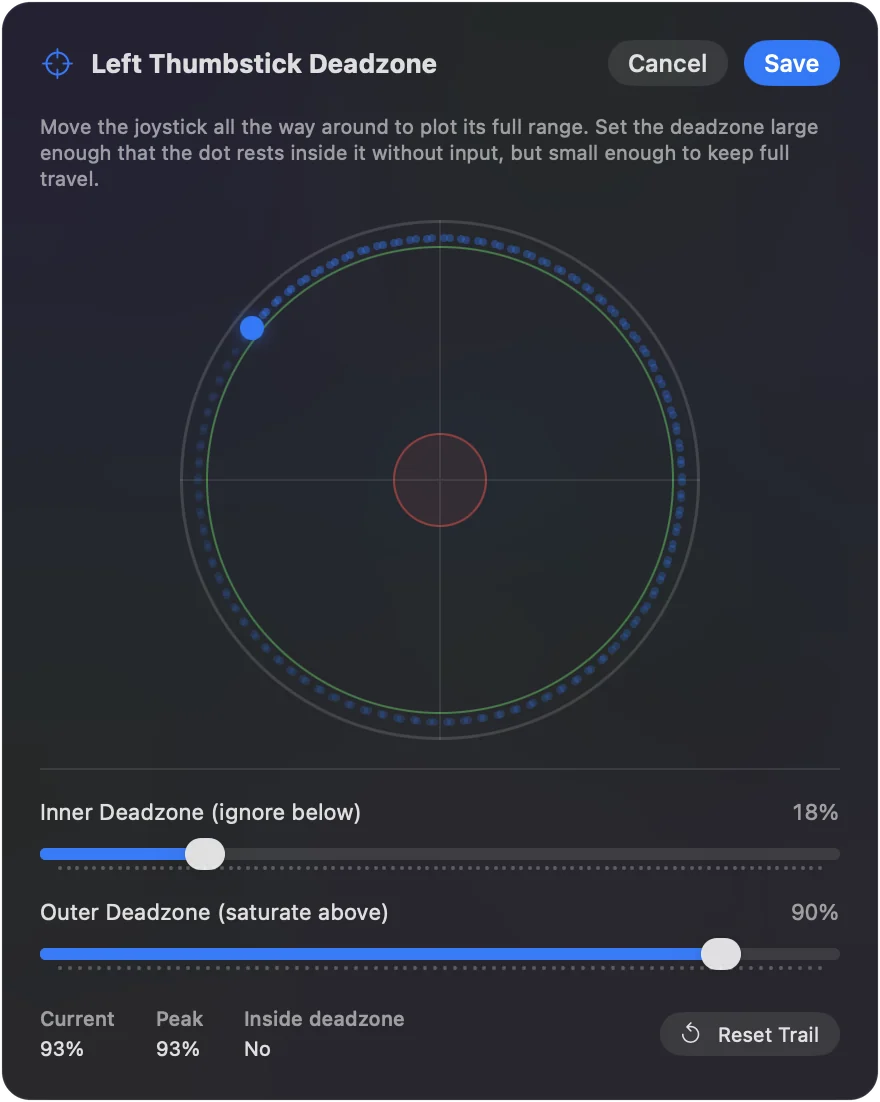
Those observations become the Deadzone, Full push at, and speed settings directly, and the list of reachable controls decides the layout. Ten minutes here saves an hour of guessing.
Choose the inputs
Match the input to what you saw:
- A standard controller. If the client can hold one: DualSense for haptics and the speaker, Xbox for larger hands.
- An adaptive controller. The PlayStation Access Controller or Xbox Adaptive Controller when buttons need to be repositioned or external switches are in play. Both have full guides on this site. InputConfig reads every Access Controller socket and port by name and edits its profiles over USB-C, so a trial needs no PS5.
- A single Joy-Con. For one hand with limited endurance.
- A MIDI pad controller. For large, soft targets: sixteen pads under one hand with no force needed.
- Tap the Mac. For a client with gross motor control but no fine control, on a MacBook. It was tested on M4 MacBooks and did not work on an M1 Pro in our testing; the calibrator's status chip tells you whether yours listens. Desktop Macs have no sensor.
- Motion. For a client who can move the whole controller but not a stick: tilting a DualSense, DualSense Edge, DualShock 4, Switch Pro Controller or Joy-Con moves the pointer.
- A joystick or switch interface. If the Mac sees it as a game controller and it lights up in the Live Visualizer, it can be mapped.
InputConfig costs nothing and needs no account, so a first session can use whatever is already in the house. If a client needs adaptive hardware, many state assistive technology programs run device loan libraries. Ask whether yours lends an Xbox Adaptive Controller or a PlayStation Access Controller, and trial it with the Xbox Adaptive Controller guide or the PlayStation Access Controller guide before a purchase request goes in. Trial with what the client already owns before anyone buys hardware.
Build the setup in layers
Add one layer per session, and stop when the client has what they need.
Step 1: Pointer and click
- You: Set up one stick or four switches, and one click. Tune deadzone, speed, and curve with the client present.
- InputConfig: Moves the pointer and clicks from those controls.
- Check: The client can reach and click a target on screen without help. Stop here for the first session.
Step 2: The essential keys
- You: Add Return, Escape, arrows, Tab, Delete and Space, with holds and double taps where buttons are scarce.
- InputConfig: Sends each key from its control.
- Check: The client can fill in a form and dismiss a dialog.
Step 3: Text and apps
- You: Put Dictation on a button, Type Text rows for the client's name, address and email, and Open App rows for the three or four apps the client uses. Use per-app presets with auto-switch if layouts need to differ.
- InputConfig: Types the stored text and opens the apps from one press each.
- Check: The client can write and send a short message.
Step 4: Feedback and safety
- You: Turn on speech and haptics on rows the client cannot see, at least for the learning period. Put an Emergency Stop output on a reachable control.
- InputConfig: Speaks or pulses as each row fires, and stops everything from that control.
- Check: Teach the controller hold explicitly: Back and Start together for three seconds by default, or socket 7 alone on an Access Controller, with a buzz one second in. A single button and a one to five second hold are chosen in Settings, General. Have the client use it once.
Lengthen the timing for slower movement
These settings all assume typical speed:
- Hold thresholds. 300 ms by default, adjustable from 50 ms to 5 seconds.
- Double-tap windows. 300 ms by default, from 100 ms to 2 seconds.
- Turbo rates. Lower for scrolling.
- The reverse tap window. In one-stick driving.
Lengthen each for a client who moves slowly. The settings are per row, so a fast control and a slow control can coexist.
Document it and hand it over
A setup that lives only in one person's head disappears when that person changes jobs or schools. Whatever form your district or service uses, an IEP or an AT plan, record the details that let someone else rebuild or repair the setup:
- The device and how it connects. For example: Xbox Adaptive Controller over Bluetooth, two switches in ports X1 and X2; or DualSense on a USB cable.
- The preset name and where the file is. Each preset exports as one small file that can be brought back with Import or dragged onto the app icon, so it can sit in the client's record or be emailed to a family member.
- What each control does, in the client's words. Every row in the editor has a Notes line. Write the note there too, so the preset explains itself on screen to a carer.
- Settings that differ from the defaults. Hold thresholds, double-tap windows, deadzones and pointer speed, with the reason for each. These are the numbers that drift when someone else tries to fix the setup.
- How to stop it. The emergency stop: Control Option Command period on the keyboard, or holding Back and Start together on the controller, plus any control you gave its own stop.
- Where the full backup is. Settings, Advanced, Data & storage, Export Backup writes every preset and setting to one file, and Restore from Backup puts it all back on another Mac in one step.
- A review date. Timing settings are the first thing to revisit as a client gets faster or tires more.
The help section mirrors the app's built-in guides. Link the client to the pages that match their setup. InputConfig itself comes in 26 languages, set in Settings, General, Language, so a client or carer can use it in their own. There is no lock on the setup, but Export Backup is a snapshot that restores everything, and the editor sits behind an Edit button the client need never press.
Keep it working
Nothing phones home and nothing expires. App Store updates never touch the data folder. When a client reports that nothing works, climb this ladder:
- Check the Access Controller's rows. A row scanned to a socket works whatever profile is lit, but a row made for a function such as Circle needs a profile that sends it. The Profile chip in the Live Visualizer names the active one.
- Check the pairing. A controller re-paired to a console must be re-paired to the Mac.
- Restore the backup. Restore from Backup puts every preset and setting back as you left them.
The short version
- Built-ins first. Then add InputConfig where they stop.
- Watch before you set. The Live Visualizer gives you the deadzone, reach and speed.
- Layer by session. Pointer and click first, the stop always.
- Write it down. Keep row notes, the preset file, a backup, and a review date.
A documented setup survives the handover, and an undocumented one usually does not.
Questions
Is there a way to lock the setup so it cannot be changed by accident?
Not a lock as such, but Export Backup is a snapshot that restores everything, and the editor is behind an Edit button the client need never press.
Can two clients share one Mac?
Presets are per macOS user account, so two accounts keep two independent setups.
Is the app free for a clinic?
It is on the Mac App Store with nothing to buy, and the source is public under the MIT license.
Does InputConfig collect any client data?
No. It makes no network connections, has no account, and has no analytics. Its Statistics sheet counts presses and time with a controller on the Mac itself, and those numbers stay on that Mac.
Can it go on clinic or school Macs managed by IT?
It is an ordinary Mac App Store app, so IT can deploy it the way it deploys other App Store apps. The one extra step is the Accessibility permission in System Settings, Privacy and Security, which someone with admin rights, or IT through device management, has to allow. The app's identifier is com.inputconfig.app. It needs macOS 14 or later.
Can a student's setup move with them to another Mac?
Export the preset, or the whole backup from Settings, Advanced, Data & storage, Export Backup, and open it on the other Mac after installing InputConfig there. Presets belong to each macOS user account, so a student who logs in with their own account on a shared Mac keeps a separate setup from everyone else.
Related
This page in other languages: العربية, Čeština, Dansk, Deutsch, Español, Suomi, Français, עברית, Magyar, Bahasa Indonesia, Italiano, 日本語, 한국어, Norsk, Nederlands, Polski, Português, Русский, Slovenčina, Svenska, ไทย, Türkçe, Українська, Tiếng Việt, 繁體中文, 简体中文
Completely free. You don't have to make an account, there are no subscriptions, and nothing is locked. Optimized for Apple silicon. Open source on GitHub.
Updated