Live Visualizer
 InputConfig is completely free on the Mac App Store. You don't have to make an account, there are no subscriptions, and nothing is locked. Optimized for Apple silicon.
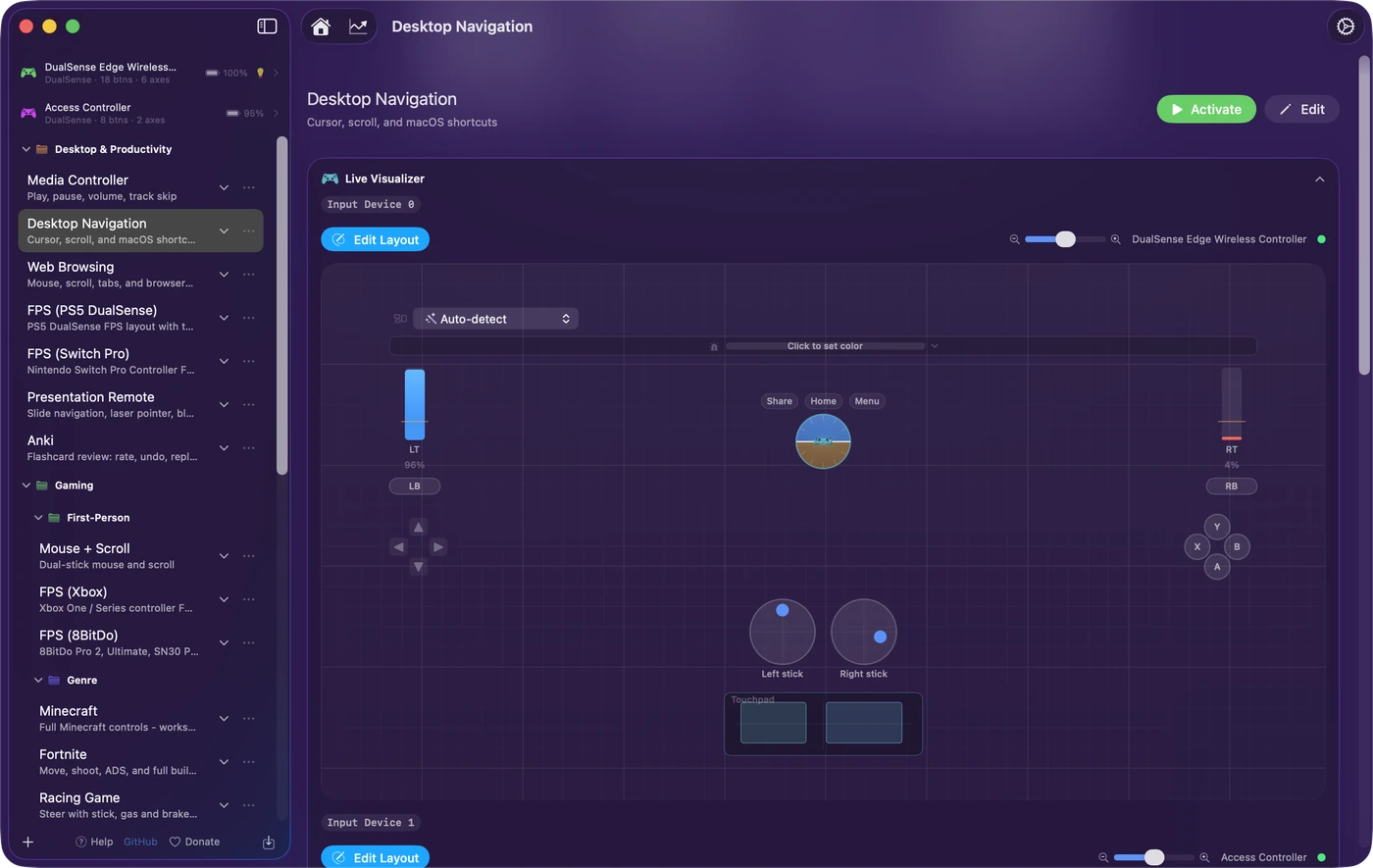
The Live Visualizer is a live drawing of each device a preset uses, one panel per controller group, on every preset's page. It answers two questions at a glance: is the Mac seeing this control, and what is it bound to. It shows input whether or not the preset is running, so it doubles as a controller tester. To check a controller, see testing a controller with it.
On this page: 10 sections
Read the controller drawing
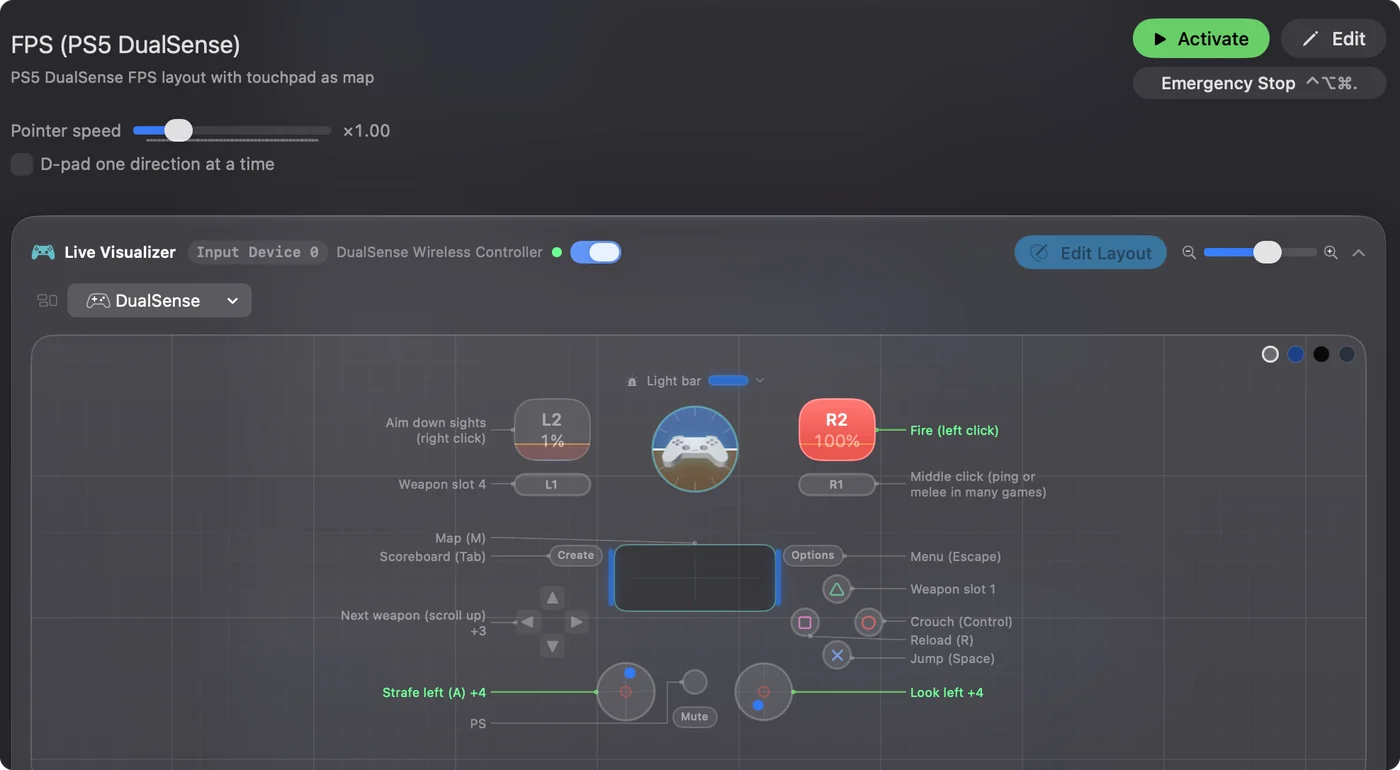
The drawing is your actual controller, from 21 models: PlayStation, Xbox, Nintendo, Stadia, both Steam Controllers, 8BitDo, the Logitech G29 and G923, and generic gamepads. Other controllers, joysticks and wheels are read as well, shown in a generic drawing. Every control sits where it does on the real thing, as you hold it: the face in the middle, the bumpers and triggers on a strip above, and paddles or back buttons on a strip below, labeled Back. Buttons carry the legend printed on them, in the printed color where there is one, and light green while pressed.
- Sticks. A dot follows the stick, and pressing it in lights the circle.
- Triggers and pedals. An analog one fills with the pull and shows its percentage, with an orange line where the preset's row starts to count, which is its deadzone. A digital trigger, such as ZL and ZR on a Switch pad, only lights.
- Trigger feel. On a DualSense or DualSense Edge, click L2 or R2 to set that trigger's resistance for this preset: Off, Light, Medium or Firm. It is a steady resistance across the pull while the preset runs, and the trigger is let go when the preset stops. It works over USB and Bluetooth, not on a DualShock 4, and it is not the effects a PS5 game plays, such as bow tension or a gun's click point.
- Touchpads. On a DualSense or DualShock 4 a dot follows each finger, the first mint and the second cyan, and the preset's touchpad regions are drawn on the pad, the one under a finger filled.
- Light bar. Drawn in the preset's color, or in the color the controller shows now. The strip above the drawing sets the preset's color.
- Profile chip. On a PlayStation Access Controller, the chip above the drawing names the active profile. Over USB-C it lists all three: Use makes one active, and Edit opens it beside the drawing with the PS5's own settings, ready for Save to Controller. Over Bluetooth the chip shows the active profile only. A DualSense Edge on USB-C has its four stored profiles listed with what each one remaps, listed, not edited.
- Wheels. The rim turns with the real one, with the angle written beside it in degrees when the wheel's range is known, such as 900 for a Logitech G29. Pedals are bars with their percentage.
- Motion. On a controller with motion sensors, a widget under the drawing turns as you tilt it.
A USB device no model matches is drawn as a labeled grid of what it reports: each stick pair as a stick, each hat as a D-pad, every other axis as a named bar, and every button numbered. If a control lights green, the Mac is reading it.
Read the key down both sides
What each control does in this preset is written in a key down both sides of the drawing, with a line from each entry to its control, so no label ever sits on a control or on another label. An entry is the row's note when it has one, otherwise its output, with a count when more than one row uses the control (Jump +1). A control too small to hold its own name gets the name in the key too. While a control is in use, its line and entry turn green.
Pick what a panel shows
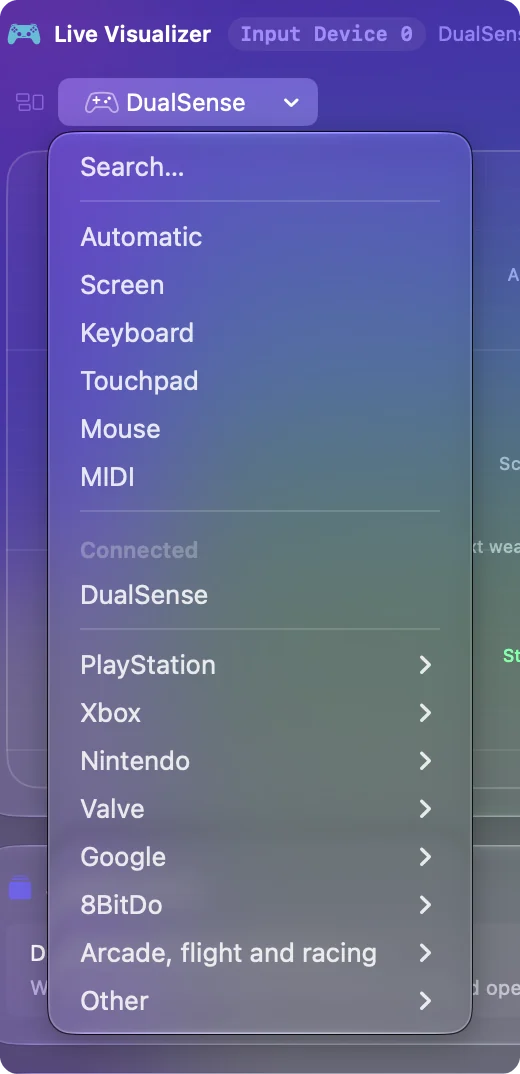
The menu at the top of each panel picks what it shows: Automatic, Screen, Keyboard, Touchpad, Mouse and MIDI, then Connected and a menu for each maker: Xbox, PlayStation, Nintendo and the rest.
- Connected. Connected lists the controllers plugged in now, and picking one makes the group read that controller and draws it as itself.
- Every model by maker. Below that is every model, some with versions to choose from, such as the 8BitDo Pro 2 or SN30 Pro+, or the Elite Series 2 with or without paddles. Picking a model draws the group as that model, with nothing connected or with another controller lighting it, and names the preset's buttons that way. On a preset with several controller groups it names them only while no names are set.
- Automatic. Goes back to drawing whatever is connected.
A line under the drawing says when it is not simply the connected controller: the model was not recognized and a standard gamepad is shown, or nothing is connected and the group's model is shown, or the drawing is the controller the preset is made for and the connected pad lights it. Another line says what that model never sends to a Mac, such as the Xbox Elite's profile button or a Joy-Con's SL and SR, so a dark control is not taken for a fault. A button the drawing has no place for is listed under it as Also reported.
A group set to one controller reads another of the same family while its own is away, such as a DualSense Edge for a DualSense. Otherwise the panel says Waiting for that controller, with Use the connected controller to switch. Read the line under the drawing whenever it looks wrong, because it says why.
Use the other maps
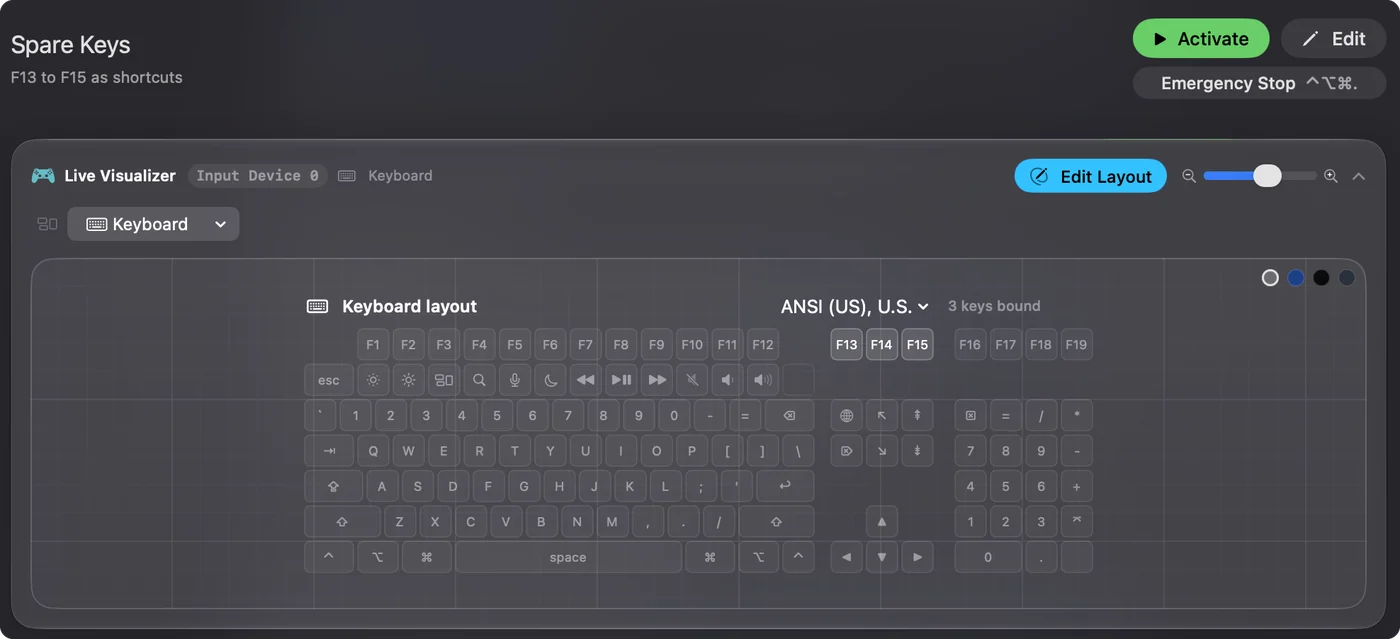
- Keyboard. Draws your keyboard's shape (ANSI, ISO or JIS) with every key labeled as your layout types it, and lights keys as you press them. The number pad, F13 to F19 and the navigation keys show when such a keyboard is connected or the preset binds those keys, and the menu above the keyboard sets the shape, the layout and the number pad.
- Mouse. Draws a mouse and a trackpad and shows clicks, side buttons 4 and 5, scrolling in four directions, the scroll gesture, double clicks and a Force Touch gauge. Force Touch is read only while InputConfig is the front window.
- Touchpad. Shows the controller's touchpad large, with its regions.
- Screen. Shows one display in its real shape with the preset's screen regions, a menu to pick the display or Follow the pointer, and Draw a screen region, which opens the editor with a new region row and the Screen part of the device's Regions card to draw on.
- MIDI. A keyboard shaded by velocity, a dial for every knob, pitch bend and aftertouch, a channel strip and an event log.
Keyboard and Mouse work with no preset running, and both need the Accessibility permission to show live keys and clicks. Bound keys and inputs are drawn at full strength and the rest dimmed. Every kind of input has a map, so you can check anything before you bind it.
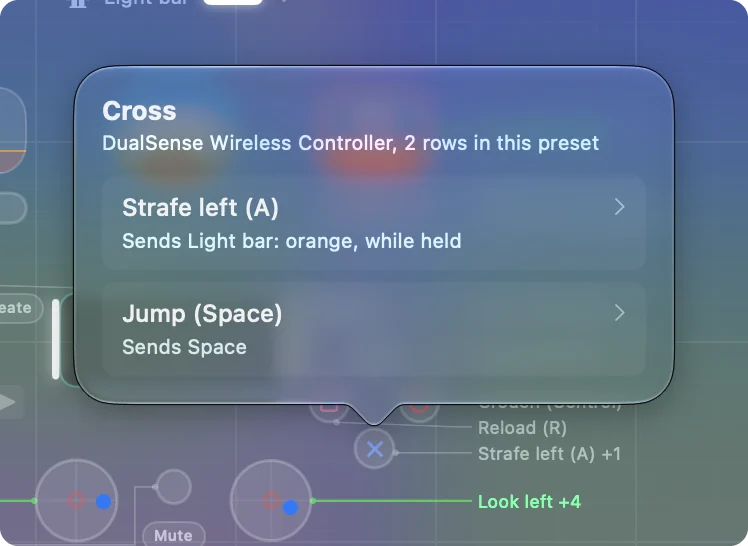
Click a control to jump to its row
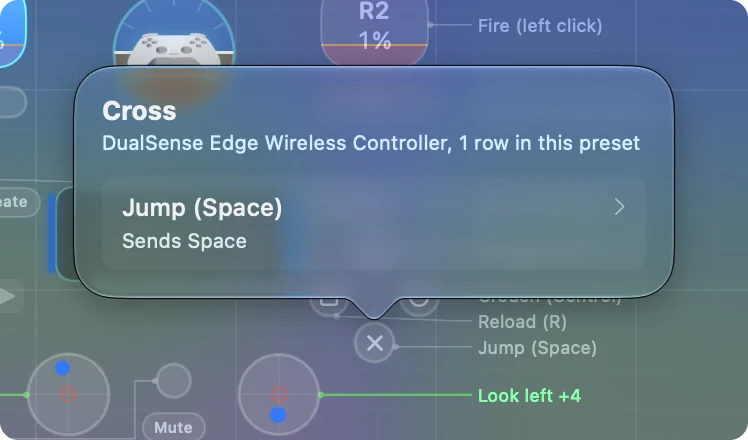
- You: Click any control in the drawing.
- InputConfig: Opens a popover that names it, says how many rows in the preset use it, and lists each one in words.
- Check: Pick a row and the editor opens there, with the row lit for a moment so it is easy to find. A control nothing uses says so and offers Open the editor.
The motion widget's popover also has Reset gyroscope, which re-zeroes it now, for a model that has wandered: hold the controller flat and still, then click it. The fastest way to find a row is to click its control.
Edit Layout, zoom and background
- Edit Layout. On the title row, lets you drag the parts of the keyboard, mouse and touchpad maps and saves the arrangement. Reset puts them back. A drawn controller keeps its real layout.
- Zoom. The slider beside it enlarges the map, and a zoomed map can be dragged around.
- Background. The circles in the corner change it: Normal, Blueprint, Black or Slate.
Zoom in when a control is too small to read.
Test a controller with it
- A control that never lights. It is not reaching the Mac: check the connection, the mode switch, or the plug in an Access Controller port.
- A stick dot off the crosshair. The stick is drifting, and Adjust live on its row shows the exact number to set as its deadzone.
- A trigger at a few percent at rest. It needs a small deadzone.
For the order to test things in, see how to test a controller on a Mac. For a DualSense, see the PS5 controller tester, and for wheels and flight sticks, testing a wheel or joystick. If it lights here, the Mac has it. If it does not, no preset can use it.
If it draws the wrong controller
Climb this ladder, smallest step first:
- Read the line under the drawing. It says whether the preset is made for another controller or a model was picked for the group.
- Pick yours under Connected. The group reads that controller and draws it as itself.
- Choose Automatic. The panel goes back to drawing whatever is connected.
A DualSense drawn as an Xbox pad is a choice someone made, and one click undoes it.
The short version
- Check input. A control that lights is reaching the Mac.
- Check bindings. The key down both sides says what each control does.
- Jump to a row. Click the control, then pick the row.
Open the Live Visualizer first whenever something does not work.
Questions
Does it cost performance?
It draws only when something changes, goes idle when nothing moves, and pauses while the preset editor is open.
Does the preset have to be running?
No. The panel shows live input for the preset you clicked, running or not.
Can I see a controller the preset does not bind?
Every connected controller gets a panel, as well as every controller group in the preset.
Why is my DualSense drawn as an Xbox controller?
Either the preset is made for an Xbox controller, or a model was picked for the group from a maker's menu. The line under the drawing says which. Pick your controller under Connected, or choose Automatic, to draw it as itself.
Does it work with VoiceOver?
Each control is announced by name with its live value, and what it does in the preset is read as its hint.
Related
Completely free. You don't have to make an account, there are no subscriptions, and nothing is locked. Optimized for Apple silicon. Open source on GitHub.
Updated