The binding editor
 InputConfig is completely free on the Mac App Store. You don't have to make an account, there are no subscriptions, and nothing is locked. Optimized for Apple silicon.
The binding editor is where a preset is made: a list of rows, each one control and what it sends. Select a preset in the sidebar and click Edit to open it. Every row is the same shape, one input on the left, one or more outputs on the right, and an Options panel for how the two are joined. Once one row makes sense, the whole app does.
On this page: 9 sections
Read a row
Left to right, a row has a drag handle, the row number, Scan, the input type, the input itself, an arrow, the output type and the output. Under the row is a Notes line that says what the row does, and Options, which unfolds below it.
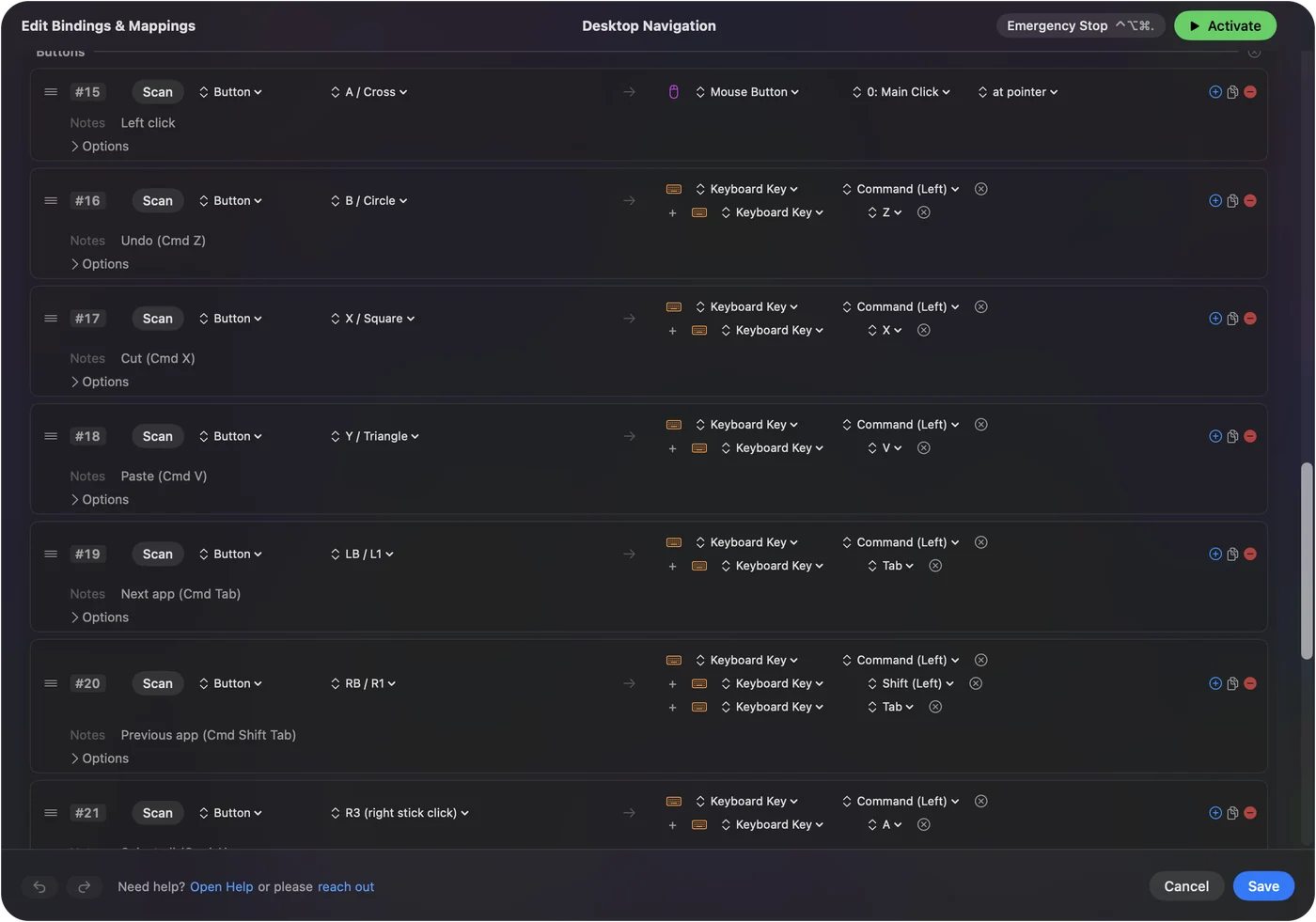
Rows sit under section headings such as Left stick, Buttons or D-pad, which you can rename, add to or remove. The editor's search field finds any row by input, output, section or note. Clicking a control in the Live Visualizer lists its rows, and clicking one opens it. Read the Notes line first: it says in words what the row does.
Add every control at once
An empty input device offers Automatically insert available inputs and says what it found, for example a stick and ten buttons on an Access Controller.
- You: Press Automatically insert available inputs.
- InputConfig: Adds a row for every control the device reports, under a heading per part of the device, each waiting for an output.
- Check: Scroll the list: it only holds what the device really has. A gyro appears only if the pad publishes one, paddles only if it has them, and a mouse slot gets buttons, movement, scroll, double click and the scroll gesture.
The same offer is on the device's menu, with Insert one part, Sort rows into sections and New section. Start here on a new device, then give each row an output.
Pick an input
- Controller. Button, Axis, Hat (the D-pad), Stick Gesture, Touchpad, Touchpad Region, Touchpad Gesture and Motion. An Axis row fires by a direction, plus or minus, or by a stick region or trigger band: pick either in its direction menu.
- The Mac itself. Keyboard Key and Mouse make the Mac's own keyboard, mouse and trackpad into inputs, and Tap the Mac reads a knock on a MacBook. Tap the Mac was tested on M4 MacBooks and did not work on an M1 Pro in our testing; the calibrator's status chip tells you whether yours listens.
- Areas. Screen Region is an area of a display, its own input.
- MIDI. Notes, pads, knobs, the pitch wheel and the sustain pedal.
Sticks and analog triggers bind one direction at a time, so a stick is four rows. The easy way to pick any input is Scan: press it, then press the control. See Scan.
Pick an output
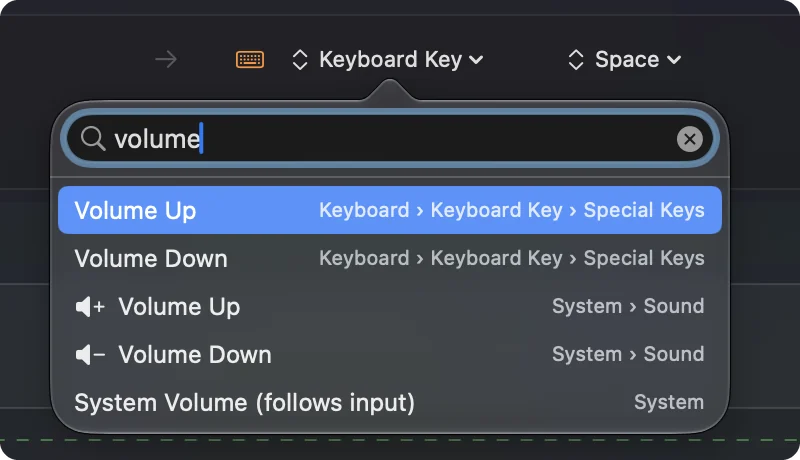
- Keys. Keyboard Key, which can be a chord such as Command Shift 3, and Type Text, which sends a whole phrase.
- Mouse. Mouse Button, Mouse Motion, Mouse Wheel and Mouse Wheel Step.
- MIDI. MIDI Note, MIDI CC, MIDI Pitch Bend, MIDI Program Change and MIDI Transport. See MIDI output.
- The Mac and the app. System Function, System Volume and App Action. See system functions.
A row can carry several outputs with the plus button, and they fire together. A Mouse Button output clicks wherever the pointer is, or always at one spot on the screen. For the spot, open its click menu, which reads at pointer, choose At a fixed point: use the pointer's position now, and move the pointer to the spot; a countdown is spoken and the position is taken after three seconds. The X and Y fields that appear beside it take the spot as typed numbers instead. Several outputs on one row fire as one press.
Set the options
Options unfolds under a row, and every area of the panel is its own box.
- How it fires. Fires while held, toggles on and off, repeats while held (turbo), repeats until pressed again (an auto clicker), or a different action when held, plus a Repeat count and a macro. See macros, turbo and toggle.
- Extra actions. A different output when held, and another on a double tap. See hold and double tap.
- Second control. The row only fires while another button on the same controller is held. See chords.
- Feedback. Rumble the controller and speak a phrase when the row fires. See vibration and spoken feedback.
- Stick or trigger. Deadzones, invert, a curve, Variable Sensitivity and Adjust live. A motion row has a deadzone and invert. See deadzones.
Options is where one button learns a second and third job.
Reorder, duplicate and convert
- Reorder. Drag a row by its handle.
- Duplicate. The copy button duplicates a row with every option.
- Every axis at once. The device's menu has Stick settings, which sets the deadzone on every axis row at once, and duplicates or removes the whole device.
- Another controller. Convert To, on the preset's own menu in the sidebar, makes a new preset beside the original for another controller family, with the same rows. The original keeps its shortcut and its app list.
Convert To leaves the original alone, so trying it costs nothing.
Undo, versions and the Key field
- Undo. The editor has undo and redo, and Cancel asks before it throws away changes.
- Versions. Every save keeps a snapshot, and the preset's page can revert to any of the last ten.
- Key. The Key field at the top gives the preset its own system-wide shortcut: press it anywhere to switch to the preset, and press it again to stop.
Ten saved versions mean a bad edit is never permanent.
The short version
- One row, one control. Input on the left, outputs on the right, Options underneath.
- Start a device with one press. Automatically insert available inputs adds every control it has.
- Bind by pressing. Scan, then press the control.
Get one row right and the rest of the editor follows.
Questions
Can one button send more than one thing?
Add outputs with the plus button and they fire together, or build a macro for a sequence with timing.
What does a row with no output do?
Nothing, which is sometimes the point. A chord's modifier button can be given an empty row so it stops doing its normal job while it is held.
Why are stick rows in pairs?
A stick axis binds one direction at a time, so left and right are two rows. That is what lets each direction send a different thing and have its own deadzone and curve.
Do Keyboard Key rows work with a French, German or other keyboard layout?
Yes. A Keyboard Key row presses a key by where it sits on the keyboard, the way a real keyboard does, and the editor names every key for what it types on your layout: on French AZERTY the key in the W position reads Z, and on German QWERTZ the key in the Z position reads Y. So pick keys by the names you see, and a game that reads key positions still gets WASD movement in the right place. The names follow the input source in the menu bar, or another layout picked in the menu above the Live Visualizer's keyboard. Type Text is different: it sends the characters themselves, so accented letters and other scripts come out exactly as written.
Related
Completely free. You don't have to make an account, there are no subscriptions, and nothing is locked. Optimized for Apple silicon. Open source on GitHub.
Updated