Controller vibration on a Mac
 InputConfig is completely free on the Mac App Store. You don't have to make an account, there are no subscriptions, and nothing is locked. Optimized for Apple silicon.
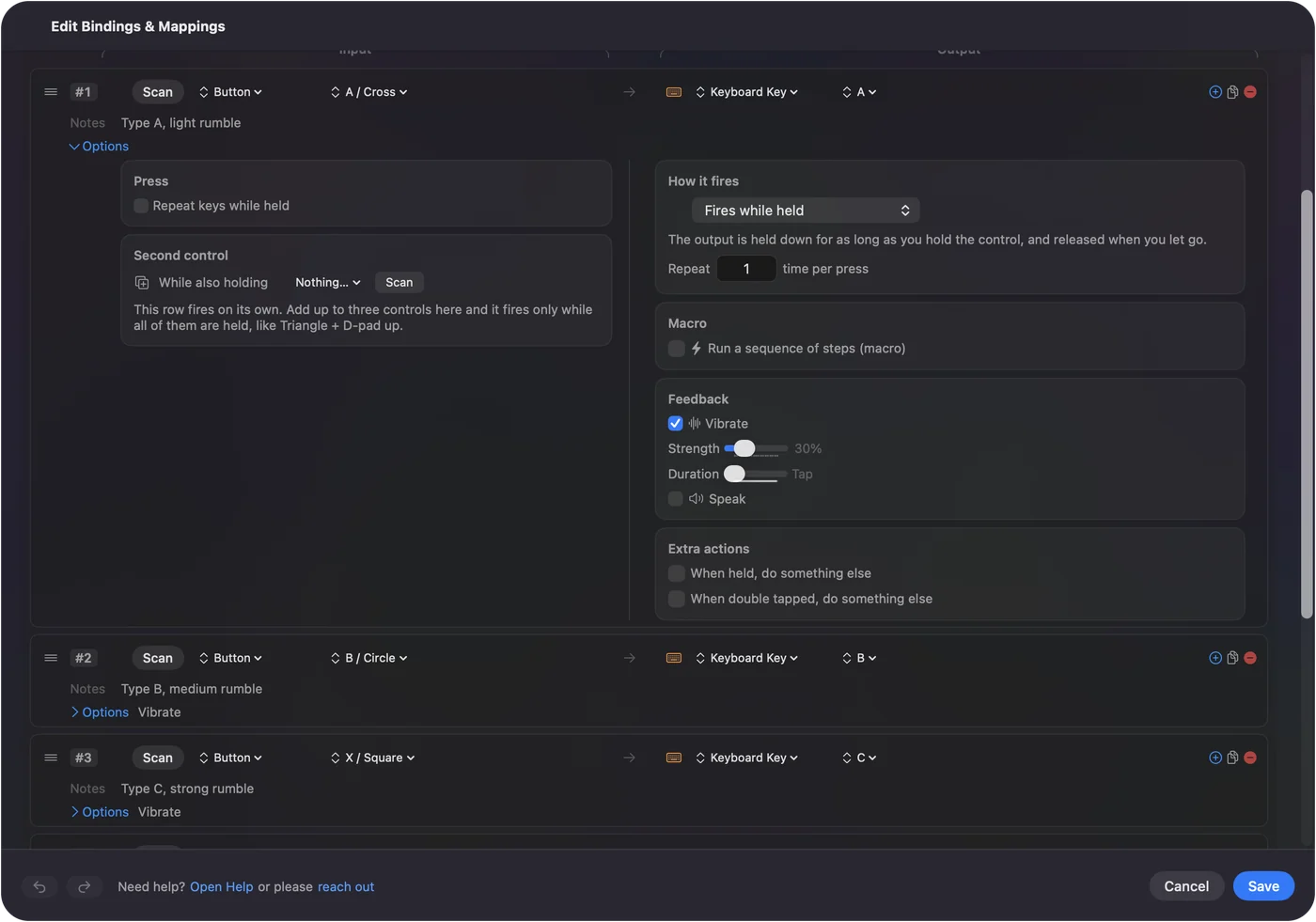
Any row in InputConfig can vibrate the controller when it fires, with a strength and a duration set per row. Tick Vibrate in the Feedback box of a row's Options. I added it so a press can be felt without looking, which matters when the output is a macro, a hidden shortcut, or a switch you cannot see. It is rumble, not Sony's textured haptics. The adaptive triggers have a setting of their own, trigger feel, covered on adaptive triggers on a Mac. For a walkthrough from scratch, see how to make a controller vibrate on a Mac. If a game never vibrates, start with PS5 controller not vibrating on a Mac.
On this page: 9 sections
Turn it on
- You: Open a row's Options and tick Vibrate in the Feedback box.
- InputConfig: Shows two sliders, and vibrates the controller each time the row fires.
- Check: Press the control and feel the buzz. The collapsed row shows the setting in its summary, as Vibrate or Vibrate 500 ms.
- Strength. From 10 to 100 percent in steps of five. New rows start at 60.
- Duration. From Tap to 2.0 seconds in 20 ms steps. Anything under 60 ms is a Tap.
A row can also vibrate and send nothing else: in the menu where you pick what a row sends, the Feedback section has Vibrate the controller. A buzz you can feel is a confirmation you do not have to look for.
Feel it before you set it
The Haptic Feedback preset puts four strengths on the four face buttons: 30 percent on Cross, 60 on Circle, 85 on Square and 100 on Triangle. Each button also types a letter, A to D, so try it with a text field in front. It turns a PlayStation pad's light bar orange while it runs. It doubles as a motor test: if it buzzes, the controller and the Mac are fine. How to test controller vibration has the full test.
Know how it plays
- Xbox controllers. A Tap is one short pulse, and anything longer is a steady buzz for that time.
- PlayStation pads. A DualSense makes its rumble with haptic actuators that need about a fifth of a second to reach the strength asked for, so a Tap, or any duration shorter than that, plays as a 220 ms buzz. For a firmer feel, raise Duration.
- Repeating rows. A turbo row vibrates once when it starts repeating, not on every repeat. A toggle row vibrates when you switch it on, and an auto clicker when you start it.
On a DualSense, longer is firmer, because short buzzes are stretched to 220 ms anyway.
Check which controllers rumble
- DualSense, DualSense Edge and DualShock 4. Driven through the app's own report, the same one that sets the light bar, so the preset's color stays put while they buzz. Over Bluetooth and USB.
- Two PlayStation controllers. Each row vibrates only the controller its group reads.
- Xbox and others with macOS haptics. They go through the system's haptics.
- The 2026 Steam Controller. It rumbles through its own report while Steam is closed, which is experimental.
- Pads read directly. Generic USB pads, arcade sticks and wheels get no rumble, and any pad with no haptics is skipped quietly.
If the pad has motors macOS or InputConfig can drive, it buzzes, and if not, nothing breaks.
Use it as feedback without a press
A row with no output can exist just to vibrate: a stick region at the edge of travel that buzzes when you reach it, or a touchpad region that confirms you found it. The Smart Preset Maker has a switch, Rumble when a trigger clicks, that adds a short buzz at 35 percent to each trigger row that clicks the mouse, so a shot or a swing is felt. Vibration can mark a place, not only a press.
If it does not vibrate
Climb this ladder, smallest step first:
- Test the motors. Activate the Haptic Feedback preset and press a face button. If it buzzes, the controller is fine.
- Check the row. Vibrate must be ticked in that row's Feedback box, and the preset must be running.
- Check the controller. Pads InputConfig reads directly, and pads without haptics, are skipped.
- Check the game. InputConfig vibrates on your own bindings and does not add rumble to a game's events. A Mac game that never asks for rumble stays still.
If the Haptic Feedback preset buzzes, the problem is the row or the game, never the controller.
What it cannot do
Vibrate drives the rumble motors only, with a strength and duration per row. The finer HD haptic effects of PS5 games are not part of it. Trigger resistance is not a row setting either. Since 1.8 it is the preset's trigger feel: click L2 or R2 in the Live Visualizer of a DualSense or DualSense Edge and pick Off, Light, Medium or Firm. That is a steady resistance while the preset runs, not the scripted trigger effects of a PS5 game, and adaptive triggers on a Mac has the details. Rumble and trigger feel, yes. Textured haptics, no.
The short version
- Tick Vibrate. In the row's Feedback box.
- Set Strength and Duration. Raise Duration for a firmer feel on a DualSense.
- Test with the preset. Haptic Feedback buzzes at four strengths.
Feel every important press, and you can stop looking at the screen to check.
Questions
Does it work over Bluetooth?
It does on the DualSense family and the DualShock 4 over Bluetooth and USB, and on Xbox controllers through macOS.
Does a turbo row rumble on every repeat?
No. It rumbles once when the row starts repeating, and an auto-click rumbles when you switch it on.
Does it support DualSense adaptive triggers or HD haptics?
Adaptive triggers, yes, from their own setting: since 1.8 a preset's trigger feel sets L2 and R2 on a DualSense or DualSense Edge to Off, Light, Medium or Firm, from the Live Visualizer. HD haptics, no. Vibrate drives the rumble motors only.
Why does a short Tap feel weak on a DualSense?
Its actuators take about a fifth of a second to reach full strength. InputConfig already stretches short buzzes to 220 ms on PlayStation pads, so for a firmer feel, raise Duration.
Why is my PS5 controller not vibrating in a Mac game?
Usually because the game does not ask for rumble on the Mac. Test the motors with the Haptic Feedback preset; if it buzzes, the controller is fine. InputConfig vibrates on your own bindings and does not add rumble to a game's events.
Related
Completely free. You don't have to make an account, there are no subscriptions, and nothing is locked. Optimized for Apple silicon. Open source on GitHub.
Updated