DualSense touchpad regions and gestures
 InputConfig is completely free on the Mac App Store. You don't have to make an account, there are no subscriptions, and nothing is locked. Optimized for Apple silicon.
The DualSense or DualShock 4 touchpad can be carved into regions, and each region is its own input that fires when a finger lands in it. Regions are drawn in the editor, in the controller's Regions section, and they belong to the preset you draw them in. The pad becomes a row of soft buttons: extra keys, hotbar slots, or a tiny keyboard for someone who cannot reach the face buttons. Areas of the screen are a different input, screen regions.
Steps
- Open the controller's Regions section in the editor and pick Touchpad.
- Draw rectangles on the pad and name them.
- Add a row with the input type Touchpad Region and pick a region, or press Scan and touch it. Give it an output. Regions carry every option a button does.
Draw regions
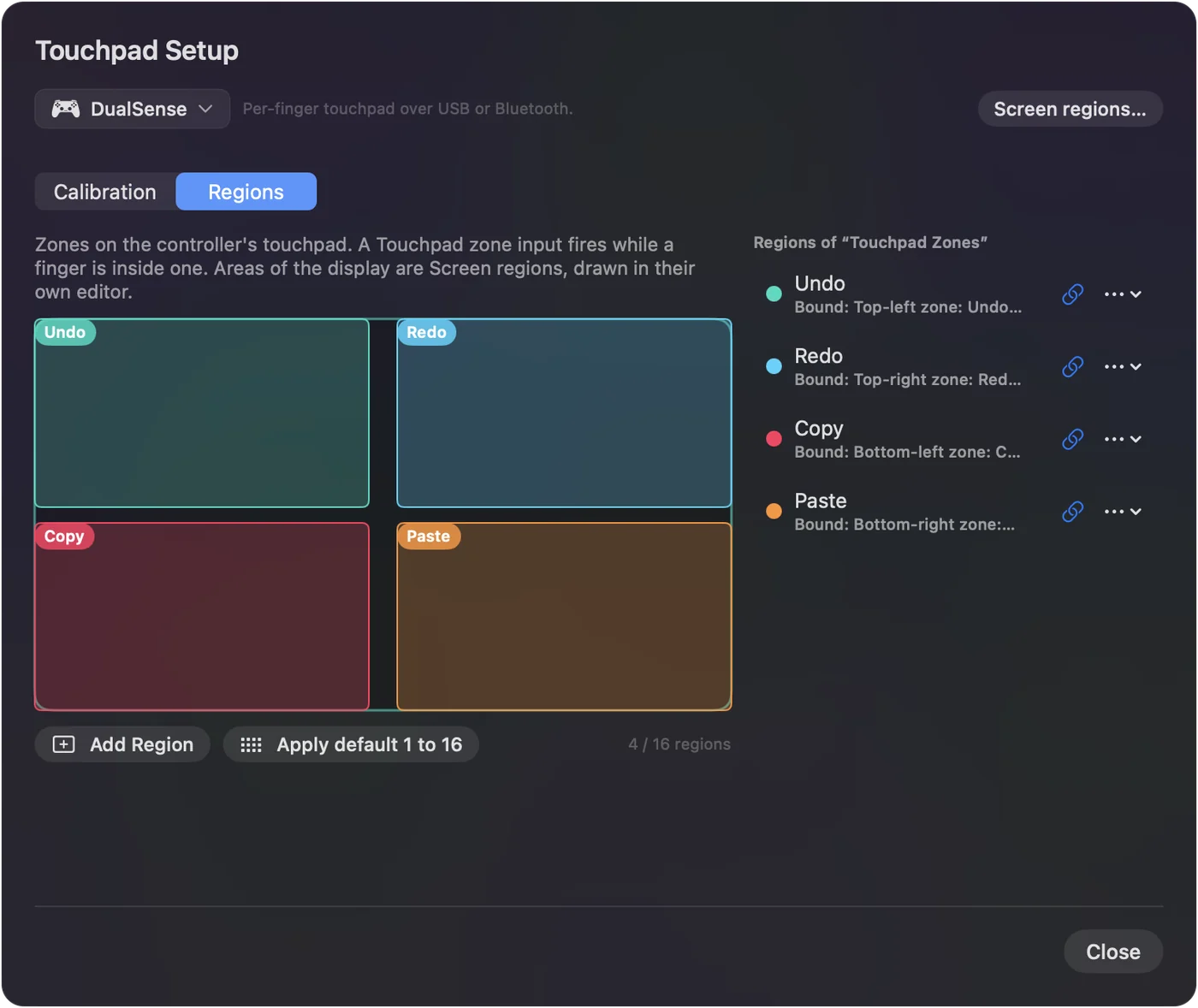
- You: In the controller's Regions section, pick Touchpad, then drag on the pad to draw each region and name it in the list. A region's Left, Top, Width and Height fields, in percent, place it by number instead. Then add a row with the input type Touchpad Region and pick a region, or press Scan and touch it.
- InputConfig: Fires the row when a finger lands in the region. Regions carry every option a button does.
- Check: Touch the region and the output fires. The Live Visualizer draws the regions on the pad and fills the one under a finger.
The pad is about 5 by 2.5 cm, so six to eight regions stay easy to hit without looking. Fewer, bigger regions are easier to hit by feel.
Bind a gesture
Touchpad Gesture recognizes a one-finger tap, a two-finger tap and a double tap, all separate from pressing the pad down. As on a Mac trackpad, the second tap of a double tap also fires a one-finger Tap row, so tap-to-click clicks twice and opens a file. Inside a region, a tap fires the region. A double tap also counts as two taps, the way a Mac trackpad works.
Share the pad with pointing
A finger that lands in a region fires it, and a finger that moves drives the motion rows. Keep regions near the edges if the middle is for pointing.
Try a layout
- Two halves. Left half and right half as Page Up and Page Down.
- Three columns. Again, Good and Easy for Anki. See Anki from a controller.
- A strip of five. A hotbar.
- Four corners. Undo, Redo, Copy and Paste.
The Touchpad Zones preset is a working example to start from.
The short version
- Draw. Drag on the touchpad in the editor's Regions section.
- Bind. Touchpad Region rows, or Scan and touch the region.
- Combine. Regions at the edges, pointing in the middle.
The touchpad is a whole extra row of buttons under your thumb.
Questions
Can regions and mouse motion share the pad?
A finger that lands in a region fires it; a finger that moves drives the motion rows. Keep regions near the edges if the middle is for pointing.
How many regions?
The pad is about 5 by 2.5 cm, so six to eight stay easy to hit without looking.
Related
Completely free. You don't have to make an account, there are no subscriptions, and nothing is locked. Optimized for Apple silicon. Open source on GitHub.
Updated