Anki from a controller
 InputConfig is completely free on the Mac App Store. You don't have to make an account, there are no subscriptions, and nothing is locked. Optimized for Apple silicon.
You can review Anki on a Mac from almost any controller: an 8BitDo Micro or Zero 2 sold as an "Anki remote", a PS5 or PS4 controller, an Xbox pad, or a single Joy-Con. InputConfig's built-in Anki preset maps the whole review loop: the bottom face button shows the answer and rates Good, the other three rate Again, Hard and Easy, and the bumpers undo and replay audio.
Reviewing flashcards is the one study task a controller makes better rather than merely possible. Anki's review loop is four keys, and four face buttons under a thumb are faster and more comfortable than reaching for 1 to 4 on a keyboard for an hour. I cover the layout, which controller to pick, and the small changes worth making. If you bought a remote and it will not pair or types letters, start with setting up an Anki remote on a Mac.
On this page: 11 sections
Steps
- Pair the controller in System Settings, Bluetooth. Pair an 8BitDo pad in a controller mode, not keyboard mode.
- Open InputConfig and activate the built-in Anki preset under Built-in Presets, Desktop & Productivity.
- Turn on Switch presets when the front app changes in Settings, Advanced, so the preset starts whenever Anki is in front.
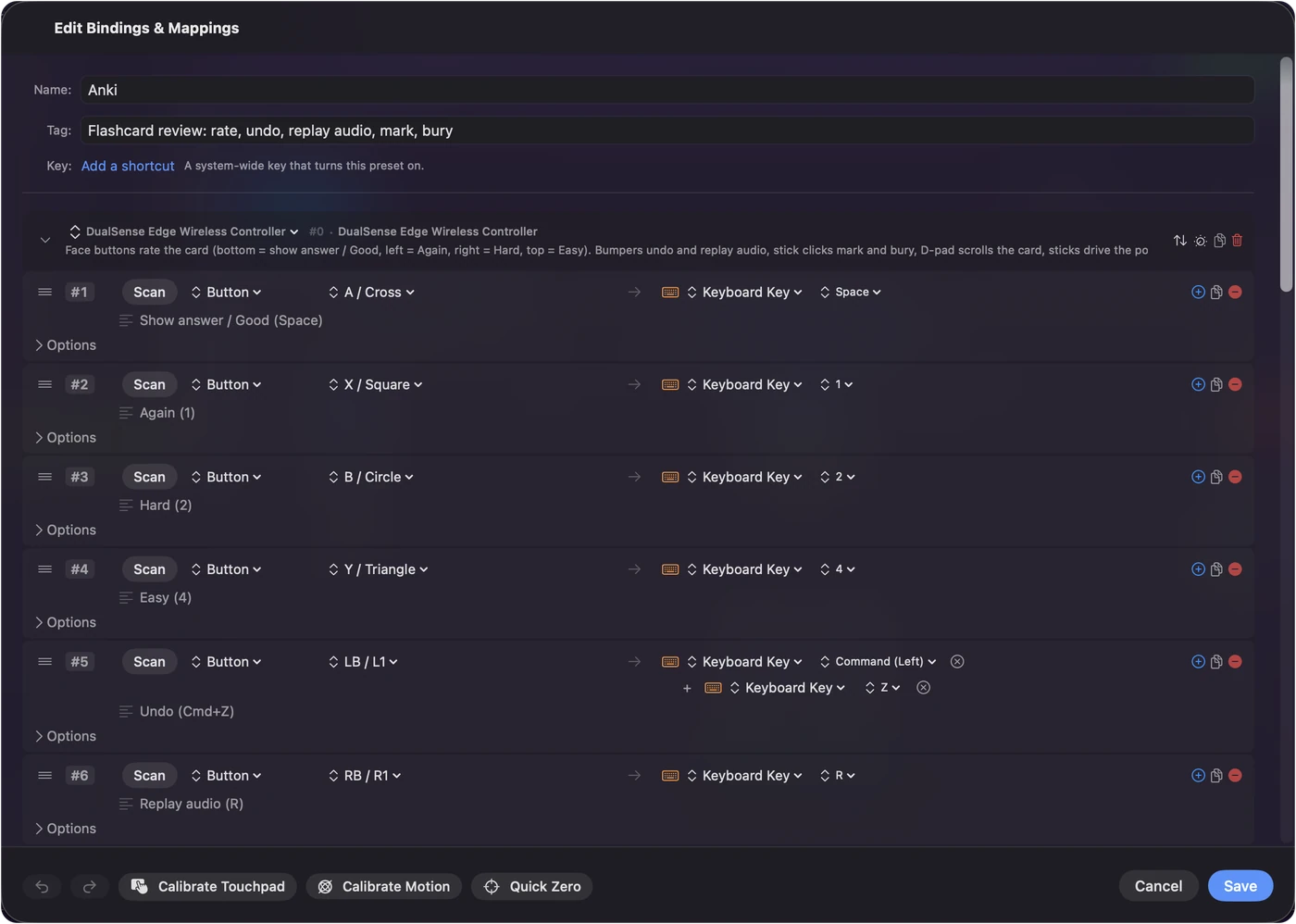
- Review: A / Cross shows the answer and rates Good, X is Again, B is Hard, Y is Easy.
- Switch on Speak on the four rating rows for the first session.
Learn the layout
| Control | Anki |
|---|---|
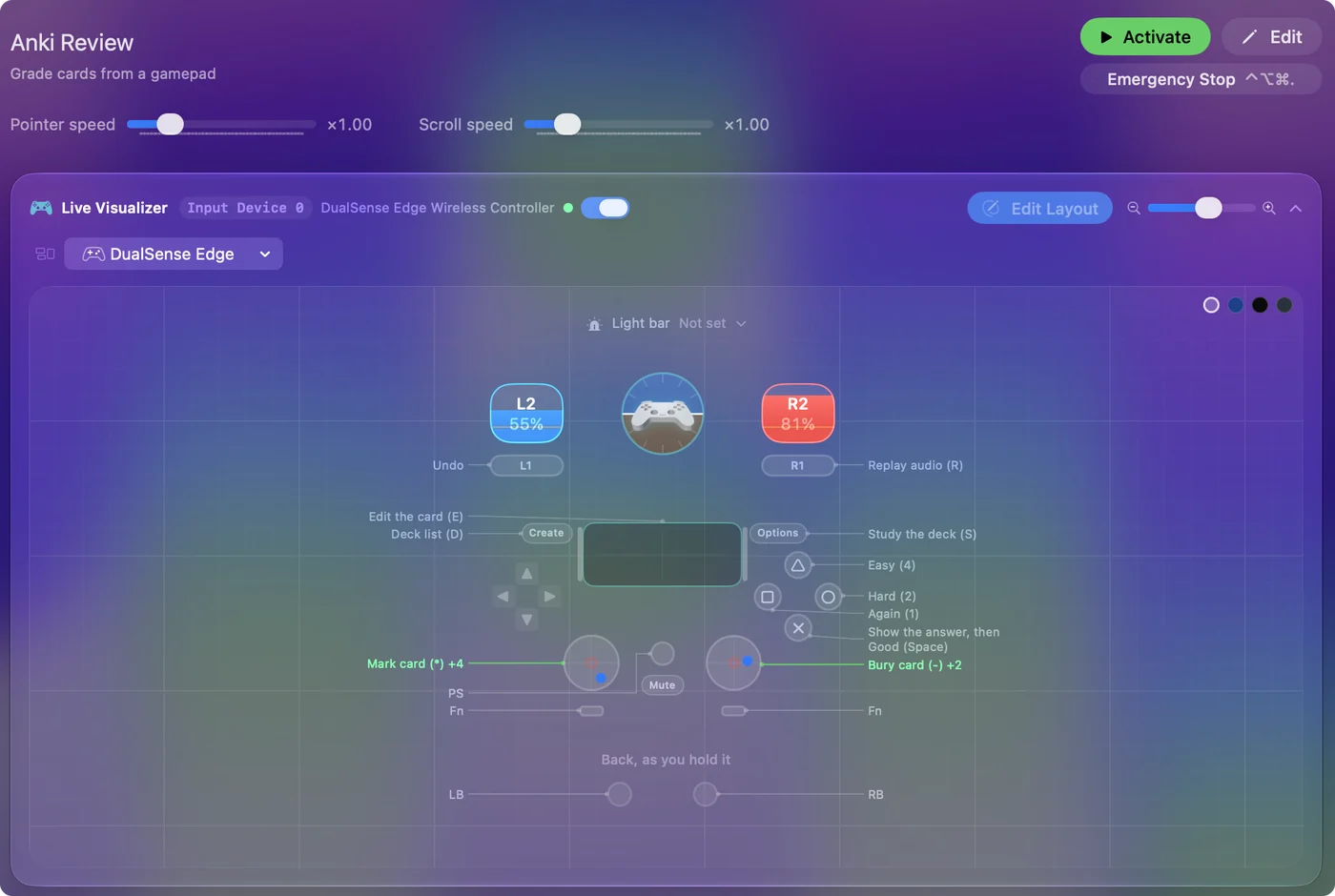
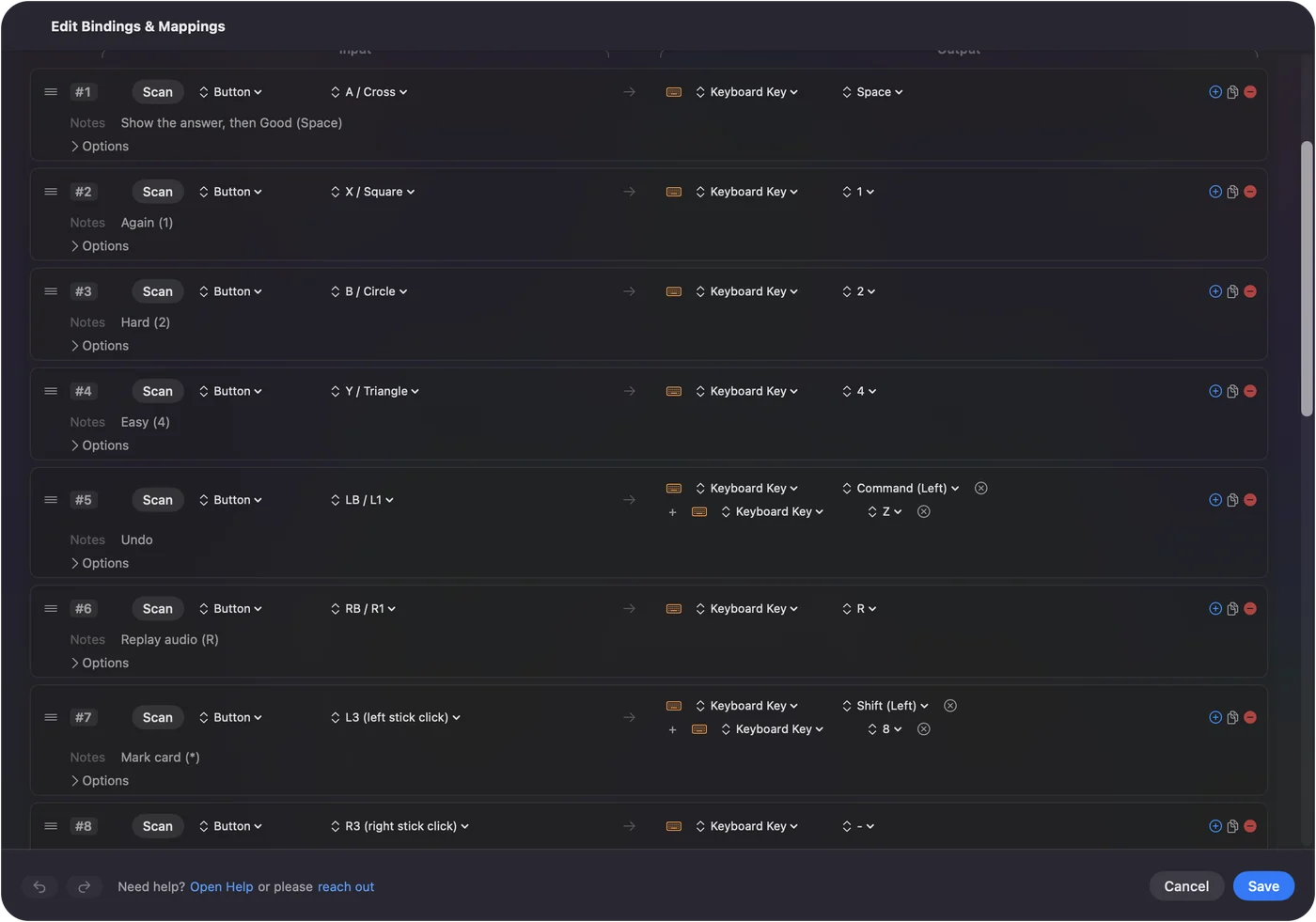
| A / Cross | Space: show the answer, then Good |
| X / Square | 1: Again |
| B / Circle | 2: Hard |
| Y / Triangle | 4: Easy |
| LB / L1 | Command Z: undo |
| RB / R1 | R: replay audio |
| L3 | Asterisk: mark card |
| R3 | Minus: bury card |
| D-pad | Arrow keys: scroll a long card |
| Left stick | Pointer |
| Right stick | Scroll |
| Start / Options | S: study the deck |
| Back / Share | D: deck list |
| DualSense touchpad press | E: edit the card |
| Left trigger | Right click |
| Right trigger | Click |
Bottom is Good, left is Again, right is Hard, top is Easy. The positions match the rough order of the buttons on Anki's own answer bar, left to right, folded onto a diamond.
Why the big button is Space, not 3
Anki's Space key shows the answer on the question side and presses Good on the answer side, so one button carries the common path: press, read, press. Rating anything other than Good is a different button. One button for the common path halves the presses in a review session.
If you would rather Space meant Hard, or Again, or Easy, Anki has no setting for it, so I wrote one: the Anki Spacebar Binder add-on. One config value, and the big button rates whatever you tell it to.
Make these changes for your first session
Small changes that pay off quickly:
- Speak on the ratings. Switch on Speak on the four rating rows for the first session, so a wrong thumb is caught immediately.
- A buzz on Again. Switch on Vibrate on Again, at a low intensity, so a lapse has a physical feel.
- Automatic start. Anki is already on the preset's auto-switch list. Turn on automatic switching once in Settings, Advanced, and the preset activates whenever Anki comes to the front.
- Your deck's color. The preset carries a light bar color. Change it if you like.
- Typed answers. For image occlusion or typed answers, dictation on a spare button types the answer into the field.
Choose a controller
Anything the Mac sees as a controller works. The ones people actually use for Anki:
| Controller | How it goes |
|---|---|
| 8BitDo Micro | Small enough to hold in one hand under a blanket. Pair it with the switch on D, the controller mode InputConfig reads directly, not K, which is keyboard mode. |
| 8BitDo Zero 2 | Tiny, no sticks or triggers, so only the rating buttons, bumpers and D-pad rows matter. Pair it in a controller mode, not keyboard mode. |
| PS5 or PS4 controller | The full layout, the touchpad press to edit a card, and a light bar that turns Anki blue while the preset runs. |
| Xbox controller | The full layout; A shows the answer and rates Good. |
| One Joy-Con | Held sideways, its four face buttons and two rail buttons cover rate, undo and replay in one hand. The Joy-Cons page covers pairing each one. |
The Anki remote page walks through modes, pairing and the usual problems.
Set up an 8BitDo Zero 2 or Micro
These two tiny pads are the ones Anki users ask about most, because they fit in one hand. Climb this ladder, simplest first:
- Keyboard mode, no app. Both have a keyboard mode in which the pad itself types keys, with no app on the Mac at all. On the Micro the keys can be changed in 8BitDo's Ultimate Software app. If those keys already do what you want in Anki, you do not need InputConfig.
- A gamepad mode with InputConfig. For your own layout, spoken ratings, or the Spacebar Binder trick, put the pad in a gamepad mode. InputConfig reads 8BitDo's X and D modes directly, so the Anki preset works on it like on any other controller. The 8BitDo page lists the modes.
The Zero 2 has no sticks, so the preset's stick clicks (mark and bury) need a new home, such as a hold on a bumper.
Do not run keyboard mode and InputConfig together. InputConfig listens to a keyboard and does not block or remap the key itself, so every key the pad types would still reach Anki as well. Pair the pad as a controller, not a keyboard, when InputConfig runs the layout.
Use it with other flashcard apps
- Mochi, RemNote and SuperMemo-style apps. They rate with number keys or letters. Duplicate the preset, change the four outputs, and add the app to auto-switch.
- Quizlet. It runs in a browser, and its flashcards flip with Space and move with the arrow keys, so a copy of this preset with D-pad left and right as the arrows already works there. Auto-switch follows apps, not websites, so put an Activate Preset action on a spare button to jump to your Quizlet copy.
- AnkiMobile on an iPad. InputConfig is a Mac app. On the iPad, AnkiMobile has its own controller support.
Choose InputConfig or the Contanki add-on
Contanki is a free Anki add-on that reads a controller from inside Anki, and a lot of the Anki community uses it. If it works for you, keep it. I would use a system-wide mapper for three reasons:
- The whole Mac. The same pad also runs the deck list, the card browser, a browser for AnkiWeb or Quizlet, and the rest of the Mac.
- No add-on to break. Nothing breaks when Anki updates and an add-on has not caught up, because Anki just receives ordinary key presses.
- Every pad the same. A PS5, Xbox or 8BitDo pad all work the same way.
You do not need both. If you run the two together, turn one off, or every button press is answered twice.
The short version
- Activate the built-in Anki preset. It puts Space on the bottom button and the ratings on the other three.
- Turn on automatic switching. Anki is already on the preset's list.
- Pair 8BitDo pads as controllers. Use D mode, not keyboard mode.
- One reader at a time. Use InputConfig or Contanki, but not both.
You press, read and press again, so the whole review loop sits under one thumb.
Download
- Anki presetThe shipped preset, identical to the built-in one. 12 KB
To add a downloaded preset: drop the file on InputConfig's Dock icon, or click the … button next to any preset in the sidebar, choose Import Preset File, and pick the file. It lands in the sidebar, ready to activate or edit. Any launch target inside a preset file is cleared on import; add one yourself in the editor if you want it.
Questions
Can I use a single Joy-Con?
Four face buttons and two rail buttons cover rate, undo, and replay, so one hand can run a full review session.
AnkiMobile on an iPad?
InputConfig is a Mac app. On the iPad, AnkiMobile has its own controller support.
How do I use an Xbox or PS5 controller with Anki on a Mac?
Pair the controller with the Mac in Bluetooth settings, open InputConfig, and activate the built-in Anki preset. The bottom face button shows the answer and rates Good, the other three rate Again, Hard and Easy, and the bumpers undo and replay audio. Add Anki to the preset's auto-switch list so it turns on whenever Anki is in front.
Do I need an Anki add-on or Karabiner-Elements?
No. InputConfig sends ordinary key presses, which is all Anki needs. Karabiner-Elements only comes in if you pair a remote in keyboard mode and want to change the keys it sends.
Related
This page in other languages: العربية, Čeština, Dansk, Deutsch, Español, Suomi, Français, עברית, Magyar, Bahasa Indonesia, Italiano, 日本語, 한국어, Norsk, Nederlands, Polski, Português, Русский, Slovenčina, Svenska, ไทย, Türkçe, Українська, Tiếng Việt, 繁體中文, 简体中文
Completely free. You don't have to make an account, there are no subscriptions, and nothing is locked. Optimized for Apple silicon. Open source on GitHub.
Updated