8BitDo controllers
 InputConfig is completely free on the Mac App Store. You don't have to make an account, there are no subscriptions, and nothing is locked. Optimized for Apple silicon.
On a Mac, put an 8BitDo pad in D mode, or on a pad without a switch hold B and Start to turn it on. That is what 8BitDo's own instructions for Apple devices say, for macOS 13.2 and later: slide the switch to D on the Pro 2, or hold B and Start on an SN30 Pro or SN30 Pro+. In that mode the Mac lists the pad as a game controller and every game with controller support sees it. InputConfig maps it like any other controller, and it also reads 8BitDo pads in some modes macOS ignores. If yours is in another mode, the modes say what each one does on a Mac.
On this page: 10 sections
Steps
- Turn the controller off.
- Slide the switch on the back to D, or on a pad without a switch hold B and Start to turn it on.
- Turn it on and reconnect. It appears in InputConfig with full button support.
Pick the right mode
- D. The mode 8BitDo lists for Apple devices on models with a switch, including the Pro 2. Use this.
- A. A position on the Pro 2's switch. Older guides, and an earlier version of this page, said to use it on a Mac; 8BitDo's current manual gives D for Apple devices instead. If a pad in A already works for you, it can stay there.
- S, Switch. The pad presents itself as a Switch controller, with Nintendo's swapped A and B. macOS 13 and later support the Switch Pro Controller, but S is not the mode 8BitDo lists for Apple devices.
- X, XInput. The Windows mode. macOS does not treat it as a game controller, so games ignore it. InputConfig has built-in profiles for 8BitDo pads that report in X mode over a USB cable, the Ultimate 2C Wired among them.
If a pad in the wrong mode is connected, InputConfig's main window says it detected an 8BitDo controller in that mode and names the mode to use.
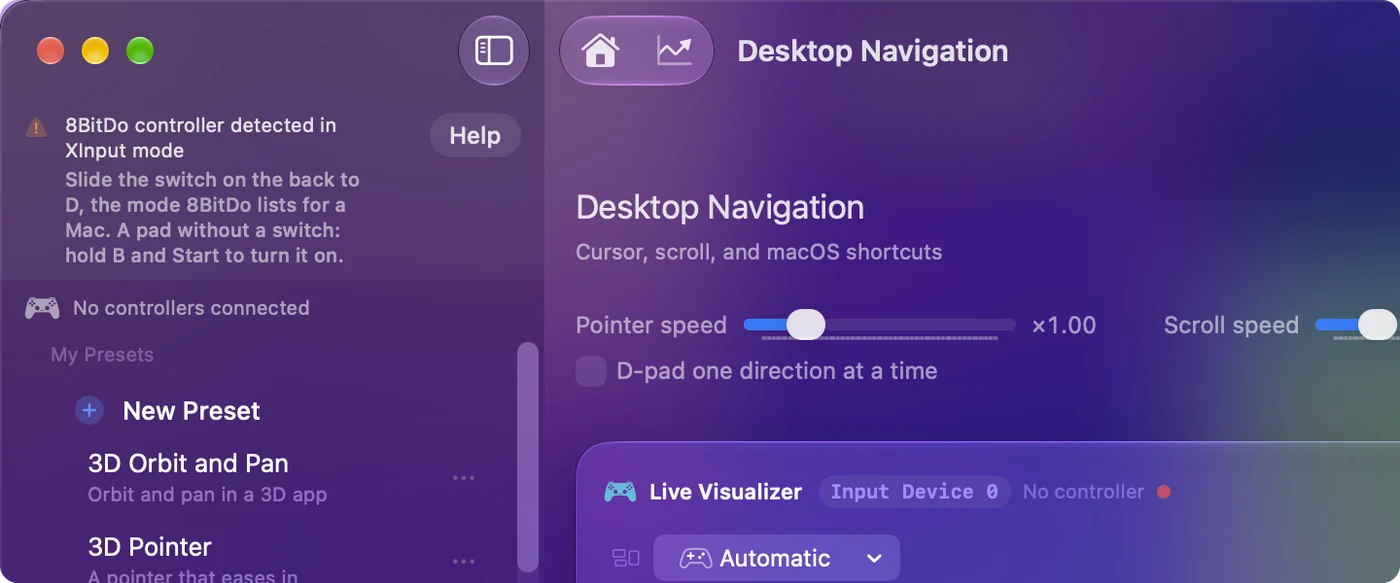
D on a pad with a switch is the answer almost every time.
Set a pad without a switch
- SN30 Pro and SN30 Pro+. They pick their mode at power-on. For a Mac, hold B and Start together to turn the pad on, then hold Pair for three seconds the first time.
- Ultimate 2C Wired. It has no Apple mode at all. Plugged in while you hold X it is in its Windows mode, and InputConfig reads it there with a profile written for it; holding B while you plug it in gives its Android mode instead.
The buttons you hold at power-on are the mode switch on these pads.
Update the firmware first if it will not pair
Apple support needs macOS 13.2 or later on the Mac and recent firmware on the pad, so an older 8BitDo may need an update before it pairs.
- Ultimate Software V2. For newer controllers, on macOS 13 or later.
- Ultimate Software. The original version, for older controllers.
- Upgrade Tool. For firmware.
An old pad that refuses to pair usually needs the Upgrade Tool, not a new mode.
Map it with InputConfig
For a game that already supports controllers, macOS is enough: pair the pad in D mode and play. InputConfig is for everything else: it turns the pad's buttons, sticks and triggers into keys, mouse movement, clicks, scrolling, macros and Mac shortcuts, so an 8BitDo works in games with no controller support, in a browser, or across the desktop.
- Read directly. An 8BitDo pad that InputConfig reads outside Apple's controller support shows up in Settings, Devices marked as detected over raw HID, and maps like any other controller.
- Opened by hand. If one does not appear, tick it under InputConfig, Devices in the menu bar.
- Bound by pressing. Press Scan on a row and press the button: the row is bound, whatever the label on the button says.
- Ready layout. FPS (8BitDo) is built for the Pro 2 and SN30 Pro+ in D mode.
Scan binds what the pad sends, so the letters printed on it never get in the way.
Check the back buttons: P1, P2, L4 and R4
The back buttons on 8BitDo pads, P1 and P2 on the Pro 2 and L4 and R4 on the Ultimate 2C, arrive one of two ways, depending on the pad and its mode. Either they are buttons of their own, which InputConfig reads as the left and right back buttons, or they are a copy of a button you assign, and the Mac receives that button.
- You: Press Scan on a row and press the back button.
- InputConfig: Binds the row to whatever the back button sends.
- Check: If the row fills with a back button or the button you assigned, it works. If nothing arrives, the back button has no assignment in this mode.
The Ultimate 2C assigns its back buttons on the controller itself, with no software; the Pro 2 and other models use 8BitDo's Ultimate Software. 8BitDo says that software does not support the pad's Mac mode, so a back button set up in another mode may not carry over. To give a back button a job of its own, assign it a button you never press in what you are doing, such as a stick click, then bind that button to a key, a click or a macro.
InputConfig 1.6 fixed 8BitDo back buttons, which earlier versions read as a DualSense Edge's Fn buttons, and offers to update rows recorded on them before. Back buttons and paddles on a Mac compares every controller. One Scan tells you whether a back button works in the mode you are in.
If it does not respond
Climb this ladder, smallest step first:
- Switch to the Mac mode. D on a pad with a switch, or B and Start at power-on on one without.
- Tick it by hand. Under InputConfig, Devices in the menu bar.
- Check the battery and other pairings. A pad still paired to a Switch nearby, or low on charge, drops out.
- Update the firmware. With 8BitDo's Upgrade Tool, then pair it again.
Most 8BitDo trouble on a Mac is the mode, so start there.
What it cannot do on a Mac
8BitDo says rumble and motion controls are not supported on Apple devices, so InputConfig's vibrate option and gyro aim skip these pads. Every button, stick, trigger and the D-pad work. Buttons and sticks, yes; rumble and gyro, no.
The short version
- Mode. D, or B and Start at power-on.
- Not pairing. Update the firmware with the Upgrade Tool.
- Back buttons. Scan one to see what it sends in this mode.
Get the mode right and an 8BitDo is an ordinary Mac controller.
Questions
Dongle or Bluetooth?
Bluetooth in D mode is the safe choice. 8BitDo says its Ultimate 2.4G controller does not work with Apple devices through its 2.4 GHz dongle, and other models' dongles vary, so pair over Bluetooth first.
Do the Pro 2's back buttons work?
Depending on the mode, they arrive as buttons of their own, which InputConfig reads as the left and right back buttons, or as copies of other buttons set with 8BitDo's software. Press Scan on a row and press one to see which.
Does rumble work on an 8BitDo controller on a Mac?
No. 8BitDo says rumble and motion controls are not supported on Apple devices, so games and InputConfig cannot vibrate these pads or use their motion sensors. Buttons, sticks, triggers and the D-pad all work.
Can I update 8BitDo firmware on a Mac?
8BitDo's Upgrade Tool runs on macOS 10.13 or later, and Ultimate Software V2 (macOS 13 or later) updates and remaps its newer controllers. An older pad may need the update before it pairs with a Mac.
Which mode is Mac mode on an 8BitDo controller?
D, on models with a mode switch such as the Pro 2. The SN30 Pro and SN30 Pro+ have no switch: hold B and Start to turn them on.
Why does my 8BitDo keep disconnecting from my Mac?
Check the mode first: D, the mode 8BitDo lists for Apple devices, is the most reliable on a Mac. Then the battery, and whether the pad is still paired to a Switch or another device nearby. Many 8BitDo pads also switch themselves off after a while with no input, which looks like a drop when you pause. If it drops in D mode with a full battery, update the firmware with 8BitDo's tool and pair it again.
Can I use 8BitDo Ultimate Software on a Mac?
8BitDo lists its Ultimate Software for Windows and for phones, and says it does not support the controller's Mac mode. To remap buttons on a Mac, including the back buttons, a mapper works in every mode the Mac can read: InputConfig binds any button to a key, a click or a macro.
Related
Completely free. You don't have to make an account, there are no subscriptions, and nothing is locked. Optimized for Apple silicon. Open source on GitHub.
Updated