How to map controller buttons to keyboard keys on a Mac
 InputConfig is completely free on the Mac App Store. You don't have to make an account, there are no subscriptions, and nothing is locked. Optimized for Apple silicon.
You map controller buttons to keyboard keys on a Mac with a mapper app, because macOS cannot do it on its own: the Game Controllers page in System Settings only swaps one controller button for another, and only in games that already read a controller. I make InputConfig for exactly this job. It is free and open source, it reads PlayStation, Xbox, Switch and 8BitDo pads as well as plain USB joysticks, and the setup takes about two minutes.
On this page
- Steps
- Map your first button
- Start from a ready desktop layout
- Map a game that ignores the controller
- Turn a stick into WASD or the arrow keys
- Hold keys, send combinations and type text
- Make it feel right
- Find the page for your controller
- If the keys do not reach the app
- What it cannot do
- The short version
- Questions
Steps
- Connect the controller over Bluetooth or USB.
- Open InputConfig and allow Accessibility access.
- Create a preset, click Scan on a row, and press the button.
- Choose Keyboard Key (or mouse, scroll, macro, MIDI) as the output.
- Save and Activate. The mapping works in every app.
Map your first button
Any PS5 DualSense, PS4 DualShock 4, Xbox, Switch Pro, 8BitDo or other HID gamepad works, with no driver.
Step 1: Allow Accessibility
- You: Connect the controller, open InputConfig from the Mac App Store, and allow Accessibility access when it asks.
- macOS: Lets InputConfig send keys and mouse events to other apps. That is all the permission is for.
- Check: InputConfig is switched on in System Settings, Privacy & Security, Accessibility.
Step 2: Scan a button
- You: Click New Preset, or pick a ready-made layout to edit. Click Scan on a row and press the button you want to map.
- InputConfig: Listens to every device at once and binds the row to the first control you press.
- Check: The row names the button you pressed.
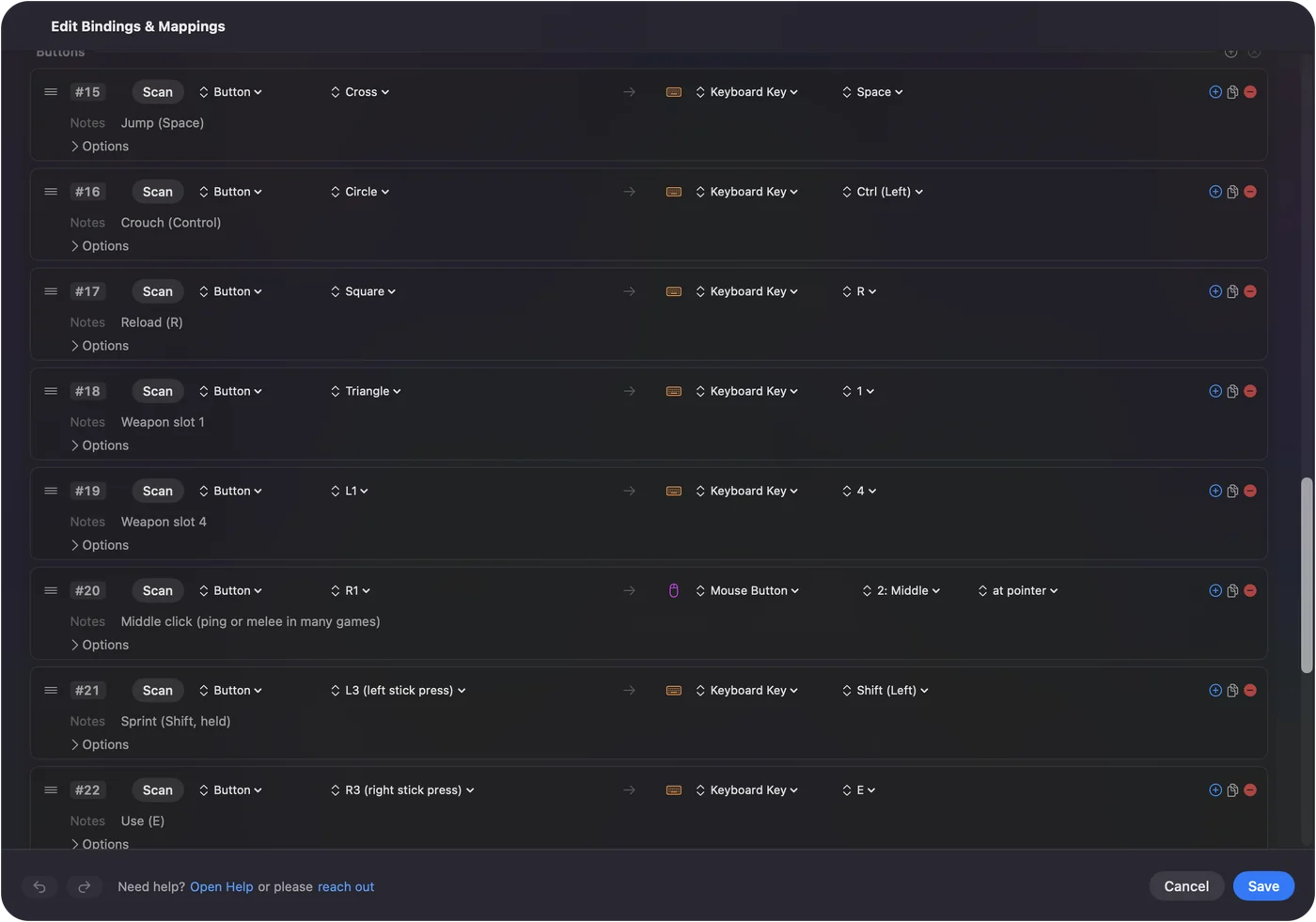
Step 3: Pick the key
- You: On the right side of the row, choose Keyboard Key and pick the key. Or choose Mouse Motion, Mouse Button, Scroll, a macro, typed text, a MIDI note or a system function.
- InputConfig: Saves the binding with the preset.
- Check: Repeat for each control. Sticks can drive the pointer or send four keys, triggers can click or send keys, and the D-pad can be arrows or WASD.
Step 4: Activate
- You: Save, then click Activate.
- InputConfig: Sends your keys to whichever app is in front, until you turn it off.
- Check: Open TextEdit and press a mapped button: its key appears. The emergency stop, Control Option Command period, releases everything at once.
Start from a ready desktop layout
The built-in Desktop Navigation preset is a complete keyboard and mouse map, row for row:
| Control | Sends |
|---|---|
| Left stick | Pointer movement |
| Right stick | Scroll |
| Right trigger | Left click |
| Left trigger | Right click |
| D-pad | Arrow keys |
| A / Cross | Left click |
| B / Circle | Undo (Command Z) |
| X / Square | Cut (Command X) |
| Y / Triangle | Paste (Command V) |
| Right stick press | Select All (Command A) |
| LB / L1 | Next app (Command Tab) |
| RB / R1 | Previous app (Command Shift Tab) |
| Back / Share / Create | Spotlight (Command Space) |
| Start / Options / Menu | Return |
Activate it and a controller runs the whole Mac, and after that you can change any row you like.
Map a game that ignores the controller
Map the controls to the keys the game expects: WASD on the left stick, mouse look on the right stick, Space to jump, the triggers to the mouse buttons. The game sees a keyboard and mouse and never knows. Ready-made layouts exist for Minecraft, Fortnite, Roblox and hundreds more.
Turn a stick into WASD or the arrow keys
This is the part people mean by joystick to keyboard. A stick is two axes, and each direction gets its own row, so one stick becomes four keys: up to W, down to S, left to A, right to D. Or the four arrow keys, or I, J, K and L, or anything else.
- When the key goes down. A direction presses its key once the stick passes that row's deadzone, 25 percent of the way out unless you change it, and releases it when the stick comes back. The release point sits slightly lower, so a stick resting near the edge does not make the key chatter.
- Diagonals. Push up and right and both rows fire, so the game sees W and D held together, exactly as it would from a keyboard.
- On or off. A stick sending keys is not analog. A game that walks when you tap W and runs when you hold Shift needs Shift on another control. The Minecraft layout puts sprint on the left stick click.
- The D-pad. Four rows the same way, which makes it the natural place for the arrow keys.
USB joysticks, flight sticks and arcade sticks work the same way: every axis, button and hat switch is a row. Joystick to keyboard on a Mac covers those.
Hold keys, send combinations and type text
A Keyboard Key row presses the key when the button goes down and releases it when the button comes up, so holding the button holds the key. That is what games expect for walking, sprinting and aiming.
- Key combinations. Put more than one key on a row, Command and A for example, and they go down together. Desktop Navigation sends Undo, Cut, Paste and Select All this way.
- Which keys. Letters, numbers, arrows, function keys including F13 to F19, the number pad, modifiers and special keys, all from the key menu on the row.
- Turbo, toggle, hold and double tap. Turbo repeats a key while the button is held, toggle latches it until the next press, and a row can do one thing on a tap and another on a hold or a double tap. See macros, turbo and toggle and hold and double tap.
- Whole words. Type Text types a saved string, like an email address, in one press. For real typing, see typing on a Mac with a controller.
Make it feel right
Each row has Options:
- Deadzone. So a resting stick does not creep.
- Sensitivity curve. Slow near the center, fast at the edge, or straight.
- Chords. A row fires only while a second control is also held, which gives every button a second job.
- Gyro. Motion rows move the pointer by tilting a PlayStation controller.
Everything is described on the help pages.
Find the page for your controller
- PS5 DualSense and DualSense Edge. PS5 controller keyboard mapping, including the touchpad and gyro.
- PS4 DualShock 4. PS4 controller keyboard mapping.
- Xbox Wireless, Series X|S, One and Elite. Xbox controller keyboard mapping.
- Switch Pro Controller and Joy-Cons. Switch Pro Controller and Joy-Cons.
- 8BitDo. Which mode to use so the Mac sees it.
- USB joysticks, flight sticks and arcade sticks. Joystick to keyboard.
- Coming from a paid mapper. Moving from Joystick Mapper or Gamepad Mapper: joystick mapper for Mac and gamepad mapper for Mac.
If you are not sure what a button is called, the controller button map lists the Xbox, PlayStation and Switch names side by side.
If the keys do not reach the app
Climb this ladder, smallest step first:
- Check the preset is active. The Live Visualizer lights each control as you press it. If it lights up, InputConfig is reading the pad.
- Check Accessibility. If nothing happens in any app, open System Settings, Privacy & Security, Accessibility, and switch InputConfig on. If it is already on and still nothing happens, remove it with the minus button and add it again.
- Match the game's keys. If a key works in a text editor but not in the game, the preset has to send the key the game is set to. Check the game's key bindings screen and change the row to match.
- Stop doubled presses. If the game does everything twice, it reads the controller itself as well as the keys. Turn off its controller support, or stop the preset and use the game's own support.
- Release a stuck key. The emergency stop stops the preset and releases every held key at once.
What it cannot do
InputConfig turns controllers into keyboard and mouse, not the other way around. It does not create a virtual controller, so it cannot make your keyboard act as a gamepad. For iPhone and iPad games on an Apple silicon Mac, macOS has its own Controller Emulation setting in that game's settings, added in macOS 11.3.
The short version
- One permission. Allow Accessibility once.
- One row per job. Scan the button, choose Keyboard Key, pick the key.
- A head start. Start from Desktop Navigation for the Mac, or from a game layout for a game.
- A way out. Control Option Command period stops everything.
Scan, pick a key, Activate. It is the same three steps for any controller and any app.
Every free controller mapper for Mac is compared on one page.
Questions
Can I map a controller to keyboard keys on a Mac for free?
Yes. InputConfig is free on the Mac App Store and open source, with no account or subscription. Enjoyable is a free older option that is no longer updated.
Does this work in apps that are not games?
Yes. The mapper sends real keyboard and mouse events, so browsers, editors, Anki, Final Cut, Blender and the Finder all respond the same way they would to a keyboard.
Which controllers work?
Any PS5 DualSense or DualSense Edge, PS4 DualShock 4, Xbox Wireless, Series or Elite, Switch Pro, Joy-Con, 8BitDo, the PlayStation Access Controller, and any other HID or MFi gamepad.
Do I need to turn it off before typing normally?
Only if a mapped button would collide with what you are doing. The menu bar icon and the emergency stop shortcut stop a preset instantly and release every held key.
Can I make my keyboard act as a controller on a Mac?
Not with InputConfig. It turns controllers into keyboard and mouse, not the other way around, and it does not create a virtual controller. For iPhone and iPad games on an Apple silicon Mac, macOS has its own controller emulation option in that game's settings, added in macOS 11.3.
Can a stick send WASD instead of moving the mouse?
Yes. Give each direction of the stick its own row and pick W, A, S and D, or the arrow keys. Diagonals hold two keys at once. The other stick can move the mouse at the same time.
Does this work in browser games?
Yes. InputConfig sends keys and mouse movement to whichever app is in front, so Safari, Chrome, Firefox and Edge receive them like a real keyboard. Browser games that read a controller themselves do not need it.
Related
This page in other languages: Español, Italiano, 日本語, 简体中文, 繁體中文, ไทย
Updated