How to play browser games with a controller on a Mac
 InputConfig is completely free on the Mac App Store. You don't have to make an account, there are no subscriptions, and nothing is locked. Optimized for Apple silicon.
Yes, you can play browser games with a controller on a Mac. Safari, Chrome, Firefox and Edge all pass a paired PS5, Xbox or Switch controller to any web page that asks for it, through a standard called the Gamepad API, and games built for it work with no setup. Most web games never ask: they read the arrow keys, WASD and the mouse. For those, InputConfig, a free Mac app I made, turns the controller into the keys and mouse the game already understands, in every browser at once.
On this page
Steps
- Pair the controller with the Mac.
- Open the game and press a button once it has loaded.
- If the game responds, play. It reads the controller itself.
- If nothing moves, open InputConfig and activate a layout with the keys the game lists.
- Press a button again and check that the game moves.
Find out whether the game reads the pad
Press a button on the controller after the page loads. Browsers only show a gamepad to a page once it has been touched, so a game can look broken until that first press.
- You: Load the game, then press any button on the controller.
- Check: If the menu or the character moves, the game reads the pad and needs nothing else. If nothing moves after a press and a reload, the game only reads the keyboard.
Xbox Cloud Gaming, GeForce NOW and most browser emulators read the pad this way. Ten seconds and one button press tell you which kind of game you have.
Map the pad to keys for keyboard games
Arrow-key platformers, .io games, Flash-era games running through Ruffle, itch.io jams and typing games ignore the controller even though the browser passes it on. A mapper sends the keys instead, and the browser sees a keyboard. Almost every keyboard web game falls into one of three shapes, and InputConfig has a starting layout for each:
- Arrow keys plus Z and X. Platformers, arcade ports, Flash-era games and most browser emulators. The Emulator / Arcade layout puts the arrows on the D-pad and the left stick, Z and X on A and B, A and S on X and Y, Q and W on the bumpers, Enter on Start and Shift on Select.
- WASD and the mouse. Browser shooters and block-building games. Start from the built-in FPS preset for your pad (Xbox, PS5 DualSense, Switch Pro, 8BitDo): WASD on the left stick, aim on the right, fire and aim on the triggers. Games that lock the pointer read how far the mouse moved rather than where it is, and InputConfig's stick-to-mouse output reports that movement.
- The mouse alone. .io games you steer by pointing, clicker games, card and puzzle games. Mouse + Scroll puts the pointer on the left stick, scrolling on the right, left click on A and right click on B, and the D-pad nudges the pointer slowly for small targets. Turn on Confine cursor so the pointer cannot wander onto a second screen.
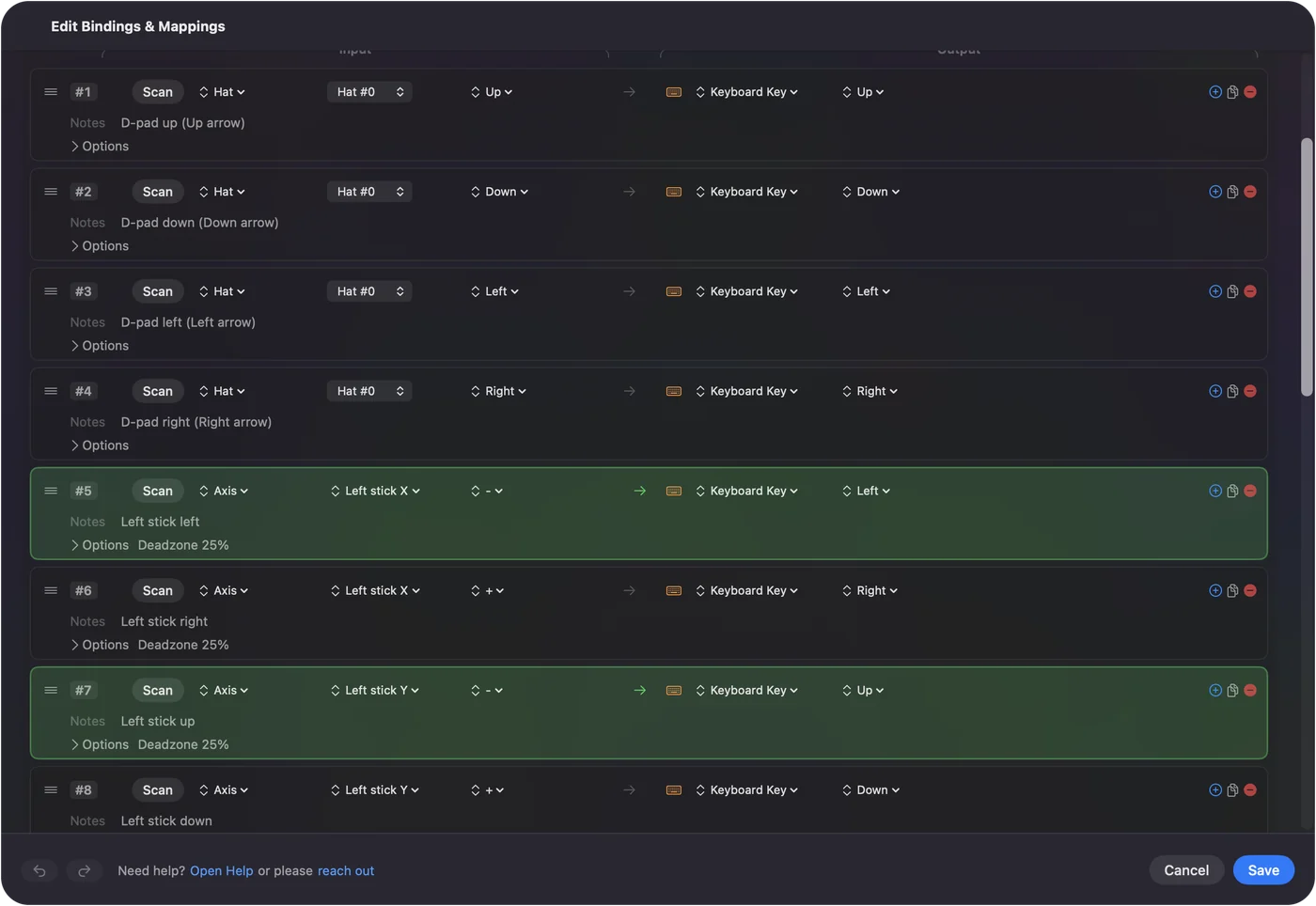
Any row can be scanned to a different button, and any key changed to the one the game uses. For games that expect you to mash a key, turbo on the fire button presses it for you at a rate you set.
Make the layout start with the browser
A game layout can switch on by itself whenever the browser you play in comes to the front.
- You: In the preset's Automation section, add the browser you play in, then turn on automatic switching in Settings, Advanced.
- InputConfig: Starts the preset when that browser comes to the front, and puts back the previous preset when you leave it.
- Check: Switch to the browser and press a button. The game layout should be live without touching the menu bar.
Switching follows the app, not the website, so the game layout is on in every tab of that browser. If that gets in the way, keep one browser for games and another for everything else. A preset can also open the game's address when it starts: put the address in the deep link field under Auto-launch when preset activates. More on auto-switch.
If the pad stops being seen mid-game
Browsers only show a controller to a page after a button press, so a pad that drops out mid-game needs that press again. Climb this ladder, smallest step first:
- Press a button. Reconnect the controller if it went to sleep, then press any button so the page sees it again.
- Reload the page. If the game still ignores the pad, reload, and press a button once the game has loaded.
- Try another browser. Each browser reads controllers through its own code, so a pad one misses can work in another.
- Switch to keys. Map the controller to the keys the game lists, with InputConfig. The keyboard route does not need the page to see the pad at all, which is why I would pick it for long sessions.
If every press arrives twice
InputConfig does not hide the controller from the browser. If a game reads the pad itself while a preset also sends keys, every press arrives twice. Climb this ladder, smallest step first:
- Stop the preset. Use the menu bar icon, and let the game read the pad on its own.
- Leave the browser off the list. Remove that browser from the preset's app list, so auto-switch does not start the layout there.
- Use the emergency stop. If a layout ever gets in the way, the emergency stop lets go of everything: Control Option Command period, or hold Back and Start together on the controller for three seconds.
Find web games that support a controller
A few game sites let you filter for it, and cloud gaming covers the rest:
- itch.io. Tags web games with controller and gamepad support.
- CrazyGames. Keeps a Controller Compatible Games collection.
- Cloud gaming. Xbox Cloud Gaming and GeForce NOW run in a browser and read the controller the same way, which is how Fortnite plays on a Mac.
Treat a site's label as a hint, not a promise. Some games only understand an Xbox-style layout, and some use the pad in menus and nowhere else.
Play Poki, CrazyGames and Scratch games
These are the sites children open, and each is a mix:
- CrazyGames. Games in the Controller Compatible collection read the pad directly: open one, press a button, play. Everything outside that collection is worth trying the same way, then mapping if nothing moves.
- Poki. A few games read a pad and a great many are made for the keyboard. The game's own instructions, usually on the first screen, name the keys it uses, and that is the list to map.
- Scratch. It has no gamepad blocks of its own, so nearly every Scratch project listens to the arrow keys, Space and a letter or two. Map the D-pad or left stick to the arrows and A to Space, and most of them play.
Make one preset per kind of game, not per game. An arrow-key layout with Space on A covers a surprising share of all three sites, and a second one with W, A, S and D covers most of the rest. Many of these games start on a Play button that wants a click, so keep a stick moving the pointer and a button clicking, the way the Web Browsing preset does with the left stick and A. For two players on one keyboard, give each controller its own keys. The two controllers page walks through it.
The short version
- Press a button first. If the game moves, it reads the pad and needs nothing else.
- Keyboard games. Map the pad to the keys on the game's first screen with InputConfig.
- Never both. If a game reads the pad, stop the preset, or every press arrives twice.
Two presets, arrow keys and WASD, cover most of the web.
Questions
Do browser games support controllers on Mac?
The ones built with the Gamepad API do, in Safari, Chrome, Firefox and Edge. Keyboard-only games need a mapper such as InputConfig.
Why does my controller not work on a website?
Press a button first. Browsers hide a gamepad until it is used. If the site is keyboard-only, map the controller to keys.
Which browser is best for playing games with a controller on a Mac?
Any current one. Safari, Chrome, Firefox and Edge all support the Gamepad API, and each reads controllers through its own code, so if one misses your pad, try another. For keyboard games the browser makes no difference, because InputConfig sends keys to whatever app is in front.
Can I use a PS5 or Xbox controller for browser games on a MacBook?
Yes. Pair it in Bluetooth settings and press a button once the game has loaded. Games that read controllers use it directly. For keyboard-only games, map the controller to keys with a free mapper such as InputConfig.
Can I play io games like slither.io or Krunker with a controller?
If the game reads a gamepad, press a button and play. If it only reads the keyboard and mouse, map the pad: the pointer on a stick for games you steer with the mouse, or WASD on the left stick and aim on the right for shooters.
Can you play Poki games with a controller on a Mac?
Some read a controller on their own. Press a button after the game loads. For the rest, map the controller to the keys the game lists on its first screen with InputConfig, and the game sees a keyboard.
Related
This page in other languages: Français, 日本語, Nederlands, Polski
Updated