How to use two controllers on a Mac
 InputConfig is completely free on the Mac App Store. You don't have to make an account, there are no subscriptions, and nothing is locked. Optimized for Apple silicon.
Yes, a Mac takes two controllers, or four, with nothing extra: pair each one the normal way and macOS keeps them apart. Games with local co-op pick them up as player one and player two. The only trouble comes with games that expect one pad plus the keyboard, or only the keyboard, and InputConfig, a free Mac app I made, fixes that by giving each controller its own keys.
On this page
Steps
- Pair the first controller in System Settings, Bluetooth, or plug it in.
- Pair the second the same way. Mixing brands is fine.
- Open a co-op game that reads controllers and press a button on each pad.
- For a keyboard-only game, make an InputConfig preset with different keys for each controller slot.
- Press Activate and check that each pad moves its own player.
Pair both controllers
Put each pad in pairing mode in turn and connect it in System Settings, Bluetooth. Wired pads count too, and macOS numbers them in the order they connected.
- Mixed brands. A DualSense and an Xbox pad together work fine.
- Two Joy-Cons. Each Joy-Con connects as its own controller, so one held sideways is a small full controller for each player.
- Two-player adapters and dual arcade encoders. InputConfig gives each player on one of these a controller of its own.
Connect them one at a time and the order you connect them in is the player order.
Tell the two pads apart
The Live Visualizer shows one panel per controller, with its name and slot number, so you can see at a glance which pad is slot 0 and which is slot 1.
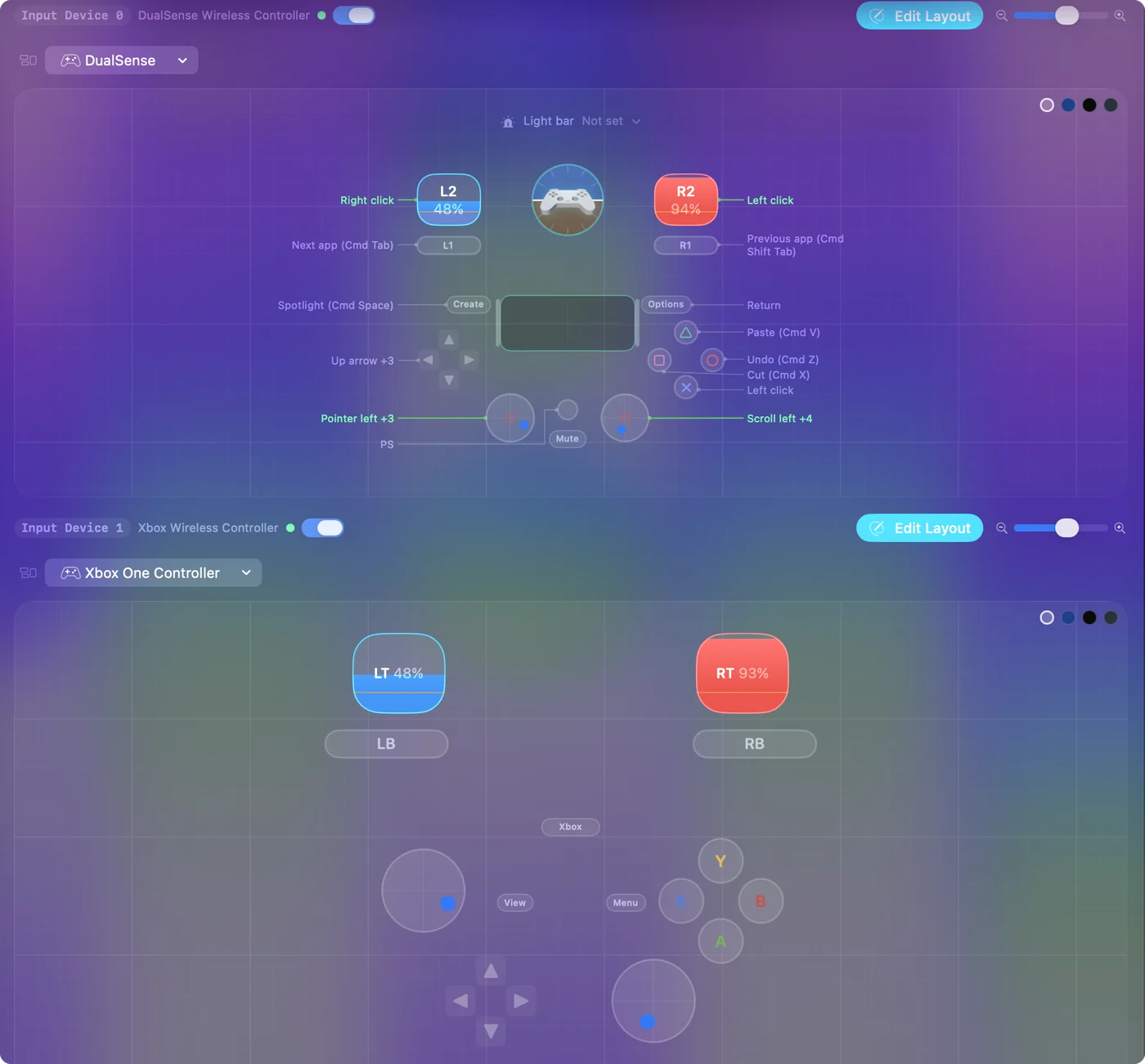
- Identify. In System Settings, Game Controllers, select a controller and press Identify: it flashes that pad's lights or plays a haptic pattern.
- Light colors. Two PlayStation controllers each get their own light color, rumble and Edge paddles. A running preset that sets a light color puts that color on both.
- A sticker. On two identical pads, a sticker on each one settles whose is whose faster than any setting.
Give each player their own keys in a keyboard game
Most two-player browser games and Scratch projects put player one on W, A, S and D and player two on the arrow keys. Some couch games take one controller plus the keyboard for the second player. InputConfig gives every connected controller its own slot, and each preset holds a separate layout per slot, so the game sees two people sharing one keyboard.
Step 1: Connect both pads
- You: Pair both controllers and open the Live Visualizer.
- InputConfig: Shows each controller with its slot number.
- Check: Press a button on each pad. The panel that lights up tells you which pad is slot 0 and which is slot 1.
Step 2: Lay out player one
- You: Make a new preset. Under the first controller, bind the left stick or D-pad to W, A, S and D, and the face buttons to the keys the game names for player one, often Space, F or G. Press Scan on a row, then push the stick or press the button, and the row fills in.
- InputConfig: Records which control on which controller each row listens to.
- Check: Each row names the control you pressed.
Step 3: Lay out player two
- You: Under the second controller, bind the same controls to the four arrow keys and player two's keys, often Enter, L or the period.
- InputConfig: Keeps the second layout separate from the first.
- Check: The second controller's rows send different keys from the first controller's rows.
Step 4: Play
- You: Press Activate and open the game.
- InputConfig: Sends each pad's keys to the game, and both players can press at once.
- Check: Each pad moves its own player. If both move player one, the rows are under the same controller.
Keep the preset once it works. The same two layouts fit hundreds of two-player web games, so there is rarely a reason to make another. The controllers page covers slots, and the Split Fiction layout is an example built for the second player.
If the game only sees one pad
Climb this ladder, smallest step first:
- Check the Mac sees both. Open System Settings, Game Controllers. If a pad is missing there, pair it again before anything else.
- Press a button on each pad in the game. Many games assign a player only when that pad sends its first press.
- Read the game's own co-op note. If it says the second player uses the keyboard, map the second pad to those keys as in the steps above.
What it cannot do
InputConfig sends keys to the app in front, so in a keyboard-only game both players are typing on one shared keyboard as far as the game knows. That works whenever the game already supports two players on one keyboard. It does not turn a one-player game into a two-player game, and it does not make a controller-only game accept a second keyboard player.
The short version
- Co-op games that read controllers. Pair both pads and play. macOS hands out player one and two.
- Keyboard-only games. Use one InputConfig preset, with WASD on the first controller and the arrow keys on the second.
- Which pad is which. The Live Visualizer shows slot numbers, and Identify in System Settings flashes a pad.
Make the two-player preset once and keep it for every keyboard game you share.
Questions
How many controllers can a Mac connect at once?
Bluetooth allows several, and four pads at once is routine. Each one gets its own slot in InputConfig.
Can two people play a keyboard-only game with two controllers on a Mac?
Yes. Map each controller to a different set of keys in one InputConfig preset, and the game sees two players on one keyboard.
How do I connect two PS5 controllers to a MacBook?
Hold Create and the PS button on the first until the light bar blinks, connect it in System Settings, Bluetooth, then repeat with the second. Mixing a DualSense and an Xbox pad works too.
Can two Joy-Cons be two players on a Mac?
Yes. Each Joy-Con connects as its own controller and gets its own slot, so a preset can give each one different keys. Held sideways, one Joy-Con is a small full controller.
Related
This page in other languages: Français, Tiếng Việt
Updated