How to use an Xbox controller as a HOTAS on a Mac
 InputConfig is completely free on the Mac App Store. You don't have to make an account, there are no subscriptions, and nothing is locked. Optimized for Apple silicon.
Yes, you can fly with an Xbox controller on a Mac. It already has most of what a basic HOTAS gives you: a stick for pitch and roll, a second stick and two analog triggers for throttle and yaw, a D-pad that works as a hat switch, and plenty of buttons. A flight game that reads controllers lets you assign them in its own controls screen. A flight game that only reads the keyboard needs the pad turned into keys first.
That second part is InputConfig, the free Mac app I make. It turns each stick direction and each trigger into the keys or mouse movement the game expects. It does not make the pad look like a joystick to a game, and the sections below are honest about where that matters.
On this page: 11 sections
- Steps
- Know what a pad can do as a HOTAS
- Pair it with the Mac
- Let the flight game read it when it can
- Turn the sticks into keys for keyboard flight games
- Make the throttle and triggers work harder
- Use two controllers as stick and throttle
- Know the Thrustmaster HOTAS One and HOTAS 4
- What it cannot do
- The short version
- Questions
Steps
- Pair the Xbox controller with the Mac over Bluetooth, or plug it in by USB on macOS 15 Sequoia or later.
- Open the flight game's controls screen and see whether it lists the controller.
- If it does, assign pitch, roll, yaw and throttle there, and run no mapper on top.
- If it does not, open InputConfig, add a row for each stick direction and trigger, and choose the game's keys.
- Add the game to the preset's apps so the layout turns on whenever the game is in front.
Know what a pad can do as a HOTAS
A HOTAS is a flight stick in one hand and a throttle in the other. An Xbox controller splits the same jobs between two thumbs:
| On a HOTAS | On an Xbox controller |
|---|---|
| Stick, pitch and roll | Left stick |
| Twist grip or rudder pedals, yaw | LT and RT, or the right stick left and right |
| Throttle lever | Right stick up and down, or a trigger |
| Hat switch | D-pad |
| Trigger and thumb buttons | A, B, X, Y, LB and RB |
What it does not have is a throttle that stays where you leave it. Both sticks spring back to the center and both triggers spring back out, so a pad holds a throttle setting only while your thumb holds it. Plan the throttle around that: keys that step it up and down, and buttons for full and cut.
Pair it with the Mac
- You: Turn the controller on, hold the pair button on its top edge until the Xbox button flashes fast, and choose it in System Settings, Bluetooth. Or plug it in with a USB cable, which works on macOS 15 Sequoia or later.
- macOS: Reads it as a game controller, with no driver.
- Check: It appears in System Settings, Game Controllers, and its buttons light there when you press them.
Xbox Series X|S, Elite Series 2 and the later Xbox One pads all pair this way. The earliest Xbox One pads have no Bluetooth, so they need the cable, and on macOS 14 a cable is not read, so use Bluetooth there. Xbox controllers have no gyroscope, so tilting the pad to fly is not an option with this one. How to connect an Xbox controller to a Mac has every pairing detail.
Let the flight game read it when it can
- X-Plane 12. It runs natively on the Mac and has its own joystick settings, where you move each axis and tell it which is pitch, roll, yaw and throttle. Laminar Research's X-Plane desktop manual, which I read on October 27, 2026, describes that screen for joysticks, yokes, throttle quadrants and rudder pedals and does not mention gamepads. Connect the pad before you start X-Plane, open its joystick settings, and see whether it is listed. I have not tested X-Plane with an Xbox pad myself.
- FlightGear. It also has joystick settings of its own.
- Microsoft Flight Simulator and DCS World. Neither has a Mac version. On a Mac they need Windows in a virtual machine or a compatibility layer, and a controller is only as good as that setup.
When the game assigns the sticks itself, you keep the analog feel: half a push is half a deflection. If the game reads the pad, use its own controls screen and leave InputConfig off for that game, or every move happens twice.
Turn the sticks into keys for keyboard flight games
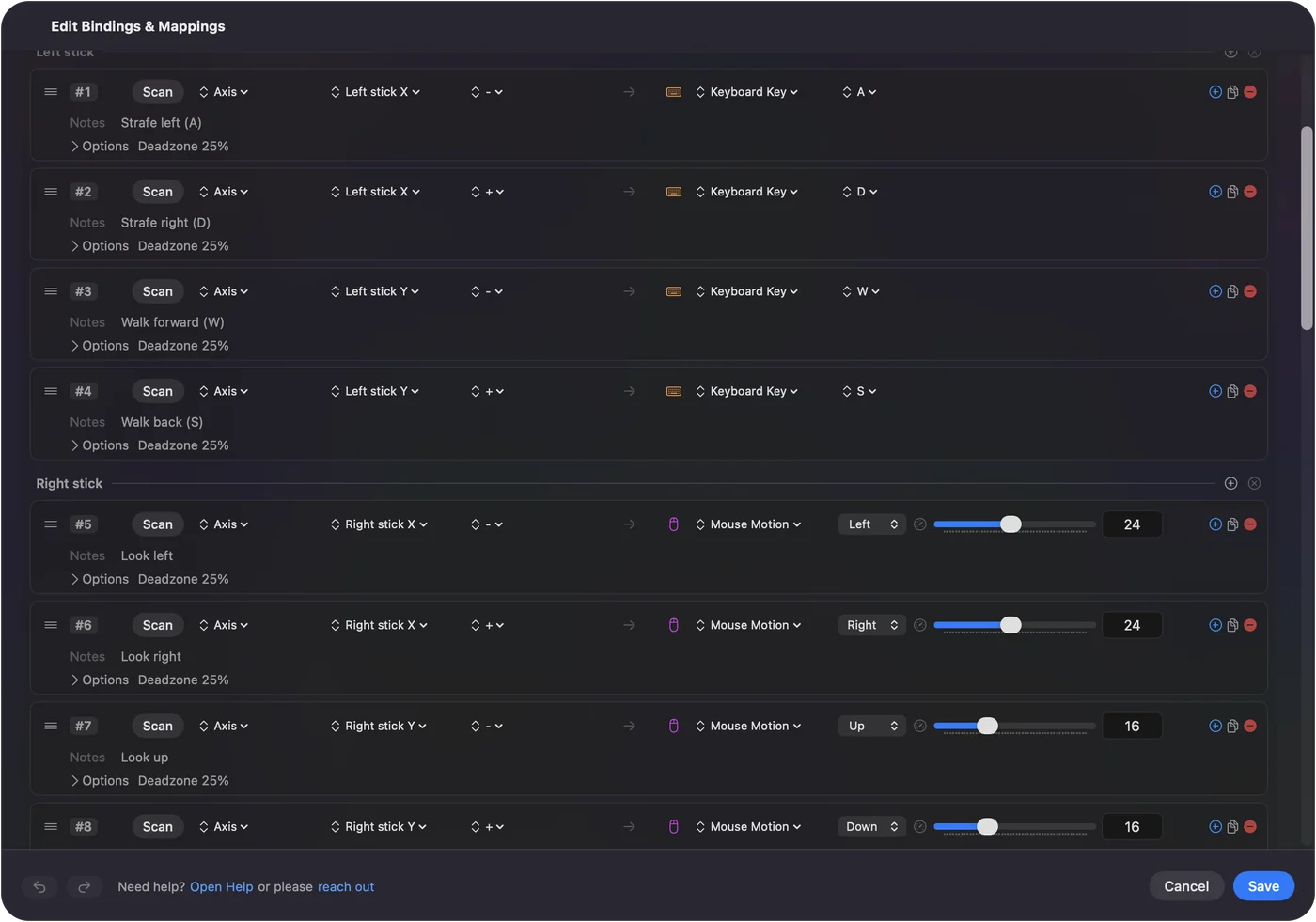
Plenty of Mac games that fly do it from the keyboard. In InputConfig each stick direction is its own row, so a stick is four rows, and a trigger is one. A row holds its key while the stick is past the row's deadzone, 25 percent of the travel by default, and Adjust live in the row's Options sets that point while you watch the stick move.
Kerbal Space Program runs natively on the Mac and flies from keys, so it makes a good example. This is how I would lay out an Xbox pad for it:
| Control | Key | What it does |
|---|---|---|
| Left stick up and down | W and S | Pitch down and up |
| Left stick left and right | Q and E | Roll |
| LT and RT | A and D | Yaw, like rudder pedals |
| Right stick up and down | Shift and Control | Throttle up and down |
| RB and LB | Z and X | Full throttle and cut throttle |
| A | Space | Stage |
| X and Y | T and R | SAS and RCS |
| View | Caps Lock | Fine controls |
Keys are on or off, so a small push is a full deflection. Kerbal's fine controls, on Caps Lock, are what make that gentle. The ready Kerbal Space Program layout uses the same keys on a gamepad, if you would rather start from it.
Make the throttle and triggers work harder
- A band on a trigger. A range of a trigger's travel, such as its last third, can be a button of its own. A light pull on RT yaws, and a full pull can fire afterburner or boost from the same trigger.
- Repeat while held. For a game that steps the throttle once per key press, Repeat in the row's Options keeps stepping while you hold the stick up.
- Hold and double tap. One button can carry two or three jobs: a tap of LB cuts throttle, and a hold lowers the landing gear.
- Mouse steering. For a game that flies with the mouse, give the left stick's rows Mouse Motion instead of keys, and turn on Variable Sensitivity so a small push moves slowly and a full push moves fast. That is the closest a mapper gets to analog control.
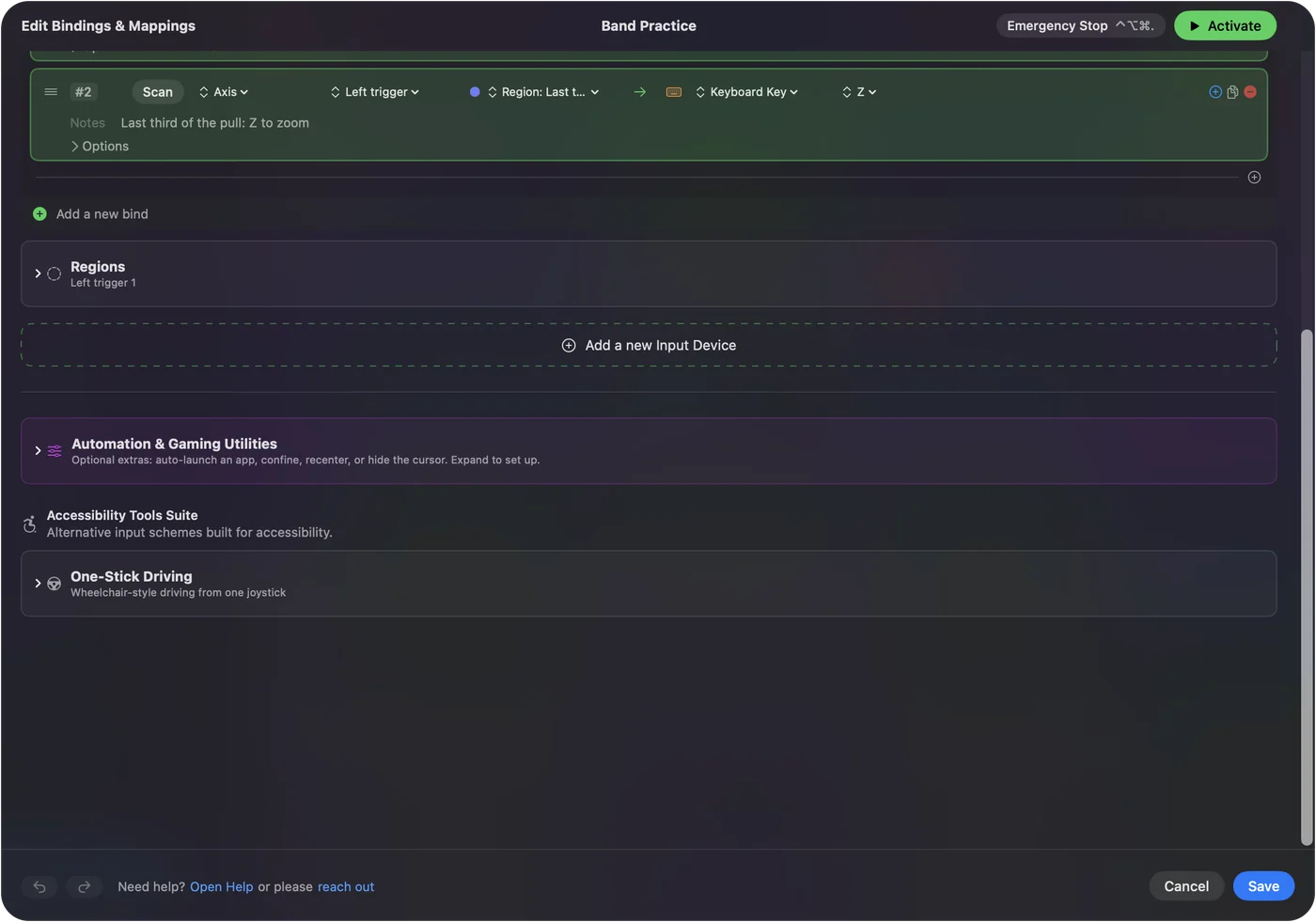
A trigger with two bands is the nearest thing a pad has to a throttle detent. Variable Sensitivity and hold and double tap have the details.
Use two controllers as stick and throttle
Every connected controller gets its own slot, and one preset can hold rows for all of them. So two pads can split the work the way a real HOTAS does: the first pad's left stick flies, and the second pad sits in your other hand as a throttle and switch panel.
- You: Connect both controllers, open the preset, and add a second input device for the other slot. Press Scan on a row and move the stick you mean.
- InputConfig: Fills the row with that controller and that stick, so the same stick on the two pads can do different jobs.
- Check: The Live Visualizer shows one panel per controller. Move each one and watch the right panel light.
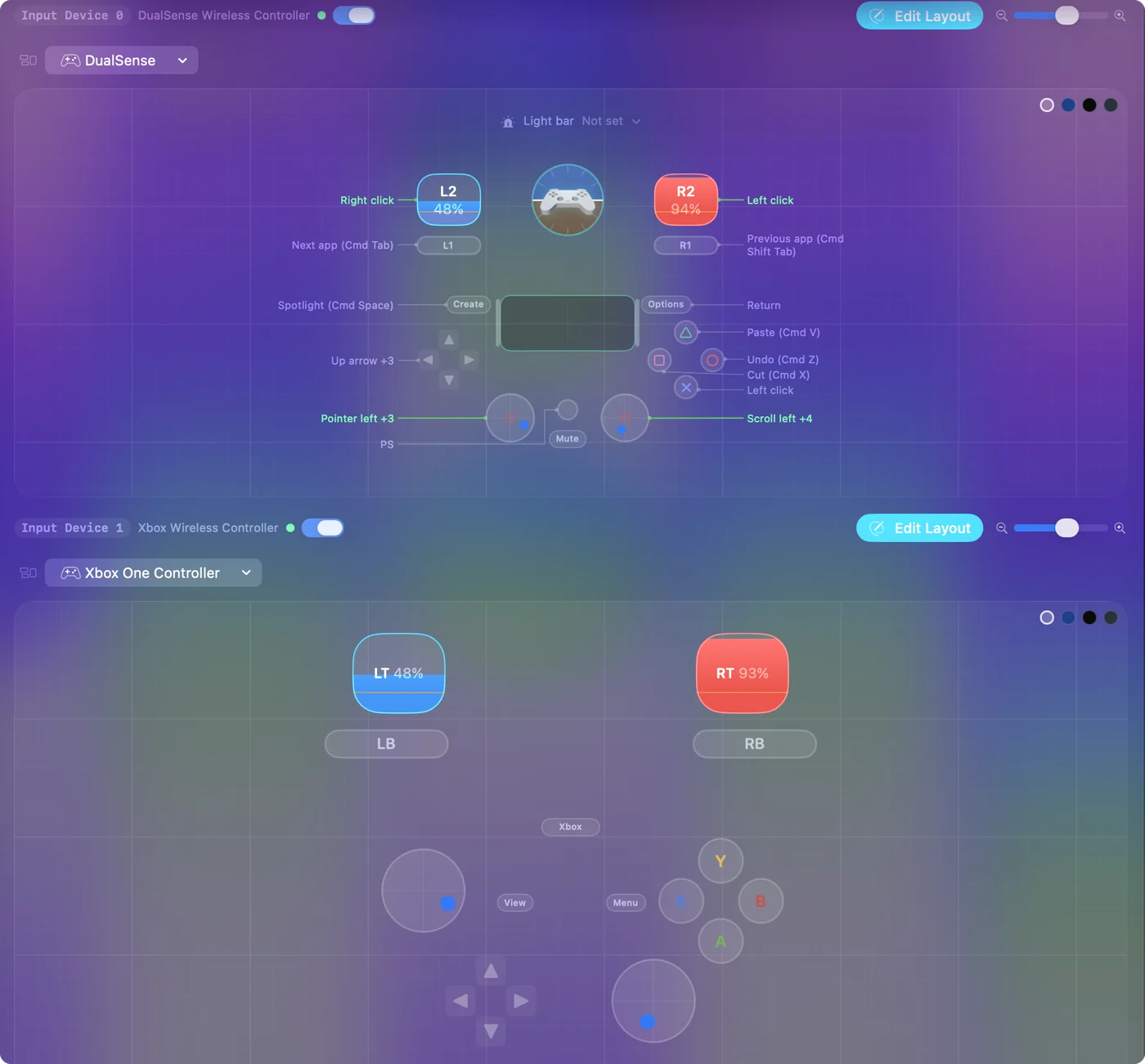
The same goes for adding real hardware later: a USB throttle or a set of rudder pedals is one more device in one more slot. Two controllers on a Mac covers connecting them.
Know the Thrustmaster HOTAS One and HOTAS 4
The searches for an Xbox HOTAS usually lead to Thrustmaster's console sets. I read their pages on October 27, 2026:
- T.Flight Hotas One. Thrustmaster's page lists PC and Xbox, with five axes, a trigger, a hat switch and a detachable throttle.
- T.Flight Hotas 4. Its page now leads to the T.Flight Hotas 5, which Thrustmaster lists for PS5, PS4 and PC with Windows 10 or 11.
Neither page lists a Mac, I could not confirm how a Mac reads either set, and I have not tested them. If you already own one, plug it in, then check System Information, USB and InputConfig, Devices in the menu bar. Flight sticks and HOTAS on a Mac has the general rules and what InputConfig reads from a real stick.
What it cannot do
- Look like a joystick to a game. InputConfig sends keyboard and mouse input. A game that only accepts a joystick or a controller has to read the pad itself.
- Keep analog control through keys. A key is pressed or not, so half a push and a full push are the same once a stick becomes keys. Mouse Motion with Variable Sensitivity is the way around it where the game flies by mouse.
- Hold a throttle position. The pad's springs return every stick and trigger, and no app changes that.
- Tilt to fly. Xbox controllers have no gyroscope. A DualSense does, if motion control matters to you.
The short version
- Pair it. Bluetooth on any supported Mac, or USB on macOS 15 or later.
- Game reads it. Assign the axes in the game's own controls screen, with no mapper running.
- Game reads keys. One InputConfig row per stick direction and trigger, with throttle on keys that step it.
- Want more. Add a second pad, or a real throttle or pedals, as another slot in the same preset.
Start in the game's controls screen, and map the pad to keys only when the game will not take it.
Questions
Can an Xbox controller be a HOTAS on a Mac?
For most flying, yes. The left stick does pitch and roll, the triggers or right stick do yaw and throttle, and the D-pad is the hat. A game that reads controllers assigns them itself, and for keyboard games InputConfig turns them into keys.
Does X-Plane read an Xbox controller?
X-Plane 12 runs natively on the Mac and has its own joystick settings. Its manual does not mention gamepads, and I have not tested one, so connect the pad before starting X-Plane and check whether its joystick screen lists it.
Can I fly Microsoft Flight Simulator or DCS on a Mac?
Not natively. Neither has a Mac version, so they need Windows in a virtual machine or a compatibility layer, and controller support depends on that setup.
Can InputConfig make a game see a joystick?
No. It sends keyboard and mouse input, not a virtual controller or joystick. A game that only accepts a joystick has to read the device itself.
Is a real HOTAS worth it on a Mac?
If you fly a sim that reads one, such as X-Plane, a real stick and throttle give you analog control and a throttle that stays put, which a pad cannot. For keyboard games, a pad mapped to keys does most of the same job.
Related
This page in other languages: Deutsch, Español, Français, Italiano, 日本語, 한국어, Polski, Português, Русский, ไทย, 繁體中文, 简体中文
Completely free. You don't have to make an account, there are no subscriptions, and nothing is locked. Optimized for Apple silicon. Open source on GitHub.
Updated