How to map an Xbox controller to keyboard keys on a Mac
 InputConfig is completely free on the Mac App Store. You don't have to make an account, there are no subscriptions, and nothing is locked. Optimized for Apple silicon.
You map an Xbox controller to keyboard keys on a Mac with a mapper, since macOS cannot send keys from a controller on its own. Keyboard mapping means the Mac receives real key presses when you press controller buttons, so anything that takes a keyboard works with the pad: a game with no controller support, a browser game, an emulator's hotkeys, Anki, a video editor. InputConfig, a free Mac app I made, does this for any Xbox controller, with a two-minute setup and no driver.
On this page
Steps
- Pair the Xbox controller and open InputConfig.
- Create or open a preset and click Scan on a row.
- Press the button, then choose Keyboard Key and pick the key.
- Activate the preset.
Map a button to a key
- You: Pair the controller and open InputConfig. Create a preset, or start from FPS (Xbox) or another built-in layout that is close to what you want. On a row, click Scan and press the button. Then choose Keyboard Key and pick the key.
- InputConfig: Binds the row to that button. Sticks can send four keys (WASD or the arrows) or move the pointer. Triggers can be keys or mouse buttons.
- Check: Press Activate, open TextEdit and press the button: its key appears. Deactivate from the menu bar when you want the keyboard back, or use the emergency stop.
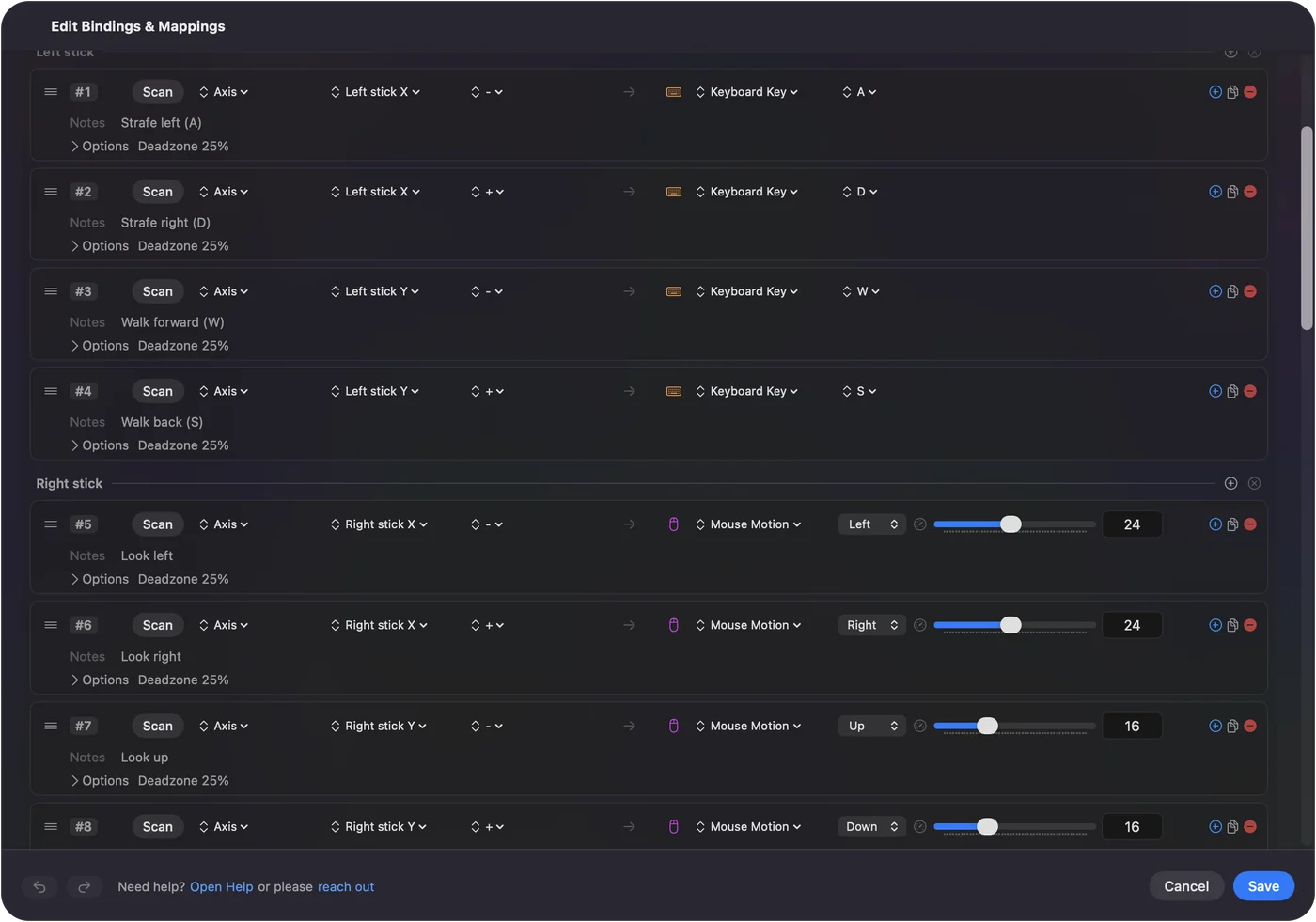
Start from the FPS (Xbox) layout
| Xbox control | Sends |
|---|---|
| Left stick | W, A, S, D |
| Right stick | Mouse look |
| RT | Left click (fire) |
| LT | Right click (aim) |
| A | Space (jump) |
| B | C (crouch) |
| X | R (reload) |
| Y | 1 |
| LB | 4 |
| RB | Middle click |
| Left stick click | Shift, held (sprint) |
| Right stick click | E (use) |
| D-pad up and down | Scroll up and down (next and previous weapon) |
| D-pad right, left | F, Q |
| View | Tab (scoreboard) |
| Menu | Escape |
That is the built-in FPS (Xbox) preset. Activate it for a shooter with default keys, then change any row the game does differently.
Pick a layout for the job
| Goal | Preset |
|---|---|
| First-person game with no pad support | FPS (Xbox): WASD on the left stick, mouse look on the right, triggers click |
| Run the whole Mac | Desktop Navigation |
| Minecraft Java | Minecraft |
| Study cards | Anki |
More than 450 games and apps have a ready layout in the preset library.
Tune each row
Each row's Options can change how its key behaves:
- Hold. The key stays down only while the button is held, the default.
- Toggle and turbo. Latch the key until the next press, or repeat it while held.
- Hold longer or double tap. Do something different on a long press or a double press.
- Macro. Run a timed sequence of keys.
- Chord. Require a second button held, for a second layer.
- Deadzone and curve. On stick rows, so a resting stick sends nothing.
It is all described on the binding editor page.
If the Xbox controller does nothing
Climb this ladder, smallest step first:
- Pair it again. Xbox Wireless, Series X|S, One and Elite controllers with Bluetooth pair from System Settings, Bluetooth: hold the pair button on top until the Xbox button flashes quickly. Connecting an Xbox controller has the details and will not connect has the fixes.
- Check the cable. A USB cable works from macOS 15 Sequoia on. Before that, use Bluetooth.
- Check Accessibility. If the Live Visualizer lights up but no key arrives, switch InputConfig on in System Settings, Privacy & Security, Accessibility.
- Check the model. A wired Xbox 360 controller is not supported by macOS, so no mapper can see it. Controller drivers on a Mac explains the options.
What it cannot do
If a game reads the Xbox controller itself while a preset also sends keys, every press arrives twice: use the game's own support there, or the preset, not both. InputConfig also does not create a virtual controller, so it cannot make a keyboard look like an Xbox pad to a game.
The short version
- Scan and pick. Scan a button, choose Keyboard Key, pick the key.
- Start close. Use FPS (Xbox) for shooters and Desktop Navigation for the Mac.
- Stop anytime. Deactivate from the menu bar, or use the emergency stop.
Any key, on any Xbox button, in any app.
Every free controller mapper for Mac is compared on one page.
Questions
Can you map an Xbox controller to keyboard keys on a Mac?
Yes, with a mapper. macOS System Settings cannot send keys. InputConfig can, for every button, stick and trigger, in any app.
Can the Xbox Share button send a key on a Mac?
Yes. Over Bluetooth InputConfig reads Share on every Xbox Series firmware, so a row can give it any key or shortcut. Unless the running preset uses it, it keeps its macOS screenshot shortcut.
Related
Updated