Do you need a controller driver on a Mac?
 InputConfig is completely free on the Mac App Store. You don't have to make an account, there are no subscriptions, and nothing is locked. Optimized for Apple silicon.
For any controller made in the last several years, no driver is needed on a Mac. macOS supports PlayStation, Xbox (Bluetooth models), Switch Pro, Joy-Con, 8BitDo and every MFi pad out of the box. Pair it and it appears in System Settings, Game Controllers. The driver question only comes up for older hardware, and for the different problem of a game that ignores a controller the Mac already sees, which a mapper such as InputConfig solves instead.
On this page
Steps
- Pair a modern controller. No driver is needed.
- Check it in System Settings, Game Controllers.
- If a game ignores it, use a mapper rather than a driver.
- For generic HID pads, connect by hand in InputConfig, Devices.
Check whether your controller needs a driver
- Wired Xbox 360 controller. macOS never supported its protocol. The old 360Controller kernel extension is unmaintained and does not load on current macOS, and there is no supported replacement. An 8BitDo wireless adapter or a modern controller is the practical answer.
- Original Xbox One controller without Bluetooth (2013 model). It has no Bluetooth, so it needs a cable. macOS added wired Xbox support in macOS 15 Sequoia. Before that, no driver makes it work.
- PS3 DualShock 3. Not officially supported. Some people get it working over Bluetooth after a manual pairing, many do not. InputConfig reads it over USB: see a PS3 controller on a Mac.
- Logitech F310 and similar DirectInput pads. With the switch on D they are generic HID devices, so they need no driver and do not appear under Game Controllers. With the switch on X the Mac cannot read them at all. InputConfig picks them up on its own in D mode and maps them. The Logitech page has the details, including the USB-C plug-in fix.
If the controller pairs and shows up in Game Controllers, it does not need a driver.
If a game ignores a controller the Mac sees
If the controller appears in System Settings and a game still ignores it, no driver will help. The game does not read controllers. A mapper sends the keyboard and mouse input the game does understand. That is what InputConfig is for, and it is free.
Connect a generic pad without a driver
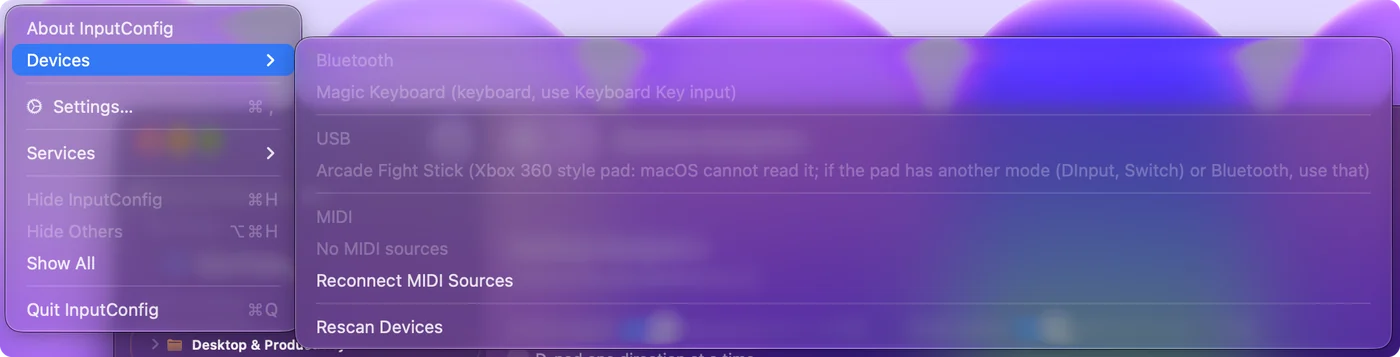
- You: Plug the pad into the Mac, open InputConfig, and choose InputConfig, Devices in the menu bar.
- InputConfig: Lists every Bluetooth and USB device it can see. Choose the pad to connect it by hand, and it is remembered for next time.
- Check: Press Scan on a row and press a button on the pad. If the menu instead shows the pad grayed with a reason, macOS cannot read it in that mode.
Xbox 360 controller on Sonoma, Sequoia, Tahoe and macOS 27
The answer has not changed with any recent version: a wired Xbox 360 controller does not work on a current Mac. macOS has never spoken its USB protocol, and the Mac does not list it under Game Controllers.
- 360Controller and its forks. Copies of the old driver still circulate on GitHub. It is an unmaintained kernel extension, and I do not recommend lowering a Mac's startup security to try it for a gamepad.
- Increase controller compatibility is something else. That switch in System Settings, Game Controllers makes a supported controller work with games written for the Xbox 360 Controller. It does not make an Xbox 360 controller work.
- A mapper cannot read it either. InputConfig reads what macOS can see, so it cannot use a wired Xbox 360 pad. Its Devices menu names the pad and says why.
The practical fix is a controller macOS supports: any Bluetooth Xbox controller, a PlayStation pad, or an 8BitDo pad in the right mode. If a game only knows the Xbox 360 layout, pair a modern pad and turn on Increase controller compatibility for it. If an update broke a controller that did work, see controller not working after a macOS update.
The short version
- Modern controllers. They need no driver, so you pair and play.
- Generic HID pads. They need no driver either. Connect them from InputConfig, Devices.
- Wired Xbox 360 pads. There is no working driver on current macOS, so I would replace the pad.
- A game that ignores the pad. That calls for a mapper, not a driver.
On a current Mac, the answer to "which driver?" is almost always "none".
Questions
Do PS5 and Xbox controllers need a driver on a Mac?
No. Both are supported natively over Bluetooth, and over USB too (wired Xbox pads from macOS 15 Sequoia on).
Is there a 360Controller driver for current macOS?
No. The 360Controller project is unmaintained and its kernel extension does not load on current macOS. Use a modern controller or a wireless adapter.
My generic gamepad is not under Game Controllers. Do I need a driver?
No. It is a generic HID device. InputConfig can connect it by hand from the Devices menu and map it without a driver.
Do I need the Xbox Accessories or PlayStation Accessories app on a Mac?
No, and neither has a Mac version: both run on Windows, and the Xbox one also on Xbox consoles. They are for firmware updates and the controller's own profiles, not for connecting it. A modern controller pairs with a Mac without them.
Does an Xbox 360 controller work on macOS Sequoia or Tahoe?
Not the wired Xbox 360 controller. macOS has never supported it, and the old 360Controller driver is unmaintained. Use a Bluetooth Xbox, PlayStation or 8BitDo pad instead.
Related
Updated