Controller not recognized on a Mac
 InputConfig is completely free on the Mac App Store. You don't have to make an account, there are no subscriptions, and nothing is locked. Optimized for Apple silicon.
One check tells you which problem you have. Open System Settings, click Game Controllers in the sidebar, and press a button on the controller. If it is not listed, the Mac has not paired it or cannot read it, and the fix is in Bluetooth, the cable or the controller's mode. If it is listed and lights up as you press, the Mac is fine and the game is the problem. Find your case below.
On this page
- Steps
- Find your case
- If it is not in System Settings at all
- If a wired controller does nothing
- If the game ignores a controller the Mac sees
- If the Mac does not call it a game controller
- Use the Apple or Switch mode on third-party pads
- If it stopped working after a macOS update
- Check a MIDI controller in Audio MIDI Setup
- What InputConfig cannot fix
- The short version
- Questions
Steps
- Open System Settings, Game Controllers and press a button.
- Not listed: re-pair over Bluetooth after forgetting the device.
- Listed but ignored by a game: enable it in the game or Steam, or use InputConfig.
- Not a game controller to macOS: connect it by hand in InputConfig, Devices.
Find your case
- Not in Bluetooth or Game Controllers at all. Pair it again, then how to connect a controller to a Mac.
- Plugged in by cable and nothing happens. The wired ladder.
- Listed in Bluetooth but not in Game Controllers. Game Controllers is missing from System Settings.
- Lights up in System Settings, ignored by the game. Controller connected but not working.
- Works in Steam's menus but not in the game. Works in Steam but not in the game.
- An 8BitDo or Switch Pro Controller. 8BitDo not working on a Mac, Switch Pro Controller not working on a Mac.
- A PS5 or Xbox controller. PS5 controller not working, Xbox controller will not connect.
- Connects, then drops, or feels slow. Keeps disconnecting (written for the DualSense, most causes apply to any pad) and input lag.
If it is not in System Settings at all
The Mac has not paired it. Climb this ladder, smallest step first:
- Forget it. If the controller is listed in Bluetooth, forget it there.
- Put it in pairing mode. PS and Create on PlayStation, the top-edge button on Xbox, Sync on Switch Pro, and on 8BitDo mode D, or B and Start, then Pair.
- Unpair it from the console. A controller still paired to a console keeps jumping back to it.
- Check the model. Wired Xbox 360 pads are not supported by macOS at all, and PS3 controllers are unofficial at best. Per-controller steps: connect a controller to a Mac.
If a wired controller does nothing
A cable needs no pairing, so when a wired controller does nothing on a Mac, climb this ladder, smallest step first:
- The cable. Many cables that come with cheap accessories carry power only. The controller charges, its light comes on, and the Mac never sees it. Try a cable you know moves data, such as the one for a phone or a drive.
- The accessory prompt. On a Mac laptop with Apple silicon, macOS asks before a new USB accessory can connect. If the prompt was dismissed or answered Do not Allow, the controller still charges but the Mac does not recognize it. Unplug it and plug it in again to get the prompt back, and check System Settings, Privacy & Security, Accessories.
- Hubs and adapters. Plug straight into the Mac. A bus-powered hub or a loose USB-A to USB-C adapter is a common cause of a pad that appears and vanishes.
- Whether the Mac sees it at all. Hold Option, open the Apple menu, choose System Information, then USB. If the controller is listed, the connection works and the question is whether macOS treats it as a game controller (the section on when the Mac does not call it a game controller covers that). If it is not listed, it is the cable, the port or the controller.
- The model. The Switch Pro Controller charges over USB, but macOS only reads it over Bluetooth. The wired Xbox 360 controller uses a protocol macOS does not support, and InputConfig cannot read it either. A wired Xbox Series or Xbox One controller needs macOS 15 or later. Before that, pair it over Bluetooth.
The Switch 2 pads never appear in Game Controllers, because macOS does not read them. InputConfig does, as an experimental feature: the Switch 2 Pro Controller and the GameCube controller for Switch 2 over USB-C, the Joy-Con 2 in their charging grip, and since 1.8 all three over Bluetooth once you turn on Connect Switch 2 Pro, GameCube and Joy-Con 2 controllers over Bluetooth in Settings, Devices.
If the game ignores a controller the Mac sees
If the Mac lists the controller and a game still ignores it, the Mac side is done: controller connected but not working has the fix for each kind of game.
If the Mac does not call it a game controller
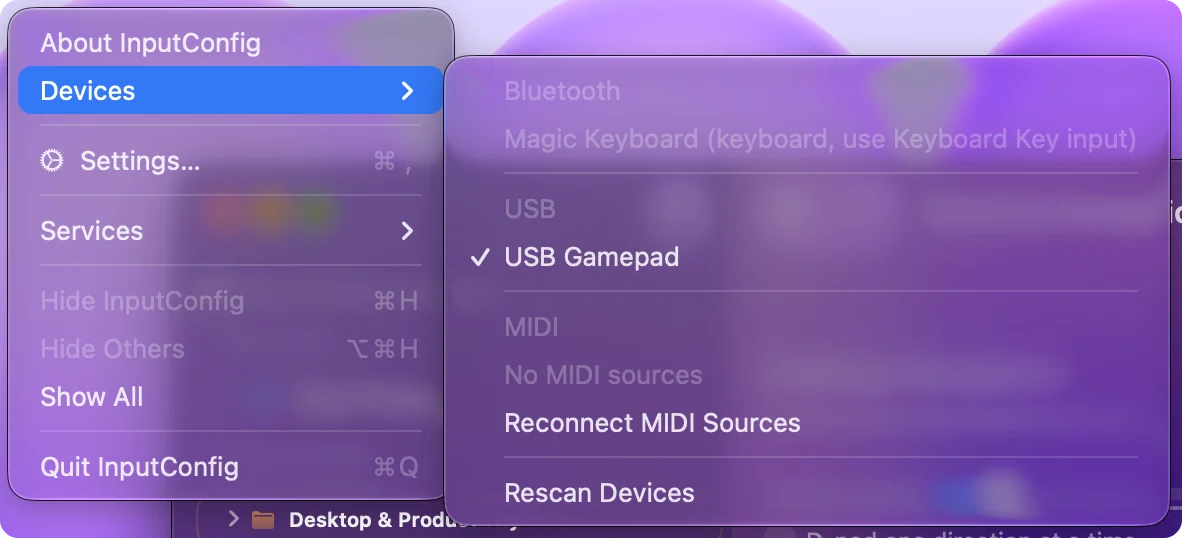
Some pads, fight sticks, wheels, adaptive devices and DIY boards report themselves as generic HID devices and never appear under Game Controllers. InputConfig lists them under InputConfig, Devices in the menu bar, where you can connect one by hand. Its inputs are then read directly and remembered for next time. See connect it by hand and which controllers work on a Mac.
Use the Apple or Switch mode on third-party pads
macOS recognizes the controllers it has support for: PlayStation, Xbox pads with Bluetooth, the Switch Pro Controller and Joy-Cons on macOS 13 and later, and MFi gamepads. Many PowerA, GameSir, Logitech and other third-party pads copy one of those through a mode switch or a button held at power-on. If yours has an Apple, MFi, iOS or Switch mode, use it: that is the mode macOS reads.
A pad that only speaks a PC mode (XInput or DirectInput) may show up in System Information and even in Bluetooth, but never in Game Controllers, so games that use Apple's controller support will not see it. That does not make it useless. InputConfig reads many of these pads directly:
- 8BitDo pads in X mode. Over a USB cable.
- Logitech F310, F510 and F710. With the switch on D.
- The DualShock 3. Over USB.
- Most generic USB gamepads and arcade sticks. Many get named buttons from the community SDL GameControllerDB.
It turns their buttons and sticks into keys, mouse movement or MIDI, which every app on the Mac reads. The full list is on which controllers work on a Mac, and GameSir's modes are on GameSir controllers on a Mac.
If it stopped working after a macOS update
It has happened before: after macOS 15.4, wired controllers stopped working in many apps while Bluetooth kept working, and controller not working after a macOS update lists each version with its fix. When a controller stops working right after an update, climb this ladder, smallest step first:
- Update again. Install any point update Apple offers in System Settings, General, Software Update.
- Pair again. Forget the controller in Bluetooth, power it off, and pair it again.
- Shut down fully. Shut the Mac down, wait a few seconds, and start it again.
- Test before you play. Test in System Settings, Game Controllers before testing in a game, so you know which side broke. The test page has other ways.
Check a MIDI controller in Audio MIDI Setup
A MIDI keyboard, pad or DJ controller is a different kind of device. Open Audio MIDI Setup (in Applications, Utilities), then Window, Show MIDI Studio. If the device is there, the Mac sees it and the problem is in the music app's MIDI settings. If it is not, try another cable and plug straight into the Mac. InputConfig lists MIDI sources under InputConfig, Devices and can use a MIDI controller as an input. See MIDI as input.
What InputConfig cannot fix
- Pairing. If the Mac cannot pair a controller, no app can read it.
- Games that need a gamepad. InputConfig makes a controller send keys, clicks and pointer movement. It does not turn a pad into one a game sees as a gamepad.
- Wired Xbox 360 pads. macOS does not speak their protocol, so InputConfig cannot read them either.
The short version
- Not listed in Game Controllers. Pair again, try a data cable, or switch the pad to its Apple or Switch mode.
- Listed, ignored by the game. Turn it on in the game or Steam, or map it to keys with InputConfig.
- Not a game controller to macOS. Connect it by hand in InputConfig, Devices.
Game Controllers in System Settings is the dividing line: before it is the Mac, after it is the game.
Questions
Why does my Mac not recognize my controller?
Either it is not paired (fix the Bluetooth pairing), it is paired but the game does not read controllers (use a mapper such as InputConfig), or it is a generic HID device macOS does not class as a game controller (connect it by hand in InputConfig's Devices menu).
How do I check if my Mac sees the controller?
System Settings, Game Controllers, in the sidebar, lists every paired controller and lights up buttons as you press them. The item appears once a controller has been connected.
Does a wired Xbox 360 controller work on a Mac?
No. macOS has never supported its USB protocol, and no driver makes it work on a current Mac. InputConfig lists it in its Devices menu, grayed out, with the reason. Any Bluetooth Xbox controller works natively.
Why is my controller not showing up in Bluetooth on my Mac?
It is not in pairing mode, it is still paired to a console that grabs it first, or it has no Bluetooth: some early Xbox One controllers are USB only. Put it in pairing mode with the console off and look again.
Will InputConfig make my controller work in a game that ignores it?
It makes the controller send keys, mouse movement and clicks, which the game already reads, so for games without controller support, yes. It does not turn a pad into one a game sees as a gamepad, and it cannot fix pairing.
Why is my MacBook not detecting my wired controller?
Usually a charge-only cable, a hub, or the accessory prompt on Apple silicon laptops: if Do not Allow was chosen, the pad charges but the Mac ignores it. Unplug it, plug it straight in with a data cable, and allow it.
Related
Updated