PS5 controller keeps disconnecting from a Mac
 InputConfig is completely free on the Mac App Store. You don't have to make an account, there are no subscriptions, and nothing is locked. Optimized for Apple silicon.
A DualSense that keeps dropping off a Mac is nearly always one of seven things, and you can check them in ten minutes. The first two cover most cases: it is still paired to a PS5 nearby, or its battery is low. A USB-C cable straight into the Mac is the fix that works when nothing else does.
On this page
Work down the seven fixes
Climb this ladder, smallest step first:
- Unpair it from the PS5. A DualSense remembers its console. If the PS5 is in rest mode nearby, the pad wakes it and jumps back, and the Mac sees a disconnect. Unpair it on the PS5 (Settings, Accessories, General, Bluetooth Accessories), or keep the console fully off.
- Charge it. Under about 20 percent the DualSense's Bluetooth gets unreliable well before it dies. The battery level shows in the Bluetooth menu and at the top of InputConfig's sidebar.
- Pair it fresh. Pairing data does go bad. Forget the controller in System Settings, Bluetooth, hold PS and Create to pair again, and it often stays put afterward.
- Take the cable off the hub. If you are on a cable and it still drops, plug the controller straight into the Mac. Cheap USB-C hubs drop HID devices when something else on them draws power.
- Move closer. Bluetooth is 2.4 GHz, the same as Wi-Fi and a lot of USB 3 cables. A Mac mini or Mac Studio behind a desk with the pad across the room drops more than a laptop on the sofa.
- Use a cable on an older Mac. Macs from before about 2018 have older Bluetooth chips that struggle with a DualSense.
- Use a cable for long sessions. A drop at the same point every session has its own section.
If you only try one thing, try a USB-C cable straight into the Mac.
If it drops after a long session
If it stays connected for a while and then drops at about the same point every session, with a full battery and no PS5 nearby, you are not imagining it. A DualSense dropping after a long Bluetooth session on an Apple silicon Mac, often around the 15 minute mark, has been reported in the PCSX2 and RPCS3 bug trackers. Nothing on the Mac side reliably fixes it. A USB-C cable does. Press PS to reconnect in the meantime.
On a DualSense Edge, the same long sessions can leave the back paddles and Fn buttons silent while the sticks still work. Turn the controller off and on and they come back.
If it disconnects only in one app
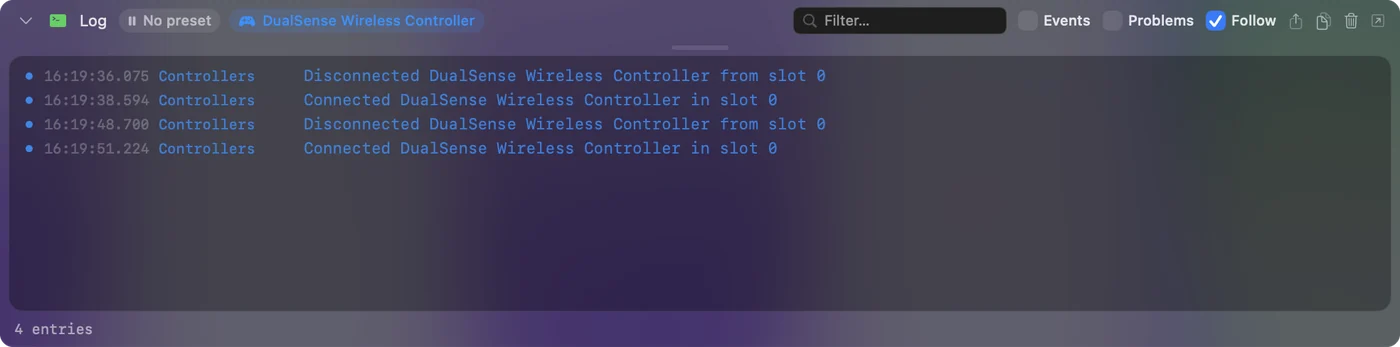
That is the app, not the Bluetooth. Some games reset the controller connection when they lose focus or change scenes. If you map with InputConfig, its activity log tells the two apart.
- You: Turn on Show the activity log in InputConfig's Settings, Advanced, then play until the pad drops.
- InputConfig: Lists every connect and disconnect at the bottom of the main window.
- Check: A disconnect line means the pad really dropped. No line means the game stopped listening.
Since 1.8, Try to reconnect paired controllers when InputConfig opens, when the Mac wakes and when a preset starts, in Settings, Devices, asks a paired DualSense that is switched on and waiting to come back. If you turned on Disconnect a wireless controller after it sits unused there, a drop after a quiet spell is that setting.
Disconnect it on purpose
When you are done, disconnect it rather than leaving it to drop: click its name in Control Center's Bluetooth list, or click its entry at the top of InputConfig's sidebar and choose Disconnect. Either way it stays paired, and one press of PS brings it back. Turning it off, and moving it back to the PS5, has the rest. Sony has since given the DualSense four pairing slots, so it can stay paired with the Mac and other devices at once: a PS5 controller on multiple devices has the buttons.
The short version
- Unpair it from the PS5 and charge it. Those two cover most drops.
- Pair it fresh. Forget it in Bluetooth and pair again with PS and Create.
- Use a cable. Plug it straight into the Mac, which is what I would do on desktop Macs, older Macs and for long sessions.
A pad that drops at the same minute every session needs a cable, not a setting.
Questions
Why does my PS5 controller disconnect from my Mac after a few minutes?
Most often it is still paired to a PS5 nearby and jumping back to it, or the battery is low. Unpair it from the console and charge it.
Is a cable more reliable than Bluetooth for a DualSense on a Mac?
Yes, especially on a desktop Mac. USB-C straight into the Mac, not through a hub.
How do I stop my PS5 controller connecting to my PS5 instead of my Mac?
Turn the PS5 fully off instead of leaving it in rest mode, or remove the controller on the PS5 under Settings, Accessories, General, Bluetooth Accessories. A DualSense reconnects to the last device it was paired with, so after using it on the PS5, pair it with the Mac again.
Does a PS4 controller keep disconnecting from a Mac for the same reasons?
Yes. The DualShock 4 has the same habits: it jumps back to a PS4 in rest mode, gets unreliable on a low battery, and prefers a cable on a desktop Mac. It pairs with PS and Share instead of PS and Create, and its cable is micro-USB.
Related
This page in other languages: Español, 日本語, 繁體中文
Updated