How to connect a PS5 controller (DualSense) to a Mac
 InputConfig is completely free on the Mac App Store. You don't have to make an account, there are no subscriptions, and nothing is locked. Optimized for Apple silicon.
Hold the PS button and the Create button (the small one left of the touchpad) together until the light bar blinks quickly, then open System Settings, Bluetooth, and click Connect next to the controller. It is listed as DualSense Wireless Controller, or on some Macs just Wireless Controller. Or plug in a USB-C cable that carries data. macOS has supported the DualSense since Big Sur 11.3 and it needs no driver.
On this page
Steps
- Turn the DualSense off, then hold PS and Create until the light bar blinks quickly.
- Open System Settings, Bluetooth, and click Connect next to DualSense Wireless Controller.
- Press PS once if the light bar goes dark after pairing.
- Open System Settings, Game Controllers, and press a button to check it is live.
Pair it and check it arrived
- You: Turn the DualSense off, then hold PS and Create together until the light bar blinks quickly.
- macOS: Lists DualSense Wireless Controller, or Wireless Controller, in System Settings, Bluetooth. Click Connect.
- Check: Open Game Controllers in the System Settings sidebar and press a few buttons. Each one lights on screen.
A slow pulse on the light bar means the pad is looking for its PS5, and the Mac will not list it until the blinking is quick.
Or plug in a USB-C cable
A cable needs no pairing at all. Plug a USB-C cable into the controller and into the Mac, using a USB-A to USB-C cable on an older Mac, and the Mac sees it straight away. Use a cable that carries data: many charging cables do not, and then the controller charges but the Mac never lists it. The DualSense charges from a MacBook's USB-C port too, and works as a wired controller while it does. InputConfig works with the DualSense wired or wireless.
Know what works on a Mac
The basics work everywhere. The extras depend on the app.
- Sticks, buttons, triggers and the D-pad. Every game that supports controllers on macOS reads them.
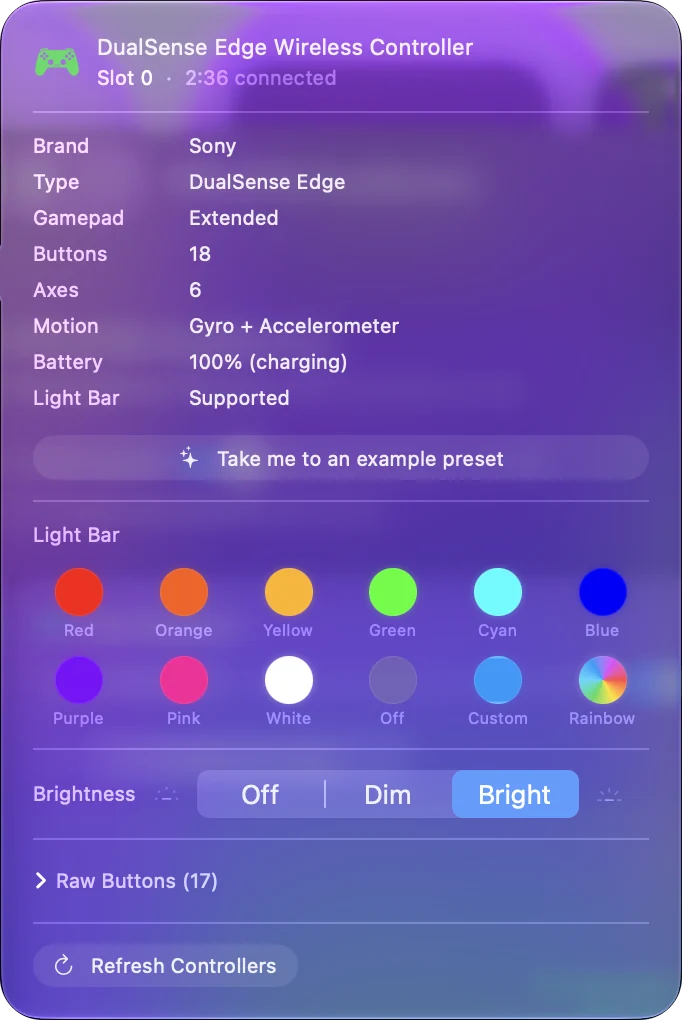
- Light bar, touchpad, gyroscope and rumble. macOS can read all of them, but a game has to ask, and few Mac games do. InputConfig uses them all: the touchpad as a trackpad, the gyroscope for aiming or as a motion cursor, a light bar color per preset, and rumble as feedback on any button.
- Adaptive triggers. macOS lets a game set their resistance, and few Mac games do. InputConfig gives each trigger a steady Light, Medium or Firm resistance while a preset runs. See adaptive triggers on a Mac.
- The Create button. It takes a screenshot or a recording through macOS by default, and InputConfig leaves that alone unless the running preset uses Create for something else.
- Firmware updates. Not from a Mac. Sony's updater runs on a PS5 or a Windows PC.
Every feature, one by one, is on the what works with a DualSense on a Mac page.
Pair a DualSense Edge
The Edge pairs the same way and needs macOS 13.3 or later, according to Sony. Its back paddles and Fn buttons are readable on a Mac, over Bluetooth and USB, and InputConfig binds them like any other button. In InputConfig a preset set to a DualSense also reads an Edge when the DualSense is away, since the two number their controls the same way. The DualSense Edge page covers the details.
If it will not pair, or keeps dropping
Climb this ladder, smallest step first:
- Unpair it from the PS5. Otherwise it keeps going back to the console.
- Forget it and pair fresh. Remove it in the Mac's Bluetooth settings, then hold PS and Create again.
- Charge it. The DualSense gets flaky under 20 percent.
- Move closer, or use a cable. Pairing is identical on every Mac, but a Mac mini or Mac Studio behind a monitor or under a desk gets a weaker signal than a laptop on your lap.
The disconnecting page goes through every cause.
Use it in games that do not support it
Plenty of Mac games and every non-game ignore the DualSense. For those, InputConfig turns its buttons and sticks into keys and mouse movement, with a ready-made FPS layout for the DualSense as a starting point. The questions people ask right after pairing: Minecraft Java, which has no controller support at all, Roblox, Steam games that ignore the pad, and using the DualSense as a mouse.
Add a second DualSense
Pair the second one the same way. Both show up as DualSense Wireless Controller, and games with local co-op see two players. In InputConfig each one keeps its own light color, rumble and Edge paddles, and a preset can give each player a layout on their own pad: two of the same controller on one Mac.
Turn it off or disconnect it
- Turn it off. Hold the PS button for about ten seconds until the light bar goes out.
- Disconnect and keep the pairing. Click Bluetooth in Control Center and click the controller's name, or click its entry at the top of InputConfig's sidebar and choose Disconnect. Next time, one press of PS brings it back.
- Remove it for good. In System Settings, Bluetooth, click the info button next to the controller and choose Forget This Device.
- Give it back to the PS5. Connect it to the console with a USB cable and press PS.
Sony has since given the DualSense four pairing slots, so it can stay paired with the Mac and other devices at once: a PS5 controller on multiple devices has the buttons.
The short version
- Pair it. PS and Create until the light bar blinks quickly, then Connect in System Settings, Bluetooth.
- Or plug it in. A USB-C cable that carries data needs no pairing at all.
- Map it where games ignore it. InputConfig uses the touchpad, the gyro and the light bar that Mac games rarely touch.
If the light bar pulses slowly, the pad is still looking for its PS5.
Sources
Every fact about the controller on this page comes from its maker's own page or from Apple's, read on the date shown. What InputConfig does with it comes from the app itself.
- Apple. Connect a PlayStation wireless game controller to your Apple device lists the DualSense and the DualSense Edge, gives the pairing hold of the PS button and the Create button until the light bar flashes, and says the controller connects by itself over a USB cable that carries data. Read October 7, 2026.
Questions
Can you use a PS5 controller on a Mac?
Yes, the PS5 controller is compatible with a Mac. Pair it over Bluetooth (hold PS and Create) on macOS 11.3 or later, or plug in USB-C. macOS supports it with no driver. Native Mac games see it directly, and a mapper such as InputConfig makes it work in everything else.
Does a PS5 controller work on a Mac mini, MacBook Air or MacBook Pro?
Yes, on any Mac with Bluetooth or a USB-C port. Pairing is identical on a Mac mini, MacBook Air, MacBook Pro, iMac and Mac Studio: hold PS and Create until the light bar blinks quickly, then click Connect in System Settings, Bluetooth. I have not tried every new model myself, so if yours is brand new, a data cable is the quick check.
Do the adaptive triggers work on a Mac?
Only in games that set them. macOS lets a game change the triggers' resistance, and few Mac games do. InputConfig can set a steady Light, Medium or Firm resistance on each trigger while a preset runs. Haptics, the light bar, touchpad and gyroscope work in apps that use them.
Can I update the DualSense firmware from a Mac?
Not from a Mac. Sony's firmware updater runs on a PS5 or a Windows PC.
Why does my PS5 controller not show up in Bluetooth on my Mac?
It is not in pairing mode. Turn it off, then hold Create and PS until the light bar blinks quickly. A slow pulse means it is looking for its PS5 instead, and the Mac will not list it.
Can I charge a PS5 controller from my MacBook?
Yes. Plug it into a USB-C port on the Mac and it charges, and it works as a wired controller while it does. An Apple USB-C charger charges it too.
Does the PS5 controller work with PS Remote Play on a Mac?
Yes. Sony's PS Remote Play app for Mac takes a DualSense over Bluetooth or a USB cable, and Sony says haptic feedback works there over USB. Pair it the same way first. You do not need InputConfig for Remote Play.
How do I sync a PS5 controller to a Mac?
Syncing is the same as pairing. Turn the DualSense off, hold PS and Create together until the light bar blinks quickly, then click Connect next to it in System Settings, Bluetooth.
Related
This page in other languages: Français, Italiano, 日本語, Русский, 繁體中文, 简体中文
Updated