How to play Roblox with a controller on a Mac
 InputConfig is completely free on the Mac App Store. You don't have to make an account, there are no subscriptions, and nothing is locked. Optimized for Apple silicon.
You can play Roblox on a Mac with a controller. Roblox reads Xbox and PlayStation pads on macOS with no driver: pair one, join an experience, and the left stick walks, the right stick turns the camera, and A (Cross on PlayStation) jumps. Past that it depends on the experience. Each one is built by its own creator, and abilities, shops and menus made for a keyboard often have no button at all. For those, InputConfig, free on the Mac App Store, plays the keyboard-only experiences from the controller anyway.
On this page
Steps
- Pair the controller in System Settings, Bluetooth, before you open Roblox.
- Open Roblox, join an experience, and push the left stick.
- If your character walks, play with Roblox's own gamepad controls.
- If the experience ignores the pad, activate InputConfig's Roblox layout so the controller sends the keys and mouse.
Connect it and check Roblox has it
- You: Pair the pad in System Settings, Bluetooth, or plug it in, before you open Roblox. The connect a controller page has the pairing button for each one. Then join any experience and push the left stick.
- Roblox: Switches to gamepad input when the pad is used. There is no controller setting to switch on inside Roblox.
- Check: If your character walks, Roblox has the pad.
Roblox's own gamepad controls:
- Left stick. Moves.
- Right stick. Turns the camera, and pressing it in zooms.
- A or Cross. Jumps.
- Right trigger. Uses the tool you are holding.
If you want buttons swapped, macOS can do that per app in System Settings, Game Controllers. It only swaps controller buttons. It cannot turn a button into a key (what macOS can and cannot do).
If an experience ignores it, use the Roblox layout
Many experiences were built for keyboard only, or use keys the gamepad layout never sends. For those, InputConfig maps the controller to the keys the experience uses, and the experience sees a keyboard. The ready Roblox layout in the Smart Preset Maker:
- Move and look. W, A, S and D on the left stick, mouse look on the right stick.
- Jump and sprint. Space on A, Shift on B.
- Tools. 1 to 4 on the D-pad, the mouse buttons on the triggers, and Escape on Y for the menu.
- Extras. Add E or F on a bumper for experiences that use them.
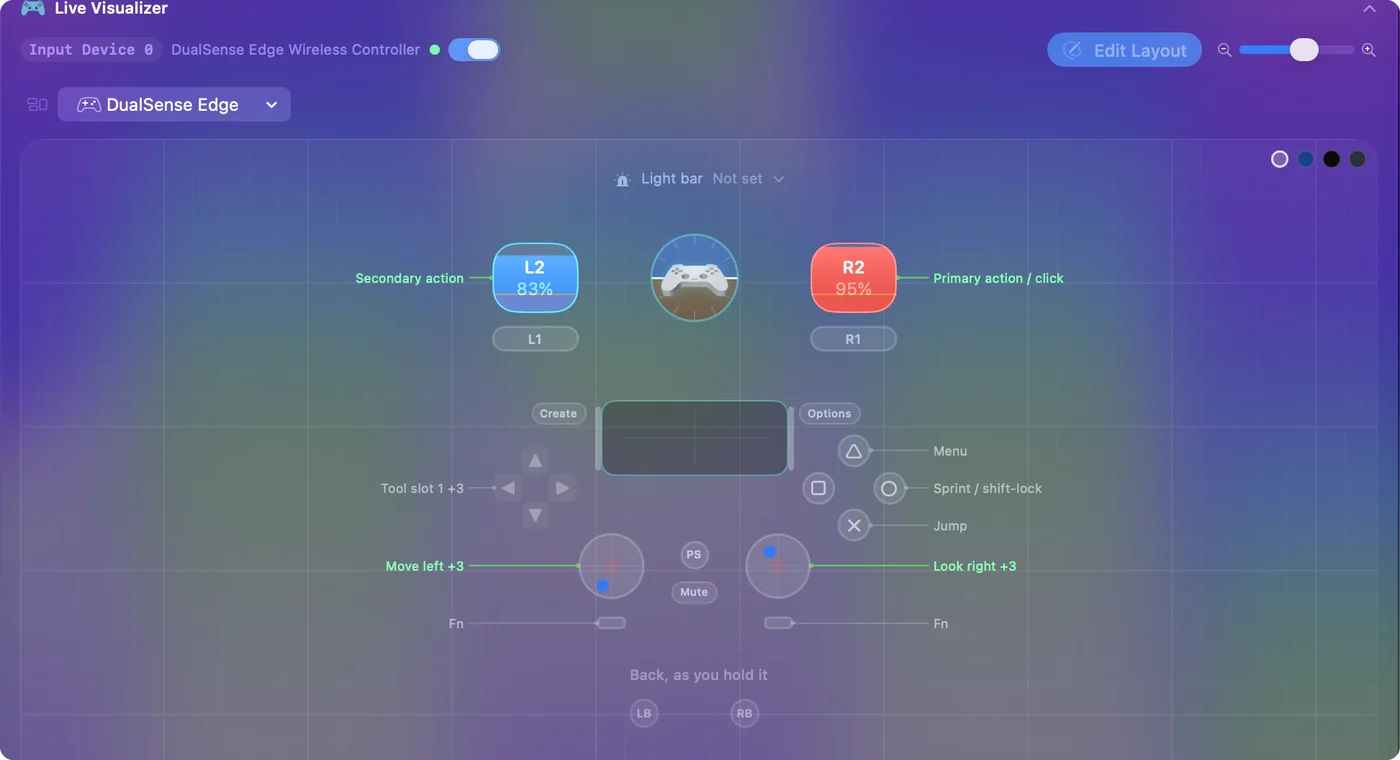
Roblox's menus and a lot of its games want a mouse. Put the pointer on the left stick and a click on a trigger in a second preset, and the whole thing becomes playable from the sofa, menus included. A racing wheel works the same way: Roblox does not see a wheel on a Mac, but InputConfig can put steering on A and D, the gas pedal on W and the brake on S, which drives the vehicles that use those keys (racing wheels on a Mac).
Shift lock and the camera from a controller
Roblox binds shift lock to the Shift keys and gives it no controller button, which is why people ask how to shift lock with a controller so often. With Roblox's own gamepad controls you do not need it: the right stick already turns the camera. With the Roblox layout, B sends Shift, so it is your shift lock button once Shift Lock Switch is on in the Roblox menu, Settings.
One catch: Roblox only allows shift lock while it thinks you are on a keyboard and mouse. If it is also reading the controller directly, it can decide you are on a gamepad and shift lock stops responding. Without shift lock, hold the left trigger (the right mouse button in the layout) while you move the right stick. That is a right-drag, which turns Roblox's standard camera. More on the camera, and on playing from a MacBook trackpad, in Roblox camera and shift lock on a Mac.
Pick one per experience: the pad or the layout
InputConfig does not hide the controller from Roblox. No app on a Mac can. In an experience that reads the pad itself, the left stick then moves you twice over, once as a gamepad and once as W, A, S and D, and on-screen prompts can flip between controller and keyboard icons as both arrive. Where the pad already does everything you need, stop the preset, and where it does not, keep the preset running and let the keyboard carry the game. Stop and Start are on the menu bar icon.
If an experience asks for clicking over and over, read the Roblox auto clicker page first: many experiences forbid auto clickers and some detect them, and that page covers the rules before the setup.
If the controller does nothing in Roblox
Climb this ladder, smallest step first:
- Check that the Mac sees it. Open System Settings and click Game Controllers in the sidebar. If the pad is not listed there, pair it again.
- Bring Roblox to the front. Click into the Roblox window, then press a button.
- Restart Roblox with the pad on. Quit it with Command Q and open it again.
- Try a second experience. If the pad works in one and not another, the Mac and the controller are fine. That experience was built for the keyboard, and the layout is the fix.
- Stop the preset where the pad works. Otherwise the game gets the controller and the mapped keys at once, and the character can move twice as far as intended.
Set it up for a child
A child should not have to switch anything. Add Roblox to the Roblox preset's app list and turn on Switch presets when the front app changes in Settings, Advanced, and the preset turns on when Roblox comes to the front (per-app auto-switch). The emergency stop is on by default: holding Back and Start together on the controller (Create and Options on a DualSense) for three seconds stops the preset from anywhere and hands the keyboard back (emergency stop). The controller setup for a child guide has the rest.
The short version
- Pair first, then open Roblox. The default gamepad controls work in experiences built for them.
- Use the layout for the rest. InputConfig's Roblox layout sends W, A, S, D, Space, Shift and the mouse.
- One at a time. Stop the preset in experiences that already read the pad.
If the pad works in one experience and not another, the controller is fine and the layout is the fix.
Questions
Does Roblox support controllers on Mac?
Yes, gamepads in general and Xbox controllers in particular. Individual experiences may not use it. A mapper covers those.
Why is my controller not working on Roblox on my Mac?
Check System Settings, Game Controllers first. If the pad is not listed there, it is a pairing problem. If it is listed, quit Roblox with Command Q and reopen it with the pad on, then try a second experience: some replace the standard controls. If Roblox still ignores it, InputConfig sends Roblox keyboard and mouse input from the controller, so Roblox does not need to detect it.
Why can't my character move with a controller in Roblox on Mac?
Check that the Mac lists the pad under System Settings, Game Controllers, click into the Roblox window, and press a button. Then quit Roblox with Command Q and open it again with the pad on. If it moves in one experience and not another, that experience was built for the keyboard.
Where are the Roblox controller settings on a Mac?
Roblox has no controller setting to switch on. Its gamepad controls start when you use the pad. macOS can swap buttons per app in System Settings, Game Controllers, and InputConfig changes what each button sends.
Can I use a Switch Pro Controller for Roblox on a Mac?
The Mac pairs it over Bluetooth, and whether Roblox reads it can vary. If Roblox ignores it, InputConfig reads the Pro Controller and sends Roblox the keyboard and mouse input every experience accepts.
How do I shift lock on Roblox with a controller?
Roblox gives shift lock no controller button. It is on the Shift keys, and with Roblox's own gamepad controls the right stick already turns the camera. With the InputConfig Roblox layout, B sends Shift, so it works as shift lock once Shift Lock Switch is on in Roblox's Settings.
Can I auto click in Roblox on a Mac?
InputConfig has an auto clicker: a row set to Repeats until pressed again with a left click starts clicking on one press and stops on the next. Some experiences ban auto clicking, so check their rules first.
Does Roblox see a mapper as cheating?
A mapper sends ordinary keyboard and mouse input, the same events a keyboard sends, and changes nothing inside Roblox. Each experience still decides its own rules, so read them for competitive games.
Related
This page in other languages: Español, Français, Bahasa Indonesia, 한국어, Русский, 繁體中文
Updated