Questions
An auto clicker for Roblox on a Mac
You can run a free auto clicker for Roblox on a Mac with InputConfig, but read the rules before you set it up. Roblox's Community Standards forbid exploits that give an unfair advantage and automation that runs disruptive tasks, each experience can add rules of its own and ban you from it, and some experiences detect auto clicking. I will not give you a speed that is safe, because no one outside Roblox and the experience's creator can know one. Where auto clicking is allowed, the built-in Auto Clicker preset starts in two clicks and stops with one press.
On this page: 10 sections
Steps
- Read the rules of the experience you play, and skip auto clicking where they forbid it.
- Install InputConfig from the Mac App Store and allow Accessibility access.
- Activate the built-in Auto Clicker preset from the Desktop & Productivity folder.
- Click into Roblox, point at what you want clicked, and press fn F6.
- Press fn F6 again to stop, or use the emergency stop, Control Option Command period.
- To run it only in Roblox, list Roblox under Activate when these apps are in front and turn on Switch presets when the front app changes.
Read the rules before you click
Three layers of rules apply, and the strictest one wins:
- Roblox itself. The Integrity part of Roblox's Community Standards forbids exploits used for an unfair advantage and bots or automation that run disruptive tasks.
- The experience. Each experience's creator can set rules and ban players from that experience. Some allow idle clicking and some forbid it, so read the experience's description and rules.
- Detection. Some experiences watch for clicking that is too fast or too regular. Pages that print a safe clicks-per-second number for Roblox are guessing.
Varying the gap makes a run feel less mechanical, but it is not a disguise, and I will not promise that any setting goes unnoticed. If an experience says no auto clickers, the setting that keeps you safe is off.
Set it up with the built-in preset
The Auto Clicker preset ships with InputConfig 1.6, so there is nothing to build for a first try.
- You: Right-click Auto Clicker in the Desktop & Productivity folder and choose Activate. Click into the Roblox window, point at the button you want clicked, and press fn F6.
- InputConfig: Clicks the left button 10 times a second where the pointer is, until you press fn F6 again. fn F7 does the same with right clicks, 5 a second, and holding a mouse's side button 4 clicks 15 a second only while held.
- Check: Roblox reacts to the clicks, and the next fn F6 stops them.
Hold fn with F6 and F7: on a MacBook those keys are Focus and a media key first, and the preset listens for F6 and F7 themselves. The side button row has Block the button's own action ticked, so it does not also go Back while the preset runs.
The preset also has controller rows, but Roblox reads controllers itself, so with a pad connected each press does two things: the preset's click and Roblox's own action for that button. In Roblox, I would start the clicker from fn F6 or the side button and leave the controller out. For playing Roblox with a pad, see Roblox with a controller on a Mac. In Roblox, start the clicker from a key or a side button, not from a controller the game also reads.
 InputConfig is free on the Mac App Store. macOS 14 or later, no account, no tracking, open source.
Click one button on the screen
When the target is a button that never moves, a fixed point keeps every click on it even if you nudge the mouse. Work on a copy: right-click Auto Clicker, choose Duplicate, and open the copy with Edit.
- You: On the fn F6 row, open the menu beside the click, which reads at pointer, choose At a fixed point: use the pointer's position now, and move the pointer onto the Roblox button within three seconds.
- InputConfig: Takes the position three seconds later. From then on the pointer jumps to that spot before every click.
- Check: The menu now reads at x, y. Start a run and watch the pointer land on the button.

The point belongs to the screen, not to the Roblox window, so keep the window where it was when you captured it. Full screen is the easiest way to do that. Leave the mouse alone during a run, because the pointer is moved back before every click.
Run it only while Roblox is in front
Per-app switching keeps the clicker inside Roblox, and leaving Roblox ends the run.
- In Settings, Advanced, turn on Switch presets when the front app changes.
- Open your Auto Clicker copy with Edit and expand Automation & Gaming Utilities at the bottom of the editor.
- Under Activate when these apps are in front, press the plus button and pick Roblox.
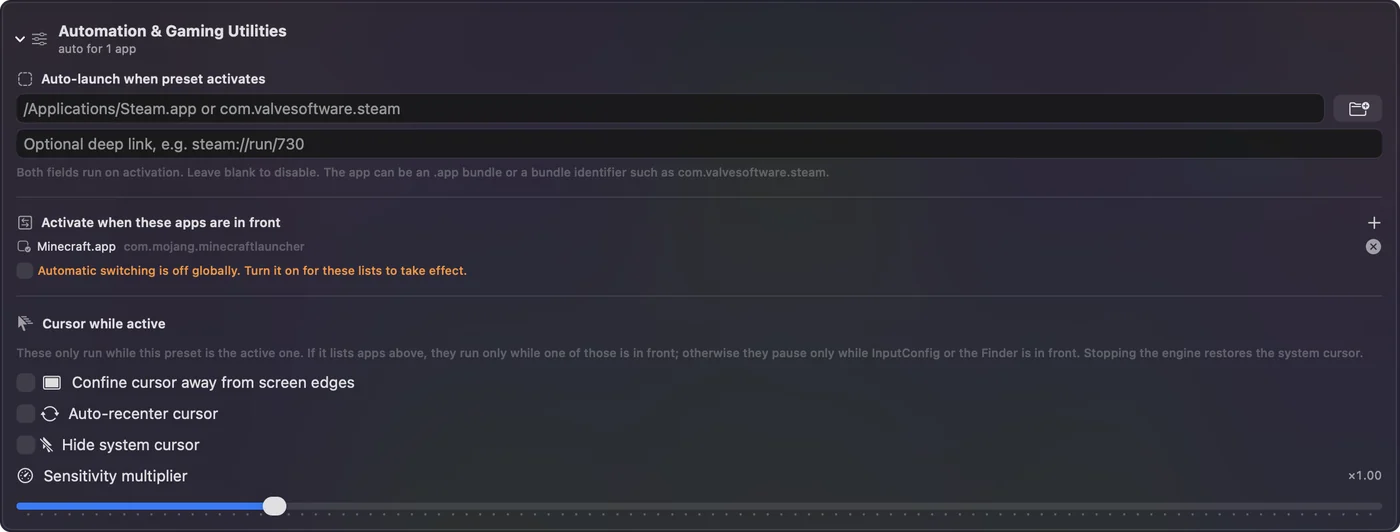
When you switch to another app, the preset you had before comes back, which ends any run. More on how it behaves is in switching presets by app. Leaving Roblox ends the run, so it never clicks in your other apps.
Pick a pace
Every row's pace is in its Options, under How it fires:
- Every. The gap between clicks. 100 ms is 10 a second, 200 ms is 5, 1000 ms is one.
- Vary by up to. A random amount either way on each gap. The preset's X row clicks every 150 ms, give or take 40.
- Stop after. A count that ends the run. The preset's Y row clicks 100 times and stops.
Faster is rarely better in Roblox, because many experiences only count so many clicks a second. The CPS calculator turns a rate into the Every value to type.
If Roblox ignores the clicks
Climb this ladder, smallest step first:
- Grant Accessibility. System Settings, Privacy & Security, Accessibility, with InputConfig switched on.
- Click into Roblox first. Clicks go to whatever is under the pointer, so Roblox must be the window under it.
- Close the editor. Opening the preset editor pauses the preset and ends a run.
- Slow down. Try Every at 200 ms. An experience that counts a limited pace often counts more clicks at a slower one.
- Accept a no. Some experiences block auto clicking on purpose. That is their call.
Every other fix is on auto clicker not working on a Mac.
What it cannot do
- Hide. It sends ordinary clicks, the way a mouse does. It has no anti-detection feature and never will.
- Play for you. It clicks at a pace, at the pointer or at one point per row. It does not read the screen or react to the game.
- Click several spots in turn. One row clicks one spot. Two spots need two rows, each with its own trigger.
The short version
- Rules first. Roblox's Community Standards, then the experience's own rules.
- Start. The built-in Auto Clicker preset, fn F6 to start and stop.
- Contain it. List Roblox under Activate when these apps are in front.
- Stop. fn F6 again, or Control Option Command period.
Where an experience allows it, two clicks set it up; where it does not, no speed makes it safe.
The auto clicker guide covers every setting used here, from Every to the emergency stop.
Questions
Can you get banned for using an auto clicker in Roblox?
Yes, it can happen. Roblox's Community Standards forbid exploits for an unfair advantage and disruptive automation, each experience can ban players under its own rules, and some experiences detect auto clicking.
Is there a safe auto clicker speed for Roblox?
No one outside Roblox and the experience's creator can know one, so I do not give a number. Read the experience's rules; where they forbid auto clicking, no speed is safe.
What is a free auto clicker for Roblox on a Mac?
InputConfig is free on the Mac App Store and has a built-in Auto Clicker preset: fn F6 starts and stops left clicks, fn F7 right clicks, and a mouse's side button 4 clicks while held.
Does it work on an M1, M2, M3 or M4 Mac?
Yes. InputConfig runs on any Mac with macOS 14 or later, Apple silicon or Intel.
How do I stop the auto clicker in Roblox?
Press fn F6 again, or use the emergency stop, Control Option Command period, from any app. Leaving Roblox also ends the run if the preset is set to switch with the front app.
Related
Free. macOS 14 or later. No account, nothing leaves your Mac. Open source on GitHub.