Roblox on a Mac with a controller
 The Roblox layout is built into InputConfig, free on the Mac App Store. You don't have to make an account, there are no subscriptions, and nothing is locked. Optimized for Apple silicon.
On a Mac: The Roblox app runs natively on macOS and reads Xbox and PlayStation controllers on its own: the standard controls walk, jump and turn the camera from a pad. Anything an experience puts on a letter key, and any experience that replaces the standard controls, needs the keyboard, which is what this layout sends.
Yes, you can play Roblox on a Mac with a controller, and this layout makes it work in every experience, not only the ones built for a pad. Roblox reads a controller for walking, jumping and the camera, but each experience decides the rest, and many put the sword on a letter key and the shop behind a mouse. This layout sends the default Roblox keyboard scheme from the controller: WASD, Space, Shift, the mouse and number keys for tools.
Every experience takes a keyboard, so a child never has to learn which games allow the pad. If Roblox will not see the controller at all, start with playing Roblox with a controller on a Mac.
On this page: 9 sections
The layout, control by control
How the layout thinks
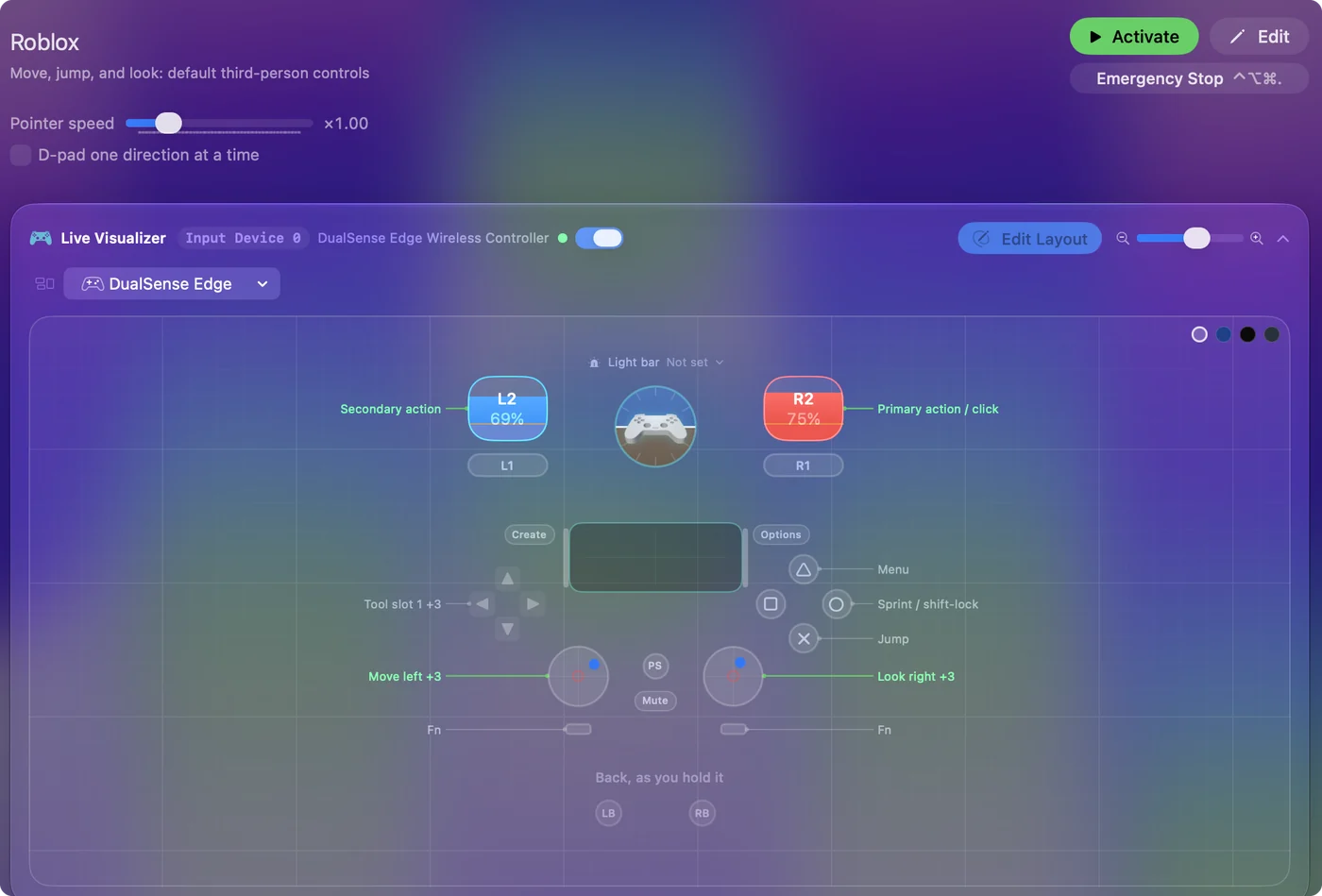
- Move and look. The left stick moves and the right stick looks.
- Act. The right trigger is the left mouse button, Roblox's do-everything click: swing the sword, fire, press the button, buy the thing. The left trigger is right click, which some experiences use for a second action and many ignore, so it never gets in the way.
- Jump and Shift. Jump is the bottom face button. The right face button is Shift, which is sprint in most experiences and shift lock in Roblox's own camera. Which one you get depends on the experience and on the Shift Lock setting in the Roblox menu, so try both.
- Tools. The D-pad is tool slots 1 to 4, where Roblox puts the backpack hotbar: up, right, down, left, the way you read a clock.
- Menu. The top face button is Escape.
One layout, and the controller works in every experience the same way.
Tune it to how you play
- Camera speed. Roblox's camera sensitivity multiplies the right stick. If looking feels slow, raise the in-game sensitivity first. It does more than the speed here. If it feels twitchy, lower it, or switch the look rows to the Smooth curve.
- More tools. Big inventories use slots 5 to 9. Add D-pad rows with While holding set to L1, and the D-pad becomes 5 to 8. Chords explains the idea.
- Shift lock that stays. If you use Shift as shift lock, set that row to Toggles on and off so one press locks the camera and the next releases it. If your experience uses Shift to sprint, leave it as a hold.
- Chat. Slash opens chat, and typing from a controller is no fun. Bind the touchpad press to the / key and keep a keyboard nearby for the message, or put a few stock phrases on the face buttons behind a chord with Type Text outputs.
Three phrases that cover most of a match, one per Type Text row:
Type Text: paste one into each row's Type Text output.
gg
one sec
brb
What happens: open chat with the touchpad, press the chord, and the phrase is typed for you.
When the right stick moves the pointer, not the camera
Roblox's standard camera only turns with the mouse while the right mouse button is held, while shift lock is on, or in first person, so in some experiences the right stick slides the pointer and the view stays put. Climb this ladder, smallest step first:
- Hold the left trigger. It is the right mouse button in this layout, so holding it while you push the right stick sends a right drag, which turns the standard camera in any experience.
- Turn on shift lock. In the Roblox menu, open Settings and switch Shift Lock Switch on, then press the right face button, which sends Shift. The camera now follows the stick with nothing held. Some experiences switch shift lock off. Then use the trigger.
- Use the arrow keys. In Roblox's standard controls the Left and Right arrow keys turn the camera. Change the right stick's left and right rows from mouse movement to those two keys for a steady turn with no button held. I and O zoom in and out, and they sit well on the bumpers.
Game layouts leave Hide system cursor and Auto-recenter cursor off, because Roblox's menus want a free pointer. If the pointer still vanishes or snaps back to the middle in its menus, open the preset's Automation & Gaming Utilities section and switch both off. The left trigger is the quickest fix, and it works in any experience that uses the standard camera.
Set it up for a younger player
This is the layout I give parents, and three settings make it safer for a child:
- The emergency stop. It is on out of the box: holding Back and Start together for three seconds always gives the keyboard back, whatever the experience is doing. The buttons and the hold time are in Settings, General, Emergency stop.
- Auto-switch. Add Roblox to the preset's auto-switch list so it turns on when Roblox comes to the front and off when it leaves, and the controller never types into homework.
- Spoken names for buttons. If the child is still learning which button is which, turn on Speak in the face buttons' Options for a week with a word for each, such as jump, sprint and menu. They learn by ear.
Nothing runs inside Roblox: the Mac sends ordinary keyboard and mouse events, the same as pressing the keys, so it is not a script or a cheat. The emergency stop is the one setting I would never skip for a child.
If your controller is not working in Roblox
When Roblox does not react to your controller on a Mac, climb this ladder, smallest step first:
- Check that the Mac sees the controller. Open the gamepad tester and press a button. If nothing lights up there, the problem is the connection, and a controller that is connected but not working covers that first.
- Play it from keys. If Roblox still ignores the pad, activate this layout. It sends the keyboard and mouse controls Roblox already reads. Turn the game's own controller option off while it runs, or a press can arrive twice. The layout works whether or not Roblox ever sees the controller.
Get it in two clicks
- Get InputConfig free on the Mac App Store, open it, and click Smart Preset Maker on the welcome screen.
- Search for Roblox and pick it. The layout is created as a preset in your sidebar, named and ready.
- Press Activate. Every row can be changed afterwards: the editor's Scan button rebinds any control the moment you touch it.
To check the controller itself first, the gamepad tester shows every button and stick live in your browser.
Roblox controls: every button and the key it sends
The Sends column is Roblox's default keyboard and mouse controls, as this layout expects them. If you changed a key in the game's settings, change the same row in InputConfig.
| Controller | Sends | What it does |
|---|---|---|
| Left stick left | A | Move left |
| Left stick right | D | Move right |
| Left stick up | W | Move forward |
| Left stick down | S | Move back |
| Right stick right | Mouse motion right (speed 20) | Look right |
| Right stick left | Mouse motion left (speed 20) | Look left |
| Right stick down | Mouse motion down (speed 14) | Look down |
| Right stick up | Mouse motion up (speed 14) | Look up |
| Right trigger | Left click | Primary action / click |
| Left trigger | Right click | Secondary action |
| A / Cross | Space | Jump |
| B / Circle | Shift (Left) | Sprint / shift-lock |
| Y / Triangle | Escape | Menu |
| D-pad up | 1 | Tool slot 1 |
| D-pad right | 2 | Tool slot 2 |
| D-pad down | 3 | Tool slot 3 |
| D-pad left | 4 | Tool slot 4 |
Button names follow the Xbox / PlayStation pair shown in the editor, so A / Cross is the bottom face button on either pad. On a Switch Pro Controller the bottom button is labeled B; the mapping still fires on position.
Questions
Why does my controller not work in some Roblox games on Mac?
Each experience is made by a different creator, and many are built around a keyboard and mouse. If the controller is listed under Game Controllers in System Settings, the Mac sees it and the gap is in the experience. This layout sends keyboard and mouse input, which every experience reads.
Roblox on my Mac does not detect my controller. Will this still work?
Yes. InputConfig reads the controller itself and Roblox only receives keyboard and mouse input, so Roblox never has to detect a controller. The Mac does need to see it: if the pad shows in System Settings, Game Controllers, you are set.
Why does the right stick move the pointer instead of the camera?
Roblox's standard camera turns with the mouse only while the right button is held, in shift lock, or in first person. Hold the left trigger while you look, turn on shift lock and press the right face button, or put the Left and Right arrow keys on the right stick.
Why is my controller not working in Roblox on a Mac?
First check the Mac itself sees the controller, with the gamepad tester. If it does and Roblox still ignores it, activate the Roblox layout in InputConfig, which sends the game's keyboard and mouse controls from the controller.
Can I play Roblox on an M1 Mac or a MacBook Air?
Roblox has a native Mac version, and its minimum requirements are listed on its store page, so check your Mac against that list. I have not tested it on each Mac. The controller layout itself works the same on any Mac that runs InputConfig.
Related
Completely free. You don't have to make an account, there are no subscriptions, and nothing is locked. Optimized for Apple silicon. Open source on GitHub.
Updated