Chords
 InputConfig is completely free on the Mac App Store. You don't have to make an account, there are no subscriptions, and nothing is locked. Optimized for Apple silicon.
A chord is a row that only fires while another button on the same controller is held, the way Shift works on a keyboard. Set it in a row's Options, under Second control. It gives every button a second layer without giving up its first job: D-pad up scrolls, and Triangle plus D-pad up jumps to the top of the page.
Steps
- Add a row on the button that does the work and set its output.
- Open its Options and, under Second control, set While also holding to the modifier button.
- Save. The row fires only while the modifier is down and the button is pressed.
Make a chord
- You: Add a row on the button that does the work and set its output. Open its Options and, under Second control, set While also holding to the modifier button, or press Scan and press it.
- InputConfig: Fires the row only while the modifier is down and the button is pressed.
- Check: Hold the modifier, press the button, and the chord fires. Press the button alone and the plain row fires instead.
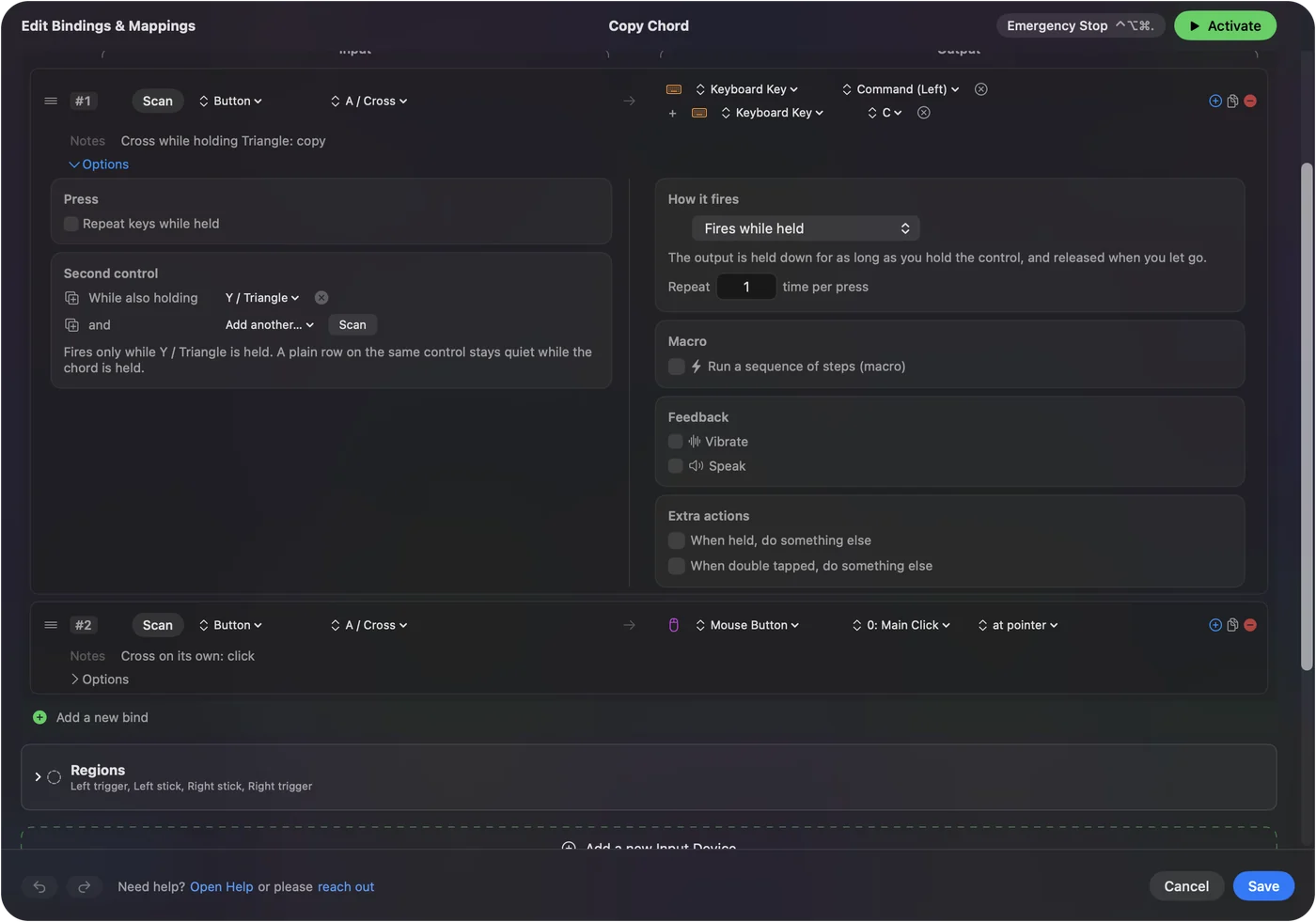
Up to three modifiers can be required at once. Hold the modifier first, then press the button, like Shift plus a key.
Keep the plain row too
Keep the plain row for the normal action and add a second row with the modifier for the chord. While the modifier is held the plain row stays quiet. One button, two rows: the plain job and the chorded job.
Decide what the modifier does on its own
The modifier keeps whatever it is bound to. If you do not want that, give it a row with no output, or pick a button with nothing bound, such as a paddle or a bumper. A trigger can be a modifier when it is bound as a button rather than an axis. A paddle makes the best modifier, because it has no job of its own.
If the chord fires the wrong row
Climb this ladder, smallest step first:
- Hold the modifier first. If you press the button first, the chord fires as soon as the modifier goes down while the button is held, and the plain row lets go.
- Empty the modifier's own row. If the modifier also fires its own job, give it a row with no output.
- Update to 1.6. InputConfig 1.6 fixed chords firing the plain row on release.
Order matters: modifier down, then the button.
What can and cannot be part of a chord
As the held control, a controller row's chord can hold anything Scan sees, including a key, a mouse button or a MIDI pad. The row itself stays a controller row. Keyboard, mouse and MIDI rows have hold and double-tap actions instead, which give a key or pad up to three jobs. Chords live on controller rows; keys and pads get hold and double tap. See hold and double tap.
The short version
- Second control. In the row's Options, set While also holding.
- Two rows per button. The plain one and the chorded one.
- Modifier first. Then the button.
One spare button doubles every other button on the controller.
Questions
Can the modifier be a trigger?
It can when the trigger is bound as a button rather than an axis.
What if I press the button first?
The chord fires as soon as the modifier goes down while the button is held, and the plain row lets go. To avoid it, hold the modifier first.
Can a keyboard key, mouse button or MIDI pad be part of a chord?
As the held control, yes: a controller row's chord can hold anything Scan sees, including a key, a mouse button or a MIDI pad. The row itself stays a controller row. Keyboard, mouse and MIDI rows have hold and double-tap actions instead, which give a key or pad up to three jobs.
Related
Completely free. You don't have to make an account, there are no subscriptions, and nothing is locked. Optimized for Apple silicon. Open source on GitHub.
Updated