Questions
How to give a controller button a double-tap action on a Mac
Tick Send a different action on a double tap in a row's Options in InputConfig, the free mapper I make: one tap sends the normal output, two quick taps send another. Nothing in macOS offers this for a controller, and most games do not either.
Add a hold and the same button has three jobs. The catch is a short wait on single taps, covered below, which decides which buttons it suits.
On this page: 8 sections
Set it up
Install InputConfig from the Mac App Store and allow Accessibility access first.
Step 1: The single tap
- You: Add a row, press Scan, press the button, and choose what a single tap sends.
- InputConfig: Fills the row's input with that button.
- Check: The row names your button and its output.
Step 2: The double tap
- You: Open the row's Options and, under Extra actions, tick Send a different action on a double tap. Next to Double tap sends, pick the key. The ⌃ ⌥ ⇧ ⌘ toggles beside it add Control, Option, Shift or Command, so the double tap can be a shortcut such as Command W (new in 1.6).
- InputConfig: Watches for a second tap inside the window.
- Check: Set the window after within, in milliseconds, then save and activate. Two quick taps send the second output.
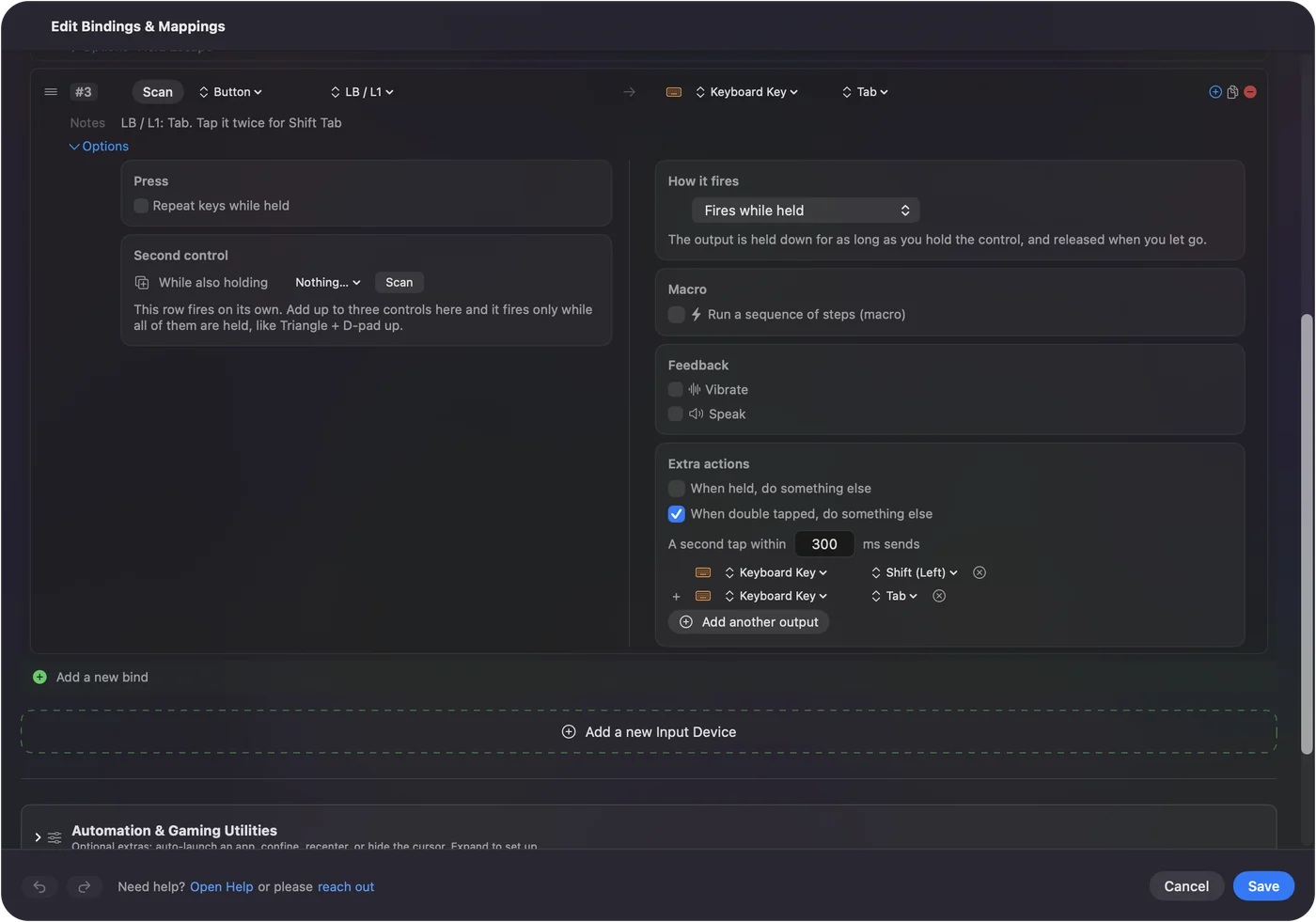
The built-in Hold & Double-Tap preset is a working example: LB is Tab, and two quick taps send Shift Tab.
 InputConfig is free on the Mac App Store. macOS 14 or later, no account, no tracking, open source.
Know the trade-off: a single tap waits
After your first tap, InputConfig cannot know yet whether a second one is coming, so it waits out the window before sending the single tap. With a 300 ms window, a single tap lands about a third of a second late, and it goes out as a short press rather than for as long as you hold. The double tap itself fires the moment the second tap ends.
- Good fits. Return, a shortcut, a click or a Siri Shortcut.
- Bad fits. Anything you hold or need instantly: movement keys, a held Shift, a fire button.
Keep double taps on buttons that do one-shot jobs.
Choose the window
The window runs from 100 to 2000 ms and starts at 300.
- 250 to 350 ms. Suits most people.
- Longer. Helps a hand that moves slowly, at the price of a longer wait on every single tap.
- Shorter. A hand with a tremor may do better with a shorter window, so two accidental presses are less likely to land inside it, or with a hold instead of a double tap.
Start at 300 and change it only if taps are missed or fire by accident.
Give one button three jobs
Hold and double tap sit on the same row. Set How it fires to Different action when held as well, and the button sends one output on a tap, another on a double tap, and a third once held past the time you set. Add a chord and the same button does something else again while another button is held.
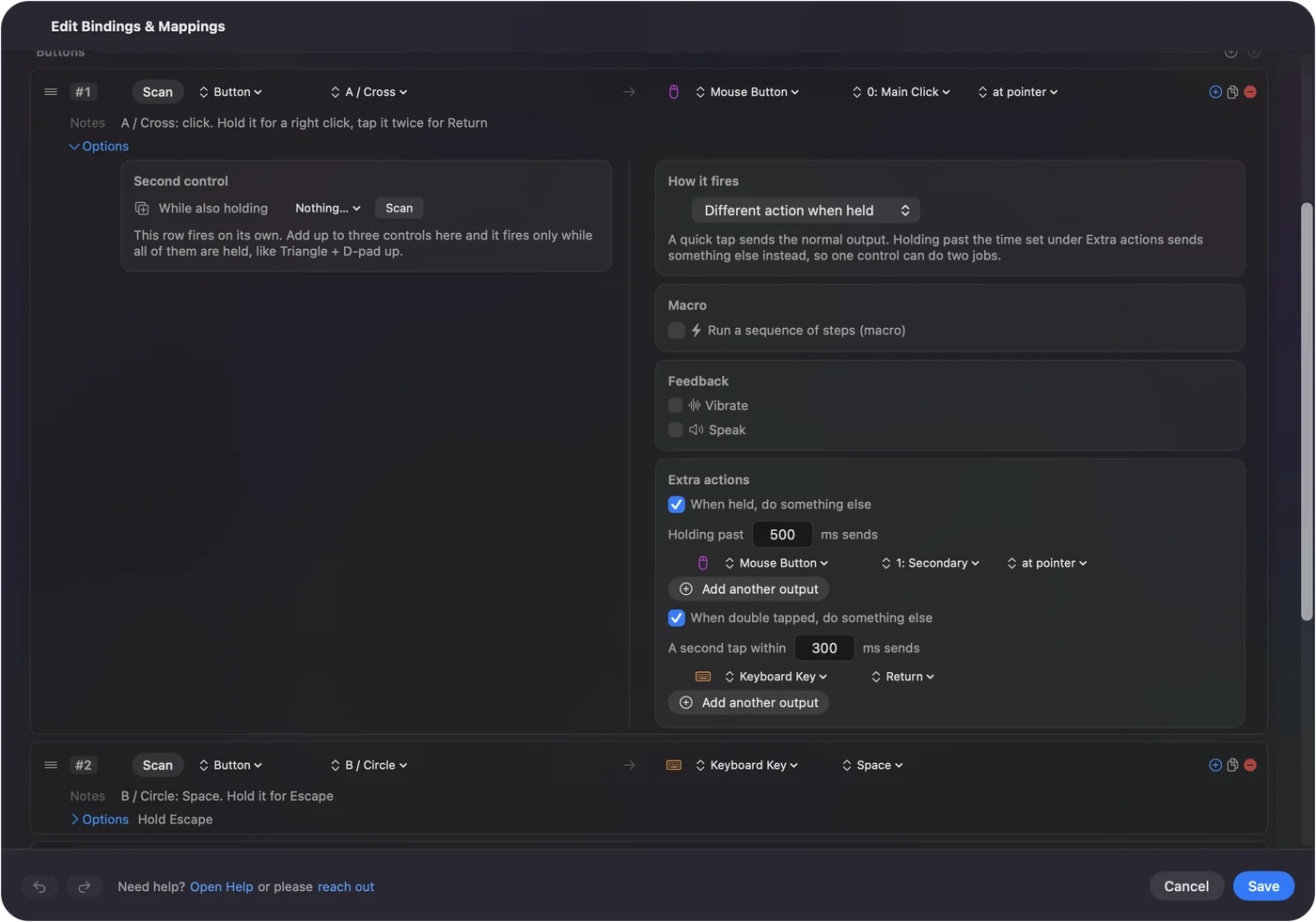
The Hold & Double-Tap preset puts all three on A: a tap clicks, a hold right-clicks, a double tap presses Return. That is how a single switch on an adaptive controller can run a Mac; switches on a Mac builds whole layouts this way.
If the double-tap box is off or missing
Climb this ladder, smallest step first:
- Check the press mode. Toggles on and off, Repeats while held and Repeats until pressed again are other press modes, so the double-tap box is switched off while one of them is chosen.
- Move the macro. A row with a macro has no double tap; put the macro on its own row.
- Send a shortcut instead. In the editor the double-tap action is a key or a key with modifiers. To run a Shortcut on a double tap, give the Shortcut a keyboard shortcut of its own in the Shortcuts app (Add Keyboard Shortcut in its details) and send that; for an app, use its menu shortcut.
- Use a chord or another button. Otherwise put Run Siri Shortcut or Open App on a chord or a button of its own.
A double tap sends keys; anything else gets there through a keyboard shortcut.
Double tap other inputs
- Keys, mouse buttons and MIDI pads. They have the same double-tap option. The built-in Modifier Holds preset opens Launchpad on a double tap of Right Command, and a modifier that took part in a shortcut never counts as a tap. A key still types as well, so use one that types nothing on its own.
- A double click on a mouse button. It is its own input, Double click, so a single click keeps its job with no wait. See the Double Click Deck.
- The DualSense touchpad. It has a double tap gesture of its own. See touchpad gestures.
- A knock on a MacBook. Tap the Mac reads single, double and triple taps as separate inputs. It is tested on M4 MacBooks; it did not work on an M1 Pro in our testing, and the calibrator's status chip tells you whether your Mac's sensor is listening. See Tap the Mac.
A mouse's Double click input has no wait at all, so prefer it on a mouse.
The short version
- Where. Row Options, Extra actions, Send a different action on a double tap.
- The cost. A single tap waits out the window, 300 ms by default.
- The fit. One-shot jobs, never movement or a held key.
Put double taps on buttons that do one-shot jobs, and a single button can carry three.
Questions
Can a controller button do something different when double tapped on a Mac?
Yes. In InputConfig, tick Send a different action on a double tap in the row's Options and pick the key or shortcut it sends.
Why does my single tap feel slow?
Because the app waits out the double-tap window before sending it. Shorten the window, or move the double tap to a button whose single tap does not need to be instant.
Can one button have a tap, a double tap and a hold?
Yes, all on one row, plus a chord on top. The built-in Hold & Double-Tap preset shows it on A.
Can a double tap send a keyboard shortcut?
Yes. Since 1.6 the double-tap key has Control, Option, Shift and Command toggles beside it.
Does it work on the Mac's own keyboard?
Yes. A key still types as well, so use a key that types nothing on its own, such as a right-hand modifier or F13 to F19.
Related
Free. macOS 14 or later. No account, nothing leaves your Mac. Open source on GitHub.