Hold and double-tap
 InputConfig is completely free on the Mac App Store. You don't have to make an account, there are no subscriptions, and nothing is locked. Optimized for Apple silicon.
Every row in InputConfig can carry up to four outputs on one control: the press, a hold action past a threshold, a double-tap action on two quick presses, and since 1.8 a triple-tap action on three quick taps. All of them are in the row's Options. It is how a single switch on an adaptive controller does four things.
On this page: 7 sections
Add a hold action
- You: In Options, under Extra actions, turn on When held, do something else, set the hold time, and pick the hold output (any output, or several).
- InputConfig: Fires the normal output on release for a press shorter than the threshold, and the hold output instead for a press past it.
- Check: Tap the control and the normal output fires; hold it past the threshold and the hold output fires.
400 to 600 ms feels natural; go longer for a control that gets pressed by accident. A longer threshold is the cure for holds that fire by accident.
Add a double-tap or triple-tap action
- You: Under Extra actions, turn on When double tapped, do something else, set the window and pick the output.
- InputConfig: Waits for a possible second press. Two presses inside the window fire the double-tap output.
- Check: Double tap and the double-tap output fires. A single press fires when the window closes, not instantly.
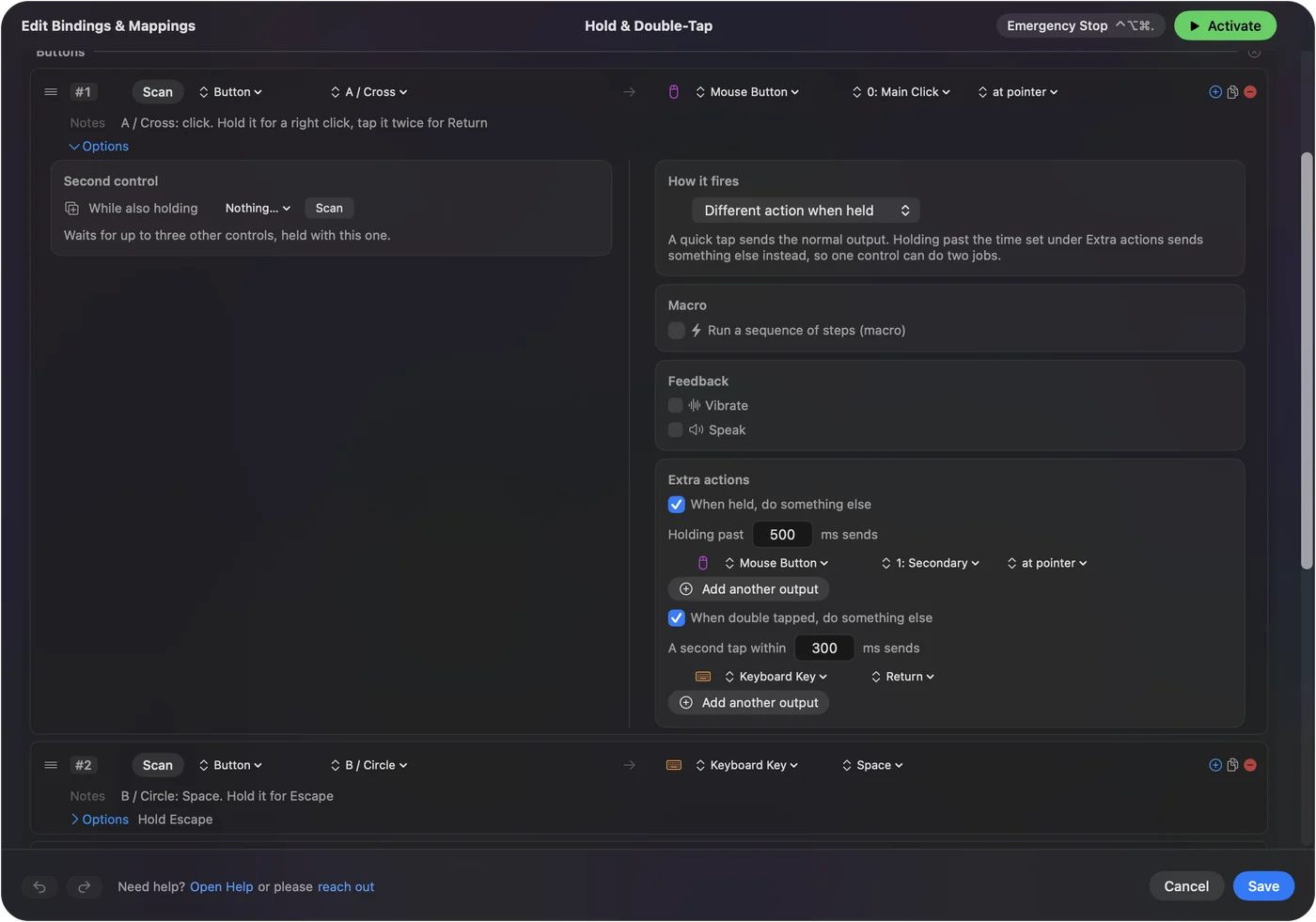
250 to 350 ms suits most people; a longer window helps a hand that moves slowly. Every double-tap row delays its single press by the window, so keep the window as short as your hand allows.
Three quick taps can be a job of their own. A row can do something else on a triple tap, set beside its hold and double-tap actions in Options, so a key or a switch holds four jobs.
Stack them with a chord
Hold, double tap and a chord can all sit on one row. A typical adaptive layout: press is left click, hold is right click, double tap is Return, and with a second switch held the same button is Escape. The Hold & Double-Tap preset shows it on the face buttons, and Modifier Holds puts it on the Mac's own modifier keys. One switch and a second switch can cover four jobs.
Use them on keys and pads
Any key row can have a hold action and a double-tap action, which is how Modifier Holds works; chords are the one option keyboard rows lack. A key still does its normal job as well, so they suit keys that type nothing, such as F13 to F19 or a right-hand modifier. Put hold and double tap on keys that type nothing.
What it cannot do
- A macro on hold. The hold action is any output, or several, but not a macro, and a row with a macro has no hold action. Put the macro on its own row.
- Other press modes. Toggle, repeat and macros are other press modes, so a row with a hold or a double tap does not also toggle, repeat or run a macro.
- Repeat while held. A hold repeats only when Repeat keys while held is on for the row; otherwise the key stays down as one press. Use turbo on a separate row for rapid repetition.
When a row needs a macro or turbo, give that job its own row.
The short version
- Hold. Different action when held, 400 to 600 ms.
- Double tap. When double tapped, do something else, 250 to 350 ms.
- Triple tap. Three quick taps, beside the hold and the double tap.
- All of them. They stack with a chord on the same row.
Three or four jobs per button is often the difference between a layout that fits your hands and one that does not.
Questions
Can the hold action be a macro?
No. The hold action is any output, or several, but not a macro, and a row with a macro has no hold action. Put the macro on its own row.
Does a hold repeat while I keep holding?
Only when Repeat keys while held is on for the row; otherwise the key stays down as one press. Use turbo on a separate row for rapid repetition.
Do hold and double tap work on keyboard keys?
Any key row can have a hold action and a double-tap action, which is how Modifier Holds works. Chords are the one option keyboard rows lack. A key still does its normal job as well, so they suit keys that type nothing, such as F13 to F19 or a right-hand modifier.
Related
Completely free. You don't have to make an account, there are no subscriptions, and nothing is locked. Optimized for Apple silicon. Open source on GitHub.
Updated