Minecraft on a Mac with a controller
 The Minecraft layout is built into InputConfig, free on the Mac App Store. You don't have to make an account, there are no subscriptions, and nothing is locked. Optimized for Apple silicon.
On a Mac: Java Edition runs natively on macOS and has no controller support of its own. Bedrock, the version with a gamepad scheme, does not exist for Mac. So on a Mac, a controller in Minecraft is this layout, or nothing.
Yes, you can play Minecraft on a Mac with a controller, with no mods: InputConfig turns the pad into the keyboard and mouse that Java Edition already reads. Java is the version that runs on a Mac, and it has never supported a controller. Bedrock has a gamepad scheme, but there is no Bedrock for macOS.
If you are new to it, Playing Minecraft with a controller on a Mac goes step by step. If you are thinking about a mod instead, Controller mods compared with this layout helps you choose.
On this page: 9 sections
The layout, control by control
How the layout thinks
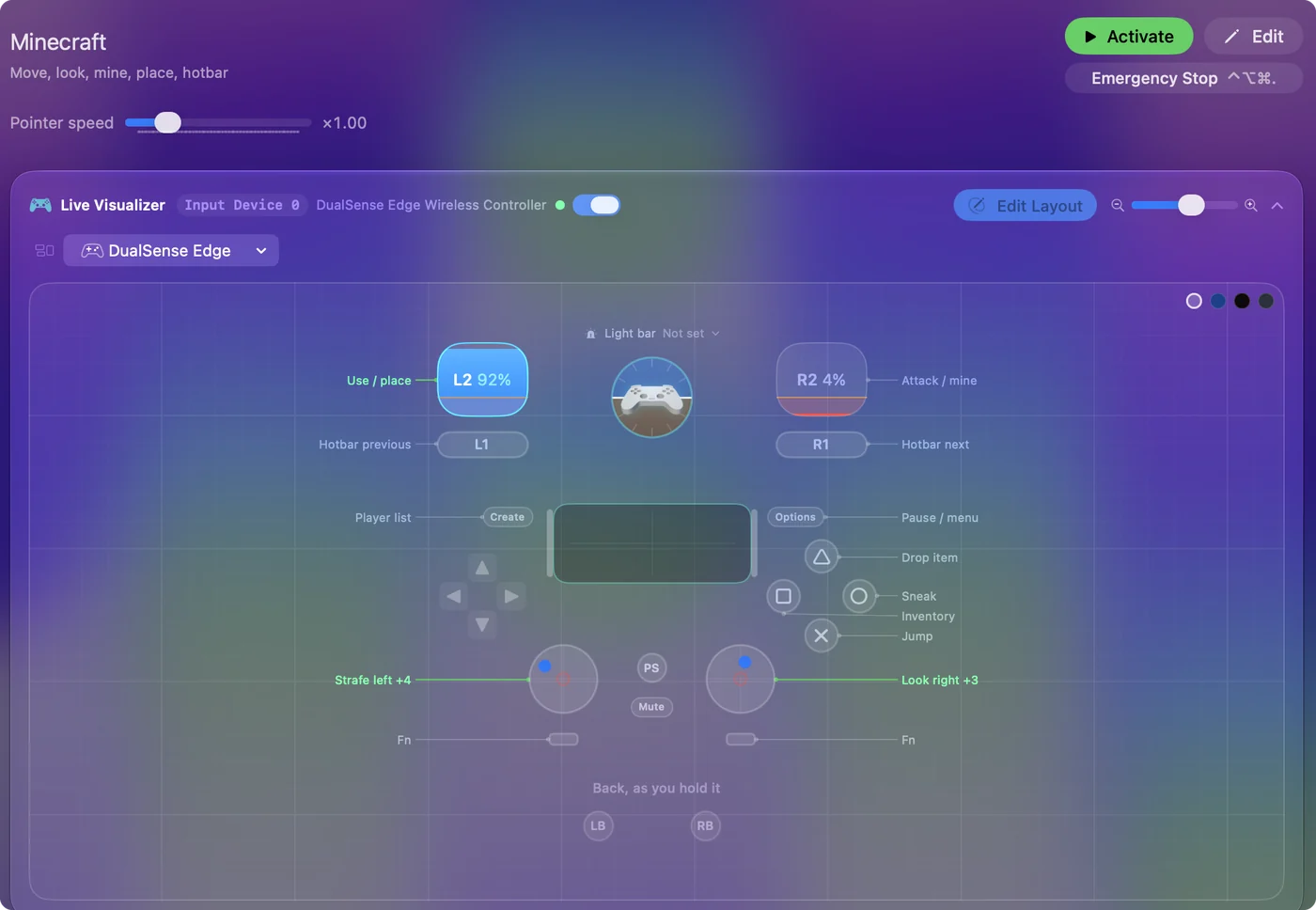
- Move and look. The left stick is W, A, S and D, the right stick is the mouse. Look speed is high, 20 across and 14 up and down, and it still feels calm, because Minecraft smooths mouse look.
- Mine and place. The right trigger mines and the left trigger places, the console convention. Years of Bedrock on a console carry straight over.
- Jump and sneak. Jump is the bottom face button. Sneak is the right face button, which sounds wrong until you play: your thumb is on the stick, and that is the button it reaches without leaving the stick for long.
- Inventory and drop. Inventory is the left face button and drop is the top one, far enough from sneak that you never throw your diamond pickaxe into lava by accident.
- Hotbar. The bumpers step through the hotbar one slot per press, because Java's hotbar is the mouse wheel and the bumpers are the closest thing a pad has to a wheel.
- Sprint and menus. Sprint is the left stick click: push forward, click, and you are running. Options pauses and Create shows the player list.
If you know Minecraft on a console, your hands already know this layout.
Tune it to how you play
- Sneak that stays on. Bridging over the void with a held button is stressful. Set the Sneak row's press mode to Toggles on and off: one press to crouch, one to stand. Do the same for sprint if your thumb gets tired.
- All the hotbar slots. For direct slots, bind the D-pad to 1, 2, 3 and 4, then add four more D-pad rows with While holding set to L1 for 5 to 8. The number keys select instantly, which matters in a fight.
- Auto-mine. Strip mining is a held trigger for an hour. Set the right trigger row to Toggles on and off and it latches, mining until you pull it again. Give a placing row Repeats while held and one held press lays blocks as fast as the game accepts them. The Minecraft auto clicker page covers AFK farms, and many servers forbid auto clickers, so check theirs first.
- Look speed. If turning feels slow in a fight, raise the speed on the four look rows, or switch their curve to Aggressive so small movements stay precise and big pushes whip around. Bedrock players usually like Aggressive.
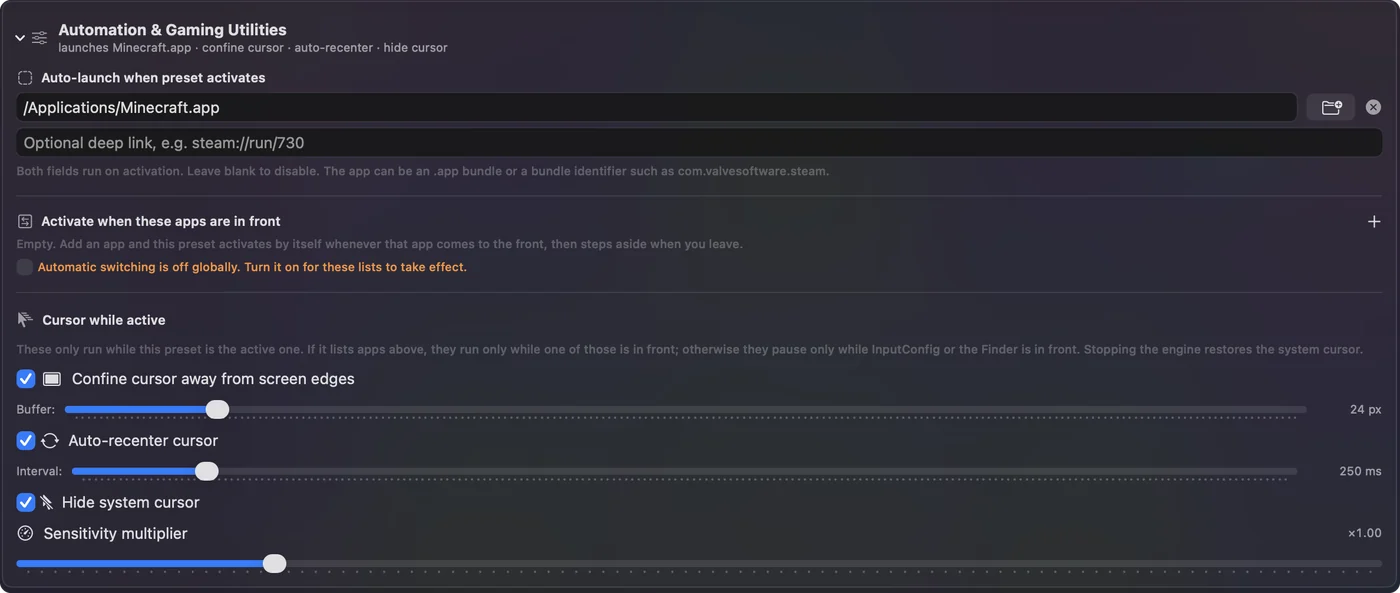
- Sorting the inventory. The layout keeps the pointer off the screen edges and leaves it visible, because Minecraft locks and hides the mouse itself while you play. In the inventory, the right stick moves the pointer over the item grid. If an older copy of the preset still hides the pointer or snaps it to the middle, turn off Auto-recenter cursor and Hide system cursor in its Automation & Gaming Utilities section.
- Sprint at full push. The built-in Minecraft preset also sprints when the left stick is pushed all the way forward, through a ring region named Sprint that shares the stick and sends Left Control.
Toggle on sneak and mining is the change people thank me for most.
Little things that make it fun
- Debug screen on a double tap. Give the Jump row a double-tap action that sends F3. Twice on the button and the debug screen appears. Twice again and it goes away.
- Camera on the touchpad. On a DualSense, put F5 on the touchpad press: one tap for third person, another for the front view, a third to come back.
- A thump per block. Turn on Vibrate on the Use / place row at a low strength. Every block you set gives a tiny thump, which is strangely satisfying when you are laying a floor.
- Let the preset open the game. It already points at Minecraft.app, so activating it opens the launcher. Add Minecraft to the preset's auto-switch list and it turns itself on when the game comes to the front.
Auto-switch means you pick up the pad and play, with nothing to remember.
Java, Bedrock, and mods
- Java Edition. Everything on this page is Java, because that is what a Mac runs. Modded Java is fine too: Fabric, Forge, Prism and MultiMC launch the same Java game, and the same keys arrive.
- Bedrock. There is no Bedrock for macOS, and the iPhone and iPad version cannot be installed on a Mac either. The Bedrock-on-Mac guides run the Windows version in a virtual machine or the Android version through a community launcher, so any page that tells you to switch the controller on in Bedrock's settings is written for a different computer.
- Controller mods. Controlify, Controllable and MidnightControls add a real gamepad scheme with on-screen button prompts. They work on a Mac when the mod loader does, and they are worth trying if you already play modded. The three mods compared with this layout has the details.
Use a mod or this layout, not both at once, because Minecraft would get the mod's action and the layout's key from the same press. If you play vanilla, or on a server that discourages mods, this layout needs nothing installed in the game at all.
If your controller is not working in Minecraft
When Minecraft does not react to your controller on a Mac, climb this ladder, smallest step first:
- Check that the Mac sees the controller. Open the gamepad tester and press a button. If nothing lights up there, the problem is the connection, and a controller that is connected but not working covers that first.
- Stop looking for a setting. Minecraft reads the keyboard and mouse here, so no option makes it see a pad. Activate this layout, and the controller sends the keys and mouse movement Minecraft already reads. The layout works without Minecraft ever seeing the controller.
Get it in two clicks
- Get InputConfig free on the Mac App Store, open it, and click Smart Preset Maker on the welcome screen.
- Search for Minecraft and pick it. The layout is created as a preset in your sidebar, named and ready.
- Press Activate. Every row can be changed afterwards: the editor's Scan button rebinds any control the moment you touch it.
To check the controller itself first, the gamepad tester shows every button and stick live in your browser.
Minecraft controls: every button and the key it sends
The Sends column is Minecraft's default keyboard and mouse controls, as this layout expects them. If you changed a key in the game's settings, change the same row in InputConfig.
| Controller | Sends | What it does |
|---|---|---|
| Left stick left | A | Strafe left |
| Left stick right | D | Strafe right |
| Left stick up | W | Walk forward |
| Left stick down | S | Walk back |
| Right stick right | Mouse motion right (speed 20) | Look right |
| Right stick left | Mouse motion left (speed 20) | Look left |
| Right stick down | Mouse motion down (speed 14) | Look down |
| Right stick up | Mouse motion up (speed 14) | Look up |
| Right trigger | Left click | Attack / mine |
| Left trigger | Right click | Use / place |
| A / Cross | Space | Jump |
| B / Circle | Shift (Left) | Sneak |
| X / Square | E | Inventory |
| Y / Triangle | Q | Drop item |
| LB / L1 | Scroll up | Hotbar previous |
| RB / R1 | Scroll down | Hotbar next |
| L3 (left stick click) | Ctrl (Left) | Sprint |
| Start / Options | Escape | Pause / menu |
| Back / Share / Select | Tab | Player list |
Button names follow the Xbox / PlayStation pair shown in the editor, so A / Cross is the bottom face button on either pad. On a Switch Pro Controller the bottom button is labeled B; the mapping still fires on position.
A preset with this name also ships inside the app, with a file you can download: Minecraft built-in preset.
Questions
Can I play Minecraft on a Mac with a PS5 or Xbox controller?
Yes. Java Edition ignores the pad, so InputConfig turns a DualSense, DualShock 4, Xbox or Switch Pro controller into the keyboard and mouse the game already reads. Pair the controller, pick Minecraft in the Smart Preset Maker, and press Activate. It works on any Mac with macOS 14 or later, Apple silicon or Intel, including a MacBook Air.
Will this work on a server or with anti-cheat?
Yes. The game receives ordinary key presses and mouse movement from the operating system, exactly as if you typed them. Nothing is injected into Minecraft and no mod is installed.
Can I use this layout and a controller mod at the same time?
Use one or the other. With both running, Minecraft gets the mod's action and the layout's key from the same press. If you play a modded instance with Controlify some days and vanilla on others, keep the layout for vanilla and switch it off before you launch the modded one.
Why is my controller not working in Minecraft on a Mac?
Minecraft reads the keyboard and mouse on this route, so no setting makes it see a controller. Check the Mac sees the pad with the gamepad tester, then activate the Minecraft layout in InputConfig, which sends the game's keys and mouse movement from the controller.
Related
Completely free. You don't have to make an account, there are no subscriptions, and nothing is locked. Optimized for Apple silicon. Open source on GitHub.
Updated