Questions
An auto clicker for Minecraft on a Mac
On a Mac, a Minecraft auto clicker usually means one of two jobs: holding a mouse button down for an AFK farm, or clicking at a steady pace, and InputConfig does both for free. In your own single-player world, that is your call. On a server, the server's rules decide: many forbid auto clickers, and Hypixel forbids anything that automates a gameplay action, at any speed. Minecraft on a Mac is Java Edition, which reads the mouse and keyboard, so the clicks reach it like a real mouse's.
On this page: 9 sections
Steps
- Check the server's rules first; on Hypixel, auto clickers and macros are not allowed.
- Install InputConfig from the Mac App Store and allow Accessibility access.
- Right-click the built-in Auto Clicker preset, choose Duplicate, and open the copy with Edit.
- For an AFK farm, give a row a 1: Secondary click and set How it fires to Toggles on and off.
- For steady clicking, keep a row on Repeats until pressed again and set Every to your pace.
- Activate the preset, click into the game, and press the control once to start and again to stop.
Check the server's rules first
- Your own world. Single-player, or a world you share with friends who agree: your call.
- A server. Each server sets its own rules, and many forbid auto clickers, AFK farms or both. Read them before you start a run.
- Hypixel. Its allowed modifications page forbids anything that automates a gameplay action, with auto clicking and macros named. The speed makes no difference.
Some servers detect clicking that is too fast or too regular, and I will not promise that any setting is allowed or goes unnoticed. On a server, the server's rules decide, not the clicker's speed.
Hold right click for an AFK farm
An AFK fish farm, or eating, or holding a shield up, needs the right button held down, not clicked. A latched click does that: one press pushes the button down and leaves it down, and the next press lets it go.
- You: On a row in your copy, set the output to Mouse Button with 1: Secondary (the right button), and set How it fires to Toggles on and off. Scan a trigger that types nothing, such as a side button with Block the button's own action ticked.
- InputConfig: Holds right click down from the first press until the second.
- Check: Click into the game, press once, and let go of the mouse. The rod stays cast, or the food keeps being eaten.
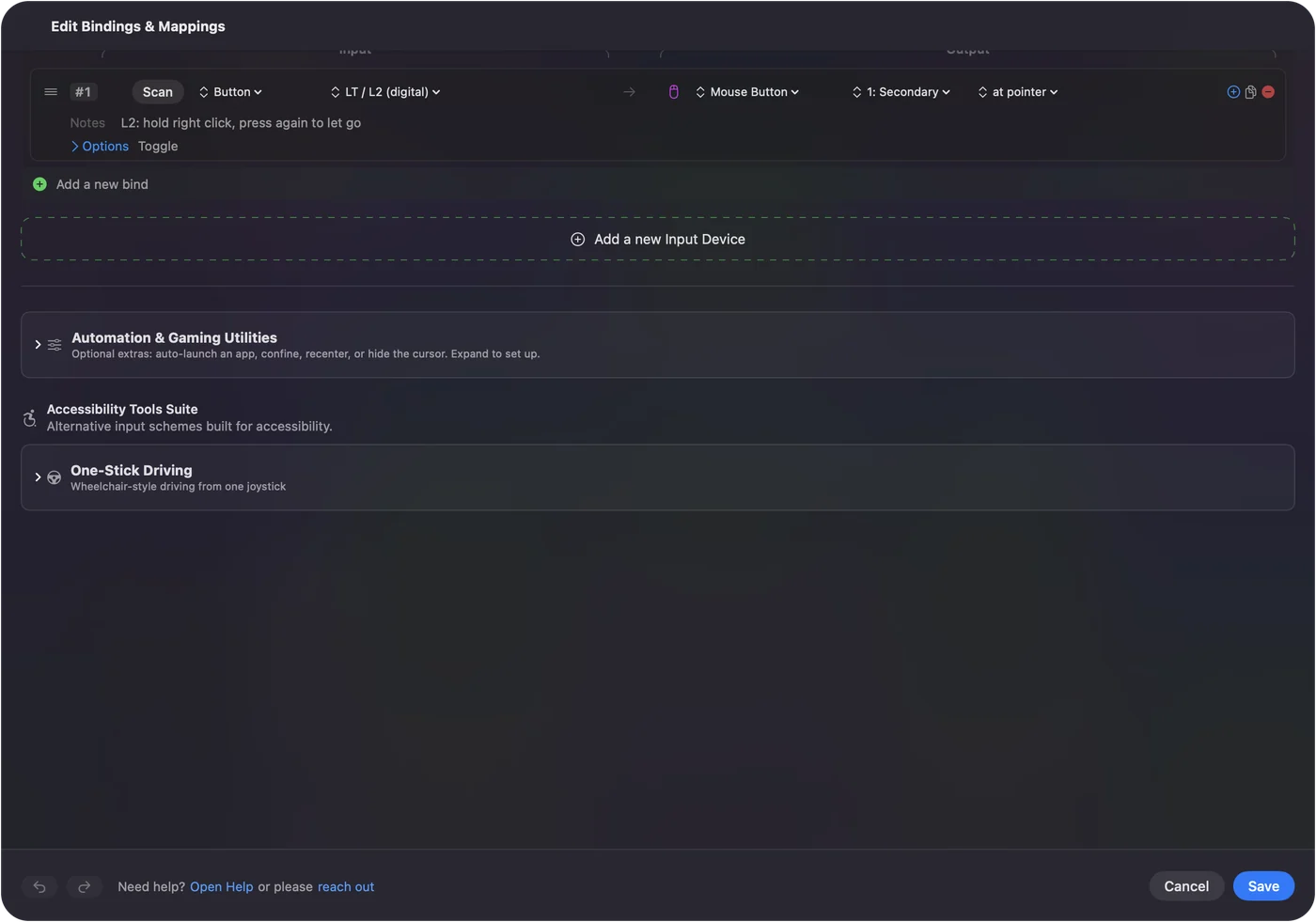
The same row with 0: Main Click holds the left button, which keeps mining a block that grows back. Keep the game window in front: by default Java pauses when it loses focus, and fn F3 and P on a MacBook keyboard turns that off. Locking the Mac lets go of the held button. For an AFK farm, hold the button, do not click it.
 InputConfig is free on the Mac App Store. macOS 14 or later, no account, no tracking, open source.
Click at a steady pace
A mob farm wants repeated clicks, and in Java Edition faster is not better. Since 1.9, an attack does full damage only once its cooldown has refilled, so clicking faster than that hits for less.
- You: On a left click row, set How it fires to Repeats until pressed again, then set Every to 1000 divided by the Attack Speed on the weapon's tooltip. A sword shows 1.6, so about 650 ms.
- InputConfig: Clicks at that gap where the pointer is, until you press the control again.
- Check: The attack indicator is full, or nearly, at each swing.
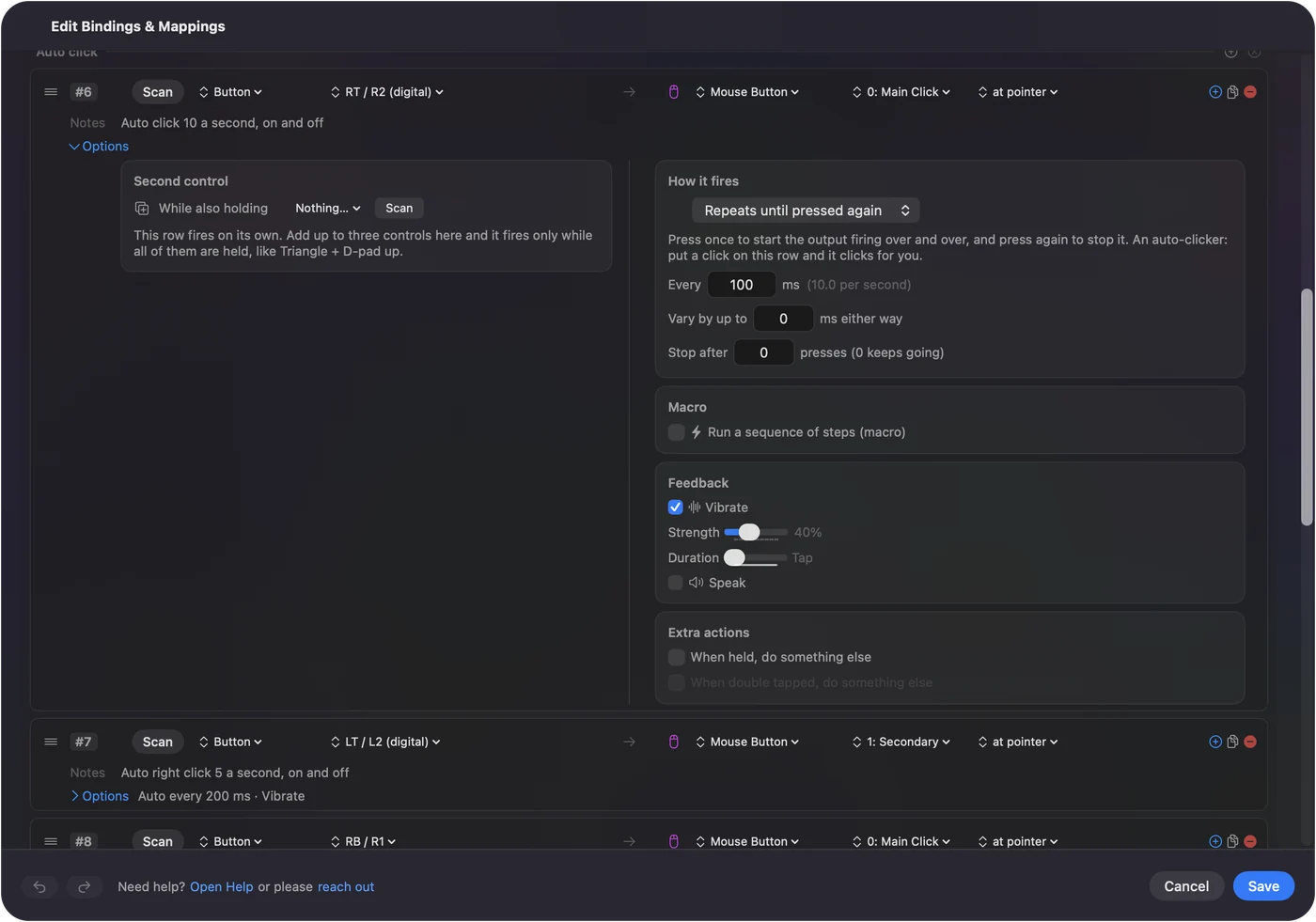
For a run that stops by itself, set Stop after as well. The CPS calculator works out how long a count takes.
Use the preset's own rows
The built-in Auto Clicker preset works in Minecraft as it ships:
- fn F6. Left click 10 times a second, on and off. Hold fn: F6 alone is the Focus key on recent MacBooks.
- fn F7. Right click 5 times a second, on and off.
- Mouse button 4. Left click 15 times a second only while held, with its own Back blocked.
- A controller. Java Edition has no controller support of its own, so the controller rows do not double up with the game. The right trigger toggles left clicks, the left trigger right clicks, and the left stick turns the view through the pointer.
To auto click while you play with a controller, add an auto click row to the Minecraft layout you already use, rather than switching presets. The Minecraft with a controller page covers that layout.
If Minecraft ignores the clicks
Climb this ladder, smallest step first:
- Grant Accessibility. System Settings, Privacy & Security, Accessibility, with InputConfig switched on.
- Click into the game. The pause menu takes the clicks if the window lost focus.
- Close the editor. Opening the preset editor pauses the preset and ends a run.
- Slow down. A pace near the weapon's cooldown counts better than a burst.
Every other fix is on auto clicker not working on a Mac.
What it cannot do
- Aim or move. It clicks or holds a button. It does not walk, turn or react to what happens in the game.
- Hide. It sends ordinary clicks and has no anti-detection feature.
- Run Bedrock. Minecraft Bedrock Edition does not run on a Mac, so this page is about Java Edition.
The short version
- AFK farm. A 1: Secondary row set to Toggles on and off.
- Mob farm. Repeats until pressed again, Every at 1000 divided by the weapon's Attack Speed.
- Servers. Read the rules; Hypixel says no at any speed.
In your own world it is your call; on someone else's server it is theirs.
For every setting in order, from the first run to the emergency stop, see the Mac auto clicker guide.
Questions
Can you get banned for using an auto clicker in Minecraft?
On servers that forbid them, yes. Many servers ban auto clickers and some detect them. In your own single-player world, it is your call.
Is an auto clicker allowed on Hypixel?
No. Hypixel's rules forbid anything that automates a gameplay action, with auto clicking and macros named, whatever the speed.
How do I hold right click in Minecraft on a Mac without holding the button?
In InputConfig, give a row a 1: Secondary click output and set How it fires to Toggles on and off. One press holds right click down and the next press lets it go.
What auto clicker speed is best for Minecraft Java?
Match the weapon's cooldown: set Every to 1000 divided by the Attack Speed on its tooltip, about 650 ms for a sword. Clicking faster than the cooldown does less damage, not more.
Does it work with Minecraft Java on Apple silicon?
Yes. InputConfig runs on any Mac with macOS 14 or later, Apple silicon or Intel, and Minecraft Java reads its clicks like a real mouse's.
Related
Free. macOS 14 or later. No account, nothing leaves your Mac. Open source on GitHub.