How to play Minecraft with a controller on a Mac
 InputConfig is completely free on the Mac App Store. You don't have to make an account, there are no subscriptions, and nothing is locked. Optimized for Apple silicon.
Minecraft Java Edition, the Minecraft you buy for a Mac, has no controller support, so you add it one of two ways: a mod inside the game, or a mapper outside it that turns the controller into the keyboard and mouse Minecraft already understands. Both work with a PlayStation, Xbox or Switch pad. The mapper I make, InputConfig, is free and ships with a ready Minecraft preset. Bedrock, the version on consoles, phones and Windows, is not sold for the Mac. Minecraft Education is on the Mac, and its support site says it is built for keyboard and mouse or touch, not a controller.
On this page
Steps
- Pair the controller with the Mac over Bluetooth or USB.
- Install InputConfig from the Mac App Store and grant it Accessibility when asked.
- Pick the Minecraft preset in InputConfig's sidebar and press Activate.
- Open Minecraft. The left stick walks, the right stick looks, and the face buttons jump and sneak.
Connect the controller to your MacBook
Do this first, before any mod or mapper, because Minecraft cannot use a controller the Mac has not seen. It works on a MacBook Air, MacBook Pro or any other Mac the same way.
- You: Put the controller in pairing mode, open System Settings, click Bluetooth, and click Connect beside it. Or plug it in with a USB cable. The pairing button for each pad is on its own page: PS5, Xbox and Switch Pro.
- macOS: Lists the pad under Game Controllers in System Settings and lights each button as you press it.
- Check: Open Game Controllers in the sidebar and press a button. If it lights up, the Mac has it and you can go on.
Bluetooth or cable. Bluetooth leaves your hands free of a wire. A cable skips pairing and keeps the battery full, which is why I would plug in for a long session. If the Mac does not list the pad, no Minecraft setting will fix it, so sort out the connection first.
Choose a mod or a mapper
- A mod. The nicer feel if you already run a modded game: on-screen button prompts and a controller-aware inventory. The cost is a mod loader, a wait after every Minecraft release, and server rules about client mods.
- A mapper. Nothing touches the game, so it works in vanilla, on any server, on every version, and in the launcher menus too.
If you do not already run mods, I would start with the mapper, because it is the one that never breaks on an update. The three mods compared with a mapper goes deeper.
Option 1: add a mod
Three mods add real controller support to Java:
- Controlify. Fabric and NeoForge, with gyro aim and an on-screen keyboard.
- Controllable. Forge, NeoForge and Fabric.
- MidnightControls. Fabric, NeoForge and Quilt.
Install Fabric, NeoForge or Forge, put the mod in Minecraft's mods folder, and launch the loader's profile.
Finder, Go to Folder: The mods folder on a Mac.
~/Library/Application Support/minecraft/modsWhat happens: Finder opens the folder the loader reads mods from. Drop the mod's file there.
A new Minecraft release leaves a mod behind until its author updates it, so check the mod's page for your exact version first, and read a server's rules before you join with client mods.
Option 2: use the Minecraft preset
InputConfig reads the controller and sends Minecraft the keys and mouse movement it expects. The built-in Minecraft preset is already laid out.
- You: Pair the pad, pick the Minecraft preset in InputConfig's sidebar, and press Activate.
- InputConfig: Opens Minecraft if it is in your Applications folder and keeps the pointer off the screen edges. Minecraft locks and hides the mouse itself while you play, so the pointer still works in the inventory and menus.
- Check: The left stick walks with W, A, S and D, and the right stick turns the camera. On a PlayStation pad the light bar turns grass green, so you can see the layout is running.
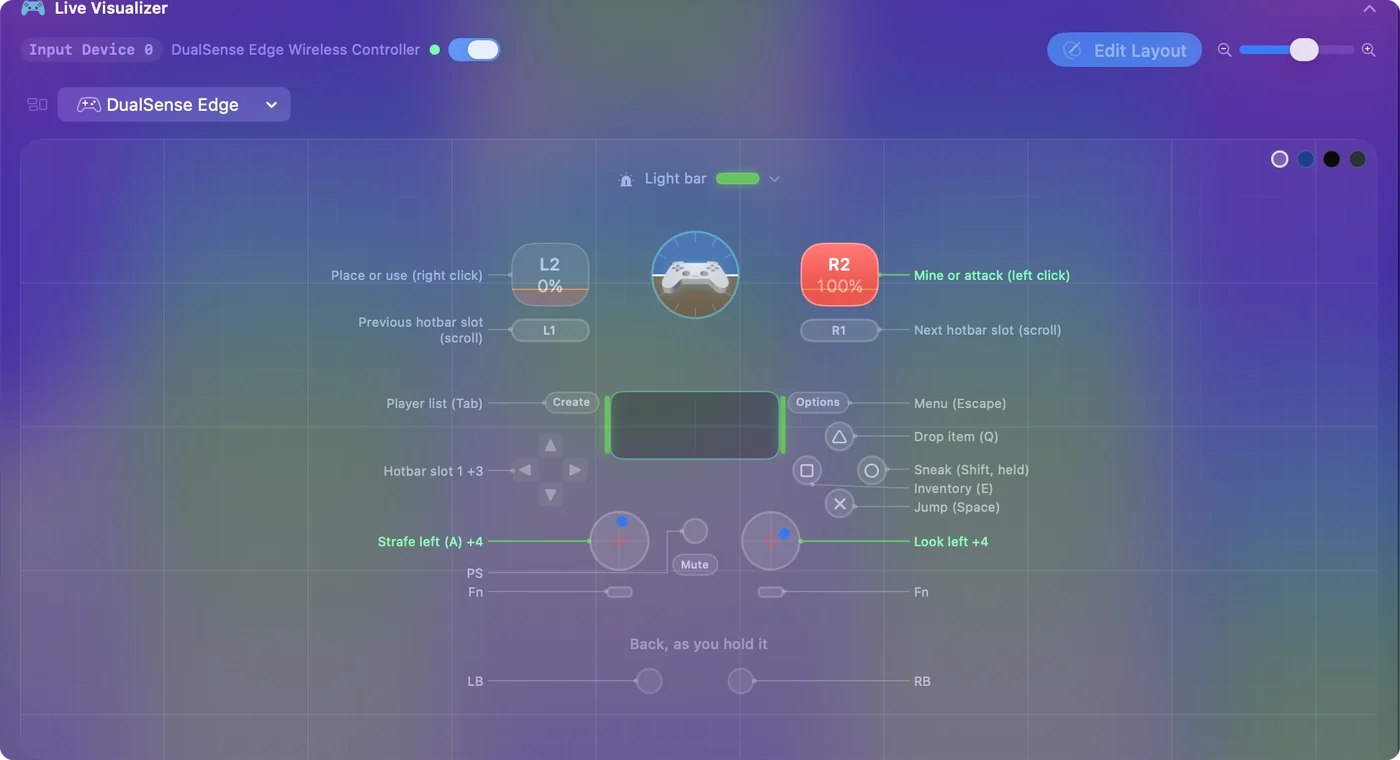
The rest of the layout:
- Mine and build. The right trigger mines and attacks. The left trigger places and uses.
- Hotbar. The bumpers scroll it, and the D-pad picks slots 1 to 4.
- Stick clicks. The left stick click sprints, and so does pushing the left stick all the way forward. The right stick click swaps hands.
- Menus. Menu is Escape and View is Tab.
Make the mapper feel right
Two settings matter, and both are on the right stick's rows in the editor.
- Deadzone. If the camera creeps with your thumb off the stick, raise the deadzone on the right stick rows.
- Look speed. It is the Speed value on those same rows. Set it to taste.
The preset leaves Auto-recenter cursor and Hide system cursor off, so the right stick moves the pointer over the item grid when the inventory is open. The deadzones page explains each setting.
For an AFK farm or a held button, the Minecraft auto clicker page covers both, and the rules: many servers forbid auto clickers.
With a PS5, Xbox or Switch Pro controller
The Minecraft layout binds by position, so one preset works on every pad. Only the pairing and the labels differ.
- PS5 DualSense or PS4 DualShock 4. Pair it in System Settings, Bluetooth (PS5 steps, PS4 steps). Cross jumps, Circle sneaks, Square opens the inventory. PlayStation pads also send motion, which InputConfig reads, if you want to aim a bow by tilting the controller.
- Xbox Series, or Xbox One with Bluetooth. Pair it the same way. A jumps, B sneaks, X opens the inventory.
- Switch Pro Controller. It pairs over Bluetooth. Nintendo's letters are swapped, so the bottom button, labeled B, jumps. Its gyro works for tilt aiming too.
If nothing happens in the game
Climb this ladder, smallest step first:
- Check the Mac sees the pad. Open Game Controllers in the System Settings sidebar and press a button.
- Check the preset is running. The menu bar icon has Start and Stop.
- Check Accessibility. InputConfig can only send keys once it is switched on in System Settings, Privacy & Security, Accessibility. The menu bar icon turns orange while a running preset waits for it.
- Click into the game. Minecraft has to be the window in front to receive the keys.
Controller connected but not working covers the Mac side in more depth.
Bedrock and Minecraft Education
Bedrock is not sold for the Mac, so the console-style controller support it has does not help here. For Java, the choice is a mod or a mapper. Minecraft Education, which schools use, does run on a Mac, and a mapper is the only route there. The Minecraft Education page has the setup.
The short version
- Java has no controller support. Add a mod or a mapper.
- The mapper is the quick route. Pair the pad, pick InputConfig's Minecraft preset, press Activate.
- Tune two numbers. They are Deadzone and Speed, on the right stick rows.
A mapper sends ordinary keys, so it works on any server and every version.
Questions
Does Minecraft Java Edition support controllers on Mac?
Not built in. Add a mod such as Controllable or MidnightControls, or map the controller to the keyboard with InputConfig, which needs no mod and works on any server.
Can I use a PS5 controller for Minecraft on a Mac?
Yes, both ways. Pair it over Bluetooth, then either install a mod or activate InputConfig's Minecraft preset.
Will a mapper get me banned on a server?
No. A mapper sends ordinary keyboard and mouse input. The server sees nothing unusual. Servers that ban mods are one reason to prefer a mapper.
Can I use an Xbox 360 controller for Minecraft on a Mac?
Not the wired Xbox 360 pad: macOS does not support it. Any Xbox Series or Xbox One controller with Bluetooth, a PS4 or PS5 pad, or a Switch Pro Controller works with the Minecraft preset.
How do I connect a controller to Minecraft on a MacBook?
Pair the controller in System Settings, Bluetooth, then activate InputConfig's Minecraft preset. It runs on any Mac with macOS 14 or later, Apple silicon or Intel, including every MacBook Air and MacBook Pro that can run macOS 14.
Can you play Minecraft Bedrock on a Mac?
Not as a Mac app. Bedrock is sold for Windows, consoles and phones. On a Mac you play Java Edition, or Minecraft Education if a school provides it.
Related
This page in other languages: Deutsch, Español, Français, 日本語, 한국어, Русский, ไทย, 繁體中文
Updated