How to connect an Xbox controller to a Mac
 InputConfig is completely free on the Mac App Store. You don't have to make an account, there are no subscriptions, and nothing is locked. Optimized for Apple silicon.
Turn the controller on with the Xbox button, then hold the small pairing button on the top edge, next to the USB port, until the Xbox button blinks fast. On the Mac, open System Settings, Bluetooth, and click Connect next to Xbox Wireless Controller. That is the same on a MacBook Air, MacBook Pro, iMac or Mac mini, and it takes no driver and no app. A cable works too, on macOS 15 Sequoia and later. Getting a game to use the pad is the second half, and it is further down.
On this page
Steps
- Turn the controller on with the Xbox button.
- Hold the pairing button on the top edge until the Xbox button blinks fast.
- Open System Settings, Bluetooth, and click Connect next to Xbox Wireless Controller.
- Open System Settings, Game Controllers, and press a button to check it is live.
Check that your controller has Bluetooth
Apple's own list is the Xbox Wireless Controller with Bluetooth (Model 1708), the Series X and Series S controllers, the Elite Series 2 and the Adaptive Controller. In practice:
- Works over Bluetooth. Every Xbox Series X|S controller, the Elite Series 2, and the Xbox One controllers made from 2016 on, the ones with the 3.5 mm headphone jack.
- Cable only. The first Xbox One controllers, without the jack, and the original Elite have no Bluetooth. They need a cable, which means macOS 15 or later, and I have not tested those older pads on it.
- Never. The wired Xbox 360 controller does not work on a modern Mac: its USB protocol is Microsoft's own and macOS has no driver for it. InputConfig lists one in its Devices menu, grayed out, with that reason. Xbox 360 controllers on a Mac has the details.
Pair it over Bluetooth
- You: Turn the controller on with the Xbox button, then hold the pairing button on the top edge until the Xbox button blinks fast.
- macOS: Lists Xbox Wireless Controller in System Settings, Bluetooth. Click Connect.
- Check: The Xbox button stays lit, and Game Controllers in the System Settings sidebar lights each button you press.
Slow blinking means the pad is looking for its Xbox, and only fast blinking means it is in pairing mode.
Or use a cable on macOS 15 or later
Apple added wired Xbox controllers in macOS 15 Sequoia. Plug a USB-C cable into a Series or Elite Series 2 pad, or micro-USB into an Xbox One pad, and if the Mac asks whether to allow the accessory to connect, click Allow. If you missed or declined that prompt, unplug the cable and plug it in again. The pad then shows up in Game Controllers in the System Settings sidebar, which is the quickest way to prove it works.
On macOS 14 Sonoma a cable does not make an Xbox pad a controller, so pair it over Bluetooth instead. InputConfig shows this case in its Devices menu: the pad is listed grayed out with the note to update to macOS 15 or use Bluetooth.
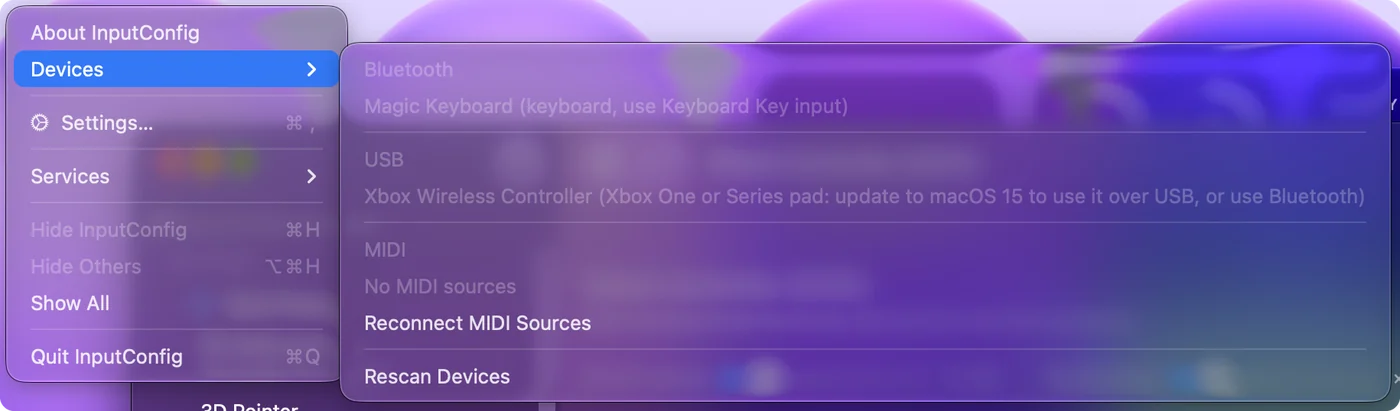
If a cable does nothing on Sequoia or later, try another one, since many cheap USB-C cables carry power and no data, and plug straight into the Mac rather than a hub or a monitor while you test.
If it will not pair
Climb this ladder, smallest step first:
- Unpair it from the Xbox. A controller still paired with a console keeps returning to it. Turn the console fully off.
- Forget it and pair fresh. Remove the old entry in the Mac's Bluetooth settings, then pair from the pairing button again.
- Update the firmware. Old firmware is the usual reason an Xbox controller pairs and drops, or never appears. The update runs on an Xbox, or on Windows through the Xbox Accessories app, not on a Mac.
Every check, in order, is on Xbox controller will not connect to a Mac.
Make a game use it
Native Mac games that support controllers pick up an Xbox pad without any setup. Steam games read it through Steam Input, and cloud games in a browser read it through the browser. Minecraft Java Edition, most strategy and older indie games, and every app that is not a game do not read controllers at all.
For those, InputConfig, which I built and give away free, maps its buttons and sticks to keys, clicks and the mouse. It has a Minecraft layout, an FPS layout for Xbox controllers built in, ready layouts for 450+ games and apps, and a mouse layout for the desktop. If Steam is the problem, see controller works on a Mac but not in Steam. Xbox controllers have no gyroscope or touchpad, so those features do not apply.
Turn it off, disconnect it, or add a second pad
- Turn it off. Hold the Xbox button for about six seconds until its light goes out.
- Disconnect and keep the pairing. Click its name in the Bluetooth list in Control Center. In InputConfig you can also click its entry at the top of the sidebar and choose Disconnect. On a cable, InputConfig tells you to unplug it instead, since an app cannot drop a wired connection.
- Remove it. In System Settings, Bluetooth, click the info button next to it and choose Forget This Device.
- A second Xbox pad. It pairs the same way and shows up under the same name. Two of the same controller on one Mac covers giving each player their own pad.
The short version
- Check the model. A Series pad, an Elite 2, or an Xbox One with a headphone jack has Bluetooth.
- Pair it. Hold the top-edge button until the Xbox button blinks fast, then Connect in System Settings, Bluetooth.
- Cable only on Sequoia. On macOS 14, use Bluetooth.
If it pairs and drops, update its firmware on an Xbox or a Windows PC before anything else.
Sources
Every fact about the controller on this page comes from its maker's own page or from Apple's, read on the date shown. What InputConfig does with it comes from the app itself.
- Apple. Connect an Xbox wireless game controller to your Apple device lists the Xbox Wireless Controller with Bluetooth (Model 1708), the Series S and Series X controllers, the Elite Series 2 and the Adaptive Controller, and gives the pairing steps. Read October 7, 2026.
- InputConfig. The app's README says a wired Xbox One or Series controller needs macOS 15 or later, with Bluetooth for macOS 14. Read October 7, 2026.
Questions
Does a Mac support Xbox controllers?
Yes. Every Bluetooth Xbox controller is compatible with a Mac and pairs in System Settings with no driver, on macOS 11.3 and later for the Series X|S, and a cable works on macOS 15 Sequoia and later. Games without controller support need a mapper such as InputConfig.
Does an Xbox controller work on a Mac mini or MacBook Air?
Yes. Pairing is the same on a MacBook Air, MacBook Pro, iMac and Mac mini: hold the pairing button until the Xbox button blinks fast, then click Connect in System Settings, Bluetooth. A Mac mini on the far side of a desk can get a weaker Bluetooth signal than a laptop, so move closer or use a data cable on macOS 15 or later.
Why does my Xbox controller keep disconnecting from my Mac?
Usually old controller firmware or a controller still paired to an Xbox. Update it on an Xbox or Windows PC, unpair it from the console, then pair the Mac again.
Can I use an Xbox 360 controller on a Mac?
No. The wired one uses a USB protocol macOS cannot read, and the wireless one has no Bluetooth, so it cannot pair with a Mac. An Xbox One controller with a headphone jack, or any Series controller, is the replacement.
Does the Xbox Wireless Adapter work on a Mac?
No. Microsoft makes that USB adapter for Windows, and macOS has no driver for it. Every Xbox controller that works on a Mac connects through the Mac's own Bluetooth, or by cable on macOS 15 and later.
Why won't my wired Xbox controller connect to my Mac?
Wired Xbox controllers need macOS 15 Sequoia or later. On macOS 14, pair over Bluetooth. On Sequoia and later, click Allow if the Mac asks whether to let the accessory connect, and use a cable that carries data, plugged straight into the Mac.
Why is my Xbox controller connected to my Mac but not working in a game?
The Mac sees it, but the game may not read controllers. Open System Settings, Game Controllers and press a button to prove the pad is live. If it is, the game has no controller support, and a mapper such as InputConfig, free on the Mac App Store, turns the buttons and sticks into keys and mouse movement. You do not need an app just to connect it.
Related
This page in other languages: Čeština, Deutsch, Español, Français, Magyar, Bahasa Indonesia, Italiano, 日本語, 한국어, Polski, Português, Русский, ไทย, Українська, Tiếng Việt, 繁體中文, 简体中文
Updated