Xbox controller will not connect to a Mac
 InputConfig is completely free on the Mac App Store. You don't have to make an account, there are no subscriptions, and nothing is locked. Optimized for Apple silicon.
Four things account for nearly every Xbox controller that will not work with a Mac: the controller has no Bluetooth, its firmware is old, it is still paired with an Xbox, or it is on a cable with a macOS that does not read wired Xbox pads. Check them in that order. The wired Xbox 360 pad is a separate case: no Mac reads it, which Xbox 360 controllers on a Mac explains. If the Mac shows it connected and a game still ignores it, skip to the section on games.
On this page
Check that it has Bluetooth
Look at the plastic around the Xbox button.
- Same color as the face, with a headphone jack. A 2016 or later Xbox One controller, or a Series controller. It has Bluetooth.
- Glossy, matching the top bumpers, no jack. A first-generation Xbox One pad: no Bluetooth, cable only.
- Elite controllers. The Elite Series 1 has no Bluetooth. The Elite Series 2 does.
Update the firmware
Xbox controllers ship with firmware that pairs badly with anything that is not an Xbox, and the fix is an update, which runs on an Xbox console or on Windows through the Xbox Accessories app, and it cannot be done on a Mac. If the Mac shows a message that the controller needs a firmware update, that is the same problem. Updating Xbox controller firmware without Windows on the Mac lists every way round it. If you have neither an Xbox nor a PC, a friend with either one will do, because the update takes two minutes and it sticks.
Unpair it from the Xbox
A controller bound to an Xbox keeps trying to reach it. Turn the console fully off, or pair the controller to the Mac while out of the console's range, and it stays with the Mac.
Pair it fresh
- You: Forget any old entry in System Settings, Bluetooth. Turn the controller on, then hold the pairing button on the top edge for a full three seconds.
- macOS: Lists Xbox Wireless Controller. Click Connect.
- Check: The Xbox button blinked fast before it connected. A short press only turns the pad on. Holding until the fast blink is what forgets the old pairing.
If Bluetooth will not take it, a cable works on macOS 15 Sequoia and later: USB-C on Series pads, micro-USB on Xbox One.
If it does not show up in the Bluetooth list
A short press on the Xbox button only turns the controller on, and it goes looking for the last thing it was paired with: an Xbox, a phone, a PC. The Xbox button blinks slowly while it looks. Climb this ladder, smallest step first:
- Wait for the fast blink. Only fast blinking means pairing mode.
- Restart Bluetooth. Turn it off and on in Control Center.
- Forget the old entry. Remove any old Xbox Wireless Controller in System Settings, Bluetooth.
- Put in fresh batteries. Series and Xbox One pads run on AA batteries, and weak ones make pairing fail before they make the controller go dark.
If it is on a cable and nothing happens
Macs read wired Xbox controllers from macOS 15 Sequoia on. Climb this ladder, smallest step first:
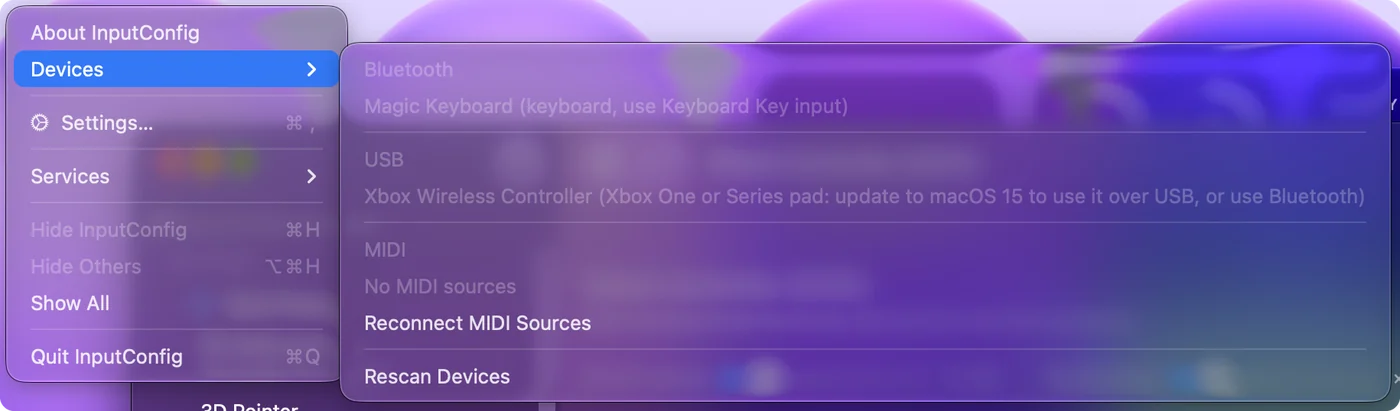
- Check the macOS version. On macOS 14 Sonoma the cable does not make it a controller. Pair it over Bluetooth instead. If InputConfig is installed, its Devices menu lists the pad grayed out with the note Xbox One or Series pad: update to macOS 15 to use it over USB, or use Bluetooth.
- Allow the accessory. On Sequoia and later, the first time you plug in, the Mac may ask whether to allow it. If you missed or declined that prompt, unplug, plug in again and click Allow.
- Swap the cable. Many USB-C cables are charge only.
- Skip the hub. Plug straight into the Mac, not a hub or a display, while you test.
If the Mac connects and a game ignores it
Open Game Controllers in the System Settings sidebar and press some buttons. If they light up there, the Mac side is working and the game is the problem: it has no controller support, it runs through Steam Input or CrossOver, or it is a cloud stream. Controller connected but not working covers each case. For a game with no controller support at all, InputConfig, free on the Mac App Store, maps the Xbox pad to the keys and mouse the game already understands.
The short version
- Bluetooth model. A headphone jack or a Series badge means it can pair.
- Firmware, then pairing. Update it on an Xbox or Windows, unpair it from the console, and hold the pairing button until the fast blink.
- Cable on Sequoia only. On macOS 14, Bluetooth is the only way.
Old firmware is the cause people check last and should check first.
Questions
Which Xbox controllers work with a Mac over Bluetooth?
Xbox Series X|S controllers, the Elite Series 2, and Xbox One controllers made from 2016 on, the ones with a headphone jack. Earlier Xbox One pads and the Elite Series 1 are cable only.
How do I update Xbox controller firmware without an Xbox?
Through the Xbox Accessories app on a Windows PC. There is no Mac version.
Why is my Xbox controller not showing up on my Mac?
It is not in pairing mode. Hold the pairing button on the top edge until the Xbox button blinks fast, not slowly, then look in System Settings, Bluetooth. If it still does not appear, check it has Bluetooth, fresh batteries and current firmware.
My Xbox controller is connected to my Mac but not working in games. Why?
The game does not read controllers, or not through the layer it runs in. Check the pad in Game Controllers in System Settings. If it responds there, map it to keys and the mouse with InputConfig, or turn on Steam Input for Steam games.
My wired Xbox controller stopped working after a macOS update. Why?
macOS 15.4 broke wired controllers in many apps, Steam included, while Bluetooth kept working. Pair it over Bluetooth, update macOS and Steam, or turn on Increase controller compatibility for the app in System Settings, Game Controllers.
Does a wired Xbox 360 controller work on a Mac?
No. Its USB protocol is not one macOS can read, on any version. InputConfig lists it in the Devices menu, grayed out, with the reason.
Related
This page in other languages: Español, Русский, Tiếng Việt
Updated