How to test a controller on a Mac
 InputConfig is completely free on the Mac App Store. You don't have to make an account, there are no subscriptions, and nothing is locked. Optimized for Apple silicon.
To test a controller on a Mac, connect it, open System Settings and click Game Controllers in the sidebar, then press every button: each one lights as you press it. If the controller is listed and lights up, the Mac side works. For stick positions, trigger travel, drift, the touchpad, motion and battery you need a live view, and there are two free ones below: the browser tool on this site, and the Live Visualizer in InputConfig.
On this page
Steps
- Connect the controller over Bluetooth or a cable.
- Open System Settings, Game Controllers, and select the controller.
- Press every button and watch each one light.
- For sticks, triggers and drift, open InputConfig and click any preset to see the Live Visualizer.
Test it in System Settings
- You: Open System Settings and click Game Controllers in the sidebar. It appears once a controller has been connected. Click your controller and press each button.
- macOS: Lists every connected pad and lights each button on its drawing as you press it.
- Check: If a PlayStation, Xbox or Switch controller is not listed here, the Mac is not seeing it and the problem is pairing, not the game.
Wheels, flight sticks and generic USB pads never appear here, because macOS does not treat them as gamepads, and that does not mean they are broken.
See every axis in InputConfig
InputConfig is free on the Mac App Store. Click any preset in its sidebar and the Live Visualizer draws the controller you are holding, with every control where it sits and the legend printed on it. It draws 19 models as themselves, among them the DualSense, the DualShock 4, the Xbox pads, the Switch Pro Controller and Joy-Cons, and any other pad as a standard gamepad or a plain map of what it reports. Nothing has to be running.
- Buttons. Each one lights as you press it.
- Sticks. Each stick's dot follows the stick.
- Triggers. Each analog trigger fills with its percentage.
- Touchpad and motion. A dot follows each finger on a DualSense or DualShock 4 touchpad, and the motion widget turns as you tilt a pad that has motion sensors.
- Paddles and back buttons. They are drawn on a strip below the controller, as you hold it.
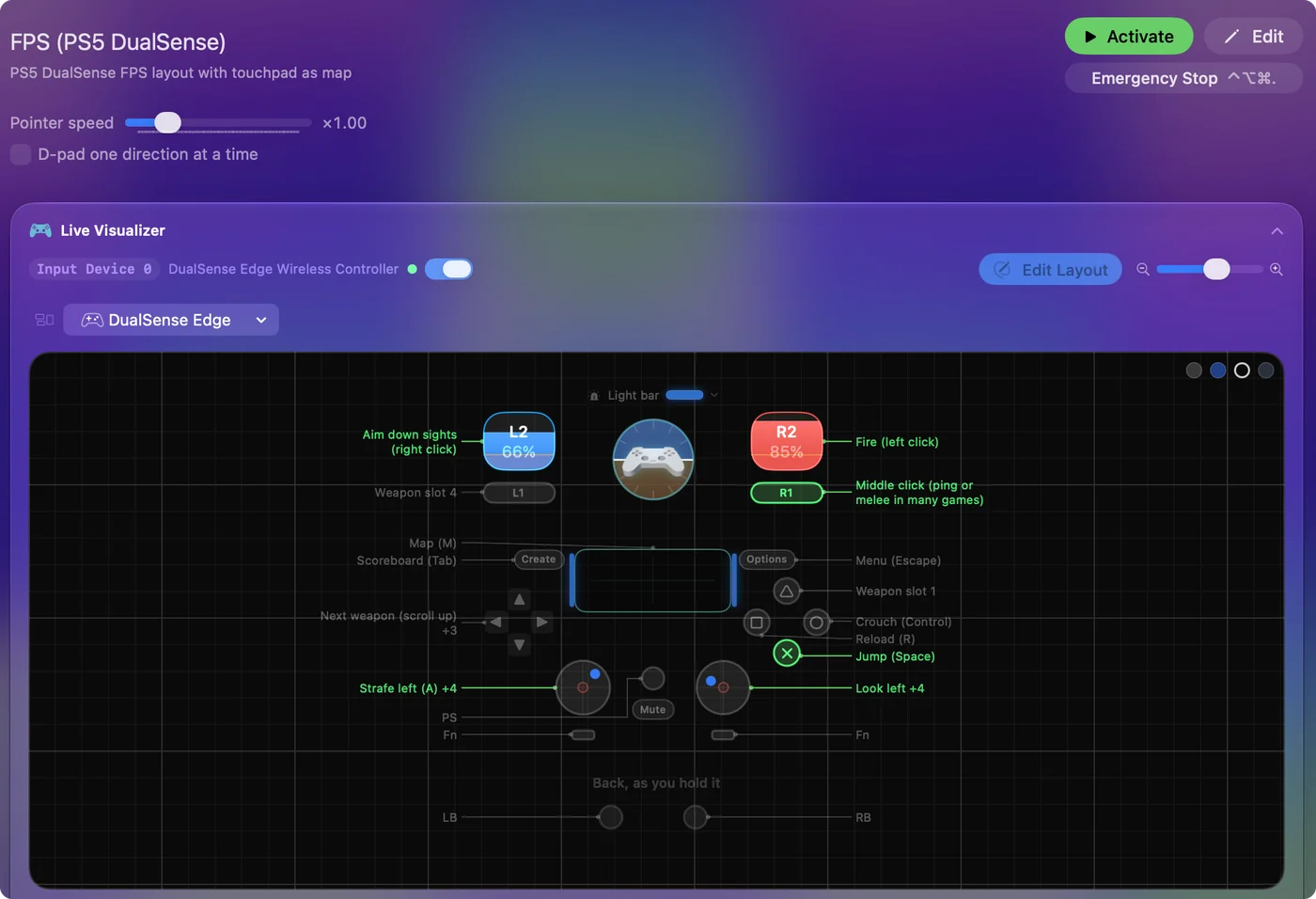
It also reads devices System Settings does not list, such as generic USB pads, arcade sticks, wheels and flight sticks, and draws each one, as itself when it knows the model and as a plain map of what it reports when it does not. Two lines under the drawing help you read it: one says what that model never sends to a Mac, so a dark control is not mistaken for a broken one, and Also reported lists any button the drawing has no place for. Click the controller at the top of the sidebar for what the Mac reports about it: brand, type, how many buttons and axes it has, whether it has motion sensors, and the battery level with its charging state. Settings, Devices keeps a Live press log with the name macOS gives each button you press.
Or test it in a browser
The gamepad tester on this site reads a connected controller through the browser and shows every button, both sticks and both triggers live. The stick drift test records both sticks at rest, gives the drift as a number and suggests a deadzone. Both run right in the page. A browser sees buttons, sticks and triggers, not a touchpad or motion sensors, and it only shows a controller after you press a button with the tab in front.
Run the test in order
- Buttons. Press each one, D-pad and stick clicks included, and watch it light.
- Sticks. Move each round its full circle, then let go. The dot should reach the edge all the way round and come back to the crosshair.
- Triggers. Squeeze each slowly. An analog trigger climbs smoothly from 0 to 100 percent. A digital one, as on Switch pads, just lights. See trigger not working if one does neither.
- The extras. Touchpad, paddles, motion, whatever your pad has.
- Rumble. Activate the built-in Haptic Feedback preset and press the four face buttons: each rumbles at a different strength, and each types a letter, a to d, into the app in front.
- Cable, then Bluetooth. A fault that appears only on one of them is the connection, not the controller.
Test a PS5 or PS4 controller
A DualSense or DualShock 4 has the most to test: the touchpad with two fingers, the gyro, the light bar and the Edge's back buttons, none of which a browser tester sees. They have their own page: PS5 controller tester on a Mac.
Test an Xbox controller
Pair an Xbox Wireless Controller by holding the small pairing button on its top edge until the Xbox button blinks fast, then pick it in System Settings, Bluetooth. Game Controllers lists it, and every button lights as you press it. In the Live Visualizer each stick shows its position and each trigger its percentage. An Elite Series 2 is drawn with its four paddles on the back strip. They read only on the default profile, and the line under the drawing says so. The Haptic Feedback preset tests rumble the same way as on a PlayStation pad.
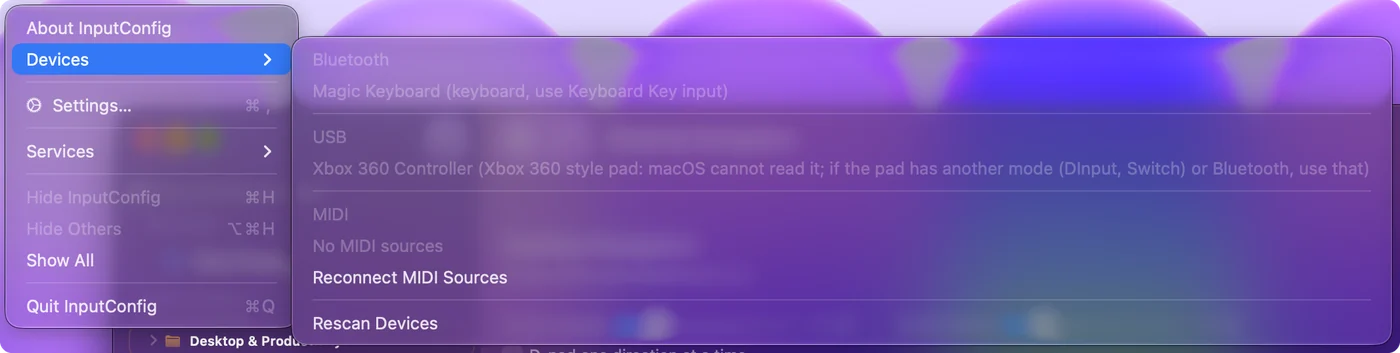
Over a USB cable, an Xbox One or Series controller needs macOS 15 or later. A wired Xbox 360 controller is a different case: macOS cannot read it, so it will not show up in any tester on a Mac. InputConfig lists it in its Devices menu, grayed out, with that reason, so you are not left guessing.
Test a Switch Pro Controller, Joy-Cons or an 8BitDo
- Switch Pro Controller and Joy-Cons. They pair with macOS 13 and later: hold the small Sync button until the player lights run back and forth, then pick the controller in System Settings, Bluetooth. Each Joy-Con pairs on its own. Their ZL and ZR are digital, so they light rather than fill, and macOS does not report SL or SR. InputConfig reads Joy-Con motion when macOS reports it, and reads the face buttons by position, so the drawing and your rows agree on which one is A.
- Switch 2 Pro Controller and Joy-Con 2. System Settings never lists them, so test them in InputConfig. It reads the Pro Controller 2 over a USB-C cable, motion included, the Joy-Con 2 one at a time in their charging grip, and since 1.8 both over Bluetooth once the Switch 2 setting in Settings, Devices is on. All of it is experimental, with no rumble, and the Bluetooth part is not yet checked on a controller.
- 8BitDo. In the modes the Mac reads as a standard controller it appears under Game Controllers. In modes it reads as a generic USB device it does not, and System Settings looks empty even though the pad works. InputConfig reads both kinds, and when it spots an 8BitDo in a mode it cannot use, the main window says which mode it is in. The 8BitDo page lists which mode to use.
Tell the controller from the Mac
- Not listed in Game Controllers. The Mac has not connected to it. That is pairing, a cable, or a mode switch, not a broken controller. Start with controller not recognized on a Mac.
- Listed, and every button lights. The controller and the Mac are fine. If a game still ignores it, the game is the problem: see controller connected but not working.
- Listed, but one part never responds. If one button or stick fails in every tester, over both cable and Bluetooth, that part of the controller is worn or broken.
- A stick that moves on its own at rest. That is drift, and it can be hidden: fix stick drift on a Mac.
A fault that shows in every tester, on both cable and Bluetooth, is the controller itself, while anything less than that is the connection or the game.
Check the battery
A controller that drops out or lags every few minutes is often just low. InputConfig shows the battery level beside the controller at the top of its sidebar, and the menu bar icon lists every connected pad with its percentage. More on where to look: check a controller's battery on a Mac.
The short version
- Buttons. System Settings, Game Controllers lights each one.
- Sticks, triggers, drift, touchpad, motion. InputConfig's Live Visualizer shows them, free, with nothing running.
- No install. Use the browser deadzone tool on this site.
If the Live Visualizer shows every press and push, the controller works, and the problem is in the game or its settings.
Questions
How do I know if my Mac recognizes my controller?
System Settings, Game Controllers, in the sidebar, lists it. If it is there and lights up, the Mac side works.
How do I check a controller for stick drift on a Mac?
Let the stick go and watch where it rests, in the deadzone visualizer on this site or in InputConfig's Live Visualizer. A dot off center is drift. Adjust live on the stick's row in InputConfig gives the exact number, and a deadzone just above it hides the drift.
How do I test a joystick or racing wheel on a Mac?
System Settings only lists gamepads, so a USB joystick, wheel or arcade stick will not appear there. InputConfig reads those directly, and its Live Visualizer shows every axis and button, with a wheel's angle in degrees. See testing a wheel or joystick on a Mac.
How do I test controller vibration on a Mac?
Activate the Haptic Feedback preset that comes with InputConfig and press the four face buttons: each one rumbles at a different strength, and types a letter, a to d, into the app in front. If none of the four buzz on a pad that should rumble, the motors are the likely fault.
System Settings shows my controller but a browser tester does not. Why?
Browsers hide controllers until you press a button with the tester's tab in front, so press one first. If it still shows nothing, try another browser: support for controllers differs between Safari, Chrome and Firefox. The controller itself is fine if System Settings lights its buttons.
Is there a free gamepad tester app for Mac?
Yes, several. InputConfig is free on the Mac App Store, and its Live Visualizer shows every button, stick, trigger, touchpad touch and motion reading live on a drawing of your controller, with the battery level in the sidebar. It is a controller mapper first, so it also lets you do something with the pad once you know it works. There are single-purpose tester apps on the App Store too, and the browser tools on this site need no install at all.
Related
This page in other languages: Français, Русский
Updated