How to use an Xbox controller as a mouse on a Mac
 InputConfig is completely free on the Mac App Store. You don't have to make an account, there are no subscriptions, and nothing is locked. Optimized for Apple silicon.
An Xbox controller works as a Mac mouse once a mapper turns its sticks and triggers into the pointer and clicks. Every Bluetooth Xbox controller pairs with a Mac without a driver, and InputConfig, a free Mac app I made, turns it into a mouse and keyboard in every app. macOS itself cannot do this: its Game Controllers settings only swap controller buttons for other controller buttons, and only inside games that already support a pad.
On this page
Steps
- Pair the Xbox controller over Bluetooth, or plug in a USB cable on macOS 15 or later.
- Open InputConfig and allow Accessibility access.
- Activate the Desktop Navigation preset.
- Drag Pointer speed on the preset's page, or adjust rows in the editor.
Pair the controller and turn on Desktop Navigation
Step 1: Pair
- You: Hold the small pairing button on the top edge until the Xbox button blinks quickly, then pick the controller in System Settings, Bluetooth. Or plug in a USB cable, which macOS reads from macOS 15 Sequoia on.
- macOS: Connects it as a game controller, with no driver.
- Check: The Xbox button stays lit, and the controller appears in System Settings, Game Controllers.
Step 2: Activate
- You: Open InputConfig, allow Accessibility access, and activate the built-in Desktop Navigation preset.
- InputConfig: Moves the pointer from the left stick and clicks from RT and A.
- Check: Push the left stick and the pointer moves. If it drifts with the stick at rest, open the preset and raise the stick deadzone.
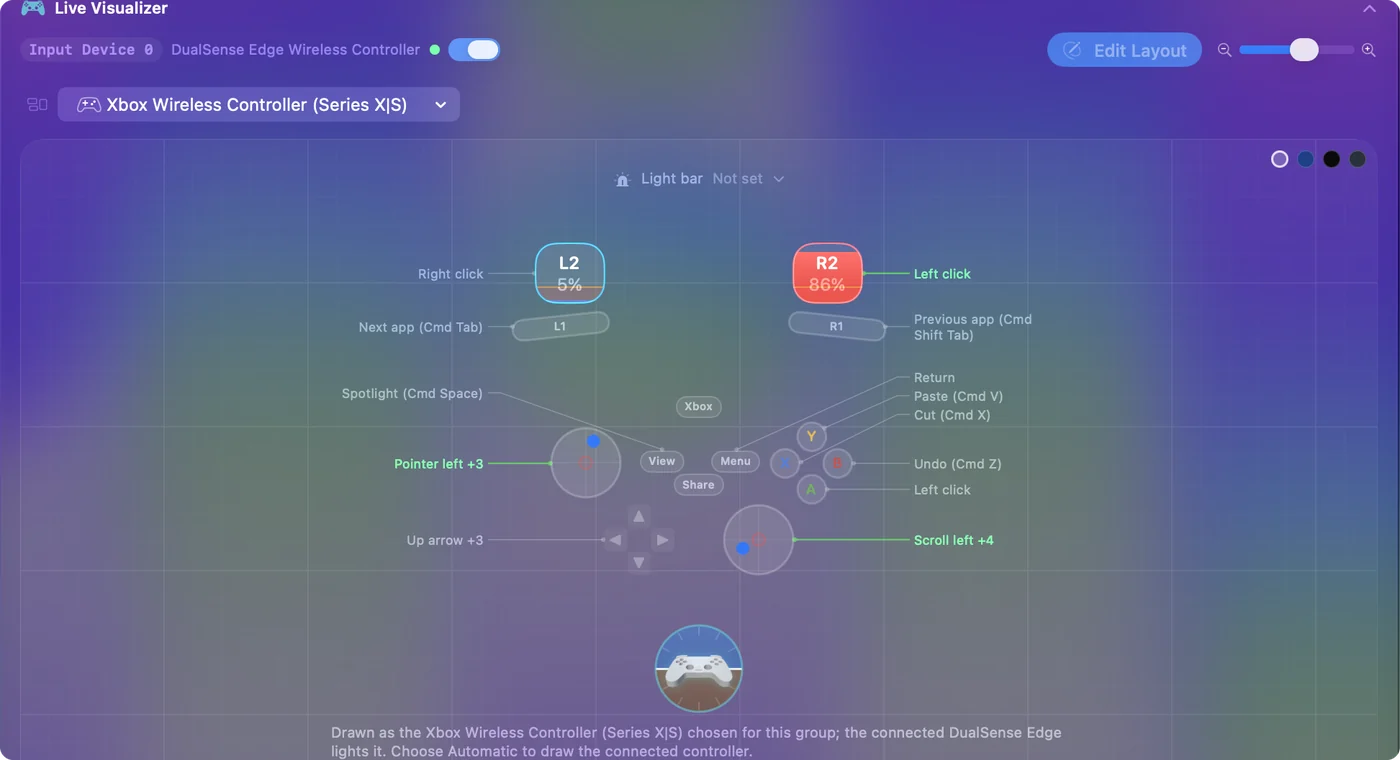
The layout, by job:
- Point and scroll. Left stick moves the pointer, right stick scrolls.
- Click. RT and A left-click, LT right-clicks.
- Edit. B, X and Y are Undo, Cut and Paste, and pressing the right stick selects all.
- Move around the Mac. The D-pad sends arrows, the bumpers switch apps, Menu is Return, and View opens Spotlight.
Pick another ready layout
- Mouse + Scroll. A pointer and nothing else: A left-clicks, B right-clicks, X middle-clicks, and the D-pad nudges the pointer slowly for small targets.
- Easy Browse. It runs the whole Mac from the pad: a pointer that starts slow, A to click, B to go back a page, the left stick press to grab and drop, the right stick press to double-click, LB for Dictation and RB to read the selected text aloud.
Slow the pointer down for small targets
- Pointer speed and Scroll speed. They sit on the preset's page and make every pointer or scroll row in the preset faster or slower at once.
- Ramp-up. In a stick row's Options, it starts the pointer slow and builds up the longer you hold, which makes small buttons easier to hit.
- The Smooth curve. A small push stays slow, and a full push still crosses the screen.
Lower Pointer speed first, and reach for Ramp-up only if small targets are still hard to land on. Controller mouse speed and scrolling with a controller cover both.
Check which Xbox controllers work
- Over Bluetooth. The Xbox Wireless Controller (the Bluetooth model from 2016 on), the Xbox Series X|S controller, the Xbox Elite Series 2 and the Xbox Adaptive Controller.
- Over a USB cable. Xbox One, Series and Elite controllers, from macOS 15 Sequoia on. The original Xbox One controller without Bluetooth needs that cable and macOS 15.
- Not at all. Wired Xbox 360 pads and the Xbox 360 wireless receiver cannot be read by macOS. InputConfig says so in its Devices menu instead of leaving you guessing.
- Elite Series 2 paddles. Press Scan on a row and press the paddle: InputConfig binds whatever the Mac receives. The Elite Series 2 on a Mac explains profiles and paddles.
Point without a stick: the Xbox Adaptive Controller
The Adaptive Controller's two large pads and its 3.5 mm ports are all buttons to InputConfig. Bind them to pointer movement in steps, clicks, or any key, and plug in the switches you already use. The Xbox Adaptive Controller guide covers the full setup.
If the pointer does not move
Climb this ladder, smallest step first:
- Check the pairing. The controller should be listed in System Settings, Game Controllers, and its buttons should light up there.
- Check the cable and macOS. A wired Xbox One or Series pad needs macOS 15 or later. Before that, pair it over Bluetooth.
- Check Accessibility. If the Live Visualizer lights up but the pointer stays still, switch InputConfig on in System Settings, Privacy & Security, Accessibility.
- Check the model. If it is a wired Xbox 360 pad, the Devices menu names it and explains that macOS cannot read it.
What an Xbox controller cannot do here
An Xbox controller has no touchpad and no gyroscope, so on a Mac it points with a stick only. If you want to point by sliding a finger or by tilting, that takes a PlayStation controller: see a PS5 controller as a mouse. The triggers are analog, though, and can drive anything a stick can.
The short version
- Pair. Use Bluetooth on any recent Xbox pad, or a cable on macOS 15 or later.
- Activate. Turn on Desktop Navigation, then adjust Pointer speed.
- Know the limit. It points with the stick only, because an Xbox pad has no touchpad and no tilt.
An Xbox pad and one preset are a full mouse for the couch, with no Steam and no driver.
Questions
Can an Xbox controller move the mouse on a Mac?
Yes, with a mapper. InputConfig's Desktop Navigation preset puts the pointer on the left stick, scrolling on the right stick and clicks on the triggers.
How do I make the Xbox controller pointer slower or faster?
Drag Pointer speed on the preset's page. For finer control, open a stick row's Options and set the Smooth curve or Ramp-up.
Do the Elite Series 2 paddles work on a Mac?
Yes, on the default profile, with no profile light lit: each paddle then reports as a button of its own, P1 to P4, and Scan binds it. In a custom profile a paddle copies the button the profile gives it, and the Mac only sees that button.
Do I need Steam to use an Xbox controller as a mouse on a Mac?
No. InputConfig runs from the menu bar with Steam closed, and the pointer works in every app, from the Finder to a browser. Steam can do something similar with its own desktop layout, but only while Steam is open.
Why does my wired Xbox 360 controller not work on a Mac?
macOS cannot read wired Xbox 360 pads or the Xbox 360 wireless receiver, so no app on the Mac can map them. InputConfig names the pad in its Devices menu and explains this.
Related
Updated