How to use a PS5 controller as a mouse on a Mac
 InputConfig is completely free on the Mac App Store. You don't have to make an account, there are no subscriptions, and nothing is locked. Optimized for Apple silicon.
A PS5 controller works as a Mac mouse, with a free app. A DualSense has two sticks, two analog triggers, a real touchpad and a gyroscope, all readable over Bluetooth or USB-C without a driver, but macOS will not turn any of them into a pointer: System Settings can only remap controller buttons to other controller buttons. InputConfig, a free Mac app I made, does the rest in about a minute.
On this page
Steps
- Pair the DualSense over Bluetooth (hold PS and Create) or plug in USB-C.
- Open InputConfig and allow Accessibility access.
- Activate the Desktop Navigation preset.
- Drag Pointer speed on the preset's page if the pointer is too fast or too slow.
Turn on Desktop Navigation
- You: Pair the DualSense (hold PS and Create until the light bar flashes, then pick it in System Settings, Bluetooth) or plug in a USB-C cable. Open InputConfig, allow Accessibility access, and activate the built-in Desktop Navigation preset.
- InputConfig: Moves the pointer from the left stick and clicks from R2 and Cross.
- Check: Push the left stick. The pointer moves. If it creeps with the stick at rest, raise the deadzone as in set the deadzone and the speed.
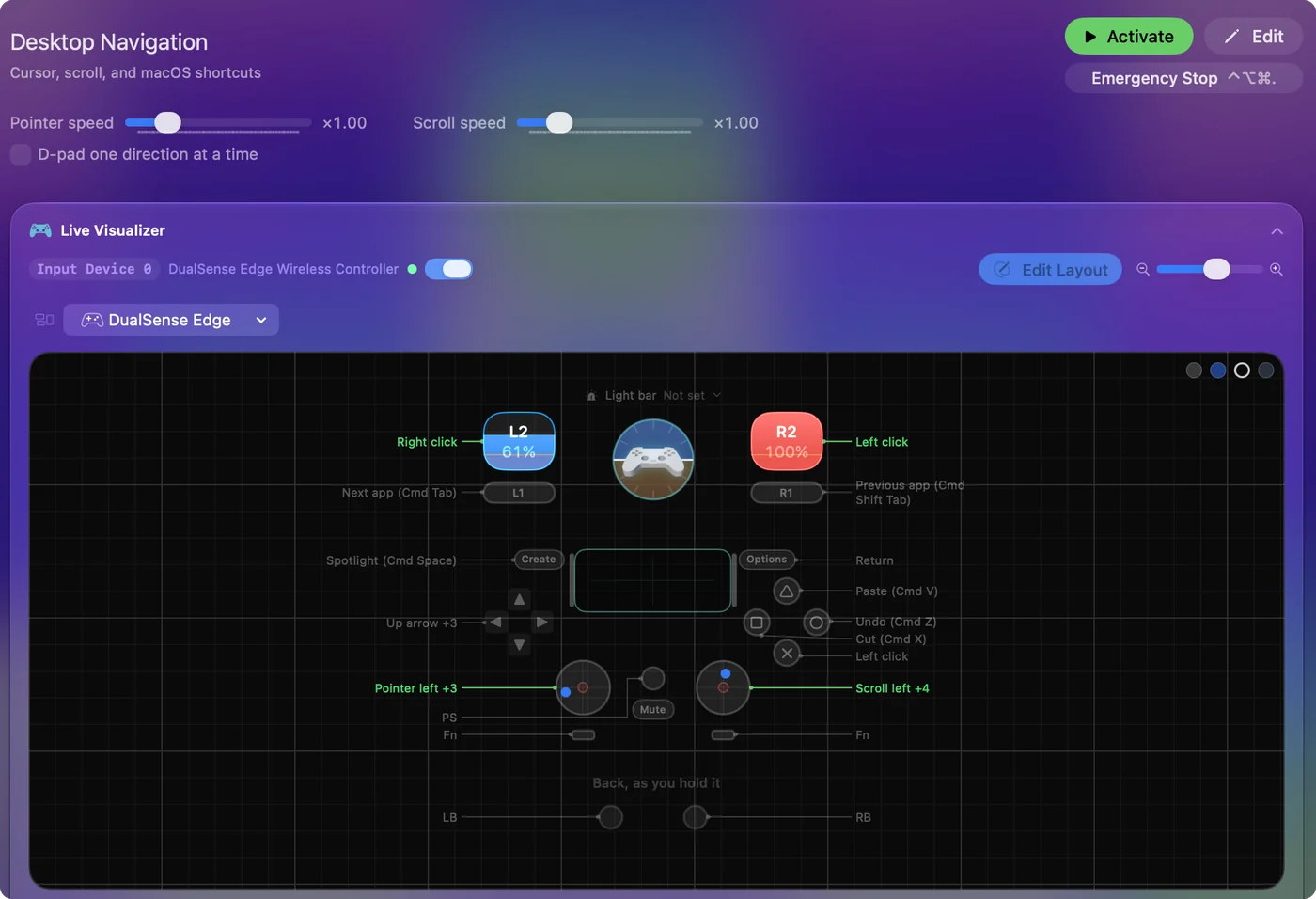
The layout, by job:
- Point and scroll. The left stick moves the pointer and the right stick scrolls.
- Click. R2 and Cross left-click, L2 right-clicks.
- Edit. Circle, Square and Triangle are Undo, Cut and Paste, and pressing the right stick selects all.
- Move around the Mac. The D-pad sends the arrow keys, L1 and R1 switch apps, Options is Return, and Create opens Spotlight.
Pick one of three ways to point
- The stick. Desktop Navigation above, or Mouse + Scroll for a pointer and nothing else: Cross left-clicks, Circle right-clicks, Square middle-clicks, and the D-pad nudges the pointer slowly for small targets.
- The touchpad. Touchpad Mouse makes it a trackpad: one finger moves the pointer, a second finger scrolls, a tap or a press clicks, and a two-finger tap right-clicks. Tap to click has the details.
- Tilt. Motion Cursor moves the pointer with the gyroscope like a laser pointer. Cross and Circle click and the right stick scrolls. A USB-C cable always carries motion. Some Bluetooth pairings drop it.
The stick is the easiest to start with, the touchpad the most precise, and tilt the one for a hand that cannot work a stick.
Use the whole Mac with Easy Browse
Easy Browse is the calm layout for browsing, reading and writing without a keyboard:
- Point. The left stick moves the pointer and starts slow. The right stick scrolls.
- Click and go back. Cross clicks, Circle goes back a page, Square closes menus and pop-ups, and Triangle confirms or opens.
- Grab and double-click. Press the left stick to grab a window, file or text and again to drop it. Press the right stick to double-click.
- Talk and listen. L1 starts and stops Dictation, and R1 reads the selected text aloud.
- Find things. Options or the touchpad press opens Spotlight, and Create shows Mission Control.
- Pages and tabs. On the D-pad, left and right go back and forward a page, and up and down switch tabs.
Dictation needs to be on in System Settings, Keyboard, and reading aloud needs Speak selection in System Settings, Accessibility, Spoken Content.
Set the deadzone and the speed
Step 1: Stop the drift
- You: Open the preset in the editor, open Options on a stick row, and press Adjust live.
- InputConfig: Shows where the stick really rests, with the deadzone ring around the center.
- Check: Drag the deadzone ring past the resting dot, and the pointer stops creeping.
Step 2: Set the speed
- You: Drag Pointer speed on the preset's page.
- InputConfig: Makes every pointer movement in the preset faster or slower at once.
- Check: Move the pointer to a small button. If you overshoot, lower it. If crossing the screen takes too long, raise it.
For finer work, pick the Smooth curve on the stick rows so small pushes are slow, or add Ramp-up so a short push moves a little and a held push speeds up. Controller mouse speed walks through each setting. A preset that is on keeps working while the editor is open, so the controller still moves the pointer and clicks, and Save and Cancel stay in reach without a mouse.
The Accessibility Pointer layout in the Smart Preset Maker is the same idea tuned for precision: a slow left stick for fine work and a fast right stick for crossing the screen.
If the pointer misbehaves
Climb this ladder, smallest step first:
- It creeps on its own. Raise the deadzone on the stick rows with Adjust live.
- It is too fast or too slow. Drag Pointer speed on the preset's page.
- It does not move at all. Check that the preset is active and that InputConfig is on in System Settings, Privacy & Security, Accessibility.
- Tilt does nothing. Use a USB-C cable, which always carries motion.
What else the DualSense does on a Mac
- Light bar. It takes the preset's color (light bar).
- Speaker. The controller's own speaker can read a phrase aloud when a button fires, once it is the Mac's sound output in System Settings, Sound (spoken feedback).
- Rumble. It can confirm a press.
- Triggers. L2 and R2 are read as analog axes.
- Create. It keeps its macOS screenshot and recording shortcut unless the running preset uses it. Desktop Navigation does, for Spotlight.
Everything the controller reports is on the connecting controllers page.
The short version
- Start. Activate Desktop Navigation.
- Fix the feel. Deadzone with Adjust live, then Pointer speed.
- Try the others. Touchpad Mouse gives you a trackpad, Motion Cursor uses tilt, and Easy Browse runs the whole Mac.
Five minutes with the deadzone and Pointer speed makes the difference between a toy and a mouse.
Questions
Can you use a PS5 controller as a mouse on a Mac?
Yes. Pair it over Bluetooth or USB-C, open InputConfig, and activate the Desktop Navigation preset. The sticks move the pointer and scroll, the triggers click, and the touchpad can work as a trackpad.
Does it need a driver?
No. macOS supports the DualSense natively. InputConfig only needs the Accessibility permission, which is what lets it move the pointer and send clicks.
Does the DualSense touchpad work as a trackpad on a Mac?
Yes, with the Touchpad Mouse preset: one finger moves the pointer, two fingers scroll, a tap or a press clicks, a two-finger tap right-clicks, and regions of the pad can be bound to their own keys.
How do I make the PS5 controller pointer slower?
Drag Pointer speed on the preset's page to the left, or switch the stick rows to the Smooth curve so a small push stays slow. Mouse + Scroll also has a slow pointer on the D-pad.
Is it free?
Yes. InputConfig is free on the Mac App Store and open source.
Can the PS5 touchpad be a mouse on a Mac, like in the PC videos?
Yes. The touchpad videos on YouTube are almost all filmed on Windows, but on a Mac InputConfig reads the DualSense touchpad directly: a finger on the pad moves the pointer, and a tap or a press clicks. No Steam and no driver is needed.
Related
This page in other languages: 日本語, 繁體中文
Updated