A precise pointer from a game controller
 The Accessibility Pointer layout is built into InputConfig, free on the Mac App Store. You don't have to make an account, there are no subscriptions, and nothing is locked. Optimized for Apple silicon.
On a Mac: Works in every app. It is a mouse. Nothing to enable beyond the one-time Accessibility permission macOS asks for.
Yes, a game controller can be a precise mouse on a Mac for hands that cannot use one: a precise pointer on the left stick, a fast one on the right, every click on two controls. It works in every app, and nothing needs enabling beyond the one-time Accessibility permission macOS asks for.
If a tremor, limited range or fatigue makes a mouse hard, start here rather than with Desktop Navigation, then read the tremor guide for the settings that make it steady.
On this page: 8 sections
The layout, control by control
How the layout thinks
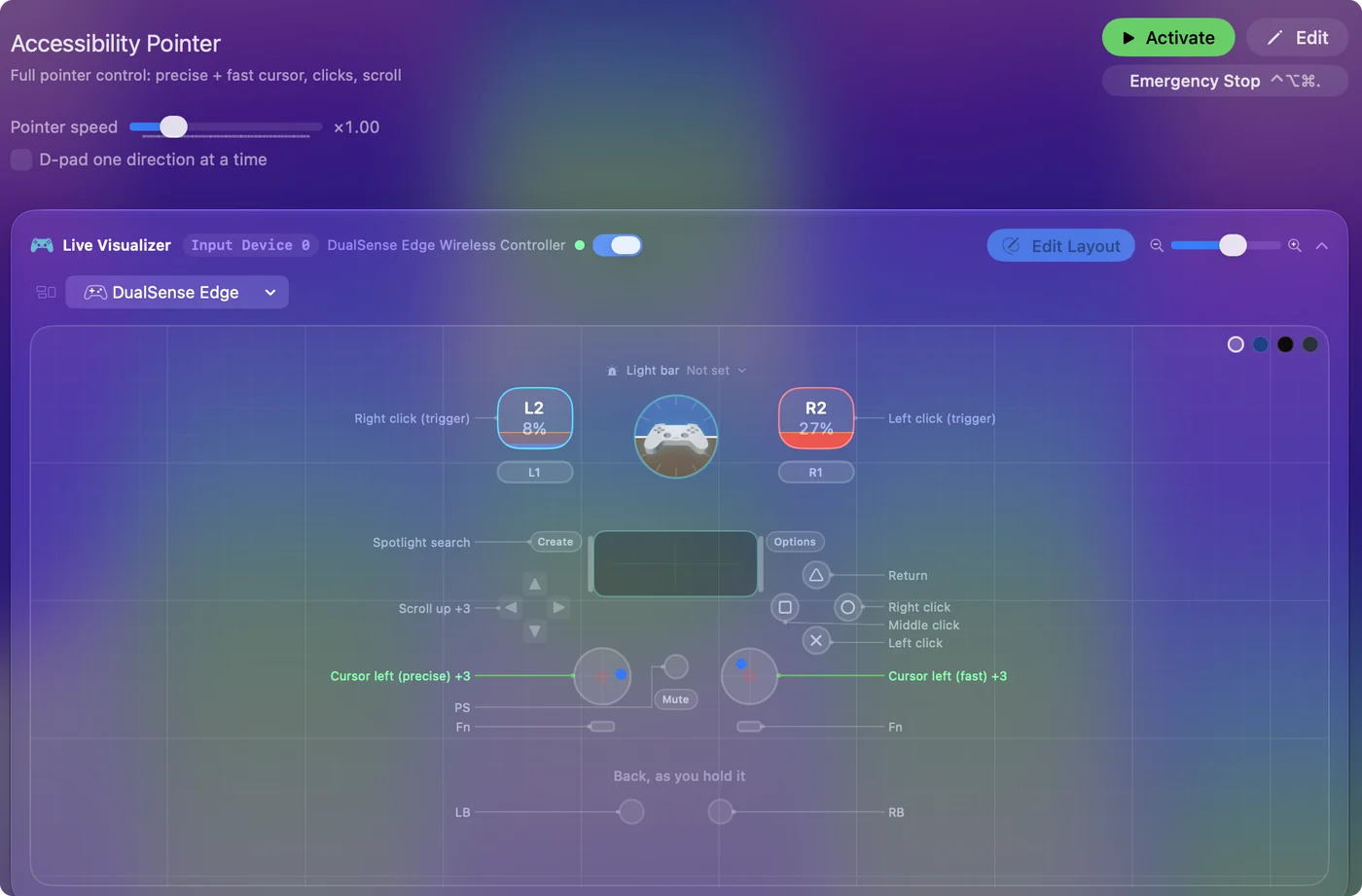
- Two pointers. The left stick moves the pointer slowly and lands on a checkbox. The right stick moves it fast and crosses the screen.
- Doubled clicks. Left click on the bottom face button and the right trigger, right click on the right face button and the left trigger, so whichever a hand can press, presses. Middle click on the left face button, Return on the top.
- Scroll. Up, down, left and right on the D-pad, because a scroll wheel is a fine motor task and a D-pad is not.
- Open anything. Spotlight on Back, Share or View.
Set the deadzone and the speed
These two settings decide whether the pointer feels steady. Do them in this order:
Step 1: Stop the drift
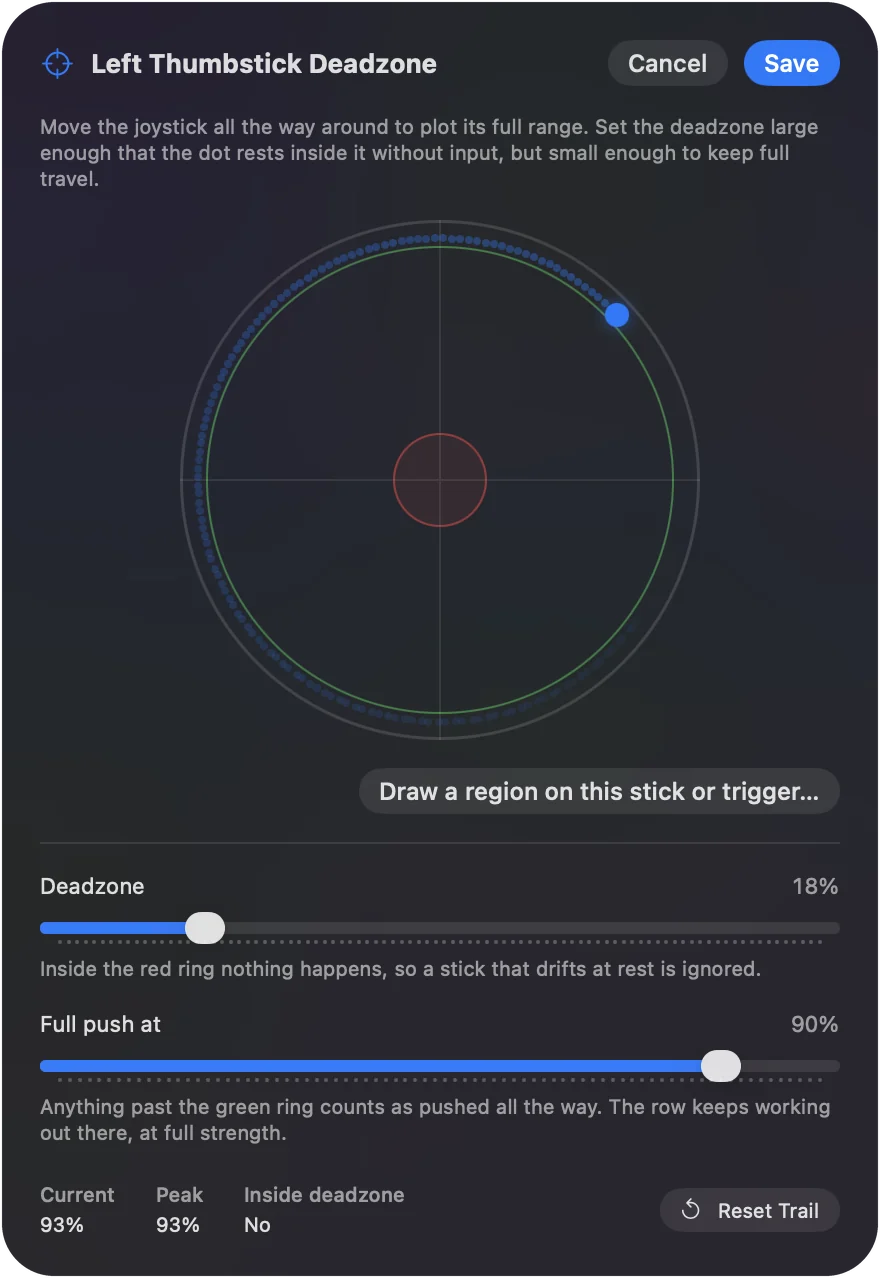
- You: Open Adjust live on a left stick row and let go of the stick.
- InputConfig: Shows where the stick really rests, and every stick row shows its deadzone.
- Check: Drag the Deadzone just past the resting point. When you let go, the pointer stays still.
Step 2: Set the overall speed
- You: Move the Pointer speed slider on the preset's page.
- InputConfig: Scales both sticks together, while each row's own speed keeps the ratio between them.
- Check: Cross the screen with the right stick and land on a checkbox with the left. If either overshoots, lower the slider.
A pointer that drifts when you let go is what makes people give up, and the deadzone fixes it.
Tune it
- Curve. Smooth on the precise stick, so the first part of the stick's travel moves the pointer barely at all.
- Ramp-up. On the fast stick, Ramp-up starts the pointer slow and builds to full speed, which avoids overshooting.
- Click and hold. Toggle on a click row turns a click into a latch: press once to hold the button down, again to release. Dragging without holding.
- Stops on release. The pointer stops the moment you let go of the stick, with no glide.
Smooth on the precise stick and Ramp-up on the fast one are the pair that make two speeds feel like one mouse.
Go beyond the pointer
Add a Start Dictation row and this is a complete way to use a Mac without a keyboard or a mouse. macOS's own Dwell Control, under Accessibility, Pointer Control, pairs well with the precise stick. The no-keyboard guide builds the whole setup on this layout, and the joystick mouse guide covers arcade sticks and wheelchair-style joysticks. Dictation plus this layout runs a Mac without a keyboard or a mouse.
Get it in two clicks
- Get InputConfig free on the Mac App Store, open it, and click Smart Preset Maker on the welcome screen.
- Search for Accessibility Pointer and pick it. The layout is created as a preset in your sidebar, named and ready.
- Press Activate. Every row can be changed afterwards: the editor's Scan button rebinds any control the moment you touch it.
Every binding, as a table
| Controller | Sends | What it does |
|---|---|---|
| Left stick left | Mouse motion left (speed 10) | Cursor left (precise) |
| Left stick right | Mouse motion right (speed 10) | Cursor right (precise) |
| Left stick up | Mouse motion up (speed 10) | Cursor up (precise) |
| Left stick down | Mouse motion down (speed 10) | Cursor down (precise) |
| Right stick left | Mouse motion left (speed 26) | Cursor left (fast) |
| Right stick right | Mouse motion right (speed 26) | Cursor right (fast) |
| Right stick up | Mouse motion up (speed 26) | Cursor up (fast) |
| Right stick down | Mouse motion down (speed 26) | Cursor down (fast) |
| A / Cross | Left click | Left click |
| B / Circle | Right click | Right click |
| X / Square | Middle click | Middle click |
| Y / Triangle | Return | Return |
| Right trigger | Left click | Left click (trigger) |
| Left trigger | Right click | Right click (trigger) |
| D-pad up | Scroll up | Scroll up |
| D-pad down | Scroll down | Scroll down |
| D-pad left | Scroll left | Scroll left |
| D-pad right | Scroll right | Scroll right |
| Back / Share / Select | Command (Left), Space | Spotlight search |
Button names follow the Xbox / PlayStation pair shown in the editor, so A / Cross is the bottom face button on either pad. On a Switch Pro Controller the bottom button is labeled B; the mapping still fires on position.
Questions
How is this different from Desktop Navigation?
Two pointer speeds on two sticks instead of one pointer and a scroll stick, clicks doubled on face buttons and triggers, and scrolling on the D-pad. It is built for precision over speed.
Can I use it with a wheelchair joystick or a switch?
If the device shows up as a gamepad, yes. The wheelchair joystick page and the adaptive controller guides cover the details.
Related
Completely free. You don't have to make an account, there are no subscriptions, and nothing is locked. Optimized for Apple silicon. Open source on GitHub.
Updated