A one-handed pointer from a game controller
 The One-Handed Cursor layout is built into InputConfig, free on the Mac App Store. You don't have to make an account, there are no subscriptions, and nothing is locked. Optimized for Apple silicon.
On a Mac: Works in every app. It is a mouse. Hold the controller in either hand, or rest it on a lap and use one half.
Yes, you can use a Mac with one hand on a game controller: the pointer on the left stick, scroll on the D-pad, three clicks and Return on the face buttons and triggers. It works in every app, because it is a mouse, and nothing needs the other side of the controller. The one-handed guide is the long version, including a single Joy-Con held sideways.
The layout, control by control
How the layout thinks
- Point. The left stick moves the pointer.
- Scroll. The D-pad scrolls in four directions.
- Click. Left click on the bottom face button and the right trigger, right click on the right face button and the left trigger, middle click on the left face button.
- Confirm and open. Return on the top face button, Spotlight on Back, Share or View.
Move it to your right hand
- You: Press Scan on each pointer row and push the right stick in that row's direction. Do the same for the scroll rows with the face buttons you want.
- InputConfig: Moves each row to the control you pressed, keeping its output.
- Check: Push the right stick and the pointer moves. The left stick does nothing.
Scan moves a row to any control, so the layout fits either hand.
Tune it
- Latch clicks. Toggle on a click row makes a drag a press and a release.
- One direction at a time. Turn on D-pad one direction at a time on the preset's page, so a thumb rolling across the D-pad scrolls one way.
- Dictation. One more button, a Start Dictation row, and no keyboard is needed.
One hand, one controller, the whole Mac.
Get it in two clicks
- Get InputConfig free on the Mac App Store, open it, and click Smart Preset Maker on the welcome screen.
- Search for One-Handed Cursor and pick it. The layout is created as a preset in your sidebar, named and ready.
- Press Activate. Every row can be changed afterwards: the editor's Scan button rebinds any control the moment you touch it.
Every binding, as a table
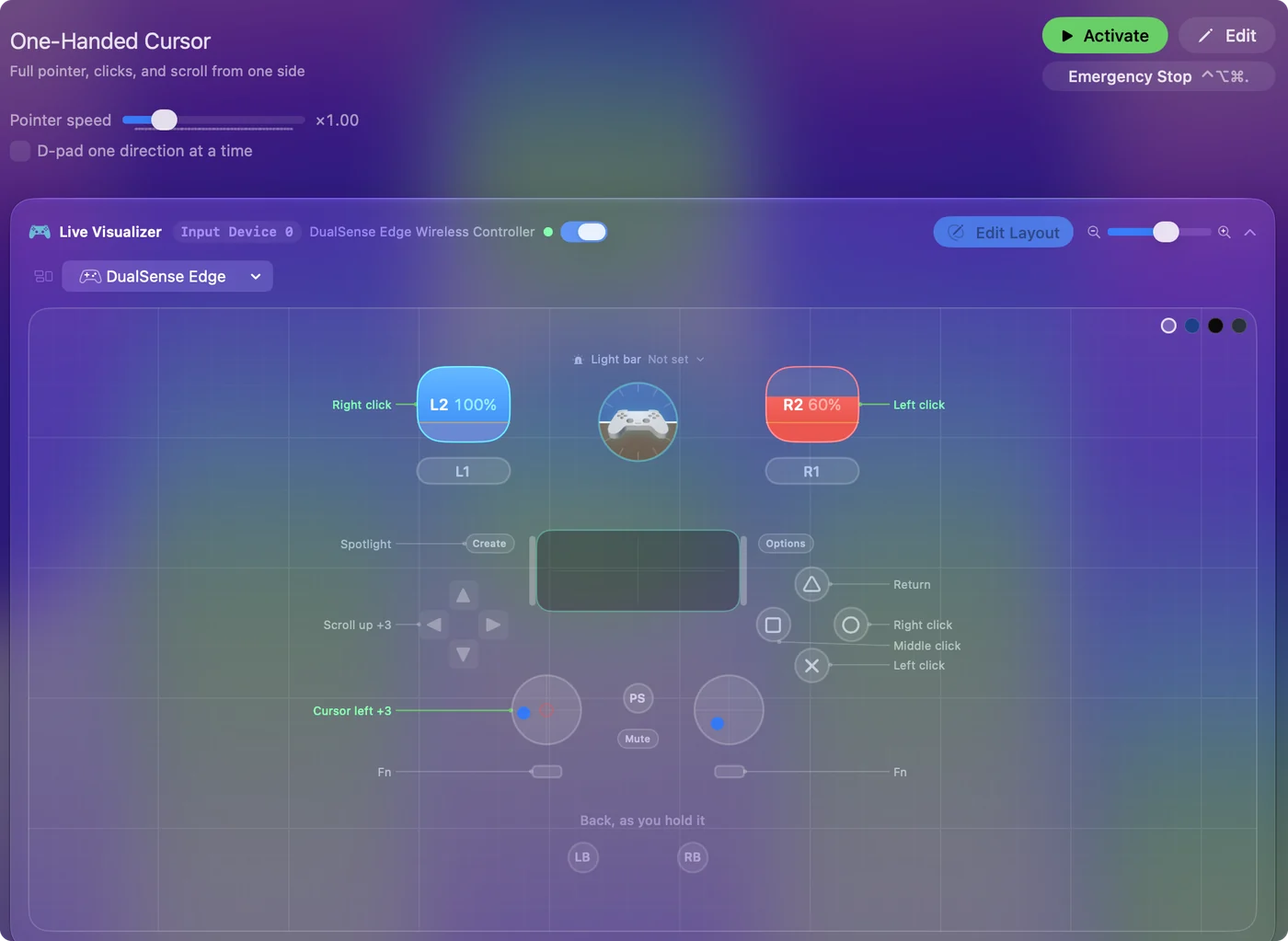
| Controller | Sends | What it does |
|---|---|---|
| Left stick left | Mouse motion left (speed 14) | Cursor left |
| Left stick right | Mouse motion right (speed 14) | Cursor right |
| Left stick up | Mouse motion up (speed 14) | Cursor up |
| Left stick down | Mouse motion down (speed 14) | Cursor down |
| Right trigger | Left click | Left click |
| Left trigger | Right click | Right click |
| A / Cross | Left click | Left click |
| B / Circle | Right click | Right click |
| X / Square | Middle click | Middle click |
| Y / Triangle | Return | Return |
| D-pad up | Scroll up | Scroll up |
| D-pad down | Scroll down | Scroll down |
| D-pad left | Scroll left | Scroll left |
| D-pad right | Scroll right | Scroll right |
| Back / Share / Select | Command (Left), Space | Spotlight |
Button names follow the Xbox / PlayStation pair shown in the editor, so A / Cross is the bottom face button on either pad. On a Switch Pro Controller the bottom button is labeled B; the mapping still fires on position.
Questions
Can I use this with a single Joy-Con?
Yes. A Joy-Con held sideways has a stick, four buttons and two shoulder buttons, and the one-handed guide maps it.
Related
Completely free. You don't have to make an account, there are no subscriptions, and nothing is locked. Optimized for Apple silicon. Open source on GitHub.
Updated