HandBrake from a game controller
 The HandBrake layout is built into InputConfig, free on the Mac App Store. You don't have to make an account, there are no subscriptions, and nothing is locked. Optimized for Apple silicon.
On a Mac: HandBrake for Mac uses Command shortcuts from its menus. Three rows in this layout send Option shortcuts from HandBrake on Windows, which a Mac ignores. The fix is below.
Yes, you can run HandBrake on a Mac from a game controller, after fixing three rows. HandBrake is a queue you feed and a button you press: open a source, add it, start. The pointer has two speeds because HandBrake's settings are small text fields, and the queue window is on the D-pad so you can watch it from across the room.
On this page: 7 sections
The layout, control by control
How the layout thinks
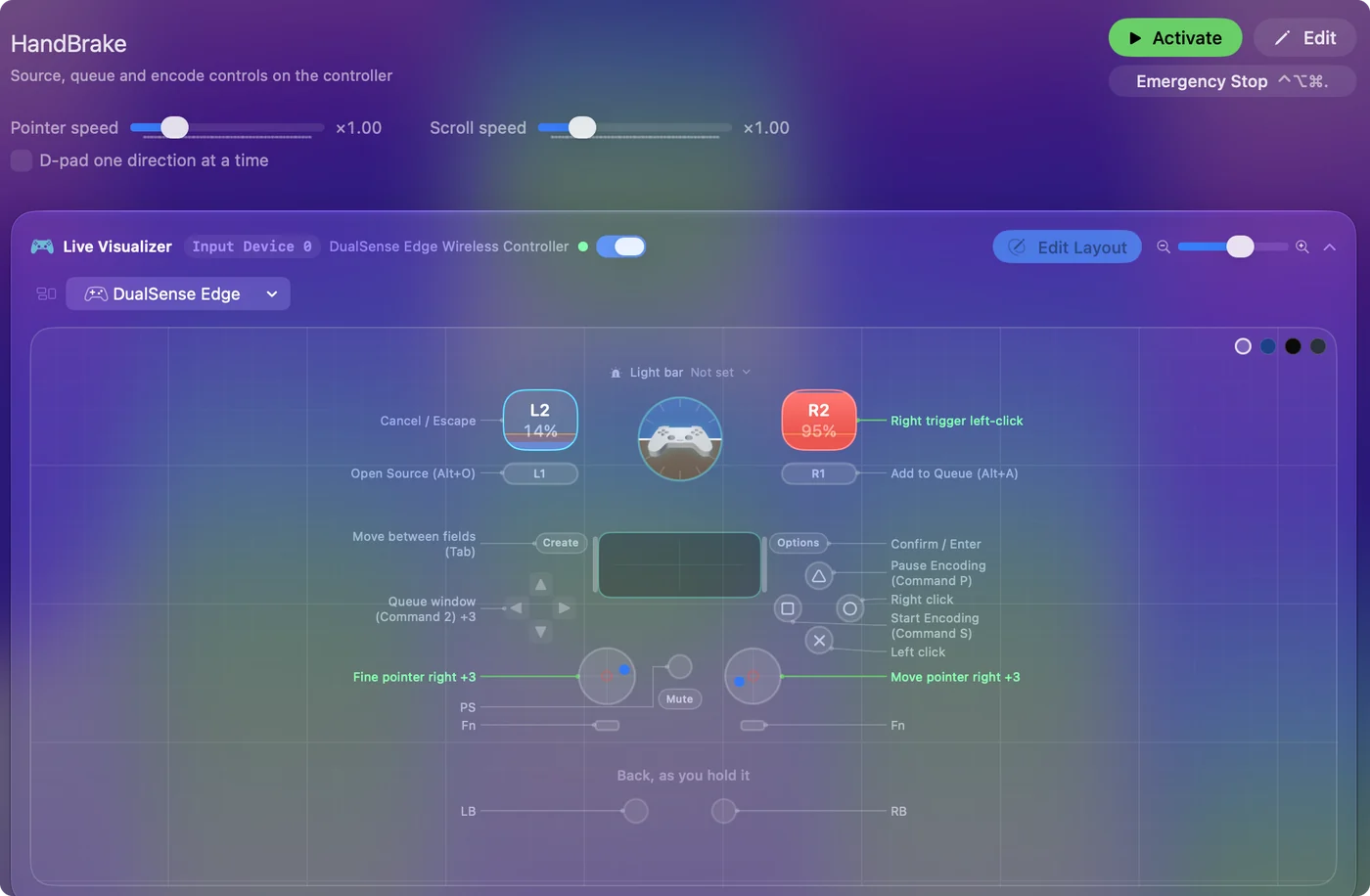
- Click. Left click and right click on the bottom and right face buttons.
- Encode. Start Encoding (Command S) on the left face button, Pause Encoding (Command P) on the top.
- Watch the queue. D-pad up opens the Queue window (Command 2), left the Activity window (Command Shift D), and right adds the title to the queue (Command B).
- Fill in fields. Return on Options confirms, Tab on Share or View moves between fields, and the left trigger is Escape.
- Two pointers. The right stick is the fast pointer and the left stick a fine pointer that also scrolls.
These rows work today. Start, pause and the queue work as shipped.
Fix three rows for the Mac
The left bumper, the right bumper and D-pad down send Option O, Option A and Option P, menu keys from HandBrake on Windows. On a Mac they do nothing. Change them in the editor:
- Left bumper: Command O, Open Source.
- Right bumper: it duplicates Add to Queue. Make it Command B as well, or give it another job.
- D-pad down: it duplicates Pause. Make it Command P, or use it for something else.
- You: Open the left bumper row's output and record Command O.
- InputConfig: Sends HandBrake's Mac menu key.
- Check: Press the left bumper and HandBrake's open dialog appears.
HandBrake's own menus show each command's key, which is the quickest check. The Option keys are for HandBrake's Windows menus, and on a Mac it uses Command.
The short version
- Fix the bumpers first. They should send Command O and Command B.
- Use the fine pointer for fields. That is the left stick.
- Watch from the couch. D-pad up shows the queue.
It suits a Mac on a TV that also converts the family's videos. Open, add, start: three buttons once the bumpers are fixed.
Get it in two clicks
- Get InputConfig free on the Mac App Store, open it, and click Smart Preset Maker on the welcome screen.
- Search for HandBrake and pick it. The layout is created as a preset in your sidebar, named and ready.
- Press Activate. Every row can be changed afterwards: the editor's Scan button rebinds any control the moment you touch it.
Every binding, as a table
| Controller | Sends | What it does |
|---|---|---|
| Right stick right | Mouse motion right (speed 16) | Move pointer right |
| Right stick left | Mouse motion left (speed 16) | Move pointer left |
| Right stick down | Mouse motion down (speed 16) | Move pointer down |
| Right stick up | Mouse motion up (speed 16) | Move pointer up |
| Left stick right | Mouse motion right (speed 12) | Fine pointer right |
| Left stick left | Mouse motion left (speed 12) | Fine pointer left |
| Left stick down | Scroll down | Scroll down |
| Left stick up | Scroll up | Scroll up |
| A / Cross | Left click | Left click |
| B / Circle | Right click | Right click |
| X / Square | Command (Left), S | Start Encoding (Command S) |
| Y / Triangle | Command (Left), P | Pause Encoding (Command P) |
| RB / R1 | Alt / Option (Left), A | Add to Queue (Alt+A) |
| LB / L1 | Alt / Option (Left), O | Open Source (Alt+O) |
| D-pad up | Command (Left), 2 | Queue window (Command 2) |
| D-pad down | Alt / Option (Left), P | Pause Encode (Alt+P) |
| D-pad left | Command (Left), Shift (Left), D | Activity window (Command Shift D) |
| D-pad right | Command (Left), B | Add To Queue (Command B) |
| Start / Options | Return | Confirm / Enter |
| Back / Share / Select | Tab | Move between fields (Tab) |
| Right trigger | Left click | Right trigger left-click |
| Left trigger | Escape | Cancel / Escape |
Button names follow the Xbox / PlayStation pair shown in the editor, so A / Cross is the bottom face button on either pad. On a Switch Pro Controller the bottom button is labeled B; the mapping still fires on position.
Questions
Why a controller for HandBrake?
It suits a Mac on a TV that also converts the family's videos, and a hand that would rather not use a mouse.
Why do the bumpers do nothing?
They send Option shortcuts from the Windows version. Change them to Command O and Command B as above.
Related
Completely free. You don't have to make an account, there are no subscriptions, and nothing is locked. Optimized for Apple silicon. Open source on GitHub.
Updated