VLC from a game controller
 The VLC layout is built into InputConfig, free on the Mac App Store. You don't have to make an account, there are no subscriptions, and nothing is locked. Optimized for Apple silicon.
On a Mac: VLC for Mac reads its default hotkeys from this layout. Its own Hotkeys settings list every key and let you change them.
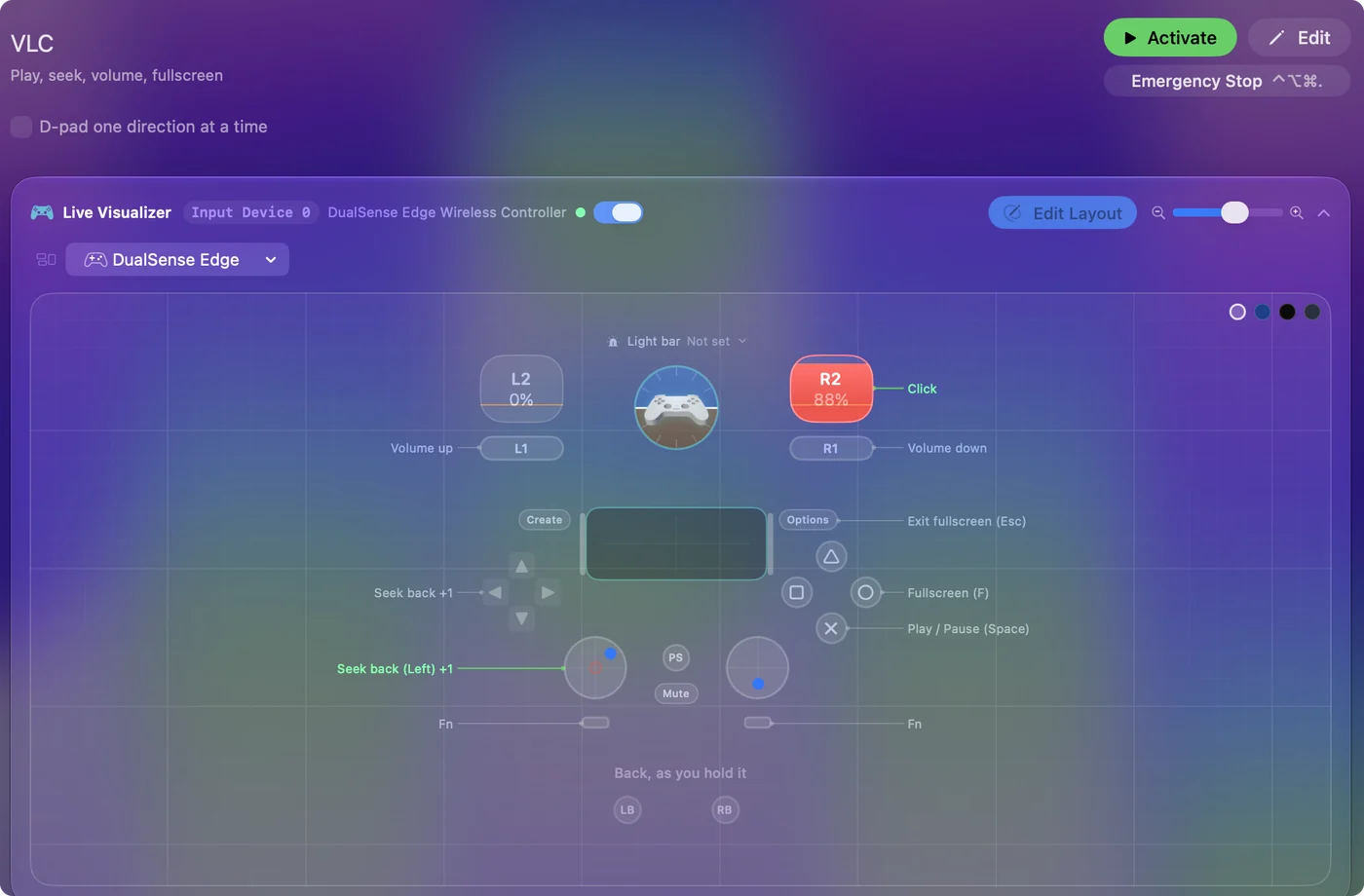
Yes, an Xbox or PS5 controller makes a good VLC remote on a Mac. Space, F, the arrows for seeking and the volume keys are most of VLC's interface, and this layout puts all of them under one thumb. It is made for a Mac on a TV playing files.
The layout, control by control
How the layout thinks
- Play and full screen. Play and pause (Space) on the bottom face button, full screen (F) on the right.
- Seek. Left stick left and right, and D-pad left and right.
- Volume. Up and down (Command Up and Command Down Arrow) on the bumpers.
- Leave full screen. Options is Escape, and the right trigger clicks for the rare menu.
How far one seek jumps is set in VLC, not in InputConfig: open VLC's Settings, Hotkeys to see the jump lengths and the key for each. VLC's own Hotkeys list is the map for every row you add.
Tune it for the couch
- Subtitles and audio track. VLC's hotkey list has keys for cycling both. Put them on the stick clicks.
- Speed. The faster and slower keys from the same list fit on the two free face buttons.
- Longer jumps. VLC has longer jumps on modifier keys. Put the longer jump on a chord with the D-pad.
- Everywhere. Switch play and pause to the System Function Play / Pause and the same button controls whatever is playing, VLC or not.
- The doorbell. Put a Mute / Unmute system function on the touchpad press.
Subtitles on the stick clicks is the one I would add first. Everything VLC lists under Hotkeys can live on a button.
The short version
- Pair and activate. There is nothing to change in VLC.
- Check VLC's Hotkeys. They decide jump lengths and the subtitle keys.
- Add mute. Put it on the touchpad press.
IINA has its own entry, and QuickTime Player takes Space and the arrow keys the same way. Play, seek, volume and full screen are all under one thumb.
Get it in two clicks
- Get InputConfig free on the Mac App Store, open it, and click Smart Preset Maker on the welcome screen.
- Search for VLC and pick it. The layout is created as a preset in your sidebar, named and ready.
- Press Activate. Every row can be changed afterwards: the editor's Scan button rebinds any control the moment you touch it.
Every binding, as a table
| Controller | Sends | What it does |
|---|---|---|
| A / Cross | Space | Play / Pause (Space) |
| B / Circle | F | Fullscreen (F) |
| Left stick left | Left | Seek back (Left) |
| Left stick right | Right | Seek forward (Right) |
| LB / L1 | Command (Left), Up | Volume up |
| RB / R1 | Command (Left), Down | Volume down |
| D-pad left | Left | Seek back |
| D-pad right | Right | Seek forward |
| Right trigger | Left click | Click |
| Start / Options | Escape | Exit fullscreen (Esc) |
Button names follow the Xbox / PlayStation pair shown in the editor, so A / Cross is the bottom face button on either pad. On a Switch Pro Controller the bottom button is labeled B; the mapping still fires on position.
Questions
Does it work with IINA or QuickTime?
IINA has its own entry. QuickTime Player takes Space and the arrow keys the same way.
Can I seek further with one press?
Yes. VLC has longer jumps on modifier keys. Check its Hotkeys settings and put the longer jump on a chord with the D-pad.
Related
Completely free. You don't have to make an account, there are no subscriptions, and nothing is locked. Optimized for Apple silicon. Open source on GitHub.
Updated