Plex from a game controller
 The Plex layout is built into InputConfig, free on the Mac App Store. You don't have to make an account, there are no subscriptions, and nothing is locked. Optimized for Apple silicon.
On a Mac: The Plex app for Mac reads keys from this layout while it is in front. Its library is easiest with a pointer, which this layout leaves for you to add.
Yes, a game controller makes a good Plex remote on a Mac under a TV: play and pause on the big button, full screen beside it, seek on the stick and the D-pad, volume on the bumpers. Plex reads these keys while it is in front. The library is easiest with a pointer, which this layout leaves for you to add.
The layout, control by control
How the layout thinks
- Play. Play and pause (Space) on the bottom face button, full screen (F) on the right, Escape on Start to leave full screen.
- Seek. The left stick and the D-pad send the arrow keys.
- Volume. Command Up and Down Arrow on the bumpers.
- Click. The right trigger clicks.
If a key does nothing in your version of Plex, its shortcuts are listed in the app's help. Change that row's output to match.
Add a pointer for the library
- Add four pointer rows. Give the right stick four Mouse Motion rows, one per direction, the way Desktop Navigation has them on its left stick. The library grid becomes clickable.
- Or keep two presets. A browsing preset with a pointer and this playback preset, both listing Plex, and a button with the App Action Next Preset to flip between them.
- Control it from any app. System Function media outputs make play and pause work while Plex is behind another window.
Climb as far as you need. Most people stop at the first rung. Four pointer rows turn a playback remote into a whole media center remote.
Get it in two clicks
- Get InputConfig free on the Mac App Store, open it, and click Smart Preset Maker on the welcome screen.
- Search for Plex and pick it. The layout is created as a preset in your sidebar, named and ready.
- Press Activate. Every row can be changed afterwards: the editor's Scan button rebinds any control the moment you touch it.
Every binding, as a table
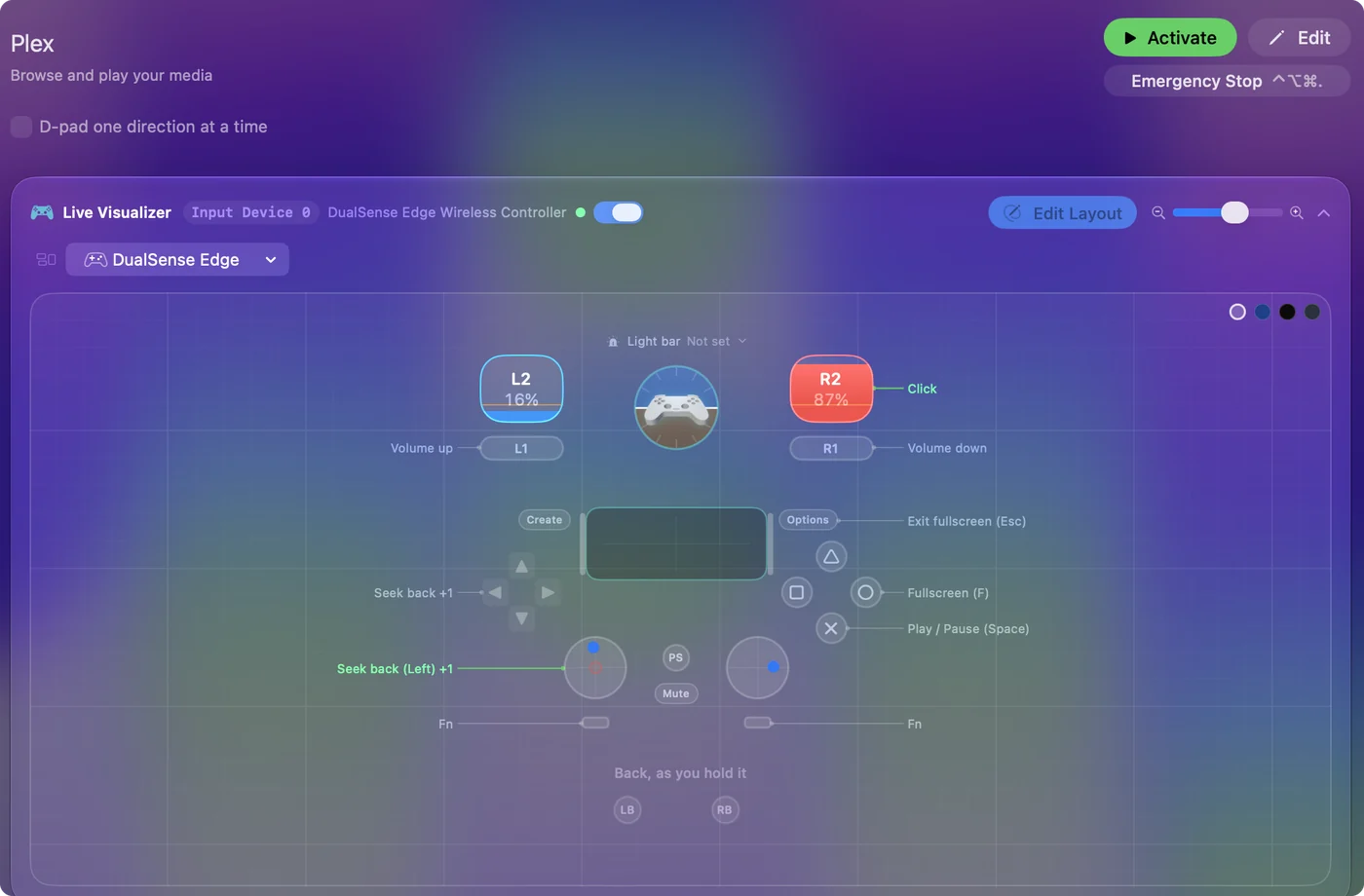
| Controller | Sends | What it does |
|---|---|---|
| A / Cross | Space | Play / Pause (Space) |
| B / Circle | F | Fullscreen (F) |
| Left stick left | Left | Seek back (Left) |
| Left stick right | Right | Seek forward (Right) |
| LB / L1 | Command (Left), Up | Volume up |
| RB / R1 | Command (Left), Down | Volume down |
| D-pad left | Left | Seek back |
| D-pad right | Right | Seek forward |
| Right trigger | Left click | Click |
| Start / Options | Escape | Exit fullscreen (Esc) |
Button names follow the Xbox / PlayStation pair shown in the editor, so A / Cross is the bottom face button on either pad. On a Switch Pro Controller the bottom button is labeled B; the mapping still fires on position.
Questions
Does this work with Plex HTPC?
Its keys are similar. Press each row once in Plex HTPC and change the output of any row that does nothing.
Related
Completely free. You don't have to make an account, there are no subscriptions, and nothing is locked. Optimized for Apple silicon. Open source on GitHub.
Updated