Deadzones and calibration
 InputConfig is completely free on the Mac App Store. You don't have to make an account, there are no subscriptions, and nothing is locked. Optimized for Apple silicon.
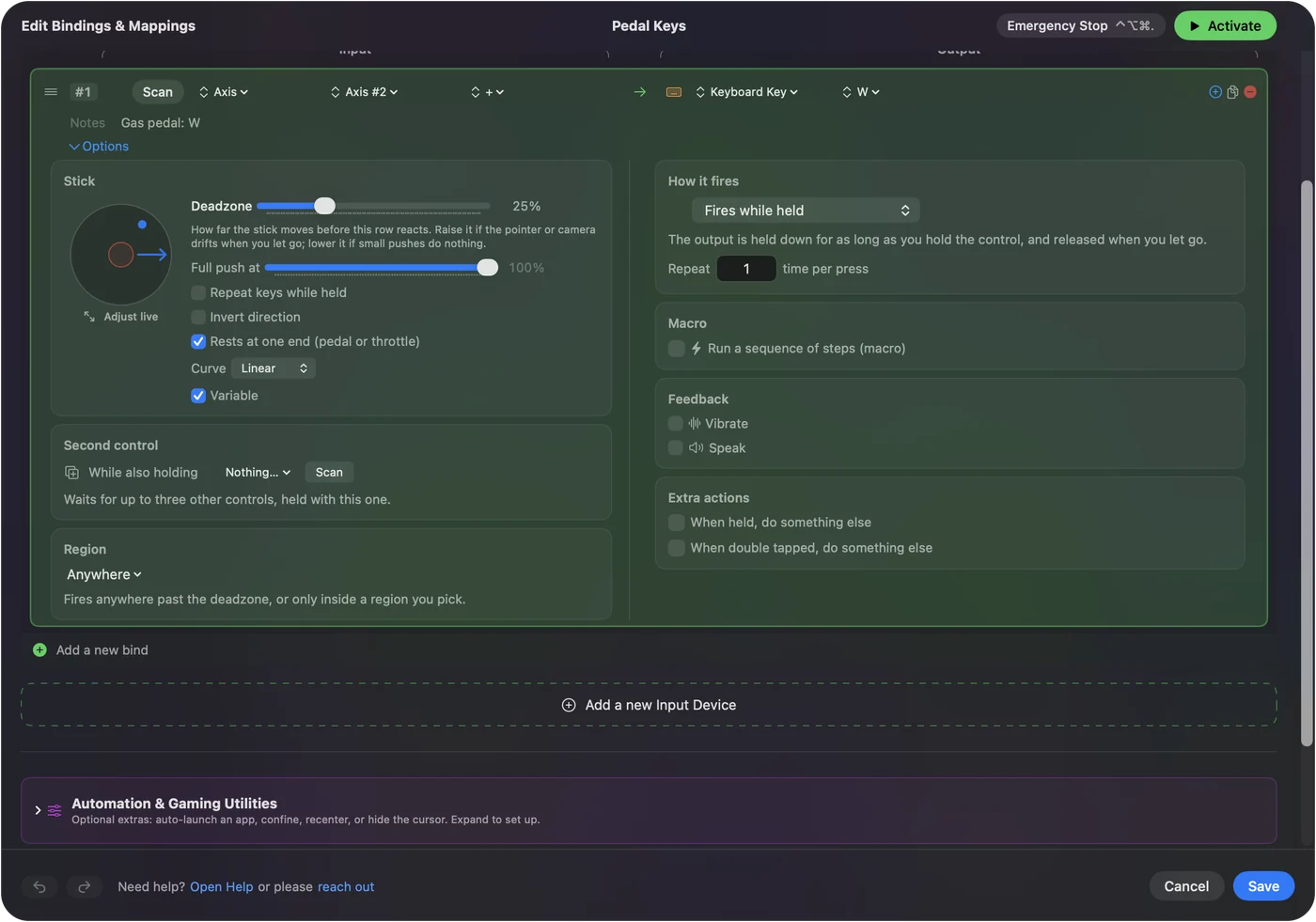
Every stick and trigger row in InputConfig has a Deadzone, which stops drift, and Full push at, where the row reaches full output. Set both in the row's Options, with Adjust live showing the stick while you move it. Full push at means a stick with limited travel, or a hand with limited range, still reaches maximum. For a drifting stick, go straight to the live plot.
On this page: 11 sections
Steps
- Expand Options on a stick or trigger row and press Adjust live.
- Let go of the stick and watch where the dot rests. That is the drift. Drag the Deadzone until the dot sits inside it, with a little margin.
- Push the stick around its full circle and set Full push at where your comfortable maximum is.
Find the settings
Expand Options on a stick or trigger row.
- Deadzone. The Deadzone, from 1 to 90 percent. Every stick row shows its deadzone, so you can read the number back later.
- Adjust live. Opens the live plot.
- Full push at. The green ring: anything past it counts as all the way, and the row keeps working there at full strength.
- Invert direction. Flips a stick axis.
- The curve and Variable Sensitivity. They sit below. See variable sensitivity.
Deadzone is where a stick starts to count; Full push at is where it counts as all the way.
Set them against the live plot
The Adjust live sheet draws the stick as a circle with a trail of recent positions, or a trigger as a bar, with sliders for Deadzone and Full push at. It shows three readings: Current, Peak, and whether the stick is inside the deadzone right now. The sliders take effect on the row as you move them, so the rows behind the sheet light by the new deadzone before you save, and a running preset fires by it; Cancel puts the old value back. The stick's regions and the trigger's bands are drawn on it too. Edit regions beside them opens the region editor for that stick or trigger, or Draw a region when it has none.
- You: Press Adjust live, let go of the stick, and watch where the dot rests.
- InputConfig: Draws the resting position and the deadzone ring, and reads the controller that row's device uses.
- Check: If the dot sits away from the center, that is drift. Drag the Deadzone until the dot sits inside it, with a little margin, then push the stick around its full circle and set Full push at to your comfortable maximum.
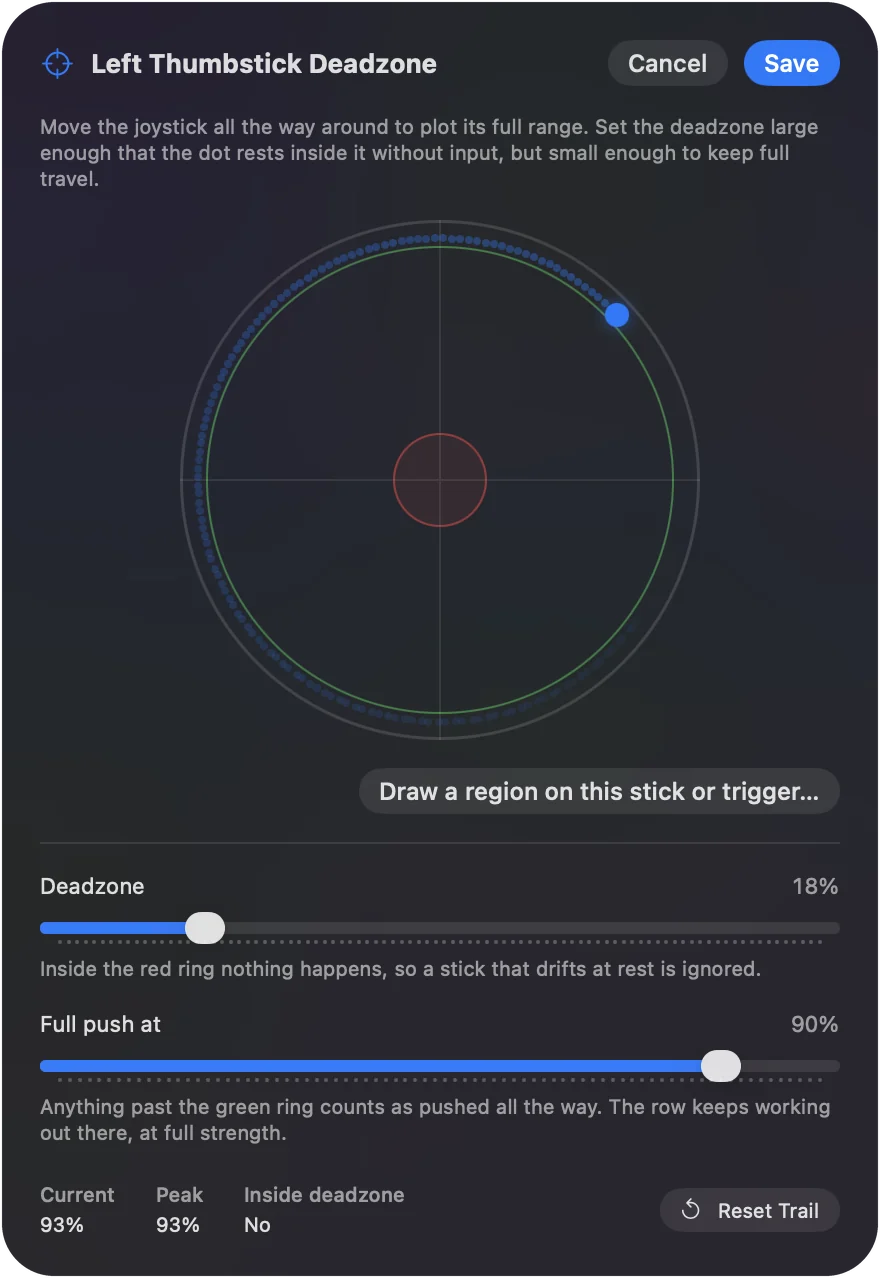
Reset Trail clears the plot. Save keeps the numbers, and Cancel puts back what was there before. Use the plot rather than guessing.
Set every axis at once
The device's menu in the editor has Stick settings, which sets the Deadzone on every axis row for that controller in one go. Set them all with Stick settings, then fine-tune single rows in their Options.
Tune for tremor and limited range
- A tremor. It shows as jitter around the center: a larger Deadzone removes it, and the Smooth curve keeps the first part of the travel gentle.
- Limited range. It shows as never reaching full speed: bring Full push at in until your comfortable maximum counts as full.
The tremor and limited range guide walks through a whole setup. A bigger Deadzone calms a shake; a lower Full push at shortens a reach.
Ease the pointer in with Ramp-up
A pointer row's Options have Ramp-up: the pointer starts slow when the stick first leaves the deadzone and speeds up to the row's Speed over the time you set. It makes small targets easier to land on without slowing long moves. The pointer stops the moment you let go of the stick.
Motion rows
Gyro and accelerometer rows have a deadzone too. On the tilt axes the pointer follows the controller's angle, and the deadzone sets how much small movement is smoothed out rather than cut off. On rate channels movement below it is scaled down smoothly rather than cut, so a shaky hand barely moves the pointer while a slow deliberate tilt still does. Calibrate in a Motion row's Options records the controller's resting zero. On motion, the deadzone softens small movement instead of cutting it off.
What happens between Deadzone and Full push at
Below the Deadzone the row sends nothing, and past Full push at it sends full output. Between the two, the travel is stretched to cover the whole range, so the output starts from zero at the edge of the deadzone instead of jumping, and a stick that stops short still reaches full speed. The curve is applied after that, to what is left. Pointer and key rows check each axis on its own. The output always starts from zero at the deadzone edge, so there is no jump.
What a deadzone here cannot do
It filters what InputConfig sends: keys, clicks, pointer movement, scrolling and MIDI. A game that reads the controller itself still sees the raw stick, so use the game's own setting for that. There is no anti-deadzone: that setting exists to push a small tilt past a game's own deadzone, and InputConfig sends keys and mouse movement rather than a controller, so a game's stick deadzone never sees it. For a game that reads the pad directly, set the deadzone in the game.
The short version
- Find drift. Adjust live, hands off, watch the dot.
- Set the Deadzone. Just past where the dot rests.
- Set Full push at. Where your comfortable push ends.
Two sliders and a minute with the plot fix most drifting sticks.
Questions
A good default Deadzone?
The app defaults to 25 percent, which is safe for a worn stick. A new DualSense is fine at 8 to 12. Use the plot rather than guessing.
Do triggers have deadzones?
A trigger is a one-direction axis, and its Deadzone stops a resting trigger from firing.
Does a deadzone here change what a game reads from the controller?
No. It filters what InputConfig sends: keys, clicks, pointer movement, scrolling and MIDI. A game that reads the controller itself still sees the raw stick, so use the game's own setting for that.
Can I set one deadzone for every stick at once?
Stick settings, in the device's menu in the editor, sets the Deadzone on every axis row for that controller in one move. Fine-tune single rows in their Options afterward.
Related
Completely free. You don't have to make an account, there are no subscriptions, and nothing is locked. Optimized for Apple silicon. Open source on GitHub.
Updated