How to use gyro like the right stick on a Mac
 InputConfig is completely free on the Mac App Store. You don't have to make an account, there are no subscriptions, and nothing is locked. Optimized for Apple silicon.
On a Mac you can tilt a DualSense, DualSense Edge or DualShock 4 to turn the camera, in any game that looks with the mouse. InputConfig reads the gyroscope and sends mouse movement, so the tilt does what the right stick would do, and the stick keeps working at the same time.
I make InputConfig, a free Mac app that maps a controller to keys and mouse. One thing to know first: it sends mouse movement, not a pretend right stick, so this works in games that take a mouse and not in games that only read a controller.
On this page: 9 sections
Steps
- Pair a DualSense or DualShock 4 with the Mac.
- In InputConfig, pick the Gyro Aim preset, or turn on Gyro fine aim in the Smart Preset Maker.
- Click Activate.
- Tilt the controller to turn the camera in a game that looks with the mouse.
- Bind Pause Motion While Held to a button so you can reset your wrist.
Know which games it works in
- Works. Any game where moving the mouse turns the camera. That covers most shooters and third-person games on the Mac, and games running through a compatibility layer that accept a mouse.
- Does not work. A game that only reads the controller itself. InputConfig does not hand the game a changed controller.
If the mouse turns the camera, the gyro can.
Start from the Gyro Aim preset
- You: Pick the Gyro Aim preset in the sidebar and click Activate.
- InputConfig: Sends sideways tilt as mouse left and right, and forward tilt as mouse up and down.
- Check: Tilt the controller. The pointer follows, and comes back when you level it.
Or add gyro to a game's layout
The Smart Preset Maker can add gyro on top of the stick. Search for the game, pick your controller, and turn on Gyro fine aim in the Fine-tune step. The right stick makes the big turns and the tilt makes the small corrections. Both drive mouse movement in the same preset, and they add together.
Build it by hand
- You: Add a row, set the input type to Motion, and pick Gyro Y plus. Give it Mouse Motion right. Add Gyro Y minus for left, Gyro X plus and Gyro X minus for up and down.
- InputConfig: Moves the mouse by the controller's tilt. Speed sets how far it travels per degree.
- Check: Four rows make a full gyro camera.
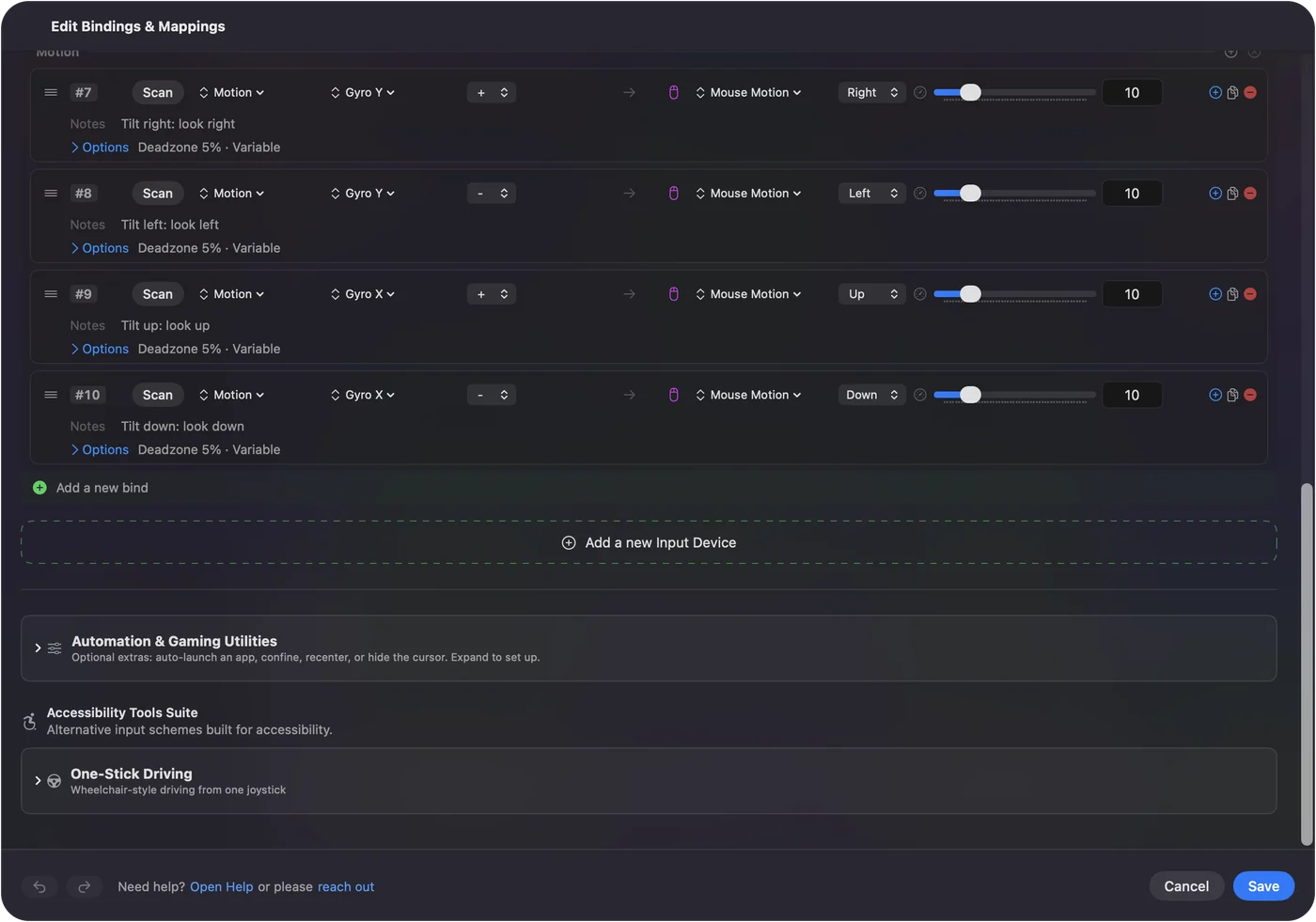
If one direction feels backwards, swap what the plus and minus rows send.
Reset your wrist without moving the camera
Tilt runs out of wrist the way a mouse runs out of desk. Bind a button, such as L1 or a back paddle, to the App Action Pause Motion While Held. Hold it, bring the controller back to a comfortable angle, and let go. The camera stays where it was.
If nothing moves
- Watch the Live Visualizer. Its motion readout moves when you tilt a controller that sends motion.
- Use a cable. Some Bluetooth pairings drop motion. A wired connection always has it.
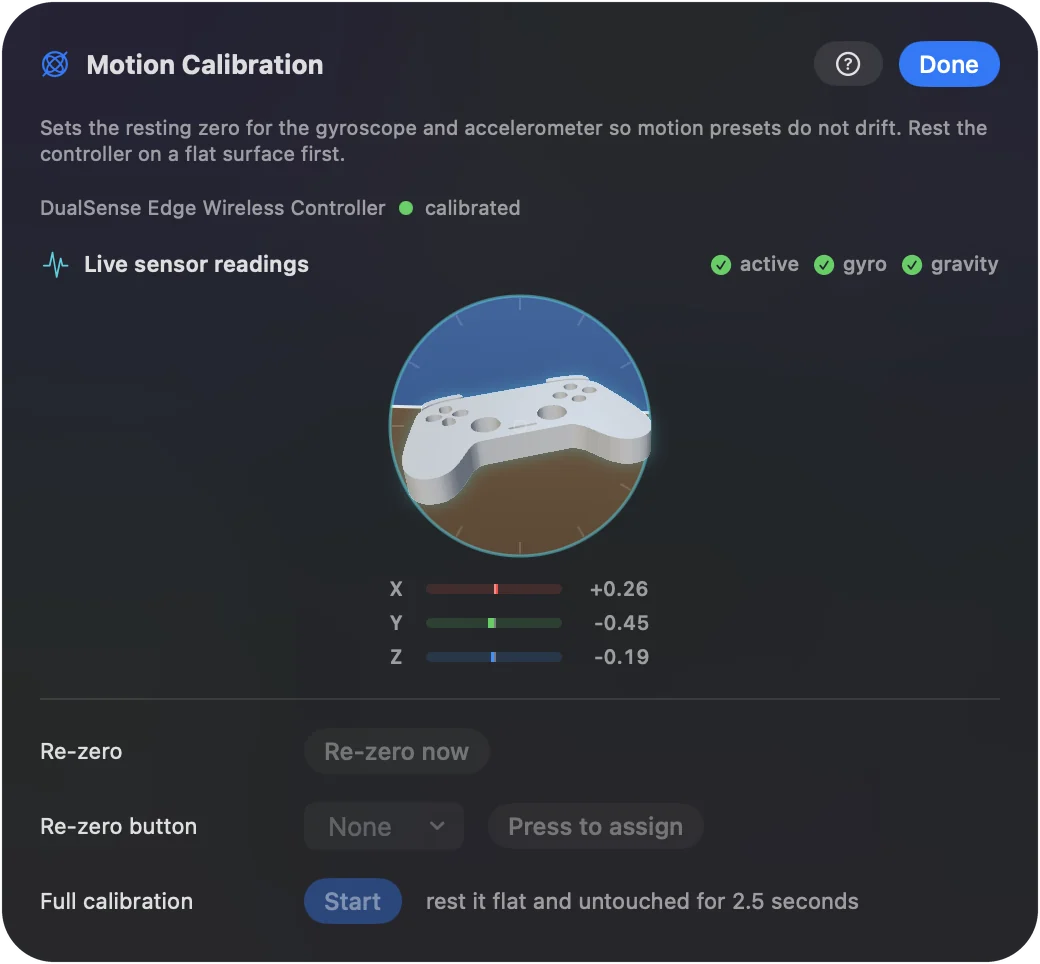
- Open Motion Calibration. The 3D model turns as you turn the controller.
The gyro aim help page has the rest.
The short version
- What it is. Tilt becomes mouse movement, which turns the camera.
- Where it works. Games that look with the mouse.
- Fastest start. The Gyro Aim preset, or Gyro fine aim in the Smart Preset Maker.
Use the stick for the big turns and the tilt for the small ones.
Questions
Can I map gyro to the right stick on a Mac?
Not as a stick. InputConfig sends mouse movement from the gyroscope, which turns the camera in any game that looks with the mouse. It does not create a virtual controller.
Which controllers have gyro that works on a Mac?
InputConfig reads the gyroscope on the DualSense, DualSense Edge and DualShock 4. The 2026 Steam Controller's gyro is read too, and that support is experimental.
Can I use gyro and the right stick together?
Yes. Both can drive mouse movement in the same preset, and they add together.
Does gyro aim work over Bluetooth?
Usually. Some Bluetooth pairings drop motion, and a USB cable always has it.
Related
Completely free. You don't have to make an account, there are no subscriptions, and nothing is locked. Optimized for Apple silicon. Open source on GitHub.
Updated