How to use gyro aim on a Mac
 InputConfig is completely free on the Mac App Store. You don't have to make an account, there are no subscriptions, and nothing is locked. Optimized for Apple silicon.
Yes, you can aim by tilting a PS5 or PS4 controller on a Mac, in any game that aims with a mouse. The DualSense, DualSense Edge and DualShock 4 have a gyroscope and macOS passes it through, but almost no Mac game uses it. InputConfig, a free Mac app I made, turns tilt into ordinary mouse movement, which covers nearly every shooter on the Mac. It also reads motion from the Switch Pro Controller, from a Joy-Con when macOS reports its motion, and from both of Valve's Steam Controllers as an experimental feature. Xbox controllers have no gyroscope.
On this page
Steps
- Connect the DualSense or DualShock 4, by cable if Bluetooth drops motion.
- Open InputConfig and allow Accessibility access.
- Activate the Gyro Aim preset and tilt the controller to aim.
- Hold L1 to pause motion and press R1 to re-zero and center.
- Lower Speed on the motion rows if the aim moves too far.
Aim with the Gyro Aim preset
The built-in Gyro Aim preset is ready to use. Rolling the pad sideways moves the aim left and right, tipping the front moves it up and down, R2 fires (left click), L2 aims (right click), Cross is Space and Circle is Control.
Step 1: Check that motion arrives
- You: Connect the controller, by cable if you can, and open the Live Visualizer.
- InputConfig: Shows the controller's motion readout, which moves as you tilt.
- Check: Tilt the pad. If the readout stays still, use a USB cable, which always carries motion. Some Bluetooth pairings drop it.
Step 2: Aim
- You: Activate Gyro Aim and tilt the controller.
- InputConfig: Sends mouse movement that follows the controller's angle, so tilting back to level brings the aim back to where it started.
- Check: A small tilt should give a small move. If the aim flies off, lower Speed on the four motion rows.
Step 3: Reset your grip
- You: Hold L1 while you swing the pad back to a comfortable angle, then press R1.
- InputConfig: Pauses motion while L1 is held. R1 makes the current angle the new neutral and centers the pointer.
- Check: The aim does not jump when you let go of L1.
The game cannot tell this from a mouse, which is why it works the same in Steam games and App Store games. If a game has its own DualSense motion setting, I would use that instead, because it reads the controller directly.
Tune how it feels
Start with a low Speed on the motion rows and raise it after a session.
- Speed. How far the aim moves per degree of tilt. At 6, a degree is roughly 17 pixels. Gyro Aim uses 10.
- Pointer speed. On the preset's page, it scales tilt along with everything else in the preset.
- The right stick too. The stick still works in the same preset and the two add together, so the stick can do the big turns and the tilt the last few degrees.
- Deadzone. The row's deadzone softens very slow movement, so a small tremor barely moves the aim while a deliberate tilt still does.
- Level is how you hold it. This option on tilt and pointer rows measures the lean from your grip instead of from lying flat.
- Poll rate on battery. On battery InputConfig reads the controller 60 times a second by default. If aim feels slow away from the charger, set On battery to 120 Hz in Settings, Advanced, Polling rate.
A resting controller does not creep: the tilt axes settle back onto gravity, and the gyro's zero looks after itself while the pad is still. Start at a low speed and raise it from there, because aim you can trust is worth more than aim that is fast.
Pause when your wrist runs out of travel
Bind a button to the App Action Pause Motion While Held. While it is held, motion stops moving the pointer and you bring the controller back to a comfortable angle. On release, the new angle is neutral, so nothing snaps. Re-zero Motion and Center Pointer on Screen are App Actions too, so you can move all three to any control. Two more switch motion on and off: Motion On / Off turns it off with one press and on again with the next, and Motion Only While Held lets the motion rows work only while its button is held.
On a DualSense Edge, a back paddle is a good home for the pause, since it has no other job in most games.
Add gyro to your own preset
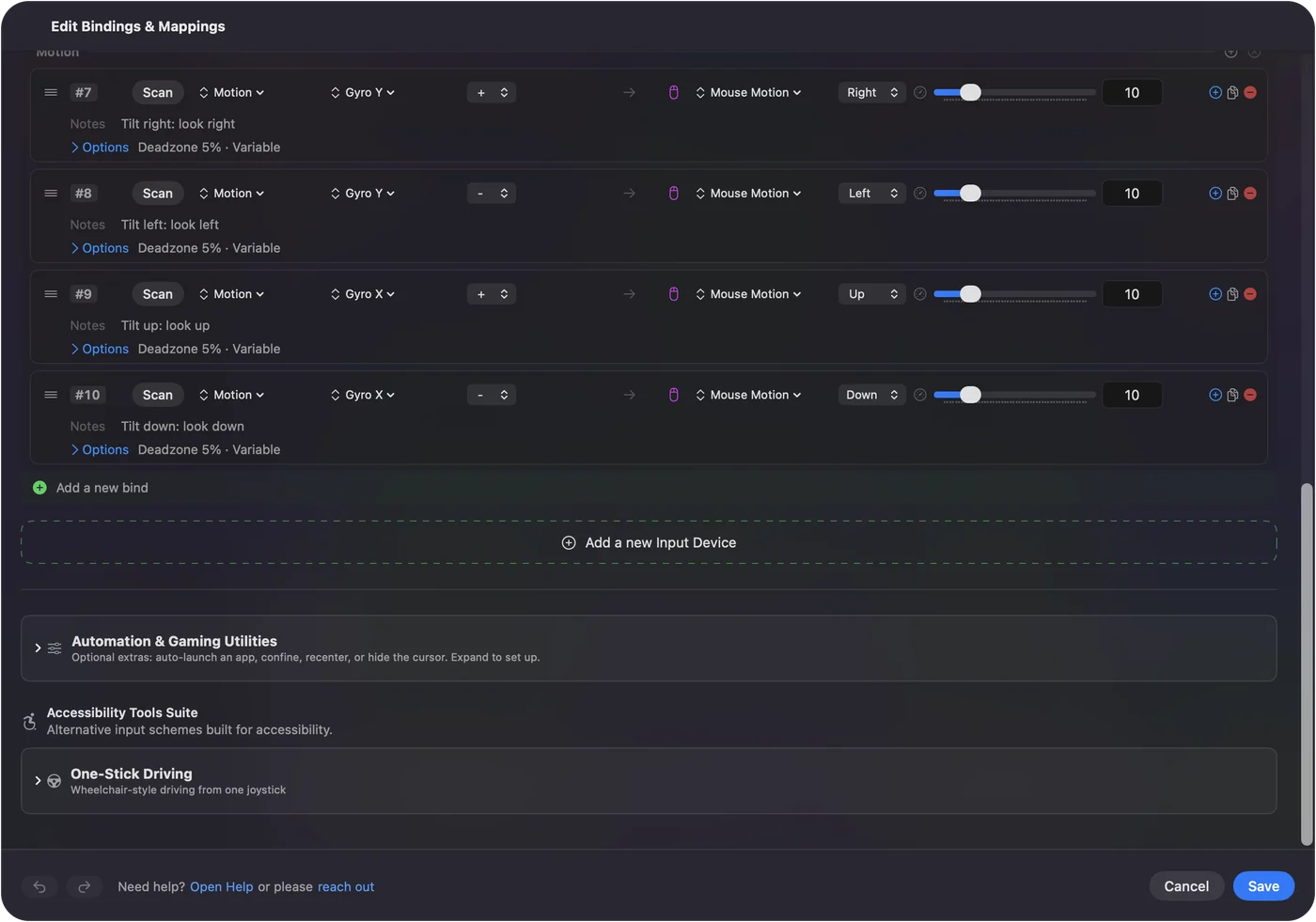
Add a row, set the input type to Motion and pick the channel:
- Gyro X. Tipping the front up and down.
- Gyro Y. Rolling sideways like a steering wheel.
- Gyro Z. Turning the pad flat, like sweeping a flashlight.
Use one row for plus and one for minus, each sending Mouse Motion in the matching direction. Or pick Set Up Full Gyro on any motion row: it adds the rows for gyro aim, tilting to move with the arrow keys, or shakes and jabs, and skips rows the device already has. Building a layout in the Smart Preset Maker for a mouse-look game, tick Gyro fine aim and it adds tilt aiming on top of the stick. The gyro page explains each axis.
Point at the desktop with Motion Cursor
The Motion Cursor preset uses tilt to move the desktop pointer instead, like a laser pointer: Cross clicks, Circle right-clicks, Triangle is Return, the right stick scrolls, L1 pauses motion and R1 re-centers. It is a real accessibility option for someone who can hold a pad but cannot work a stick.
If the aim does not move
Climb this ladder, smallest step first:
- Use a cable. Some Bluetooth pairings do not carry motion, and a USB cable always does.
- Watch the readout. Tilt the controller with the Live Visualizer open. If its motion readout moves, motion is getting through and the problem is in the preset.
- Calibrate. Choose Controller, Calibrate Motion / Gyro in the menu bar. Motion Calibration shows the controller as a 3D model that turns as you turn it, and records the resting zero if you want to set it by hand.
- Remove the double. If Steam Input's own gyro is on for that game, remove InputConfig's motion rows for it, so the two do not add together.
What it cannot do
- Xbox controllers. They have no gyroscope.
- Joy-Cons. Motion rows read a Joy-Con's gyroscope and accelerometer only when macOS reports them. The Switch Pro Controller's gyro works the way a PlayStation pad's does.
- The 2026 Steam Controller. Its gyro is read directly, as an experimental feature. Gyro X and Gyro Y follow the turn by rate rather than from gravity, so over a long session the aim can drift a little. It learns its rest bias while the controller lies still, and Center Pointer or a re-zero puts the neutral back. The new Steam Controller on a Mac has the rest.
- The 2015 Steam Controller. Its gyro is read through the helper that reads the controller, also as an experimental feature.
The short version
- Controllers. Gyro aim works on the DualSense, DualSense Edge, DualShock 4, Switch Pro Controller and Joy-Cons, plus both Steam Controllers as an experiment.
- Start. Activate Gyro Aim. Hold L1 to pause, press R1 to re-zero.
- Tune. Lower Speed on the motion rows first, then raise it.
If the aim does not move, try a cable before anything else.
Questions
Which controllers support gyro on a Mac?
In InputConfig, the DualSense, DualSense Edge, DualShock 4 and Switch Pro Controller, a Joy-Con when macOS reports its motion, and both Steam Controllers as an experimental feature. Xbox controllers have no gyroscope.
Does gyro aim work in Steam games on Mac?
Yes, in any game that aims with a mouse, Steam or not. If you also turn on Steam Input's own gyro for that game, remove InputConfig's motion rows for it, so the two do not add together.
Why does gyro not work over Bluetooth?
Some Bluetooth pairings do not carry motion. Tilt the controller with the Live Visualizer open: if the motion readout stays still, use a USB cable, which always carries it.
Does gyro aim drift?
Not on a PlayStation controller at rest: the tilt axes settle back onto gravity and the zero learns itself. The 2026 Steam Controller can drift a little over a long session. Center Pointer puts it back.
Can I use gyro and the right stick together?
Yes. Both can drive mouse motion in the same preset and they add together.
How do I make gyro aim less sensitive?
Lower Speed on the four motion rows, or drag Pointer speed on the preset's page, which scales tilt and sticks together.
Related
This page in other languages: Français, 繁體中文
Updated