DualSense Edge back paddles and FN buttons on a Mac
 InputConfig is completely free on the Mac App Store. You don't have to make an account, there are no subscriptions, and nothing is locked. Optimized for Apple silicon.
The DualSense Edge works on a Mac, over Bluetooth or USB-C, on macOS 13.3 or later according to Sony. It pairs like a standard DualSense, by holding Create and PS until the light bar blinks, and games see it as one. The catch is the extras: most Mac games ignore the back paddles and FN buttons, and Sony makes no Edge app for the Mac. InputConfig reads them from the controller's own data stream, over Bluetooth and USB, so they bind like any other button. Over USB-C the app reads the four profiles stored on the pad, FN + Triangle, Square, Cross and Circle, and lists them with their names and what each one remaps.
On this page: 7 sections
Bind a paddle or FN button
- You: Press Scan on a row and press the paddle or FN button, then give the row an output.
- InputConfig: Reads the paddle from the controller directly and binds the row to it.
- Check: Open the Live Visualizer and press the paddle. The back buttons are drawn on the controller's back, as you hold it, and the FN buttons under the sticks, each lighting when pressed and showing what it is bound to.
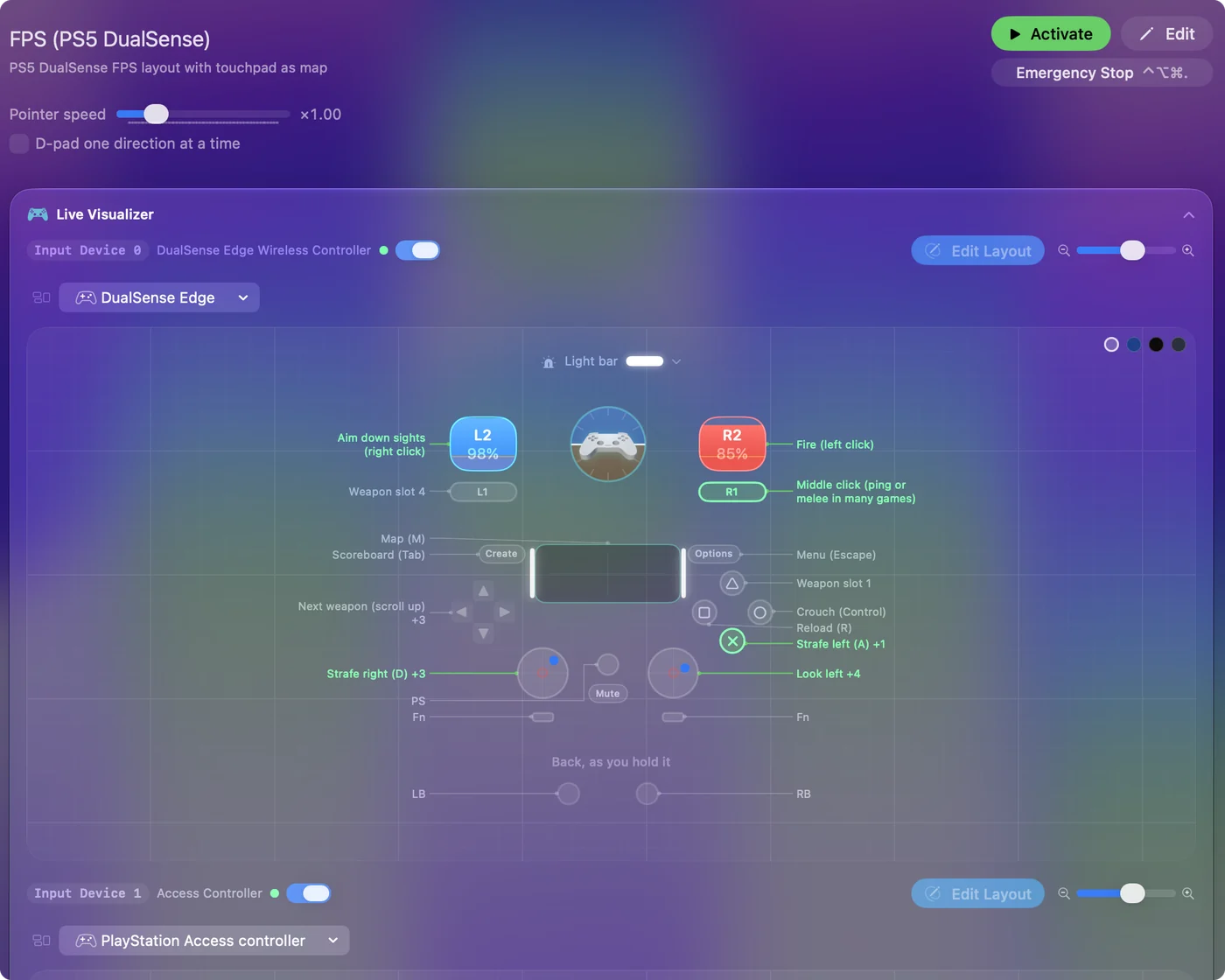
A paddle is a good home for Emergency Stop, a chord modifier, or Pause Motion While Held for gyro aim, because it has no job of its own in most games. Give the paddles the jobs that would otherwise cost you a second button.
Know the button numbers
Left paddle 16, right paddle 17, FN left 20, FN right 21, mute 15. You never need these with Scan. They are what the input menu shows and what a preset file stores. With two PlayStation controllers connected, each controller's paddles bind separately. Scan finds them for you, so the numbers are only for reading a preset file.
If the extras stop responding
Climb this ladder, smallest step first:
- Check the paddle is attached. The paddles detach, and an empty rear socket reports nothing.
- Power the controller off and on. A long Bluetooth session can wedge so the extras go quiet while the sticks and face buttons keep working. Hold the PS button to power it off, turn it back on, and they return.
- Clear a PS5 paddle assignment. If Sony's profile tool on a PS5 made a paddle mirror another button, the controller sends both, so a paddle seems to fire two things. Clear it on the PS5, or bind the mirrored button to nothing. Over USB-C, the profiles chip above the drawing in the Live Visualizer lists what each stored profile remaps.
A paddle that fires twice is almost always a mirror set on a PS5.
Rumble and trigger feel
The Edge's motors are driven by the app's own report, and the strength on a row scales them. The Edge gets the classic vibration mode, because the newer mode its firmware also offers flattens the motors on this pad. Rumble on the Edge comes from InputConfig's own report, so it works on your bindings even where a game never vibrates. See vibration.
Its adaptive triggers take a trigger feel, as on a DualSense: click L2 or R2 in the Live Visualizer and pick Off, Light, Medium or Firm. It is a steady resistance while the preset runs, over USB or Bluetooth. See adaptive triggers on a Mac.
What Sony says works on a Mac, and what InputConfig adds
Sony's support page for the Edge on other devices lists Bluetooth and USB-C on macOS 13.3 or later. It marks haptic feedback, the touchpad, the light bar, the motion sensors, the Create button, the speaker, the microphone and the headset jack as unavailable on a Mac. For most Mac games that is accurate, because they never ask for those parts.
- The touchpad. InputConfig treats the Edge as a DualSense, so the touchpad works as a trackpad. See touchpad as a mouse.
- The gyroscope. It aims or moves the pointer. See gyro aim.
- The light bar. It takes a color per preset. See light bar.
- The motors. They rumble as feedback on a press.
- The triggers. They take a Light, Medium or Firm resistance per preset.
Sony's profile editor runs on a PS5 and, through its Accessories app, on a Windows PC. InputConfig reads the four stored profiles over USB-C and lists them, but does not edit them. To switch profiles on the pad, hold FN and press a face button. The pad applies the profile itself, so what it sends is already remapped. On a Mac, InputConfig presets do that job: one layout per game or app, switched automatically when that app comes to the front.
The short version
- Pair it like a DualSense. Create and PS until the light bar blinks.
- Scan the paddles. They bind like any button, over Bluetooth or USB.
- Read the profiles. Over USB-C, the profiles chip lists all four and what each remaps.
- Power-cycle if they go quiet. Hold PS to turn it off, then on.
Every button on the Edge is yours to bind on a Mac.
Questions
Can I map the two FN buttons to different things?
They are separate inputs, buttons 20 and 21.
Does the DualShock 4 have any of these?
No paddles or FN buttons, but its touchpad, light bar, and gyroscope all work.
Do the DualSense Edge back buttons work on a Mac?
Not in most Mac software. Apple's controller framework stops at the standard layout, so games and apps never see the paddles or FN buttons. InputConfig reads them from the controller directly, over Bluetooth or USB-C, and each one binds to a key, a click, a macro, or anything else.
Can the Edge paddles run macros on a Mac?
A paddle row can run a macro, turbo, a hold action, or a chord, like any other button.
Is there DualSense Edge software for Mac?
Sony does not make one. Its profile editor is for the PS5 and Windows. InputConfig is a free, open-source Mac app that maps the paddles and FN buttons, lists the four stored profiles over USB-C, sets the trigger resistance, and also uses the Edge's touchpad, gyroscope, light bar and rumble.
Related
Completely free. You don't have to make an account, there are no subscriptions, and nothing is locked. Optimized for Apple silicon. Open source on GitHub.
Updated