Change the DualSense light bar color on a Mac
 InputConfig is completely free on the Mac App Store. You don't have to make an account, there are no subscriptions, and nothing is locked. Optimized for Apple silicon.
You can change the DualSense light bar color from a Mac, and the DualSense Edge's and DualShock 4's too, over Bluetooth or USB. Click the controller at the top of InputConfig's sidebar and pick a color under Light Bar. Each controller can have its own color, and a preset can carry a color of its own so the controller tells you which layout is running. For a color that comes back every time, give a preset its own color.
On this page: 8 sections
Pick a color for the controller
- You: Click the controller's entry at the top of the sidebar and choose a color under Light Bar.
- InputConfig: Sets the light bar at once, over Bluetooth or USB.
- Check: The light on the controller changes. The color lasts until InputConfig quits; for a color that comes back every time, put it in a preset.
- Ten swatches. Red, Orange, Yellow, Green, Cyan, Blue, Purple, Pink, White and Off.
- Custom. A color well that applies as soon as you pick.
- Rainbow. Cycles through every color. While it runs, a Speed slider sets how fast, and the swatch reads Stop. Picking any color stops the cycle.
- Brightness. Off, Dim or Bright. Dim is about a quarter of full brightness.
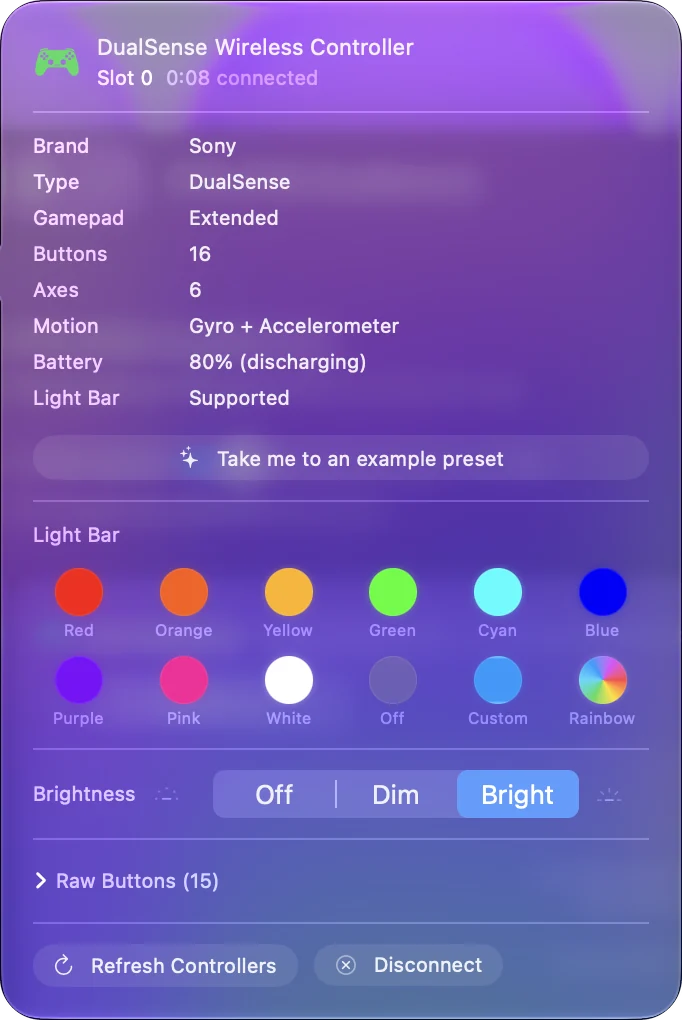
This is the controller's general color, and each controller keeps its own. Until you pick one, the first controller is green, the second purple, then red, orange, cyan and pink. For a color that sticks, give it to a preset.
Give a preset its own color
- You: Select the preset in the sidebar and click the Light bar chip between L2 and R2 in the Live Visualizer's drawing, which reads Not set until you pick one.
- InputConfig: Opens Light bar for this preset, with the same swatches, Custom and Brightness. Rainbow is there too, with its own speed, and runs only while the preset does.
- Check: The color applies when the preset activates, and changes at once if the preset is already running. Controller's color clears it, so the preset leaves the light alone.
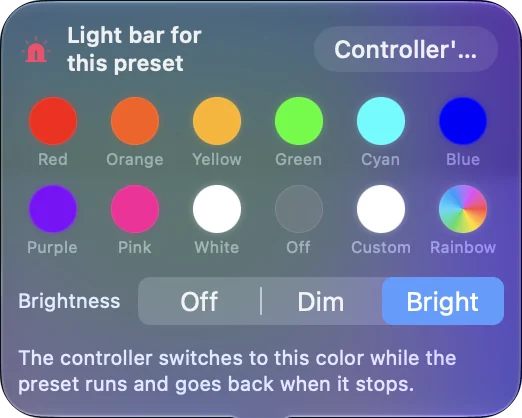
While the preset runs, every connected PlayStation controller shows its color, including one that connects later. When it stops, each controller goes back to its own color, and a Rainbow that was running starts again. The Smart Preset Maker asks for a light bar color when it builds a layout for a PlayStation pad, and several built-in presets carry one: Minecraft is green, FPS (PS5 DualSense) is PlayStation blue, Haptic Feedback is orange, and Anki is blue. A color per preset tells you at a glance which layout is running.
Change the PS5 light color from a Mac
The PS5 itself does not let you choose: the console and games pick the color. From a Mac you can, and InputConfig sets the light bar on the DualSense, DualSense Edge and DualShock 4 to any color, over Bluetooth or USB, with no PC and nothing else installed. Some macOS versions also show a light color option on the controller's page in System Settings, Game Controllers. What InputConfig adds is a color per preset, Dim and Off, and Rainbow.
If the color changes back
macOS paints the light bar in its own color, and it repaints it at times, for example when you switch apps. InputConfig puts your color back when that happens, and a Rainbow cycle carries on from the color it was showing. Vibration does not reset it either, because on these pads the rumble and the color travel in the same report. After you quit InputConfig, macOS goes back to its own color. Your color holds for as long as InputConfig runs. Turn on per-app auto-switch and give each preset its own color, and the controller shows which app's layout is running.
Use two PlayStation controllers
Since 1.6, two PlayStation controllers connected at once each keep their own general color, and each gets its own rumble, so two players can tell their pads apart. A preset's color is the exception: it goes on every PlayStation controller while that preset runs. To keep two colors during play, leave the preset on Controller's color. The two controllers page covers the rest of a two-player setup.
Turn the light off
Set Brightness to Off in the controller's popover, or in a preset if you only want it dark for one layout, say a film night. It goes dark at once. The small lights under the touchpad are not part of the light bar setting. How to turn off the PS5 controller light covers when it comes back on. To turn the whole controller off instead, hold the PS button for about ten seconds; turning off or disconnecting a controller covers that and moving it back to the console. Off is a brightness, so it can belong to one preset only.
The short version
- For the controller. Click its entry in the sidebar and pick a swatch.
- For a preset. Click the Light bar chip between L2 and R2 in the Live Visualizer.
- For the dark. Brightness Off, in either place.
Put the color in a preset and it comes back every time.
Questions
Can I turn the light off?
Choose Brightness Off, for the controller or for one preset. The small lights under the touchpad are not part of the light bar setting.
Xbox or Switch?
No color light bar on those.
Do I need Steam or a PC to change the PS5 controller color?
No. InputConfig sets it from the Mac itself, over Bluetooth or USB-C, with nothing else installed.
Does the color stay when InputConfig is closed?
No. InputConfig holds the color while it runs, and macOS paints its own once it quits.
Can I dim or turn off the Xbox controller light on a Mac?
Not with InputConfig. The Xbox button light is not a light bar the app can set, and it stays lit while the controller is on. Holding the Xbox button for about six seconds turns the controller, and the light, off.
Related
Completely free. You don't have to make an account, there are no subscriptions, and nothing is locked. Optimized for Apple silicon. Open source on GitHub.
Updated