How to change the PS5 controller light color on a Mac
 InputConfig is completely free on the Mac App Store. You don't have to make an account, there are no subscriptions, and nothing is locked. Optimized for Apple silicon.
Yes, you can pick the DualSense light bar color on a Mac. Connect the controller, click it at the top of InputConfig's sidebar, and choose a color under Light Bar. It works over Bluetooth and USB, on the DualSense, the DualSense Edge and the DualShock 4.
I make InputConfig, a free Mac app that maps a controller to keys and mouse. The light bar is one of the extras: a color for each controller, a color for each preset, Dim, Off and a Rainbow cycle.
On this page: 8 sections
Steps
- Install InputConfig from the Mac App Store and connect the DualSense over Bluetooth or USB.
- Click the controller's entry at the top of the sidebar.
- Under Light Bar, click a swatch, or click Custom for any color.
- Set Brightness to Dim or Bright.
- For a color that comes back every time, give it to a preset.
Pick a color for the controller
- You: Click the controller's entry at the top of the sidebar and choose a color under Light Bar.
- InputConfig: Sets the light bar at once, over Bluetooth or USB.
- Check: The light on the controller changes.
- Ten swatches. Red, Orange, Yellow, Green, Cyan, Blue, Purple, Pink, White and Off.
- Custom. A color well that applies as soon as you pick.
- Rainbow. It cycles through every color, and a Speed slider sets how fast.
- Brightness. Off, Dim or Bright. Dim is about a quarter of full brightness.
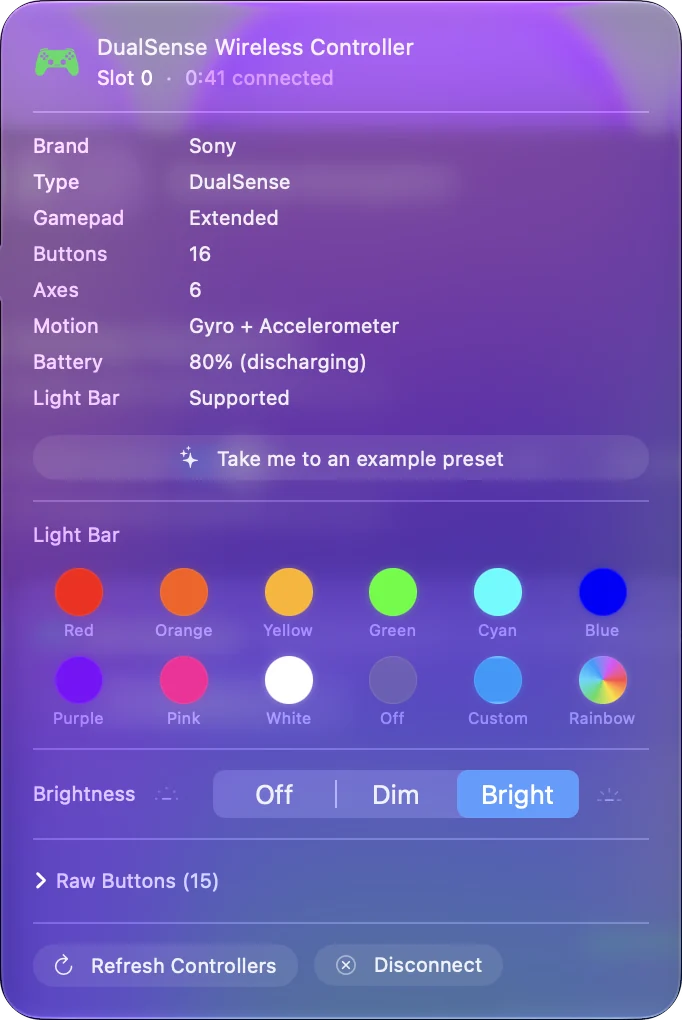
This color lasts until InputConfig quits, so put it in a preset if you want it back every time.
Give a preset its own color
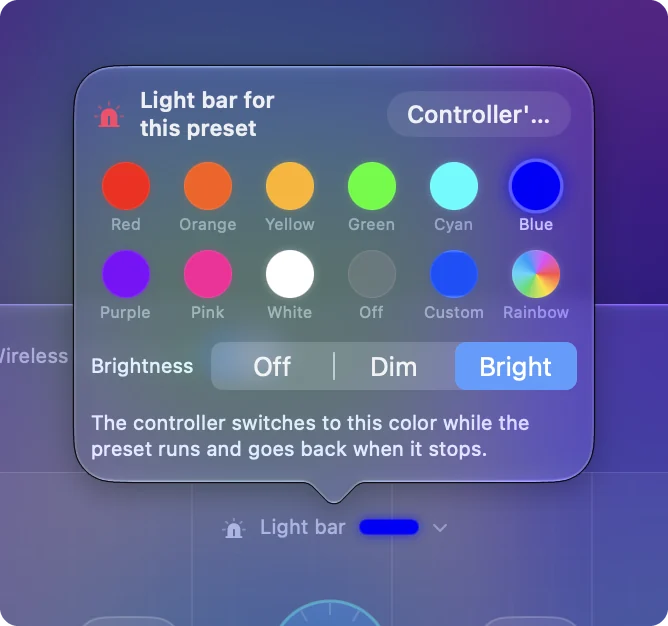
- You: Select a preset in the sidebar and click the light bar strip above the controller drawing in the Live Visualizer. It reads Not set until you pick a color.
- InputConfig: Opens Light bar for this preset, with the same swatches, Custom, Rainbow and Brightness.
- Check: Activate the preset. The controller switches to that color, and goes back to its own when the preset stops.
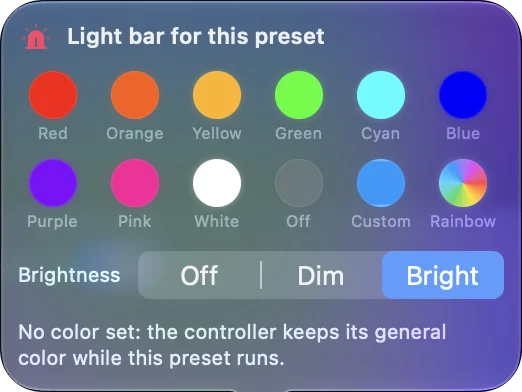
That makes the light useful: Minecraft is green, FPS (PS5 DualSense) is PlayStation blue and Haptic Feedback is orange out of the box, so a glance at the controller tells you which layout is running. With per-app auto-switch on, the color follows the app in front.
Change the color from a button
A row in a preset can send Light Bar Color as its output. It can turn the light a color while a button is held, set a color that stays, or switch the Rainbow on and off. That gives you a light that flashes red while you hold a trigger, or a button that marks which mode you are in.
If the color changes back
macOS paints the light bar in its own color and repaints it at times, for example when you switch apps. InputConfig puts your color back when that happens. After you quit InputConfig, macOS goes back to its own color.
Some macOS versions also show a light color option on the controller's page in System Settings, Game Controllers. I would try that first if one fixed color is all you want.
What it cannot do
The small player lights under the touchpad are not part of the light bar setting. The color is not saved inside the controller, so on a PS5 the console picks the color again. An Xbox or Switch controller has no light bar to color.
The short version
- One color now. Click the controller in the sidebar and pick a swatch.
- A color that returns. Click the strip above the drawing and give the preset a color.
- A color from a button. Use a Light Bar Color row.
A color per preset turns the light bar into a sign of which layout is running.
Questions
Can you change the PS5 controller color on a Mac?
Yes. InputConfig sets the DualSense light bar to any color over Bluetooth or USB. Click the controller at the top of the sidebar and pick a color under Light Bar.
Why does my PS5 controller light keep changing back?
macOS repaints the light bar in its own color at times, such as when you switch apps. InputConfig puts your color back while it is running. After it quits, macOS uses its own color again.
Can the PS5 controller light show a rainbow?
Yes. Rainbow is one of the choices under Light Bar. It cycles through every color, and a Speed slider sets how fast.
Does the color stay when I go back to the PS5?
No. The color is set from the Mac and is not saved in the controller. On a PS5, the console and the game choose the color.
Related
Completely free. You don't have to make an account, there are no subscriptions, and nothing is locked. Optimized for Apple silicon. Open source on GitHub.
Updated