Questions
How to turn off the PS5 controller light on a Mac
Open InputConfig, the free mapper I make, click the controller at the top of the sidebar, and set Brightness to Off. The light bar goes dark at once and stays dark for as long as InputConfig is running.
It works on the DualSense, DualSense Edge and DualShock 4, over Bluetooth or USB. To have it dark only for one layout, say while a video player is in front, set Off in that preset instead.
On this page: 9 sections
Steps
- Install InputConfig from the Mac App Store and connect the controller.
- Click the controller's entry at the top of the sidebar.
- Under Light Bar, set Brightness to Off.
Turn the light off everywhere
- You: Click the controller's entry at the top of the sidebar, and under Light Bar set Brightness to Off.
- InputConfig: Turns the light bar off and keeps it off while it runs.
- Check: The light bar is dark. The controller, the battery reading and the preset carry on as before.
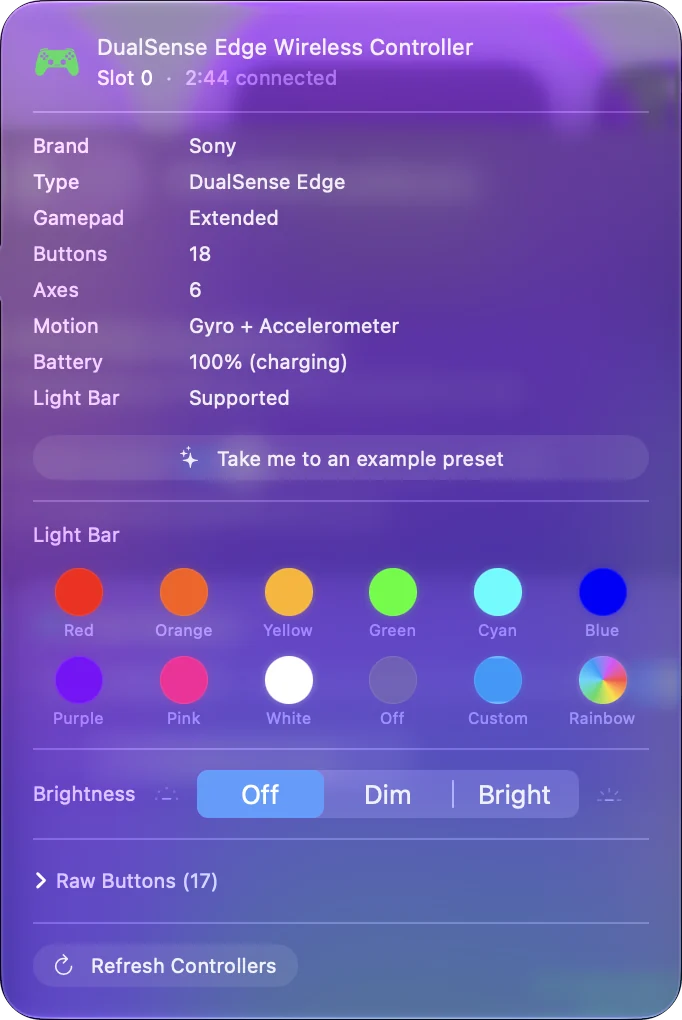
Dim, about a quarter of full brightness, is the setting in between. The swatch grid in the same popover also has an Off swatch, which does the same thing as a color. Off in the sidebar lasts until you quit InputConfig.
 InputConfig is free on the Mac App Store. macOS 14 or later, no account, no tracking, open source.
Turn it off for one preset only
- You: Select the preset in the sidebar. Above the controller drawing in the Live Visualizer there is a light bar strip, which reads Click to set color until you pick one. Click it and choose the Off swatch, or a color with Brightness set to Off.
- InputConfig: Turns the light off while that preset runs, and gives it back when the preset stops.
- Check: Activate the preset and the light goes dark.
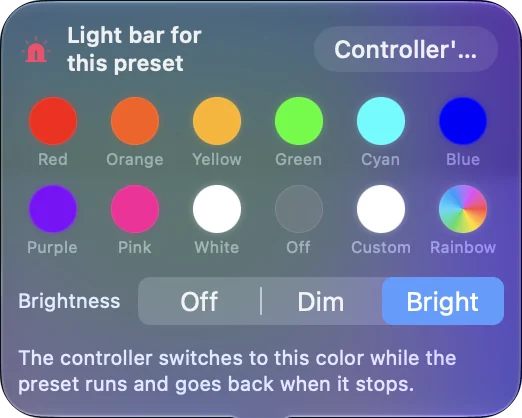
A preset that sets its own brightness wins over the sidebar setting while it runs. Pair it with per-app auto-switch and a preset for your video player. The light switches itself off when the film starts.
Know what the PS5 and macOS do on their own
- A PS5. There is no way to switch the light bar off. Settings, Accessories, Controllers has a brightness setting for the controller's indicators, which dims it, and games choose the color.
- macOS. It paints the light bar itself and repaints it at times, for example when you switch apps. Some macOS versions also show a light color option on the controller's page in System Settings, Game Controllers.
InputConfig puts its own setting back each time macOS repaints, which is why Off stays off while you work.
If the light comes back on
Each case has its own reason:
- You quit InputConfig. Nothing is holding the light any more, and macOS paints it again.
- You restart InputConfig. The sidebar setting lasts for the session, so after a restart the controller is back on its usual color. A preset keeps its light setting in the preset file.
- The controller is in pairing mode, or charging while switched off. The light then belongs to the controller itself, and no Mac app can change it.
If you always want it dark, put Off in the presets you use, not just in the sidebar.
Turn off the small lights under the touchpad
The row of small white lights below the DualSense touchpad is not the light bar, and InputConfig's Brightness setting does not control it. To have no light at all, turn the controller off: hold the PS button for about ten seconds.
InputConfig 1.6 can also disconnect a controller from its entry at the top of the sidebar. Turning off or disconnecting a controller covers both, and moving the pad back to a console. Only turning the controller off darkens every light on it.
What it cannot do
- Xbox, Switch and other controllers. These have no color light bar for an app to set.
- The Xbox button. It stays lit while the controller is on, and InputConfig cannot dim it. Holding the Xbox button for about six seconds turns the controller, and the light, off.
- The lights under the touchpad. Brightness does not reach them.
The light bar setting is for PlayStation controllers only.
The short version
- For now. Sidebar, the controller, Brightness, Off.
- For good. Off in each preset you use, since a preset keeps its light setting.
- For no light at all. Turn the controller off with a long press of the PS button.
A PS5 can only dim the light bar; a Mac with InputConfig can turn it off.
Questions
Can you turn off the PS5 controller light?
Not on a PS5, which only dims it. On a Mac, yes: InputConfig's Brightness setting has Off, for the controller in general or for one preset.
Can I turn off the PS4 controller light bar on a Mac?
Yes. The DualShock 4 takes the same Brightness setting as the DualSense, over Bluetooth or USB.
Why does the light come back on when I switch apps?
macOS repaints the light bar on some app switches. With InputConfig running, it puts your setting back straight away. After you quit InputConfig, macOS keeps its own color.
Does the light stay off after I restart the Mac?
Only once InputConfig is running again, and only if the setting is in a preset. The sidebar setting is for the current session.
Can I change the color instead?
Yes, to any color, or a rainbow cycle. The light bar page has the details.
Related
Free. macOS 14 or later. No account, nothing leaves your Mac. Open source on GitHub.