How to connect a PS4 controller to a Mac or MacBook
 InputConfig is completely free on the Mac App Store. You don't have to make an account, there are no subscriptions, and nothing is locked. Optimized for Apple silicon.
Yes, a PS4 controller works on a Mac. Turn the DualShock 4 off, hold the PS button and the Share button together until the light bar flashes, then click Connect next to it in System Settings, Bluetooth. Or plug it in with a micro-USB cable that carries data, and it pairs by itself. It works the same on every Mac, Apple silicon or Intel, with no driver: macOS has supported the DualShock 4 since Catalina.
On this page
Steps
- Turn the controller off and unplug any cable.
- Hold PS and Share until the light bar flashes quickly.
- Open System Settings, Bluetooth, and click Connect next to DUALSHOCK 4 Wireless Controller.
- Open System Settings, Game Controllers, and press a button to check it is live.
Pair it over Bluetooth
- You: Turn the DualShock 4 off, unplug any cable, then hold PS and Share until the light bar flashes quickly.
- macOS: Lists DUALSHOCK 4 Wireless Controller in System Settings, Bluetooth. Click Connect.
- Check: The light bar blinks and then stays lit. Open Game Controllers in the System Settings sidebar and press a few buttons to see them light.
Or connect it with a micro-USB cable
Once it is plugged in there is nothing to click: it pairs and connects on its own. Apple's rule is a cable that carries data as well as charge, and plenty of old micro-USB cables are charge only: the light bar may glow, but the Mac never sees a controller. If the light bar glows and the Mac lists nothing, suspect the cable before the controller.
Most current Macs have only USB-C ports, including every MacBook Air, the MacBook Neo, the iMac and the Mac mini, so use a micro-USB to USB-C cable, or a small USB-C to USB-A adapter with the cable you already have. Plug it straight into the Mac rather than a hub while you test. A cable is also the steadier choice on a Mac mini or Mac Studio under a desk, further from you than a laptop on your lap.
Know what works
- Sticks, buttons, triggers and the D-pad. Every Mac game that supports controllers reads them.
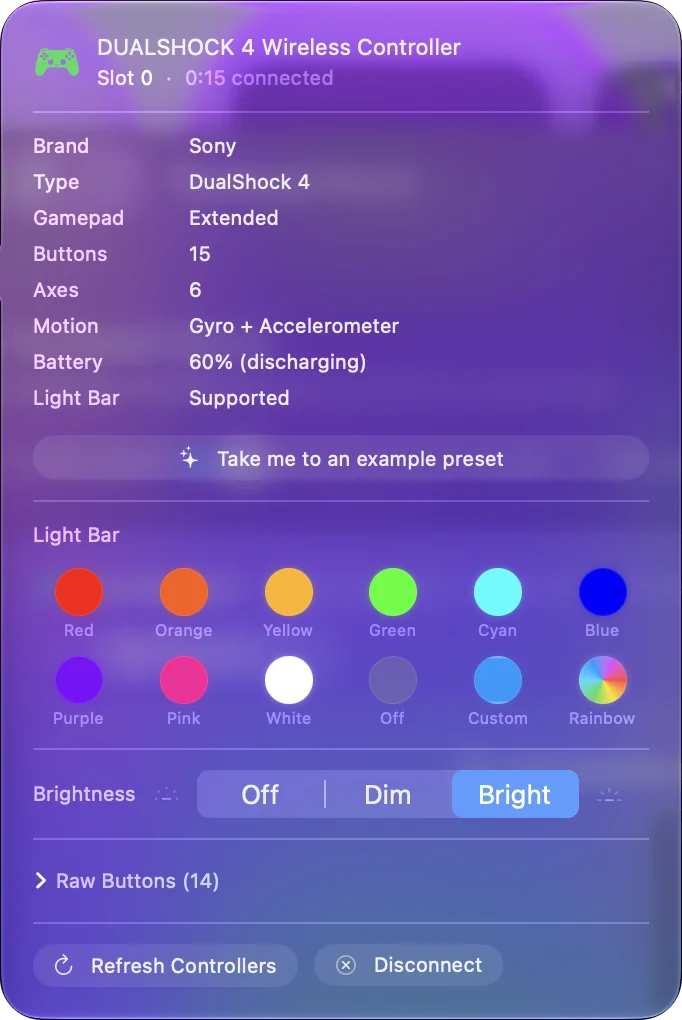
- Touchpad, gyroscope, light bar and rumble. They are there too, but a game has to ask for them, and few do. InputConfig uses the rest: the touchpad as a trackpad, gyro aim, a light bar color per preset, and rumble as button feedback.
- Battery level. It shows at the top of InputConfig's sidebar while the pad is connected.
- Two DualShock 4s. In InputConfig each one keeps its own light color and rumble.
If it will not connect
Climb this ladder, smallest step first:
- Pair it back from the PS4. A DualShock 4 remembers one console or computer at a time. Plugging it into a PS4 by USB and pressing PS pairs it back to the PS4, and the Mac loses it until you pair again.
- Start again from off. If the light bar flashes but the Mac never lists it, start with the pad off and no cable plugged in, and keep holding PS and Share until the flashing turns quick.
- Swap the cable. A charge-only cable lights the pad and never connects it.
- Use a cable for an old battery. Older DualShock 4s with worn batteries drop off Bluetooth. A cable fixes that.
Every other cause, in the order to check them, is on PS4 controller not working on a Mac.
Use it in games and apps that ignore it
The DualShock 4 works in native Mac games that support controllers. The rest depends on the game:
- Steam. Steam on a Mac reads the DualShock 4 once PlayStation controller support is switched on in Steam's Controller settings.
- Minecraft Java. It has no controller support at all, which is why people search for it so often. The Minecraft page covers a mod and the Minecraft preset, which needs no mod.
- Roblox. It has its own page.
- PS Remote Play. Sony's app for playing your PS4 or PS5 on the Mac takes the DualShock 4 over Bluetooth or USB by itself.
- Everything else. macOS can swap one controller button for another, and that is all. To make the DualShock 4 a mouse, a trackpad, a gyro aim, or a set of keys for a game that ignores controllers, you need a mapper.
I built InputConfig for that because my hands do not work well. It is free, open source, and has no account. The play any game guide is the walkthrough, the step by step for the desktop is on using a PS4 controller as a mouse, and if you came looking for DS4Windows, this is why a Mac does not need it.
Use it on the PS4 again, or disconnect it
- Back to the PS4. Sony's own steps: plug the DualShock 4 into the PS4 with a USB cable and press the PS button. After that you can unplug it and play wirelessly. To move it back to the Mac, pair it with PS and Share again. If you switch often, a cable on the Mac side saves re-pairing.
- Disconnect and keep the pairing. Click its name in Control Center's Bluetooth list, or click its entry at the top of InputConfig's sidebar and choose Disconnect.
- Remove it from the Mac. In System Settings, Bluetooth, click the info button next to it and choose Forget This Device.
- Turn it off. Hold the PS button for about ten seconds, until the light bar goes out. A Mac never tells it to sleep, so it stays on until you do.
The short version
- Pair it. From off, PS and Share until the light bar flashes quickly, then Connect in System Settings, Bluetooth.
- Or plug it in. A micro-USB cable that carries data pairs it with no clicks.
- Map it for the rest. InputConfig makes it a mouse, a trackpad or a keyboard for games that ignore it.
A DualShock 4 belongs to whichever device paired it last, so a trip to the PS4 means pairing again on the Mac.
Sources
Every fact about the controller on this page comes from its maker's own page or from Apple's, read on the date shown. What InputConfig does with it comes from the app itself.
- Apple. Connect a PlayStation wireless game controller to your Apple device lists the DualShock 4, gives the pairing hold of the PS button and the Share button until the light bar flashes, and says the controller connects by itself over a USB cable that carries data as well as charge. Read October 7, 2026.
Questions
Does the PS4 controller work on a Mac without a cable?
Yes, over Bluetooth. The DualShock 4 is compatible with a Mac with no driver. Hold PS and Share to pair.
Does a PS4 controller work on a Mac mini, MacBook Air or MacBook Pro?
Yes, on any Mac with Bluetooth or a USB port. Pairing is identical on a Mac mini, MacBook Air, MacBook Pro, iMac and Mac Studio: hold PS and Share until the light bar flashes, then click Connect in System Settings, Bluetooth. A micro-USB data cable works on any of them too, using a micro-USB to USB-C cable if the Mac only has USB-C ports.
Will the PS4 controller's touchpad work as a mouse on a Mac?
Not by itself. With InputConfig, yes: the touchpad becomes a trackpad, with regions and gestures if you want them.
Does it work on an M1, M2 or M4 Mac?
Yes. Pairing and use are the same on Apple silicon and Intel Macs, on any macOS from 10.15 Catalina on.
Why won't my PS4 controller connect to my Mac?
Most often it was paired back to a PS4, the cable is charge only, or the pad was not fully in pairing mode. The not-working page goes through each check in order.
How do I turn off a PS4 controller connected to a Mac?
Hold the PS button for about ten seconds, until the light bar goes out. A Mac never tells it to sleep, so it stays on until you do. To dim only the light bar, set its brightness to Off in InputConfig.
How do I sync a PS4 controller to a Mac?
Syncing is the same as pairing. Turn the DualShock 4 off, unplug any cable, hold PS and Share until the light bar flashes quickly, then click Connect next to it in System Settings, Bluetooth.
Related
This page in other languages: Deutsch, Français, Polski, Русский
Updated