DS4Windows for Mac
 InputConfig is completely free on the Mac App Store. You don't have to make an account, there are no subscriptions, and nothing is locked. Optimized for Apple silicon.
There is no DS4Windows for Mac, and a Mac does not need one. DS4Windows makes a PlayStation controller look like an Xbox controller to Windows games. macOS supports the DualSense and DualShock 4 natively, and native Mac games see them directly. What people usually wanted DS4Windows for, keys, the mouse, the touchpad, gyro and the light bar, is a mapper's job, and InputConfig, the free, open-source one I make, does all of it.
Steps
- Pair the DualSense or DualShock 4 in System Settings, Bluetooth.
- Play games that read controllers directly. Nothing else is needed.
- For keys, the mouse, the touchpad or gyro, install InputConfig and allow Accessibility access.
- Activate Touchpad Mouse, Gyro Aim or another built-in preset.
See what macOS already does
- Built in. Pairing over Bluetooth or USB, and the controller working in every Mac game that supports controllers.
- Needs a mapper. Buttons as keyboard keys, the stick as a mouse, the touchpad as a trackpad, gyro aim, the light bar color, and anything in a game that ignores controllers.
The second list is what people usually wanted DS4Windows for. See PS5 keyboard mapping, the PS5 controller as a mouse, and, for the DualShock 4 that DS4Windows was named after, the PS4 controller as a mouse and connecting a PS4 controller.
Find each DS4Windows setting on a Mac
| In DS4Windows | On a Mac |
|---|---|
| Show the pad to games as an Xbox controller | Not needed. Mac games read the DualSense and DualShock 4 through Apple's Game Controller framework |
| Button remaps for games | System Settings, Game Controllers (in the sidebar), per app, for games that support controllers |
| Touchpad as a mouse | InputConfig: one finger moves the pointer, tap to click, two fingers scroll |
| Gyro as a mouse | InputConfig: gyro aim on the DualSense, DualSense Edge and DualShock 4 |
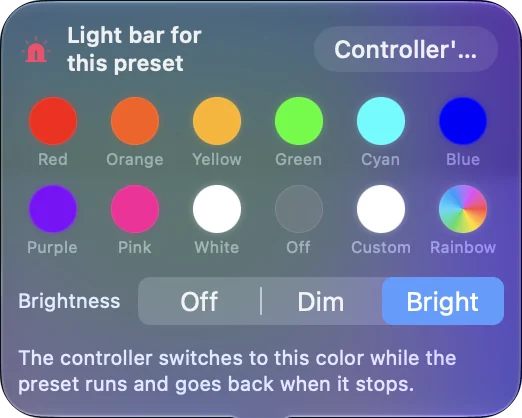
| Light bar color | InputConfig: a color, brightness, or a color per preset |
| Rumble | InputConfig: rumble as feedback on a binding, on the DualSense and on pads macOS drives haptics for |
| Profiles per game | InputConfig: a preset per game with per-app auto-switch |
| Deadzones and curves | InputConfig: Deadzone and Full push at and response curves |
| Keys and macros on buttons | InputConfig: keys, key combinations, macros, turbo and toggle |
What InputConfig cannot do
- Shaped trigger effects. InputConfig sets a steady Light, Medium or Firm resistance on a DualSense's L2 and R2, per preset. It does not play shaped effects such as a click point or pulses, so if that is what you want, it is not the app for it.
- A virtual Xbox controller. It does not make the pad look like another controller. On a Mac that is rarely needed, because games that support controllers read the DualSense and DualShock 4 directly. For Windows games in CrossOver, see controllers in CrossOver games.
The short version
- Mac games. They read PlayStation controllers natively. No DS4Windows needed.
- Keys, mouse, touchpad, gyro, light bar. InputConfig does all of these, and it is free.
- Adaptive triggers. A steady resistance per trigger, as above.
On a Mac the layer DS4Windows adds is already there, so a mapper only has to add the rest.
Coming from DSX on Windows instead? DSX for Mac covers where its DualSense features live on a Mac.
Questions
Is there a DS4Windows for Mac?
No, and a Mac does not need one: macOS supports the DualSense and DualShock 4 natively. For keys, mouse, touchpad and gyro, use a mapper such as InputConfig.
Does the PS5 touchpad work on a Mac?
Not on its own. InputConfig turns it into a trackpad: one finger moves the pointer, a tap clicks, two fingers scroll.
What replaces DualSenseX (DSX) on a Mac?
DSX on Steam is a Windows app. On a Mac, InputConfig covers the touchpad, gyro, light bar, rumble and key mapping, and it sets a steady trigger resistance, Light, Medium or Firm, but not shaped trigger effects.
Can InputConfig make my PS5 controller look like an Xbox controller?
No. It does not create a virtual controller. On a Mac that is rarely needed, because Mac games that support controllers read the DualSense and DualShock 4 directly. For Windows games in CrossOver, see the CrossOver page.
Related
This page in other languages: العربية
Updated