reWASD for Mac
 InputConfig is completely free on the Mac App Store. You don't have to make an account, there are no subscriptions, and nothing is locked. Optimized for Apple silicon.
ReWASD is Windows only, and its developers have said on their forum that a macOS version is not planned. Its strengths are per-game configs, shift layers and a community library, and those are what Mac users are usually looking for. InputConfig, the free mapper I make, covers most of them on a Mac, so weigh that. The one thing it does not do is turn a keyboard and mouse into a virtual controller.
Steps
- Install InputConfig and allow Accessibility access.
- Pair the controller.
- Search the Smart Preset Maker for the game, or start from a built-in preset.
- Rebuild your shift layer: pick a modifier button and add chord rows under it.
- Press Activate.
Why reWASD will not run on an Apple silicon Mac
According to the reWASD forum, it can run in Parallels only on Intel Macs, and the route that uses an external virtual controller needs a Windows PC. On an Apple silicon Mac, a native mapper is the practical answer.
Match reWASD features on a Mac
| In reWASD | On a Mac with InputConfig |
|---|---|
| Shift layers | Chords: a row fires only while another button is held, with up to three modifiers at once |
| Macros | Macros with a wait and hold time per step, hold-down steps, and a run that lasts only while held |
| Turbo and toggle | Turbo at a rate you set, repeat a set number of times, and toggle |
| Long press and double press | Hold and double tap: three outputs on one button |
| Gyro to mouse | Gyro aim on the DualSense, DualSense Edge, DualShock 4 and Switch Pro Controller |
| Touchpad zones | Touchpad regions and gestures on the DualSense |
| Per-game configs | A preset per game that switches with the front app |
| Community configs | Ready layouts for 450+ games and apps in the Smart Preset Maker, each listed on this site |
| Keyboard and mouse as a virtual controller | Not available. InputConfig sends keys, clicks, pointer movement, scrolling, macros and MIDI. It does not create a virtual game controller |
Rebuild a shift layer with chords
A reWASD shift layer becomes a set of chord rows in InputConfig: each row fires only while a modifier button is held.
- You: Pick a modifier button you rarely press, such as a paddle or a bumper. Add a second row on the button that does the work, open its Options, and under Second control set While also holding to the modifier.
- InputConfig: Fires the chord row only while the modifier is held, and keeps the plain row quiet then. Up to three modifiers can be required at once.
- Check: Press the button alone, then with the modifier held. You should get two different results.
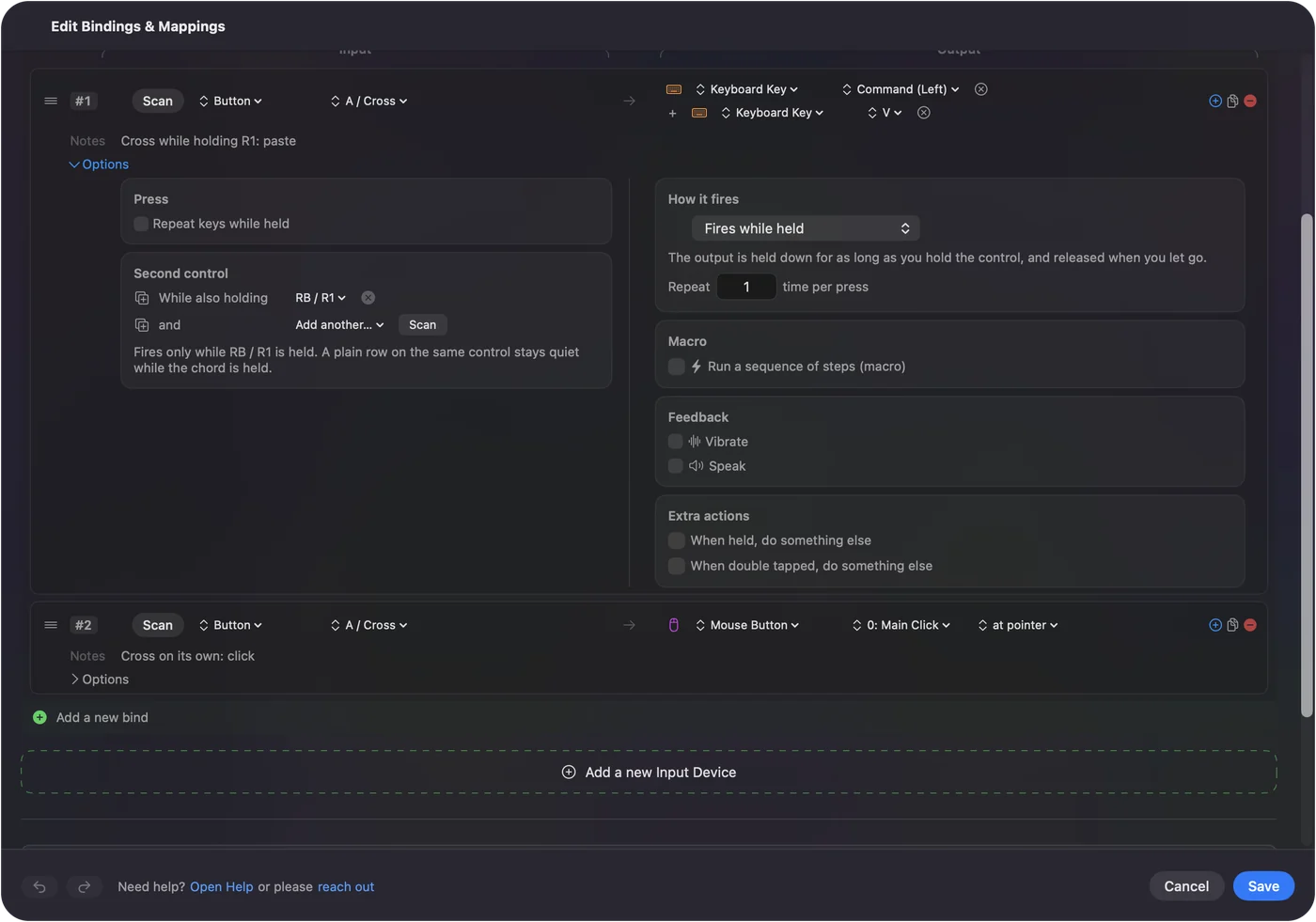
The modifier keeps whatever it is bound to, so pick a button with nothing on it, such as a paddle.
What InputConfig cannot do
The last row of the table matters. If you used reWASD to play a controller-only game with a keyboard and mouse, InputConfig will not do that on a Mac: it does not create a virtual controller.
The short version
- No Mac version. reWASD is Windows only, and Parallels works only on Intel Macs.
- Layers, macros, per-game configs. InputConfig has all three, free.
- Keyboard as a controller. InputConfig does not offer this on the Mac.
Rebuild the shift layer first, and the rest of a reWASD config follows.
Questions
Is there a reWASD for Mac?
No. reWASD is Windows only, and its developers say a Mac version is not planned.
Does reWASD work in Parallels on an Apple silicon Mac?
According to the reWASD forum, no: Parallels works only on Intel Macs.
Can InputConfig turn my keyboard and mouse into a controller, like reWASD?
No. It works the other way: controllers, MIDI gear, the keyboard, mouse and trackpad in. Keys, clicks, pointer movement, scrolling, macros, MIDI and system actions out. It does not create a virtual controller.
Is there a free reWASD alternative for Mac?
Yes. InputConfig is free, with nothing to buy except an optional tip that adds nothing, and it is open source under the MIT license.
Related
Updated