JoyToKey for Mac
 InputConfig is completely free on the Mac App Store. You don't have to make an account, there are no subscriptions, and nothing is locked. Optimized for Apple silicon.
There is no JoyToKey for Mac. JoyToKey, also called Joy2Key, is a Windows program, and its maker publishes no macOS version. What people searching for it usually want is simple: a controller that types keys and moves the mouse, in every app. On a Mac that is a mapper, and the free one I make is InputConfig, so weigh that. The best controller mapper for Mac comparison lists the others too.
On this page
Steps
- Install InputConfig and allow Accessibility access.
- Pair the controller and check it lights up in the Live Visualizer.
- Search the Smart Preset Maker for your game before building from scratch.
- For each JoyToKey row, press Scan, press the button, and pick the key.
- Press Activate.
Match JoyToKey features on a Mac
| In JoyToKey | In InputConfig on a Mac |
|---|---|
| A config file per game | A preset per game, with ready layouts for 450+ titles in the Smart Preset Maker |
| Switch config when a game starts | Per-app auto-switch: the preset changes when the app comes to the front |
| Stick as mouse | Mouse Motion rows with deadzones and speed curves, plus the DualSense touchpad and gyro |
| Button to key, with repeat | Keyboard Key rows with turbo, toggle, hold and double tap |
| Shared configs | Presets are JSON files you can export, send, and open on another Mac |
| Several controllers | Several controllers, each with its own slot in a preset |
Rebuild a JoyToKey config with Scan
A JoyToKey config is a list of buttons by number, Button 1, Button 2, Stick1 left, each with the key it sends. You do not need those numbers on a Mac.
- You: Press Scan on a row and press the button on the pad.
- InputConfig: Binds the row to that button, whatever its number.
- Check: The Live Visualizer lights each control as you press it, so you can see the Mac is reading the pad. Then pick what the row sends.
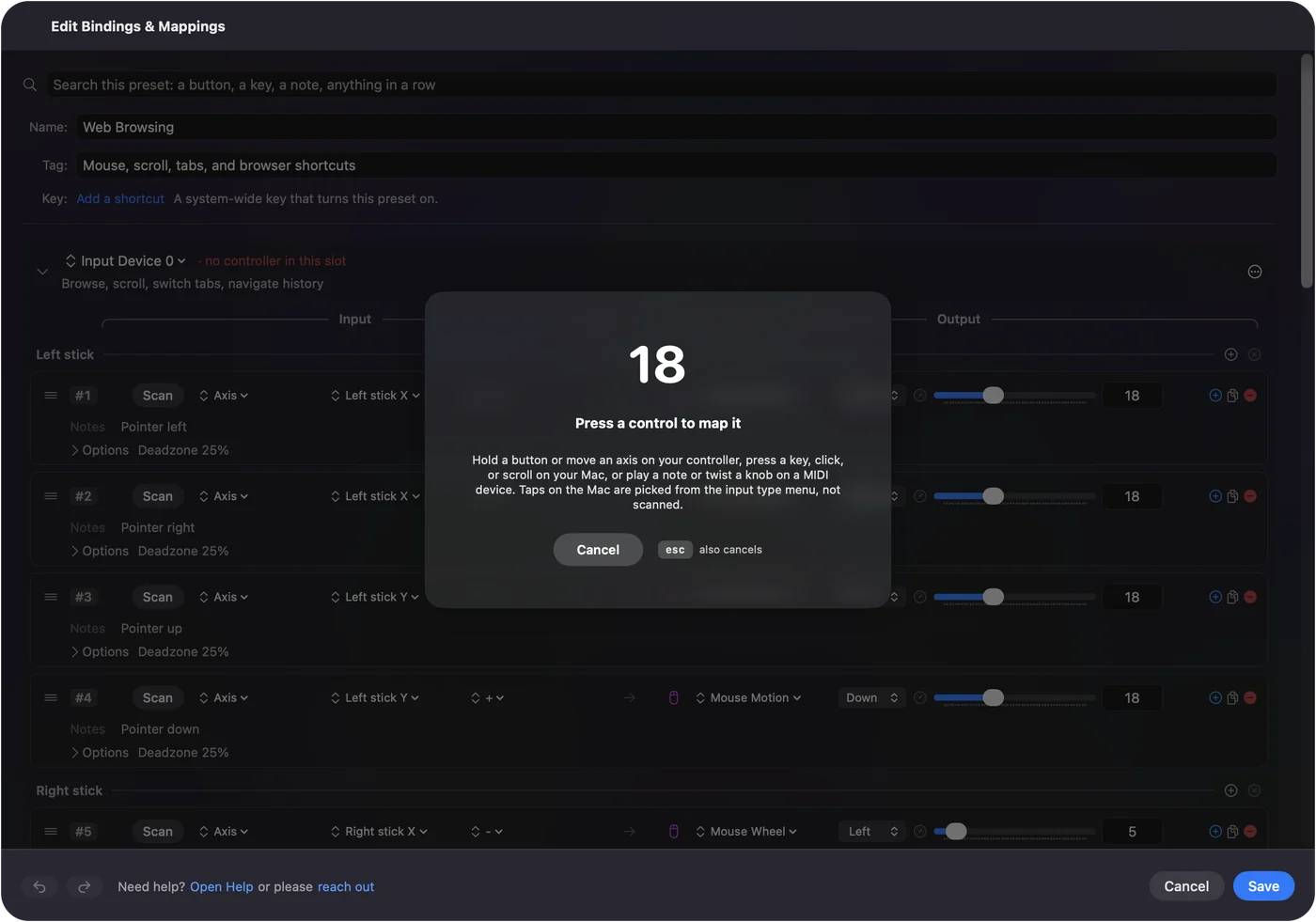
Each JoyToKey idea has a direct match:
- Buttons to keys. A Keyboard Key row per button. Repeat while held becomes turbo. A latched key is toggle.
- Stick to mouse. A Mouse Motion row on the stick, with a deadzone and a response curve so small movements stay precise.
- A second set of keys on the same buttons. Chords: a row fires only while another button is held, like Shift on a keyboard.
- One config per game. One preset per game, and per-app auto-switch activates it when the game comes to the front.
Before you build from scratch, search the Smart Preset Maker: you may only need to change a few rows.
Avoid "JoyToKey for Mac" downloads
Download sites list a "JoyToKey for Mac" or a "Joy2Key Mac download". JoyToKey's own site offers Windows builds only, so a Mac download under that name did not come from its maker. At best it is the Windows file, which a Mac cannot run. At worst it is something else wearing the name.
Get JoyToKey for a Windows PC from its official site, and on a Mac use an app from the Mac App Store or a project whose source you can read. InputConfig is both: it is on the Mac App Store, and its source is on GitHub under the MIT license. It has no account, no analytics and no network access.
What does not work
- A Windows virtual machine. JoyToKey inside one does not help: the controller and the keys it sends stay inside the virtual machine.
- Your JoyToKey config files. InputConfig cannot read them. Most layouts take a few minutes to rebuild with Scan.
The short version
- No Mac version. JoyToKey and Joy2Key are Windows only.
- The Mac equivalent. A mapper. InputConfig is free and open source.
- Moving over. Search the Smart Preset Maker, then Scan the rows you want different.
Scan replaces the button numbers, and that is most of the work.
Questions
Is there a JoyToKey for Mac?
No. JoyToKey is Windows only. On a Mac, a mapper such as InputConfig does the same job: controller buttons to keys, sticks to the mouse, in every app.
Is there an Xpadder for Mac?
No. Xpadder is also Windows only. The Mac equivalents are the same apps listed for JoyToKey.
Can InputConfig open my JoyToKey config files?
No. InputConfig cannot read JoyToKey's config files. Most layouts take a few minutes to rebuild with Scan, and the Smart Preset Maker may already have one for your game.
Does it work on a MacBook Air or other Apple silicon Mac?
Yes. InputConfig is a universal app for Apple silicon and Intel Macs, on macOS 14 or later, free on the Mac App Store.
Is there a Joy2Key for Mac?
Joy2Key is the older name for JoyToKey, and it is Windows only too. The Mac equivalents are the same: a mapper such as InputConfig.
Does it work on a Mac set to Japanese?
Yes. The mapping works the same whatever language the Mac uses. InputConfig is translated into Japanese and 25 other languages, its editor and help included, and follows the Mac's language or the one picked in Settings, General, Language. The main permission it asks for is under システム設定, プライバシーとセキュリティ, アクセシビリティ. There is also a Japanese version of this page.
Related
This page in other languages: Français, 日本語, 简体中文
Updated