Questions
How to tap to click with the PS5 controller touchpad on a Mac
Activate the built-in Touchpad Mouse preset in InputConfig, the free mapper I make, and a one-finger tap clicks, a two-finger tap right-clicks, a quick double tap double-clicks, and pressing the pad down clicks as well. It works on the DualSense, the DualSense Edge and the PS4's DualShock 4, over Bluetooth or a cable.
Out of the box, tapping a DualSense touchpad on a Mac does nothing, and pressing it only works in the few games written for it. The Mac does receive the finger positions; nothing on the Mac uses them.
On this page: 9 sections
Steps
- Connect the DualSense or DualShock 4 by Bluetooth or cable.
- Open InputConfig and allow Accessibility access.
- Select the Touchpad Mouse preset and press Activate.
- Tap the touchpad with one finger to click, or two fingers to right-click.
Turn on tap to click
Connect the controller first: PS5 or PS4.
- You: Open InputConfig and allow Accessibility access when it asks, then select Touchpad Mouse in the sidebar and press Activate.
- InputConfig: Clicks for you. The Accessibility permission is what lets it click.
- Check: Slide one finger to move the pointer, then tap. Tap with two fingers to right-click.
Cross clicks and Circle right-clicks too, for when tapping is not comfortable.
 InputConfig is free on the Mac App Store. macOS 14 or later, no account, no tracking, open source.
Know what counts as a tap
- One-finger tap. One finger touches and lifts within about 0.3 seconds, moving very little, without pressing the pad down.
- Two-finger tap. Two fingers touch and lift together just as briefly. The second finger may lift a moment after the first.
- Double tap. A second tap that lands within about 0.35 seconds of the first one lifting. As on a Mac trackpad, the second tap also counts as a tap, so tap to click turns into a double click and opens a file.
- The press. The touchpad's own button. A press is never counted as a tap, which is why press to click and tap to click can live in the same preset without clicking twice.
Anything longer, or a finger that slides, is pointing rather than tapping.
Add tap to click to any preset
- You: In the editor, add a row, set its input type to Touchpad Gesture, and pick Touchpad tap (one finger), Two-finger tap, or Touchpad double tap. Give it a Mouse Button output.
- InputConfig: Fires the row on that gesture only.
- Check: Tap the pad and the row fires. Or press Scan on a row and tap the pad; when a touch could be the press or a tap, Scan asks which one you meant.
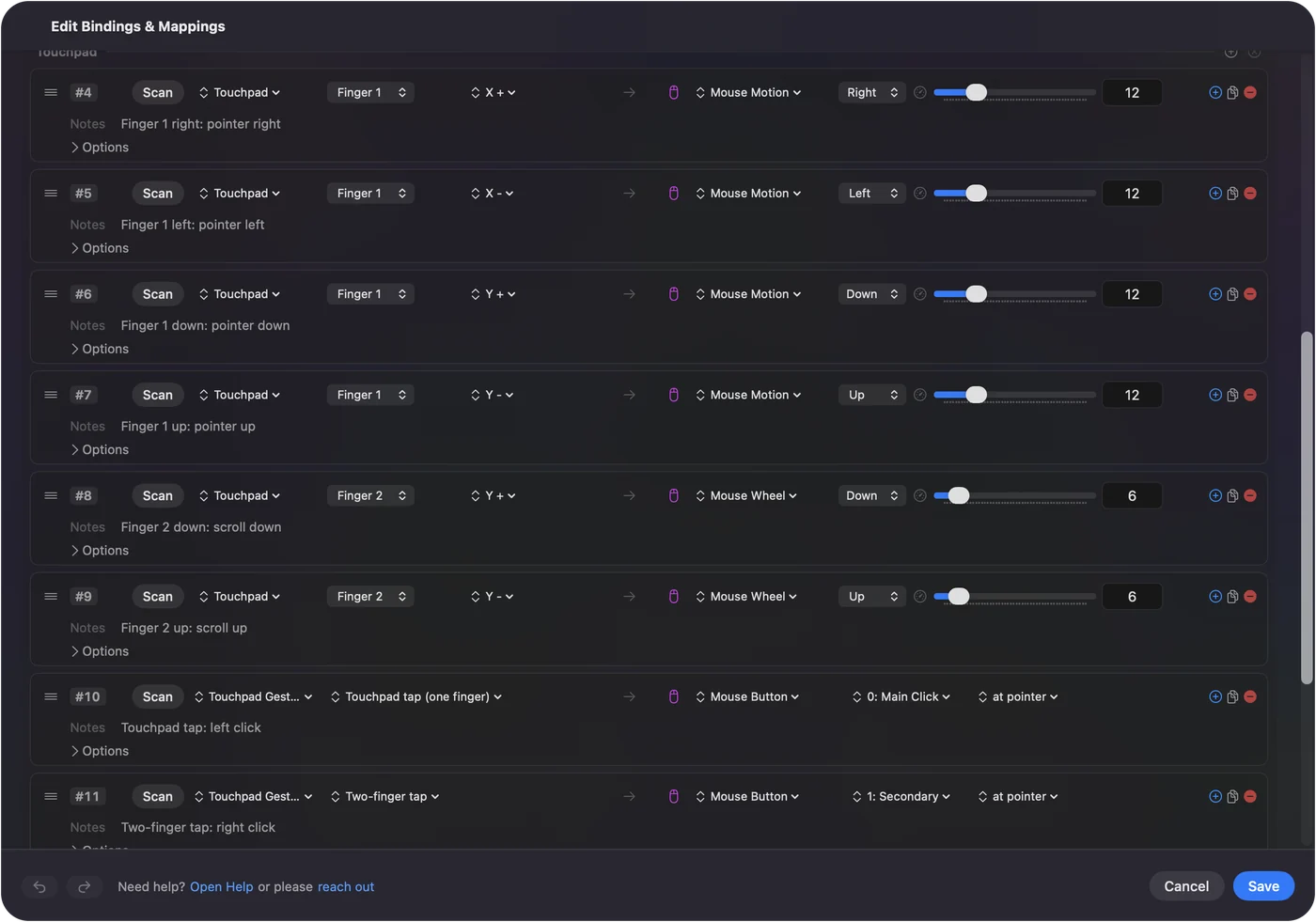
Building a layout in the Smart Preset Maker for a controller with a touchpad, tick Use the touchpad as a trackpad, which adds pointing, two-finger scrolling and tap to click in one go.
Give taps other jobs
A gesture can send anything a button can:
- A double tap. Return.
- A two-finger tap. Mission Control, as a System Function.
- A one-finger tap in a game. A key.
Inside a touchpad zone, a tap fires the zone instead, which is how the pad becomes a row of soft buttons. Turning the touchpad into buttons shows how.
If a tap still does nothing
Climb this ladder, smallest step first:
- Start a preset. The menu bar icon has Start and Stop, and the preset's page shows whether it is active.
- Allow Accessibility. In 1.6 the menu bar icon turns orange when a running preset needs the permission, and rows work the moment you allow it in System Settings, Privacy & Security, Accessibility.
- Check that touch data arrives. Open the Live Visualizer and pick Touchpad from the panel's menu. Each finger shows on the pad as you move it. If nothing moves there, the Mac is not getting touch data from the controller; disconnect it and connect it again.
- Tap quicker, or press. If the tap is too slow, or the finger drifts, lift a little sooner, or press the pad instead; in Touchpad Mouse a press always clicks.
- Move off a zone. In a preset with touchpad zones, a tap inside a zone fires the zone, not the tap row.
- Use the first touchpad. A preset reads one PlayStation touchpad: the first input device that has touchpad rows. A second pad's touchpad stays quiet in that preset.
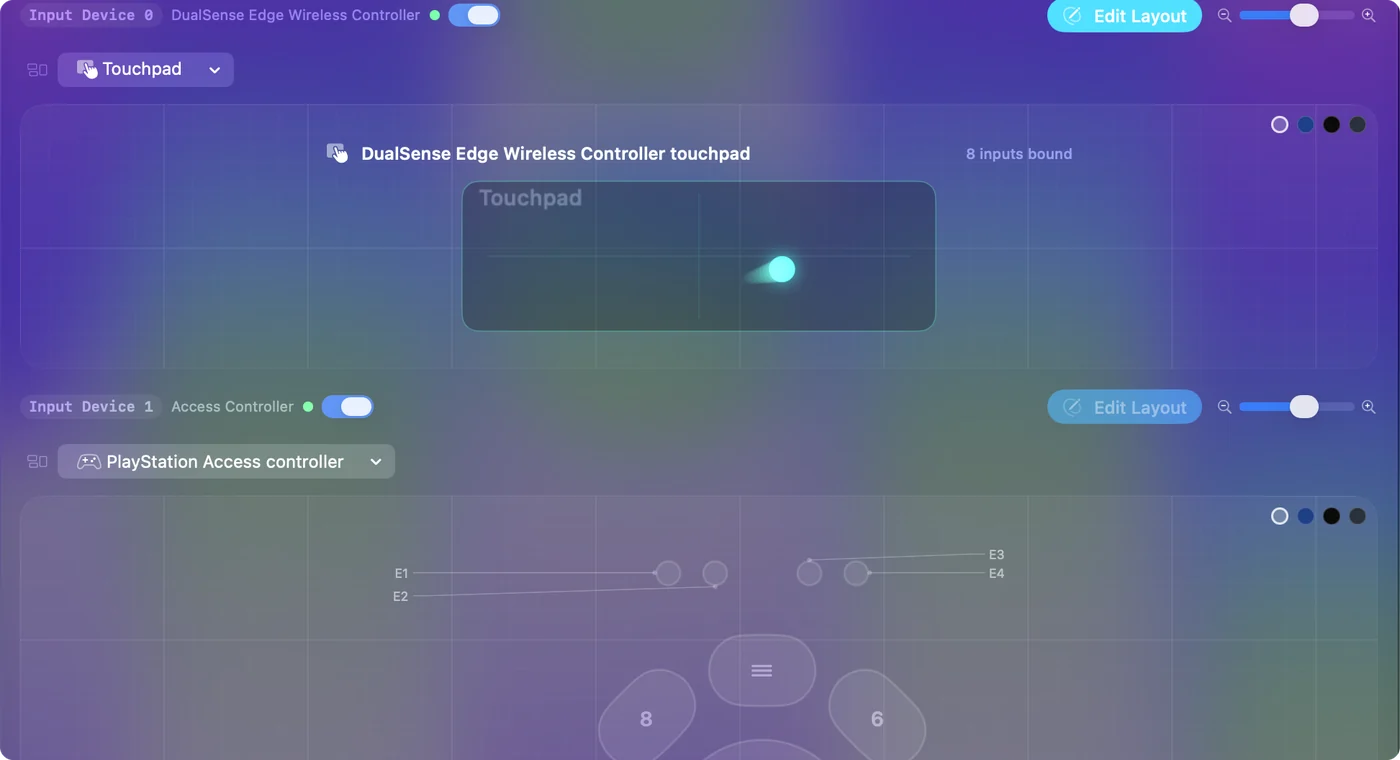
If your finger shows on the drawn pad, the controller is fine.
If the pointer lags with the visualizer open
Older versions could make the touchpad lag while the Live Visualizer was on screen, because live input redrew the whole window. That was fixed in 1.5, and 1.6 uses less CPU and energy while nothing is moving. If the pointer still stutters, try a cable, which rules out Bluetooth interference.
The short version
- Turn it on. Activate Touchpad Mouse.
- Click. One finger taps, two fingers right-click, a press always clicks.
- Anywhere else. Add a Touchpad Gesture row to any preset.
One preset, and the PS5 touchpad clicks like a MacBook trackpad.
Questions
Does tap to click work on a PS4 controller on Mac?
Yes. The DualShock 4's touchpad works the same way as the DualSense's in InputConfig, with one-finger tap, two-finger tap and double tap.
How do I right-click with the PS5 touchpad on a Mac?
Tap with two fingers at once. In the Touchpad Mouse preset that is a right click, and Circle right-clicks too.
Can I keep the press to click but turn off tap to click?
Yes. Open Touchpad Mouse in the editor and delete the Touchpad tap (one finger) row. The press row stays, so pressing the pad still clicks.
Does tap to click work over Bluetooth?
Yes. InputConfig reads the touchpad over Bluetooth and over USB.
Does a touchpad tap click in games?
It sends an ordinary mouse click, so any game that takes a mouse sees it. A game that reads the controller itself still gets its own touchpad press as well.
Related
Free. macOS 14 or later. No account, nothing leaves your Mac. Open source on GitHub.