How do I use my mouse side buttons in Minecraft on a Mac?
 InputConfig is completely free on the Mac App Store. You don't have to make an account, there are no subscriptions, and nothing is locked. Optimized for Apple silicon.
In Minecraft Java Edition, open Options, Controls, Key Binds, click Sneak, and press a side button. The Minecraft Wiki says mouse buttons 4 and 5 work for bindings, and that buttons above those work too. Java is the edition that runs on a Mac, so that is the simple answer. When your mouse sends keys instead, or you want a side button to hold a key down, InputConfig, the free Mac app I make, does it, with one trap to avoid on a Mac that I explain below.
I read the wiki's controls page on October 21, 2026. It says Bedrock Edition keeps a Fourth Mouse Button on Menu Cancel, and Bedrock has no Mac release, so Bedrock only matters here if you also play it on another machine.
On this page: 11 sections
Steps
- Open Options, Controls, then Key Binds in Minecraft Java Edition.
- Click Sneak, press a side button, and see whether the game takes it.
- If it does not, add a Mouse row in InputConfig, press Scan, and press the side button.
- Choose Keyboard Key, pick Left Shift, and set the row to fire while held.
- Add Minecraft to the preset's app list, press Activate, and test sneaking at a block edge.
What works with nothing installed
Java Edition reads mouse buttons as binds. The defaults the wiki lists are Left mouse to attack or break, Right mouse to use or place, the middle button to pick a block, Left Shift to sneak, Left Control to sprint, Q to drop, and Control with Q to drop the whole stack. Swap hands is F in Java. Everything else is a bind you choose in Key Binds.
Side buttons have no default. The wiki's note on missing information says buttons 4 and 5 work, as do those above that, and a snapshot history entry says up to 48 mouse buttons are supported for rebinding. I would treat that as a recent change and test your version. Try the game's own Key Binds first, because a bind you make there needs nothing running in the background.
For servers, remember that a bind is a bind, but a macro or a repeating click can break a server's rules. The Minecraft auto clicker page covers those rules.
Java versus Bedrock on a Mac
| Java Edition | Bedrock Edition | |
|---|---|---|
| On a Mac | Yes, this is the Mac edition | No Mac release |
| Sneak and sprint | Left Shift and Left Control | Shift and Ctrl on Windows |
| Extra mouse buttons | Buttons 4 and 5 work, and a recent snapshot widens it | Fourth Mouse Button is Menu Cancel by default |
| Where you rebind | Options, Controls, Key Binds | The game's own settings |
If you want a controller, not a mouse, the Minecraft controller page covers it, and Minecraft controls on a Mac lists every default key.
Find out what each button sends
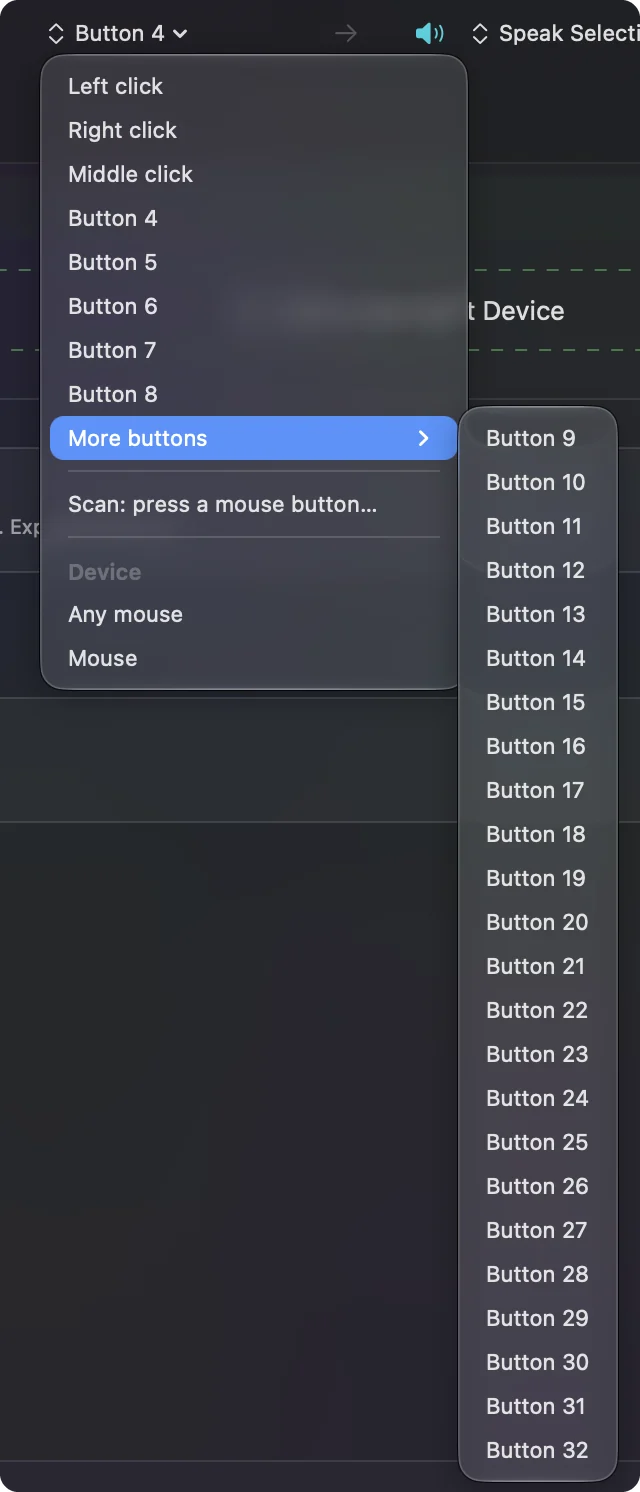
Most side buttons arrive as Button 4 and Button 5. A thumb grid on an MMO mouse usually types numbers, which in Minecraft selects hotbar slots, so a grid can be handy on its own. Scan tells you which you have.
- You: Open InputConfig, add a Mouse row, choose This Mac's mouse or trackpad, press Scan, and click the button.
- InputConfig: Names it, for example Button 4, and More buttons in the menu holds Button 9 to Button 32.
- Check: If nothing is named, the button talks only to the maker's software, such as a DPI switch, and no app can read it.
Hold sneak, sprint or drop from a side button
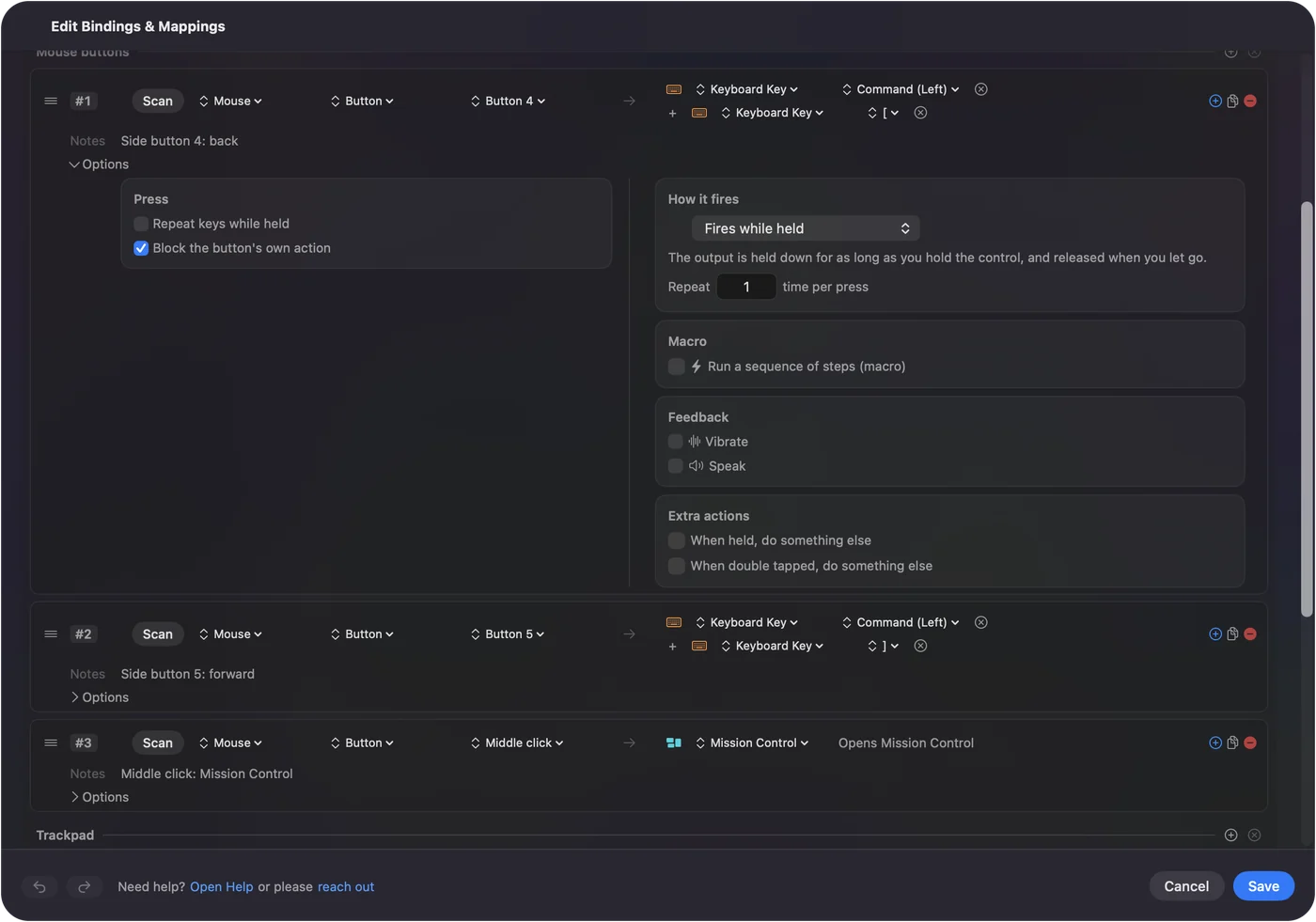
A row's Options has a How it fires menu. Fires while held holds the output down for as long as you hold the button, and lets go when you do. That is what sneak and sprint want.
- You: Add a Mouse row for Button 4, choose Keyboard Key and Left Shift, and tick Block the button's own action in the Press box.
- InputConfig: Holds Left Shift while you hold the button and releases it when you let go.
- Check: Hold Button 4 at the edge of a platform. Your character sneaks and does not fall off.
Drop is a plain tap, so a row for Button 5 that sends Q is enough, and a second row with Control and Q, set on a double tap, drops the whole stack. The Mac trap is this: on a Mac, holding Control while you click counts as a right click. If you put sprint on a held Control and then break a block, the click can turn into a place. The fix I would try first is to move Sprint in Key Binds to a key nothing else uses, such as an F key or a letter, and send that from the side button, so Control never gets held.
Macros and the options that help
- Block a bridge. A macro with a held Left Shift, a short wait and a right click makes a repeatable edge placement step. It is a chore saver and not a combat tool.
- Hold and double tap. One side button sends Q on a tap and Control Q on a double tap.
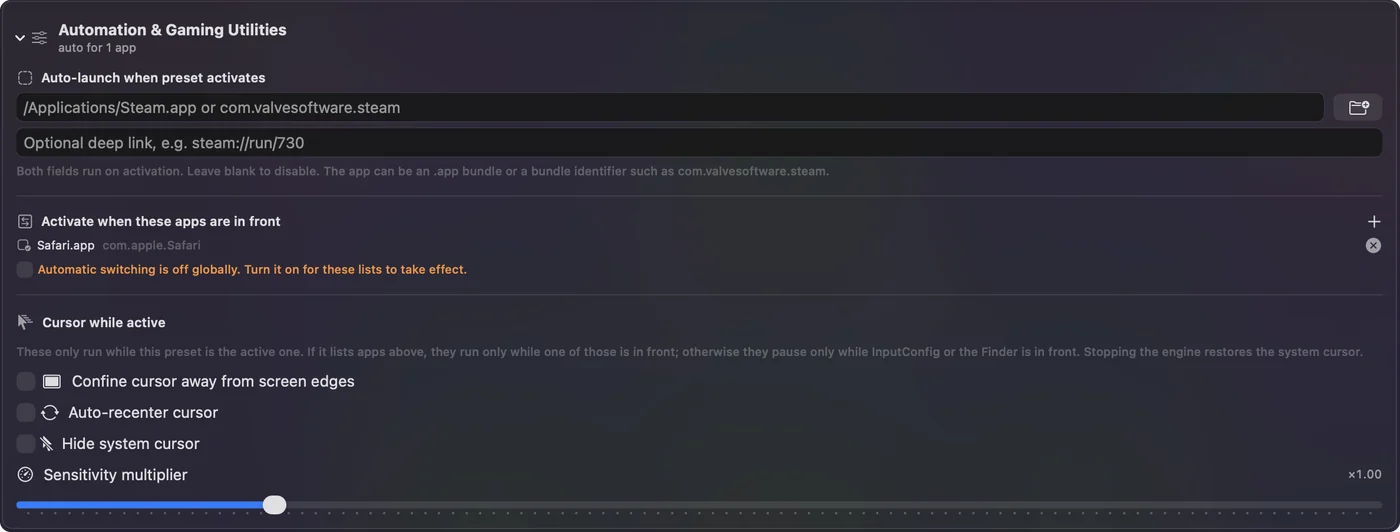
- Per app. List Minecraft under Automation & Gaming Utilities, in Activate when these apps are in front, and your side buttons are Back and Forward in a browser and sneak and drop in the game.
InputConfig's built in Trackpad & Mouse preset sends Command with the left and right brackets from the side buttons, for Back and Forward. That is what you want everywhere except the game, which is why the per app list matters.
Ideas for real players
- Speed bridgers. Put sneak on a thumb button so your fingers stay on movement.
- Builders. A thumb grid on the number keys is a hotbar. Leave it as it is, since Minecraft already reads numbers.
- One handed players. I made InputConfig because my hands are hard to use. Holding sneak or sprint from the mouse leaves the other hand free for the keyboard.
- Younger players. A preset limited to Minecraft keeps the side buttons from messing up their other apps.
If a side button does nothing
Climb this ladder, smallest step first:
- Try Key Binds. Click a bind and press the button. If the game takes it, you are done.
- Press Scan. If nothing scans, the button talks only to the maker's software.
- Check the edition. Bedrock keeps Fourth Mouse Button on Menu Cancel.
- Move Sprint. If clicks turn into right clicks, Control is being held. Use another key for Sprint.
- Check function keys. On a MacBook, F keys need fn held unless you change that in System Settings, Keyboard.
- Stop the preset. Control Option Command period turns it off.
What it cannot do
- Block a typed key. InputConfig listens to the keyboard and does not block it. A thumb grid that sends numbers still sends them.
- Read profile buttons. DPI and profile buttons send nothing to macOS.
- Change DPI. The maker's app does that, or a tool such as LinearMouse or Mac Mouse Fix.
- Add Bedrock. Bedrock has no Mac release, and InputConfig cannot make one.
- Promise server rules. I have not checked any server's rules on macros.
The short version
- Java first. Bind the side button in Key Binds.
- Hold a key. Fires while held gives you sneak and sprint on a thumb.
- Mind Control. On a Mac, Control with a click is a right click.
Bind it in the game if you can, and use InputConfig when you want a key held or a layer.
Questions
Does Minecraft support mouse side buttons on a Mac?
Java Edition does. The Minecraft Wiki says mouse buttons 4 and 5 work for bindings, and that buttons above them work too. Bedrock has no Mac release.
How do I bind sneak to a mouse side button in Minecraft?
Open Options, Controls, Key Binds, click Sneak and press the side button. If the game will not take it, send Left Shift from the button with InputConfig and set the row to fire while held.
Why does Control click place blocks in Minecraft on a Mac?
On a Mac, holding Control while you click counts as a right click. Move Sprint to another key, or set it to toggle, so Control is not held while you mine.
Is Minecraft Bedrock available on a Mac?
No. Java Edition is the version that runs on a Mac. The Minecraft Wiki lists Fourth Mouse Button as Menu Cancel in Bedrock for players on other machines.
Can I put drop on a mouse button in Minecraft?
Yes. Drop is Q by default, and Control with Q drops the whole stack. Bind a side button to Q in Key Binds, or send Q from the button with InputConfig.
Related
This page in other languages: العربية, Čeština, Dansk, Deutsch, Español, Suomi, Français, עברית, Magyar, Bahasa Indonesia, Italiano, 日本語, 한국어, Norsk, Nederlands, Polski, Português, Русский, Slovenčina, Svenska, ไทย, Türkçe, Українська, Tiếng Việt, 繁體中文, 简体中文
Completely free. You don't have to make an account, there are no subscriptions, and nothing is locked. Optimized for Apple silicon. Open source on GitHub.
Updated